
Need Partition Advise after clone

DRG35

New member
Local time
10:03 AM
Messages
8
Location
Canton

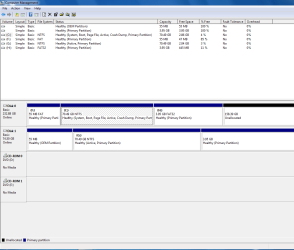
After updating my old E510 from xp to w7 found that the 80gbdrive was too small and added a 250gb and cloned it using Aomei backupper 3.2.I wanted to move an unallocated partition into C: but the extend volume isgreyed out in the wizard. The following is stated on the two drives in my computermanagement. Disk 0 - basic 232.88gb online- (f) 55mb healthy primary partition -(c) 70.49 gb ntfs healthy(system boot, page file, active, crash dump, primarypartition) - (h) 3.95gb fat32 healthy (primary partition) - 158.39gbunallocated. Disk 1- basic 74.50gb on line - 55mb healthy (oem partition) (g)70.49gb ntfs healthy (active, primary partition) - 3.95gb healthy (primarypartition). I intend to format Disk 1 after I make sure the partition are incorrect order and I am able to loaded my other programs and files. The F-C-H has mewondering if things were cloned correctly or not, that is the advise I am for help with.
 

My Computer

Computer type
PC/Desktop
Computer Manufacturer/Model Number
Dell e510
OS
xp home 5.1.2600 service pack 3 build 2600 (32 bit)
CPU
Intel Pentium D CPU 2.80GHz
Motherboard
Dell OHJ054 chipset Intel i945/G (southbridge 82801GB/GR
Memory
4.096.00 mb
Graphics Card(s)
Advanced Micro Devices (AMD/ATI Radeon x600 (0x5B62)
Sound Card
Sigma Tel High Definition audio CODEC
Monitor(s) Displays
Dell E177FP
Hard Drives
Western Digital 80GB (WDC WD800JD-75MSA3)
A picture of Disk Management would help, but it sounds like you can't extend C because H is between C and the unallocated space.

Windows Disk Management isn't flexible enough to do that--it WOULD work if H wasn't in between.

You need something like Partition Wizard, which does not have that limitation.
 

My Computer

Computer type
PC/Desktop
Computer Manufacturer/Model Number
Ignatz Special; 4 speed manual gearbox; factory air conditioning; one of one
OS
Windows 7 Home Premium SP1, 64-bit
CPU
Intel Skylake i5-6600K, not overclocked
Motherboard
AsRock Z170M Extreme 4, micro ATX
Memory
8 GB HyperX DDR4-2666 (2 x 4 GB)
Graphics Card(s)
none; graphics are integrated on CPU
Sound Card
onboard: Realtek ALC1150; external: USB Behringer UF0-202
Monitor(s) Displays
Dell S2340M 23 inch IPS
Screen Resolution
1600 x 900
Hard Drives
System: Crucial MX100 series SSD, 128 GB;
Data: Samsung Spinpoint 103SJ, 1 TB;
Backup: WD Caviar Green WD30EZRX-00D8PB0, 3 TB
PSU
Rosewill SilentNight 500 watt fanless, semi-modular
Case
Antec Solo II
Cooling
Noctua NH-U12S; Noctua F12 intake, Noctua S12A exhaust
Keyboard
Microsoft 200 6JH-00001 USB
Mouse
Dell or Microsoft optical wired; USB
Antivirus
Microsoft Security Essentials and Malwarebytes Premium
Browser
Pale Moon
Other Info
All fans PWM; speeds at idle: CPU circa 500 rpm; intake circa 600 rpm; exhaust circa 600 rpm; CPU temps 27 idle and 47 C load in a warm room (27 C/81 F) when running Intel Extreme Tuning Utility stress test.

My Computer

Computer type
PC/Desktop
Computer Manufacturer/Model Number
Skylake Special #666
OS
Windows 10 Pro x64
CPU
Intel Core i7 6700K
Motherboard
Asus Sabertooth Z170 Mark 1
Memory
GSkill TridentZ RGB 16GB 3600 16-16-16-36
Graphics Card(s)
EVGA GTX 980 Ti SC x2
Sound Card
Realtek High Definition
Monitor(s) Displays
AOC G2460PG
Screen Resolution
1920 x 1080 144Hz
Hard Drives
Samsung 860 Pro 256GB, Seagate Barracuda 4TB x2
PSU
EVGA 1000 P2, EVGA White Custom Braided Cables
Case
Corsair Vengeance C70 Gunmetal Black
Cooling
Corsair H100i v2, Corsair ML120 x2, Thermal Grizzly Kryonaut
Keyboard
Logitech G910 Orion Spectrum
Mouse
Logitech G700s
Internet Speed
Verizon Fios Quantum Gateway 75/75
Antivirus
Windows Defender, Malwarebytes Free 3.8.3
Browser
Chrome
Other Info
Corsair SP120 x4, LG Blu-ray Drive, Durabrand HT-395 100 Watt Dolby Digital Amp, Corsair H2100 Wireless 7.1 Headset
I have also found a Dell article - "How to partition a hard drive in w7 without formatting". I need something very easy to follow without having to make a lot of choices. I did run across the partition wizard referenced above. Hoping to correct the partitions on the Disk 0 only so I can continue bringing in my files and programs.

Just read the Dell article again, it is more related to adding a partition than correct the partitions that I have on my Disk 0.

here is the copy of my computer mgt. hope this is large enugh

Capture.PNG
 
Last edited:

My Computer

Computer type
PC/Desktop
Computer Manufacturer/Model Number
Dell e510
OS
xp home 5.1.2600 service pack 3 build 2600 (32 bit)
CPU
Intel Pentium D CPU 2.80GHz
Motherboard
Dell OHJ054 chipset Intel i945/G (southbridge 82801GB/GR
Memory
4.096.00 mb
Graphics Card(s)
Advanced Micro Devices (AMD/ATI Radeon x600 (0x5B62)
Sound Card
Sigma Tel High Definition audio CODEC
Monitor(s) Displays
Dell E177FP
Hard Drives
Western Digital 80GB (WDC WD800JD-75MSA3)

My Computer

Computer type
PC/Desktop
Computer Manufacturer/Model Number
Skylake Special #666
OS
Windows 10 Pro x64
CPU
Intel Core i7 6700K
Motherboard
Asus Sabertooth Z170 Mark 1
Memory
GSkill TridentZ RGB 16GB 3600 16-16-16-36
Graphics Card(s)
EVGA GTX 980 Ti SC x2
Sound Card
Realtek High Definition
Monitor(s) Displays
AOC G2460PG
Screen Resolution
1920 x 1080 144Hz
Hard Drives
Samsung 860 Pro 256GB, Seagate Barracuda 4TB x2
PSU
EVGA 1000 P2, EVGA White Custom Braided Cables
Case
Corsair Vengeance C70 Gunmetal Black
Cooling
Corsair H100i v2, Corsair ML120 x2, Thermal Grizzly Kryonaut
Keyboard
Logitech G910 Orion Spectrum
Mouse
Logitech G700s
Internet Speed
Verizon Fios Quantum Gateway 75/75
Antivirus
Windows Defender, Malwarebytes Free 3.8.3
Browser
Chrome
Other Info
Corsair SP120 x4, LG Blu-ray Drive, Durabrand HT-395 100 Watt Dolby Digital Amp, Corsair H2100 Wireless 7.1 Headset
To repeat:

You need Partition Wizard to add the unallocated 158 GB to C. That space is not a partition and it cannot be used until it is part of a partition.

It's the easiest and most reliable program out there that can do what you need.

Your other choice is to take the PC into a shop and pay them to have them do it.

If you are willing to delete H, you could add the 158 to C directly from Windows Disk Management, without using Partition Wizard. Maybe you can just move whatever is on H to some other partition and then and then delete H?

Problem is, you have very little free space on any partition, so you may have to put some of the stuff from H on C and some of it on G. Or use Partition Wizard.
 

My Computer

Computer type
PC/Desktop
Computer Manufacturer/Model Number
Ignatz Special; 4 speed manual gearbox; factory air conditioning; one of one
OS
Windows 7 Home Premium SP1, 64-bit
CPU
Intel Skylake i5-6600K, not overclocked
Motherboard
AsRock Z170M Extreme 4, micro ATX
Memory
8 GB HyperX DDR4-2666 (2 x 4 GB)
Graphics Card(s)
none; graphics are integrated on CPU
Sound Card
onboard: Realtek ALC1150; external: USB Behringer UF0-202
Monitor(s) Displays
Dell S2340M 23 inch IPS
Screen Resolution
1600 x 900
Hard Drives
System: Crucial MX100 series SSD, 128 GB;
Data: Samsung Spinpoint 103SJ, 1 TB;
Backup: WD Caviar Green WD30EZRX-00D8PB0, 3 TB
PSU
Rosewill SilentNight 500 watt fanless, semi-modular
Case
Antec Solo II
Cooling
Noctua NH-U12S; Noctua F12 intake, Noctua S12A exhaust
Keyboard
Microsoft 200 6JH-00001 USB
Mouse
Dell or Microsoft optical wired; USB
Antivirus
Microsoft Security Essentials and Malwarebytes Premium
Browser
Pale Moon
Other Info
All fans PWM; speeds at idle: CPU circa 500 rpm; intake circa 600 rpm; exhaust circa 600 rpm; CPU temps 27 idle and 47 C load in a warm room (27 C/81 F) when running Intel Extreme Tuning Utility stress test.
G: Is on the original hard drive that had xp and the upgrade to w7, the information there has not be played with. C: Disk 0 & G: Disk 1 have the same items g= 18 items c=19 items. C: on 0 is the same size as G on1.
Could I merge F & H together (fat to fat32) and then move them into C: or leave them as a partition? H: has 8 items, BAT,BIN, IMG,SRC1,SRC2,SRC3, SRC4,SRC5 file folders. F: has 72 items, from Dell file folder to video mdm file. I am trying to make sure that I do a good alignment of the partitions. I know that F has the Dellboot application on it.
 

My Computer

Computer type
PC/Desktop
Computer Manufacturer/Model Number
Dell e510
OS
xp home 5.1.2600 service pack 3 build 2600 (32 bit)
CPU
Intel Pentium D CPU 2.80GHz
Motherboard
Dell OHJ054 chipset Intel i945/G (southbridge 82801GB/GR
Memory
4.096.00 mb
Graphics Card(s)
Advanced Micro Devices (AMD/ATI Radeon x600 (0x5B62)
Sound Card
Sigma Tel High Definition audio CODEC
Monitor(s) Displays
Dell E177FP
Hard Drives
Western Digital 80GB (WDC WD800JD-75MSA3)
We seem to have trouble communicating.

Your first post implies that your problem is too free little space on C and that you would like to add the 158 GB unallocated space to C.

You've been told several times what application you need to do that.

Do you have some type of aversion to using that application?

F and H are so small that I'd just ignore them.

You should also confirm that you can boot the PC if disk 1 is completely disconnected.

If you can, then you don't need disk 1 and can reformat it if you want.
 

My Computer

Computer type
PC/Desktop
Computer Manufacturer/Model Number
Ignatz Special; 4 speed manual gearbox; factory air conditioning; one of one
OS
Windows 7 Home Premium SP1, 64-bit
CPU
Intel Skylake i5-6600K, not overclocked
Motherboard
AsRock Z170M Extreme 4, micro ATX
Memory
8 GB HyperX DDR4-2666 (2 x 4 GB)
Graphics Card(s)
none; graphics are integrated on CPU
Sound Card
onboard: Realtek ALC1150; external: USB Behringer UF0-202
Monitor(s) Displays
Dell S2340M 23 inch IPS
Screen Resolution
1600 x 900
Hard Drives
System: Crucial MX100 series SSD, 128 GB;
Data: Samsung Spinpoint 103SJ, 1 TB;
Backup: WD Caviar Green WD30EZRX-00D8PB0, 3 TB
PSU
Rosewill SilentNight 500 watt fanless, semi-modular
Case
Antec Solo II
Cooling
Noctua NH-U12S; Noctua F12 intake, Noctua S12A exhaust
Keyboard
Microsoft 200 6JH-00001 USB
Mouse
Dell or Microsoft optical wired; USB
Antivirus
Microsoft Security Essentials and Malwarebytes Premium
Browser
Pale Moon
Other Info
All fans PWM; speeds at idle: CPU circa 500 rpm; intake circa 600 rpm; exhaust circa 600 rpm; CPU temps 27 idle and 47 C load in a warm room (27 C/81 F) when running Intel Extreme Tuning Utility stress test.
No aversion, just being over careful. Your ignore F & H gives me the answer to my concerns. Thanks much for your help.
 

My Computer

Computer type
PC/Desktop
Computer Manufacturer/Model Number
Dell e510
OS
xp home 5.1.2600 service pack 3 build 2600 (32 bit)
CPU
Intel Pentium D CPU 2.80GHz
Motherboard
Dell OHJ054 chipset Intel i945/G (southbridge 82801GB/GR
Memory
4.096.00 mb
Graphics Card(s)
Advanced Micro Devices (AMD/ATI Radeon x600 (0x5B62)
Sound Card
Sigma Tel High Definition audio CODEC
Monitor(s) Displays
Dell E177FP
Hard Drives
Western Digital 80GB (WDC WD800JD-75MSA3)
What are your plans for Disk 1 ???
 

My Computer

Computer type
PC/Desktop
Computer Manufacturer/Model Number
Skylake Special #666
OS
Windows 10 Pro x64
CPU
Intel Core i7 6700K
Motherboard
Asus Sabertooth Z170 Mark 1
Memory
GSkill TridentZ RGB 16GB 3600 16-16-16-36
Graphics Card(s)
EVGA GTX 980 Ti SC x2
Sound Card
Realtek High Definition
Monitor(s) Displays
AOC G2460PG
Screen Resolution
1920 x 1080 144Hz
Hard Drives
Samsung 860 Pro 256GB, Seagate Barracuda 4TB x2
PSU
EVGA 1000 P2, EVGA White Custom Braided Cables
Case
Corsair Vengeance C70 Gunmetal Black
Cooling
Corsair H100i v2, Corsair ML120 x2, Thermal Grizzly Kryonaut
Keyboard
Logitech G910 Orion Spectrum
Mouse
Logitech G700s
Internet Speed
Verizon Fios Quantum Gateway 75/75
Antivirus
Windows Defender, Malwarebytes Free 3.8.3
Browser
Chrome
Other Info
Corsair SP120 x4, LG Blu-ray Drive, Durabrand HT-395 100 Watt Dolby Digital Amp, Corsair H2100 Wireless 7.1 Headset
Back
Top