Need some advice & info on TeraCopy as I'm getting some quirky, dispar
Hi
Need some advice & info on TeraCopy as I'm getting some quirky, disparate results.
I have been using TeraCopy for about a yr & would like to know where I may find forum or a cheat-sheet discussing TeraCopy Process Commands & what they do?
THE KERFUFFLE:
EQUIPMENT: Running W7 Pro 32 bit on 2 PCs; Laptop & desktop, both configure identically & both with SSD drives (laptop: 256MB; Desktop: 512MB). As a business guy, my archive of data is stored on large USB is upwards of 4-6 TB data. The working data on both my SSD's rarely exceeds 15 GB, (BUT the data changes regularly)
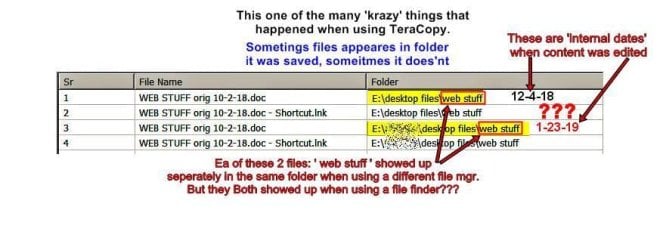
DATA OPERATION: The laptop is the working PC & it's worked every day & data copied via TeraCopy to update the 15 GB data on the 256 gb SD card using "overwrite older files" then using right click "properties" comparing # files/folders copied. If they don't, I erase the SD card & do a basic copy using TeraCopy. Sometimes the amt of files/folders come close but aren't identical which they should be, or am I wrong?
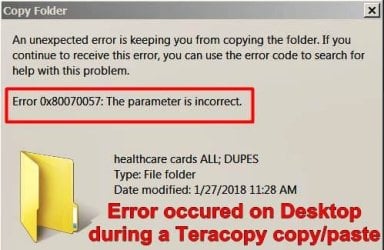
SURFACING PROBLEM: For several mo. TeraCopy was working as I expected. When I started having some discrepancies I removed TeraCopy from both PC's & reinstalled a new copy. After a while problems started appearing. Searched for forms, found a couple, but could not log in or sign up.
EXPECTED RESULTS: 15 GB files/folders on Laptop PC >TeraCopy> 256 SD >TeraCopy> Desktop PC, ending with same 15 GB files/folders. And visa-versa.
Can you guys help me with a solution or point me to a forum or website that will illuminate TeraCopy's Process Commands?
Regards,
klxdrt
Hi
Need some advice & info on TeraCopy as I'm getting some quirky, disparate results.
I have been using TeraCopy for about a yr & would like to know where I may find forum or a cheat-sheet discussing TeraCopy Process Commands & what they do?
THE KERFUFFLE:
EQUIPMENT: Running W7 Pro 32 bit on 2 PCs; Laptop & desktop, both configure identically & both with SSD drives (laptop: 256MB; Desktop: 512MB). As a business guy, my archive of data is stored on large USB is upwards of 4-6 TB data. The working data on both my SSD's rarely exceeds 15 GB, (BUT the data changes regularly)
DATA OPERATION: The laptop is the working PC & it's worked every day & data copied via TeraCopy to update the 15 GB data on the 256 gb SD card using "overwrite older files" then using right click "properties" comparing # files/folders copied. If they don't, I erase the SD card & do a basic copy using TeraCopy. Sometimes the amt of files/folders come close but aren't identical which they should be, or am I wrong?
SURFACING PROBLEM: For several mo. TeraCopy was working as I expected. When I started having some discrepancies I removed TeraCopy from both PC's & reinstalled a new copy. After a while problems started appearing. Searched for forms, found a couple, but could not log in or sign up.
EXPECTED RESULTS: 15 GB files/folders on Laptop PC >TeraCopy> 256 SD >TeraCopy> Desktop PC, ending with same 15 GB files/folders. And visa-versa.
Can you guys help me with a solution or point me to a forum or website that will illuminate TeraCopy's Process Commands?
Regards,
klxdrt
My Computer
At a glance
w7 pro 32 bit w/XP virt enabled.AMD A6-36504 GB DDR3 RAMNVIDIA GeForce 210
- Computer type
- PC/Desktop
- Computer Manufacturer/Model Number
- locally made
- OS
- w7 pro 32 bit w/XP virt enabled.
- CPU
- AMD A6-3650
- Motherboard
- ASUS F1A55-M CSM
- Memory
- 4 GB DDR3 RAM
- Graphics Card(s)
- NVIDIA GeForce 210
- Sound Card
- NVIDIA High Definition Audio
- Monitor(s) Displays
- 28" HD monitor
- Screen Resolution
- 1680 x 1050 x 32 bits (4294967296 colors) @ 59 Hz
- Hard Drives
- 2 x 500 GB Western Digital Blue Hard Drive
- PSU
- ?
- Case
- ?
- Cooling
- 3-4 fans
- Keyboard
- big yellow keys
- Mouse
- logitec
- Internet Speed
- 60 mb
- Antivirus
- panda
- Browser
- ff
- Other Info
- scanner, webcam, bw printer, fax modem, cd/dvd burner, PC usb ports: 2 usb3, 6 usb2 plus 7 port usb hub, 2 tb usb3, 1 Tb usb3, 500Mb usb2, 120Mb USB2 portable drives, asst of flash drives 250 Mb to 32 Gb. backup PC, office