Need some advise about airflow in R4 case

Omegaman007

New member
Local time
3:45 AM
Messages
31
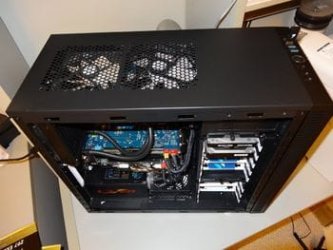
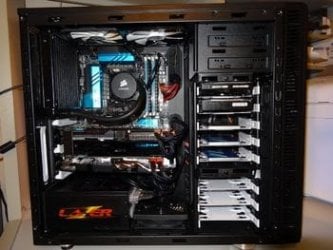
Hey guys, a couple of questions. New R4 build, really like the case but not sure if I have the best flow setup so please let me know what you think. Also, is there a way to remove the bottom drive tray while keeping the top one? It doesn't really look like it but I thought I'd check as I have too many drives for the bottom case but would like to remove it for better flow for the graphics cards. I don't want to do any modding of the case but I'm open to some strategic application of zip-ties.. LOL

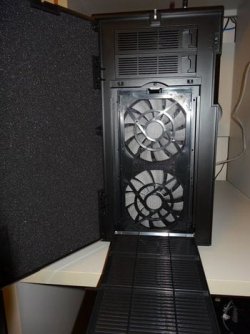
1. I moved the 140mm FD fans to the front as inlets and run them at the lowest speed off of the case fan controller.
2. On top I have a 120mm Arctic F12 and a 140mm F14 acting as exhaust and throttling with CPU temp.
3. Corsair H90 is in the rear acting as an intake (idea is that the top fans will immediately exhaust the warm air from the radiator. I plan to add another fan for push-pull across the radiator. I will also try to add a filter there so it doesn't keep sucking dust and depositing it on the radiator. Unsure if this will be acceptable for airflow or what my options are though.
4. One Arctic 120mm fan acting as intake on the bottom... this is what I'm unsure about since the two GTX670s are blowing air down, this fan may be counter-productive.
5. PS takes air in from the bottom and exhausts it out back so in-case airflow is not affected.
6. No fan on the side and not sure if putting one there will be beneficial for this setup.

I'm happy with the noise-level but I think the graphics card temperatures could be better. Just to establish a baseline while playing some Elite: Dangerous with this setup the max temps, as reported by HWMonitor, were as follows:

Core: 48
Memory: 57
Mainboard: 56
GTX 1: 77
GTX 2: 74
 

Attachments
  • LL.jpg
    LL.jpg
    20.1 KB · Views: 32
  • LL2.jpg
    LL2.jpg
    17.2 KB · Views: 32
  • LL3.jpg
    LL3.jpg
    24.7 KB · Views: 32

My Computer My Computer

At a glance

Windows 7 x64, Windows XP x64, Ubuntu
OS
Windows 7 x64, Windows XP x64, Ubuntu
First thing remove all the unused hard drive carts. I fan on the side panel won't hurt but may need to be thin design for clearance issues. I would keep the GPU's clean from dust and blow out their fans regularly and run the system as you have almost all the bases covered.
For me I prefer premium quiet fans running at the full 12v and not running the top exhaust off the CPU temps could also improve air flow as the water cooling could be fooling the top fans from needed heat extraction?
 

My Computer My Computer

At a glance

Windows 7 Ultimate 64i7 3770k OC'd 4.6 @ 1.17v, also FX 8120 & i5 ...32 gb G.Skill Sniper DDR3 10-12-12-31 @ 2133XFX Radeon 7870 2GB DDR5
Computer type
PC/Desktop
Computer Manufacturer/Model Number
A blend of brains, brawn and dumb luck.
OS
Windows 7 Ultimate 64
CPU
i7 3770k OC'd 4.6 @ 1.17v, also FX 8120 & i5 miniITX
Motherboard
MSI P67A-GD80 b3
Memory
32 gb G.Skill Sniper DDR3 10-12-12-31 @ 2133
Graphics Card(s)
XFX Radeon 7870 2GB DDR5
Sound Card
Sound Blaster Z Series Card
Monitor(s) Displays
(2) LG LED 23" 1920 x 1080 2ms Monitors via mini d-port
Screen Resolution
1680 X 1050 p
Hard Drives
Samsung 256 gb 830 SSD sata III
(1) 1 tb WD Black
(2) 1 tb Hitachi deskmates/sata II
(2) 1 tb WD green/sata II
(2) 3 tb Seagate Barracuda
(1) 120 gb OCZ Vertex SS
(1) Drobo 5N w/5 Seagate 3tb
PSU
EVGA modular 1000G2 80% gold rating & APC 1200 RS
Case
CoolerMaster Storm Styker
Cooling
7 case fans 140mm & 120mm, NZXT Kraken X60
Keyboard
(2) Logitech Illuminated Keyboards (1) usb (1) wireless
Mouse
Logitech G700 & T-BC21 - nano nx for the laptop
Internet Speed
Basic 120mbps down
Antivirus
Trend Micro Titanium Max Security & Malwarebytes Premium
Browser
Chrome and IE 10
Other Info
5 Noctua case fans + 3 Noctua in p/p on NZXT cooler
Integrated hot swap drive bays for 2.5" Drives
(2) Lite-on dvd/cd/Blu Ray optical 22X
Integrated fan controller and led on/off
HP Officejet Pro 8630 all-n-one
Hot-swappable 3.5" hard drive bay
Netgear Nighthawk router
Asus USB 3 & sata 6 PCIe card
Vantec IDE to sata adptr./Ultra sata adptr
Lenovo L420 i5 lappy with m sata
Drobo 5N advanced NAS
Thank you for your feedback. Good advice to remove the unused trays. I was actually hoping to remove the bottom 3-bay tray completely but not sure how easy it would be to rig up something that would hold the 5-bay tray sufficiently without it in place. That would give the lower front intake fan a nice straight shot to the GPUs. I also like the idea to put an exhaust fan on the side... I will try it and see if it helps with the GPU temps.
I wasn't clear regarding your last sentence, however. You suggest NOT running the top fans off the CPU temperature, correct? I could hook them up to the case fan controller, that's what I have the front fans connected to.

Thanks again for the advice
 

My Computer My Computer

At a glance

Windows 7 x64, Windows XP x64, Ubuntu
OS
Windows 7 x64, Windows XP x64, Ubuntu
Right or better yet opt for silent fans and run them wide open off the 12v PSU or split them off a 12v mobo three pin header. Just have your CPU cooling running off the CPU four pin header only.
 

My Computer My Computer

At a glance

Windows 7 Ultimate 64i7 3770k OC'd 4.6 @ 1.17v, also FX 8120 & i5 ...32 gb G.Skill Sniper DDR3 10-12-12-31 @ 2133XFX Radeon 7870 2GB DDR5
Computer type
PC/Desktop
Computer Manufacturer/Model Number
A blend of brains, brawn and dumb luck.
OS
Windows 7 Ultimate 64
CPU
i7 3770k OC'd 4.6 @ 1.17v, also FX 8120 & i5 miniITX
Motherboard
MSI P67A-GD80 b3
Memory
32 gb G.Skill Sniper DDR3 10-12-12-31 @ 2133
Graphics Card(s)
XFX Radeon 7870 2GB DDR5
Sound Card
Sound Blaster Z Series Card
Monitor(s) Displays
(2) LG LED 23" 1920 x 1080 2ms Monitors via mini d-port
Screen Resolution
1680 X 1050 p
Hard Drives
Samsung 256 gb 830 SSD sata III
(1) 1 tb WD Black
(2) 1 tb Hitachi deskmates/sata II
(2) 1 tb WD green/sata II
(2) 3 tb Seagate Barracuda
(1) 120 gb OCZ Vertex SS
(1) Drobo 5N w/5 Seagate 3tb
PSU
EVGA modular 1000G2 80% gold rating & APC 1200 RS
Case
CoolerMaster Storm Styker
Cooling
7 case fans 140mm & 120mm, NZXT Kraken X60
Keyboard
(2) Logitech Illuminated Keyboards (1) usb (1) wireless
Mouse
Logitech G700 & T-BC21 - nano nx for the laptop
Internet Speed
Basic 120mbps down
Antivirus
Trend Micro Titanium Max Security & Malwarebytes Premium
Browser
Chrome and IE 10
Other Info
5 Noctua case fans + 3 Noctua in p/p on NZXT cooler
Integrated hot swap drive bays for 2.5" Drives
(2) Lite-on dvd/cd/Blu Ray optical 22X
Integrated fan controller and led on/off
HP Officejet Pro 8630 all-n-one
Hot-swappable 3.5" hard drive bay
Netgear Nighthawk router
Asus USB 3 & sata 6 PCIe card
Vantec IDE to sata adptr./Ultra sata adptr
Lenovo L420 i5 lappy with m sata
Drobo 5N advanced NAS
set your rad fan in a push config exhausting out the rear, or move it to the top front slot and again as a push config. it looks ugly, but it does help a lot on rads.
 

My Computer My Computer

At a glance

Windows 10 ProIntel i7-3770K 4.4GHz8GB G.SKILL Ripjaws 1866 MHzEVGA GTX 980 Classified
Computer type
PC/Desktop
Computer Manufacturer/Model Number
Weekend Warrior Rig
OS
Windows 10 Pro
CPU
Intel i7-3770K 4.4GHz
Motherboard
ASUS P8Z77-V Pro
Memory
8GB G.SKILL Ripjaws 1866 MHz
Graphics Card(s)
EVGA GTX 980 Classified
Monitor(s) Displays
Asus VH238H 23" 2ms
Screen Resolution
1920x1080
Hard Drives
Intel 330 120GB SSD /
WD Blue 1TB /
WD Black 500GB
PSU
Corsair CX750M
Case
NZXT H440
Cooling
Corsair H80i- CPU / Corsair H90- GPU
Keyboard
Logitech K360 LE
Mouse
Logitech G500
Antivirus
Avast
Browser
Chrome
Other Info
1200W 2.1 Surround Sound Audio
Back
Top