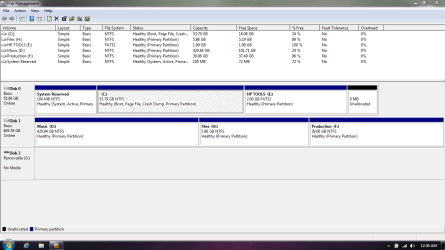
need some help... sky high cpu usage after clean install. read for inf

My Computer

Computer Manufacturer/Model Number
hp g62-450sa Laptop
OS
MS Windows 7 Ultimate 64-bit SP1
CPU
i3 350M 2.27ghz
Motherboard
hp 1425
Memory
8.00 GB Dual-Channel DDR3 @ 532MHz (7-7-7-20)
Graphics Card(s)
Intel HD Graphics
Sound Card
Realtek High Definition Audio
Screen Resolution
1366x768@60hz
Hard Drives
59GB OCZ Vertex Plus
488gb Western Digital WDC WD5000BEVT-60AORTO
PSU
laptop
Case
laptop
Cooling
laptop
Keyboard
Standard PS/2 Keyboard
Mouse
Synaptics PS/2 Port TouchPad
brian,
Which drive did you scan?
 

My Computer

Computer Manufacturer/Model Number
Toshiba Satellite S875D-S7239 laptop
OS
MS Windows 7 Ultimate SP1 64-bit
CPU
AMD A10-4600M
Motherboard
AMD Pumori (Socket FT1)
Memory
6.00 GB Dual-Channel DDR3 @ 798MHz (11-11-12-28)
Graphics Card(s)
AMD Radeon HD 7660G
Sound Card
High Definition Audio Device
Monitor(s) Displays
Generic PnP Monitor (1600x900@60Hz)
Screen Resolution
1600x900@60Hz
Hard Drives
SSD 119GB Corsair CSSD-V128GB2 ATA Device
Keyboard
Standard PS/2 Keyboard
Mouse
HP Wireless Optical Mobile Mouse Model FHA-3410
Internet Speed
What the local pub, local coffee shop offers.
Other Info
Optical Drive:MATSHITA BD-CMB UJ160B ATA Device


Also have an Asus ha1002xp netbook with Win 7 Ultimate installed.
Brian,
Please fill out your system specs using this procedure:

Update your SevenForums System Specs
User CP (located on the top menu bar) |
Your Profile | Edit System Spec
(left-hand column)

To gather info, use Speccy (my favorite) or SIW or System Info

Add the word laptop or desktop or netbook to the
“system manufacturer” block, for example,
Toshiba Satellite L305D notebook.

Provide full windows version info, for example:
MS Windows 7 Ultimate SP1 64-bit

Use the “Other Info” block for Optical Reader,
Mouse, touchpad, wifi adapter, speakers, monitor, etc

Scroll down and click on SAVE CHANGES.
 

My Computer

Computer Manufacturer/Model Number
Toshiba Satellite S875D-S7239 laptop
OS
MS Windows 7 Ultimate SP1 64-bit
CPU
AMD A10-4600M
Motherboard
AMD Pumori (Socket FT1)
Memory
6.00 GB Dual-Channel DDR3 @ 798MHz (11-11-12-28)
Graphics Card(s)
AMD Radeon HD 7660G
Sound Card
High Definition Audio Device
Monitor(s) Displays
Generic PnP Monitor (1600x900@60Hz)
Screen Resolution
1600x900@60Hz
Hard Drives
SSD 119GB Corsair CSSD-V128GB2 ATA Device
Keyboard
Standard PS/2 Keyboard
Mouse
HP Wireless Optical Mobile Mouse Model FHA-3410
Internet Speed
What the local pub, local coffee shop offers.
Other Info
Optical Drive:MATSHITA BD-CMB UJ160B ATA Device


Also have an Asus ha1002xp netbook with Win 7 Ultimate installed.
No problem, give me ten mins and it'll be done, as for the scan, I ran the initial quick scan then chose full system scan
 

My Computer

Computer Manufacturer/Model Number
hp g62-450sa Laptop
OS
MS Windows 7 Ultimate 64-bit SP1
CPU
i3 350M 2.27ghz
Motherboard
hp 1425
Memory
8.00 GB Dual-Channel DDR3 @ 532MHz (7-7-7-20)
Graphics Card(s)
Intel HD Graphics
Sound Card
Realtek High Definition Audio
Screen Resolution
1366x768@60hz
Hard Drives
59GB OCZ Vertex Plus
488gb Western Digital WDC WD5000BEVT-60AORTO
PSU
laptop
Case
laptop
Cooling
laptop
Keyboard
Standard PS/2 Keyboard
Mouse
Synaptics PS/2 Port TouchPad
If Home Premium came with the PC then there is no reason to buy Ultimate which is the exact same OS with a few expensive extra features most users don't need. The OEM license worth $100+ is good for the life of the PC and can be reinstalled as often and however you want.

I would start over and follow these steps to get a perfect Clean Reinstall - Factory OEM Windows 7.

If the problem persists then work through these Troubleshooting Steps for Windows 7 .
http://www.sevenforums.com/tutorials/219487-clean-reinstall-factory-oem-windows-7-a.html#post1839164
 
@greg He has Ultimate as reflected in his system specs.

@Brian Your DiskManagement failure display is unusual. Are you sitting in front of the computer that we want to get to running properly?
If you are sitting in front of the computer with the problem, then please try once again to generate the DiskManagement display.

thanks,
karl
 

My Computer

Computer Manufacturer/Model Number
Toshiba Satellite S875D-S7239 laptop
OS
MS Windows 7 Ultimate SP1 64-bit
CPU
AMD A10-4600M
Motherboard
AMD Pumori (Socket FT1)
Memory
6.00 GB Dual-Channel DDR3 @ 798MHz (11-11-12-28)
Graphics Card(s)
AMD Radeon HD 7660G
Sound Card
High Definition Audio Device
Monitor(s) Displays
Generic PnP Monitor (1600x900@60Hz)
Screen Resolution
1600x900@60Hz
Hard Drives
SSD 119GB Corsair CSSD-V128GB2 ATA Device
Keyboard
Standard PS/2 Keyboard
Mouse
HP Wireless Optical Mobile Mouse Model FHA-3410
Internet Speed
What the local pub, local coffee shop offers.
Other Info
Optical Drive:MATSHITA BD-CMB UJ160B ATA Device


Also have an Asus ha1002xp netbook with Win 7 Ultimate installed.
He mentions in OP that he was running Home Premium but then wiped the HD and bought Ultimate. If this is preinstalled Win7 then I wanted him to know that it is wasting the Home Premium license if he doesn't need the extra features in Ultimate.

Many users don't know that they own the OS which comes with the PC for life to reinstall as often and in whatever way they want. It has a $100+ value which is wasted if they use another OS on the machine.
 
@ greg... i know that i hae the home premium licence for life however the encryption of bit locker is something that i have wanted for my music and playlists for quite some time, my music means a lot to me and would mean an awful lot to someone else. i just saw this as a perfect opportunity to upgrade... it's tax decuctable after all ;)

@ karl, im using the other machine at the moment but can boot up the one in question, what would you like me to do?? or what looks strange? on my second hdd i do have 3 partions, on for my music, one for my production tools, samples and loops etc... which i still need to put back on, and one for my documents/contracts etc.. again need to go back on, i have 3 backups of all of my music on other hard drives but the production stuff changes that often i dont really keep backups till projects are finished.
 

My Computer

Computer Manufacturer/Model Number
hp g62-450sa Laptop
OS
MS Windows 7 Ultimate 64-bit SP1
CPU
i3 350M 2.27ghz
Motherboard
hp 1425
Memory
8.00 GB Dual-Channel DDR3 @ 532MHz (7-7-7-20)
Graphics Card(s)
Intel HD Graphics
Sound Card
Realtek High Definition Audio
Screen Resolution
1366x768@60hz
Hard Drives
59GB OCZ Vertex Plus
488gb Western Digital WDC WD5000BEVT-60AORTO
PSU
laptop
Case
laptop
Cooling
laptop
Keyboard
Standard PS/2 Keyboard
Mouse
Synaptics PS/2 Port TouchPad
i have bought myself a few more days and borrowed a MBP for the weekend which im playing live with now ;) but i do have the other with me :)
 

My Computer

Computer Manufacturer/Model Number
hp g62-450sa Laptop
OS
MS Windows 7 Ultimate 64-bit SP1
CPU
i3 350M 2.27ghz
Motherboard
hp 1425
Memory
8.00 GB Dual-Channel DDR3 @ 532MHz (7-7-7-20)
Graphics Card(s)
Intel HD Graphics
Sound Card
Realtek High Definition Audio
Screen Resolution
1366x768@60hz
Hard Drives
59GB OCZ Vertex Plus
488gb Western Digital WDC WD5000BEVT-60AORTO
PSU
laptop
Case
laptop
Cooling
laptop
Keyboard
Standard PS/2 Keyboard
Mouse
Synaptics PS/2 Port TouchPad
i just wanted to say thanks for all of the help from you guys, i got the laptop running good yesterday morning and used it to gig last night, and its actually running better than ever, wheras before i was using 20% +/- cpu with my dj software, at its peak last night i only used 5%!! thanks again for all the help.
 

My Computer

Computer Manufacturer/Model Number
hp g62-450sa Laptop
OS
MS Windows 7 Ultimate 64-bit SP1
CPU
i3 350M 2.27ghz
Motherboard
hp 1425
Memory
8.00 GB Dual-Channel DDR3 @ 532MHz (7-7-7-20)
Graphics Card(s)
Intel HD Graphics
Sound Card
Realtek High Definition Audio
Screen Resolution
1366x768@60hz
Hard Drives
59GB OCZ Vertex Plus
488gb Western Digital WDC WD5000BEVT-60AORTO
PSU
laptop
Case
laptop
Cooling
laptop
Keyboard
Standard PS/2 Keyboard
Mouse
Synaptics PS/2 Port TouchPad
Brian -

What exactly did you do to fix high CPU use?

Did you Clean Reinstall?

There wasn't much reported back after Startup Repair failed.
 
aah sorry i thought i had posted... like i said when it started i have very limited services, so i launched startup repair and no better, the version of windows i purchased needed the sp1 installed as an update, all problems in that day seemed to be coming back when i updated, so i clean installed with the iso in your sig... (great link thanks!!) that already had the sp1 included... booted, updated everything and all was fine and dandy.... i am still testing but i did really stress it whilst at work last night and it was flawless.
 

My Computer

Computer Manufacturer/Model Number
hp g62-450sa Laptop
OS
MS Windows 7 Ultimate 64-bit SP1
CPU
i3 350M 2.27ghz
Motherboard
hp 1425
Memory
8.00 GB Dual-Channel DDR3 @ 532MHz (7-7-7-20)
Graphics Card(s)
Intel HD Graphics
Sound Card
Realtek High Definition Audio
Screen Resolution
1366x768@60hz
Hard Drives
59GB OCZ Vertex Plus
488gb Western Digital WDC WD5000BEVT-60AORTO
PSU
laptop
Case
laptop
Cooling
laptop
Keyboard
Standard PS/2 Keyboard
Mouse
Synaptics PS/2 Port TouchPad
Good work, Brian. :geek: Glad it's working out well.

Keep us posted on anything else needed, although you can mark the thread Solved at any point at the top.
 
i will do, thanks again for the help :)
 

My Computer

Computer Manufacturer/Model Number
hp g62-450sa Laptop
OS
MS Windows 7 Ultimate 64-bit SP1
CPU
i3 350M 2.27ghz
Motherboard
hp 1425
Memory
8.00 GB Dual-Channel DDR3 @ 532MHz (7-7-7-20)
Graphics Card(s)
Intel HD Graphics
Sound Card
Realtek High Definition Audio
Screen Resolution
1366x768@60hz
Hard Drives
59GB OCZ Vertex Plus
488gb Western Digital WDC WD5000BEVT-60AORTO
PSU
laptop
Case
laptop
Cooling
laptop
Keyboard
Standard PS/2 Keyboard
Mouse
Synaptics PS/2 Port TouchPad
ok guys, i had marked the thread as solved, but have had to remove that, here's whats happening:

the laptop ran ok for a couple of days, however now once again the cpu just jumps right up when trying to multi task anything, i thought it may be a fault with the ssd so i removed it and put in a normal hdd, but the problem still continues.

im thinking there could actually be a problem with my processor, i3 350m, could there be any truth to this, a replacement isnt too expensive and if need be i'll buy another, but i'd like to know first.

also, when i use the oem clean install from gregrocker's sig all is good untill i try and update. then all goes pete tong with idle cpu at 50/60%

any ideas, let me know. brian.
 

My Computer

Computer Manufacturer/Model Number
hp g62-450sa Laptop
OS
MS Windows 7 Ultimate 64-bit SP1
CPU
i3 350M 2.27ghz
Motherboard
hp 1425
Memory
8.00 GB Dual-Channel DDR3 @ 532MHz (7-7-7-20)
Graphics Card(s)
Intel HD Graphics
Sound Card
Realtek High Definition Audio
Screen Resolution
1366x768@60hz
Hard Drives
59GB OCZ Vertex Plus
488gb Western Digital WDC WD5000BEVT-60AORTO
PSU
laptop
Case
laptop
Cooling
laptop
Keyboard
Standard PS/2 Keyboard
Mouse
Synaptics PS/2 Port TouchPad
Can you System Restore to before the updates which caused the problem?

The procedure is then to install the Updates in small groups with Restore points, until you isolate the group with the one causing the problem. Then System Restore to reinstall those singly with restore points to isolate the exact update causing the problem.

Start with optional Updates Drivers.

If you cannot SysRestore to before the problem begins, then reinstall and set Restore points before each group of updates to do them in small groups starting with optional Drivers.
 
i'll try mate, it did 79 updates :P probably not the best thing to do at once, ill reinstall again and then just install updates one by one. then ill report back
 

My Computer

Computer Manufacturer/Model Number
hp g62-450sa Laptop
OS
MS Windows 7 Ultimate 64-bit SP1
CPU
i3 350M 2.27ghz
Motherboard
hp 1425
Memory
8.00 GB Dual-Channel DDR3 @ 532MHz (7-7-7-20)
Graphics Card(s)
Intel HD Graphics
Sound Card
Realtek High Definition Audio
Screen Resolution
1366x768@60hz
Hard Drives
59GB OCZ Vertex Plus
488gb Western Digital WDC WD5000BEVT-60AORTO
PSU
laptop
Case
laptop
Cooling
laptop
Keyboard
Standard PS/2 Keyboard
Mouse
Synaptics PS/2 Port TouchPad
When doing that many updates, multiple months worth, I find it best to start with the oldest (in small groups as previously mentioned). Newer updates sometimes depend on older updates being installed. Whenever the machine reports that it needs to reboot after a group of updates to finish let it do so. Don't try to install more just to save on the number of reboots you have to do. If you go through a number of installs and it doesn't request a reboot, do one anyway just to ensure it's all going okay.

And, as previously mentioned, make sure restore points are being automatically created. It may be worthwhile to increase the space available for restore points when you're going through this, just in case. You can reduce it later if you want.
 

My Computer

OS
Windows 7 Ultimate x64
Back
Top