Need some help to achieve this look in Windows 7

jhonGL

New member
Local time
4:35 AM
Messages
6
This is the XP look i'm striving for http://s24.postimg.org/mgwihvqyt/xpexplorer1.png


This is what i've done so far:


- got the Luna Metallic Port to Win7Aero

- Installed classic shell

- Changed the default explorer folder open and closed icons by adding string 3 and 4 here : HKEY_LOCAL_MACHINE\SOFTWARE\Microsoft\Windows\CurrentVersion\Explorer\Shell Icons

- Installed 7+ Taskbar Tweaker

- Installed T-Clock 2010

--------------------


This is how it looks so far - Windows7 custom look


Can someone edit for me the luna metalic port (non aero), or teach me how to do it to get the following changes?

1. On xp, the taskbar has white font on selected button and black font on deselected one. On this theme, the font is black for both states - http://s23.postimg.org/j0hxitu1n/7taskbarexploericons.png Can i have this "black/white" behavior?

2. Under the taskbar buttons there is a row of pixels that are left and right clickable, very annoying when you quickly move the mouse on various buttons - http://s22.postimg.org/qnxhew9m9/w7clickunderbuttons.png Can the theme be edited to make that row of pixel disappear and have the buttons clickable even when the mouse is on the lowest possible point?

3. The font used for the taskbar buttons is slightly different. 7font - http://s22.postimg.org/tpsv2lc4x/W7fontcolor.png ; xp font - http://s9.postimg.org/3y4f2tiov/image.png Can the theme be edited to use the exact xp font?

------------------

Also, i want to make some other changes that might not be related to the theme:

- When i delete a file or folder, xp looks like this - http://s16.postimg.org/3pasfalud/xpdeletemenu.png , 7 like this - http://s21.postimg.org/5vlpymu6v/7deletemenu.png How can i get the xp smaller look in 7?

- On xp, icons for file extensions that don't have a program associated with them look like this - http://s15.postimg.org/b46i3llk7/xpdefaultunknownicon.png , win7 has this white one - http://s16.postimg.org/924875z4l/defaulticon7.png How to change to xp style?

- On xp, the icon used for for windows explorer taskbar icons is consistent, doesn't change when you navigate to a local disk and has a different icon than the one used for "folder open or closed". This is taskbar button i'm talking about - http://s9.postimg.org/3y4f2tiov/image.png - It's the windows explorer icon from win xp. Can i get in 7 a consistent "xp explorer icon" for that part?


Thanks in advance for any help!
 

My Computer My Computer

At a glance

xp 32bit / w7sp1 ultimate 64bit
Computer type
PC/Desktop
OS
xp 32bit / w7sp1 ultimate 64bit
Welcome to the Seven Forums


#1
No that cannot be done it's one color for all states.

#2
Sorry to say but no again.

#3
Yes if you know what the font is, it can be changed with Ave's Windows7 Style Builder
Capture.PNG

The dialog box size that comes up when you delete something cannot be changed.

As for the icons you could do some editing in the imageres.dll to get some of that behavior maybe.

Jerry
 

My Computer My Computer

At a glance

Win 7 Pro x64 / Win 10 ProIntel(R) Core(TM) i7-3630QM CPU @ 2.40GHz12 GB(1) Intel(R) HD Graphics 4000 (2) NVIDIA GeFo...
Computer type
Laptop
Computer Manufacturer/Model Number
Sager NP9170
OS
Win 7 Pro x64 / Win 10 Pro
CPU
Intel(R) Core(TM) i7-3630QM CPU @ 2.40GHz
Motherboard
CLEVO P170EM
Memory
12 GB
Graphics Card(s)
(1) Intel(R) HD Graphics 4000 (2) NVIDIA GeForce GTX 675M
Sound Card
(1) Realtek High Definition Audio (2) Intel(R) Display Aud
Monitor(s) Displays
17.3
Screen Resolution
1920x1080
Hard Drives
(1) Samsung 860 EVO 500GB(OS) (1) Samsung 860 EVO 500GB(Data)
Keyboard
Backlite
Antivirus
MSE, Malwarebytes Pro
Browser
Firefox
Other Info
DESKTOP: Custom-built.
OS: Win 10 Pro x64.
CASE: Rosewill R5.
CPU: Intel I5 4670K CPU @ 3.40GHz.
CPU COOLER: Cool Master Hyper 212 EVO.
MOTHERBOARD: Asus Z87-A.
MEMORY: Kingston HyperX 2x4 GB.
GPU: Nvidia Geforce 650 TI.
PSU: Corsair TX750.
DRIVES: (1) Samsung 840 120 GB SSD (2) Western Digital blue 500 GB 7200 RPM.

My Computer My Computer

At a glance

xp 32bit / w7sp1 ultimate 64bit
Computer type
PC/Desktop
OS
xp 32bit / w7sp1 ultimate 64bit
I am just curious (no offense) - Why would you want this old, dated look.
 

My Computer My Computer

At a glance

Vista, Windows7, Mint Mate, Zorin, Windows 8from 1.6GHz Duo to i7
Computer Manufacturer/Model Number
HP, Dell, Gateway, Toshiba - 4 laptops and 2 desktops
OS
Vista, Windows7, Mint Mate, Zorin, Windows 8
CPU
from 1.6GHz Duo to i7
Monitor(s) Displays
2x HP w2207
Hard Drives
5x HDD, 7x SSD, 12x Externals
Keyboard
with trackball - no mices
Mouse
Trackball mice
Internet Speed
DSL 6000
I just love that silver luna xp look!

Humans will get used to anything if forced, but if the stuff i like is available, even if it looks dated, why not enjoy it?

I got Windows7 Style Builder and tried looking for the "row of pixels under taksbar buttons" bug, but i'm lost...
 

My Computer My Computer

At a glance

xp 32bit / w7sp1 ultimate 64bit
Computer type
PC/Desktop
OS
xp 32bit / w7sp1 ultimate 64bit
Fair enough. Thanks for the answer.
 

My Computer My Computer

At a glance

Vista, Windows7, Mint Mate, Zorin, Windows 8from 1.6GHz Duo to i7
Computer Manufacturer/Model Number
HP, Dell, Gateway, Toshiba - 4 laptops and 2 desktops
OS
Vista, Windows7, Mint Mate, Zorin, Windows 8
CPU
from 1.6GHz Duo to i7
Monitor(s) Displays
2x HP w2207
Hard Drives
5x HDD, 7x SSD, 12x Externals
Keyboard
with trackball - no mices
Mouse
Trackball mice
Internet Speed
DSL 6000
I just love that silver luna xp look!

Humans will get used to anything if forced, but if the stuff i like is available, even if it looks dated, why not enjoy it?

I got Windows7 Style Builder and tried looking for the "row of pixels under taksbar buttons" bug, but i'm lost...

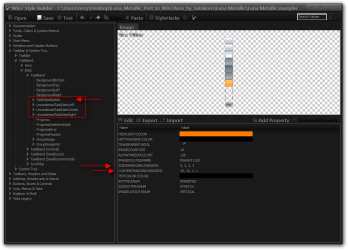
You could try changing the ContentMargins and or SizingMargins for the buttons, the numbers go by left, right, top, bottom. There is a space after the ,

Win7 Style Builder - CUsersJerryDesktopLuna_Metallic_Port_to_Win7Aero_by_SatukoroLuna MetallicLu.png

Jerry
 

My Computer My Computer

At a glance

Win 7 Pro x64 / Win 10 ProIntel(R) Core(TM) i7-3630QM CPU @ 2.40GHz12 GB(1) Intel(R) HD Graphics 4000 (2) NVIDIA GeFo...
Computer type
Laptop
Computer Manufacturer/Model Number
Sager NP9170
OS
Win 7 Pro x64 / Win 10 Pro
CPU
Intel(R) Core(TM) i7-3630QM CPU @ 2.40GHz
Motherboard
CLEVO P170EM
Memory
12 GB
Graphics Card(s)
(1) Intel(R) HD Graphics 4000 (2) NVIDIA GeForce GTX 675M
Sound Card
(1) Realtek High Definition Audio (2) Intel(R) Display Aud
Monitor(s) Displays
17.3
Screen Resolution
1920x1080
Hard Drives
(1) Samsung 860 EVO 500GB(OS) (1) Samsung 860 EVO 500GB(Data)
Keyboard
Backlite
Antivirus
MSE, Malwarebytes Pro
Browser
Firefox
Other Info
DESKTOP: Custom-built.
OS: Win 10 Pro x64.
CASE: Rosewill R5.
CPU: Intel I5 4670K CPU @ 3.40GHz.
CPU COOLER: Cool Master Hyper 212 EVO.
MOTHERBOARD: Asus Z87-A.
MEMORY: Kingston HyperX 2x4 GB.
GPU: Nvidia Geforce 650 TI.
PSU: Corsair TX750.
DRIVES: (1) Samsung 840 120 GB SSD (2) Western Digital blue 500 GB 7200 RPM.
#2
Sorry to say but no again.

You could try changing the ContentMargins and or SizingMargins for the buttons, the numbers go by left, right, top, bottom. There is a space after the ,

OMG, i've done it! :D:cool:

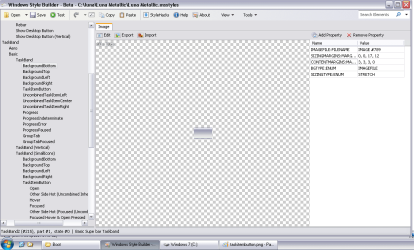
First the BackgroundBottom had to go from 3, 3, 3, 3 to 3, 3, 3, 0. Then the TaskItemButton from 10, 10, 4, 4 to 10, 10, 4, 7

Now it's impossible to click or right click under any taskbar button!

As i've managed the most important part, why not go fix the rest? :)

For nr.1 "One color for al states" <--- is this a windows7 limitation?
 

Attachments

  • backgroundBottom.png
    backgroundBottom.png
    25.5 KB · Views: 2
  • taskitembutton.png
    taskitembutton.png
    24.5 KB · Views: 1
Last edited:

My Computer My Computer

At a glance

xp 32bit / w7sp1 ultimate 64bit
Computer type
PC/Desktop
OS
xp 32bit / w7sp1 ultimate 64bit
I have tried to add Text color property's to the different states and could not get it to work.

But you could try.
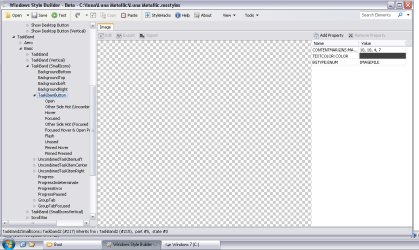
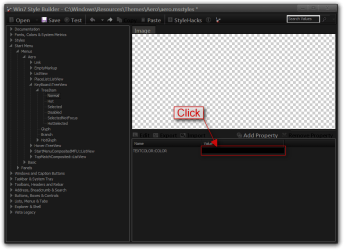
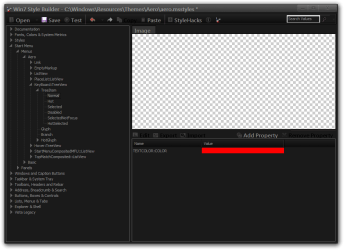
Click on Add Property
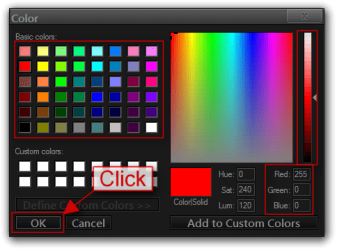
Use the drop-down menu under Type choose color under Property choose textcolor then Click OK
It always picks black as the default color click on the color
Picked the color you want and then Click OK

Jerry
This is for the start menu you want the taskbar buttons.
1.png

2.png

3.png

4.png

5.png
 

My Computer My Computer

At a glance

Win 7 Pro x64 / Win 10 ProIntel(R) Core(TM) i7-3630QM CPU @ 2.40GHz12 GB(1) Intel(R) HD Graphics 4000 (2) NVIDIA GeFo...
Computer type
Laptop
Computer Manufacturer/Model Number
Sager NP9170
OS
Win 7 Pro x64 / Win 10 Pro
CPU
Intel(R) Core(TM) i7-3630QM CPU @ 2.40GHz
Motherboard
CLEVO P170EM
Memory
12 GB
Graphics Card(s)
(1) Intel(R) HD Graphics 4000 (2) NVIDIA GeForce GTX 675M
Sound Card
(1) Realtek High Definition Audio (2) Intel(R) Display Aud
Monitor(s) Displays
17.3
Screen Resolution
1920x1080
Hard Drives
(1) Samsung 860 EVO 500GB(OS) (1) Samsung 860 EVO 500GB(Data)
Keyboard
Backlite
Antivirus
MSE, Malwarebytes Pro
Browser
Firefox
Other Info
DESKTOP: Custom-built.
OS: Win 10 Pro x64.
CASE: Rosewill R5.
CPU: Intel I5 4670K CPU @ 3.40GHz.
CPU COOLER: Cool Master Hyper 212 EVO.
MOTHERBOARD: Asus Z87-A.
MEMORY: Kingston HyperX 2x4 GB.
GPU: Nvidia Geforce 650 TI.
PSU: Corsair TX750.
DRIVES: (1) Samsung 840 120 GB SSD (2) Western Digital blue 500 GB 7200 RPM.
No luck...

I found where to change the font and color, but it's for all states. It would be great to see a theme with different colors so we could understand how it works.
 

My Computer My Computer

At a glance

xp 32bit / w7sp1 ultimate 64bit
Computer type
PC/Desktop
OS
xp 32bit / w7sp1 ultimate 64bit
I have never seen a theme where the taskbar buttons have different colors for different states, if you ever find one post back.

Jerry
 

My Computer My Computer

At a glance

Win 7 Pro x64 / Win 10 ProIntel(R) Core(TM) i7-3630QM CPU @ 2.40GHz12 GB(1) Intel(R) HD Graphics 4000 (2) NVIDIA GeFo...
Computer type
Laptop
Computer Manufacturer/Model Number
Sager NP9170
OS
Win 7 Pro x64 / Win 10 Pro
CPU
Intel(R) Core(TM) i7-3630QM CPU @ 2.40GHz
Motherboard
CLEVO P170EM
Memory
12 GB
Graphics Card(s)
(1) Intel(R) HD Graphics 4000 (2) NVIDIA GeForce GTX 675M
Sound Card
(1) Realtek High Definition Audio (2) Intel(R) Display Aud
Monitor(s) Displays
17.3
Screen Resolution
1920x1080
Hard Drives
(1) Samsung 860 EVO 500GB(OS) (1) Samsung 860 EVO 500GB(Data)
Keyboard
Backlite
Antivirus
MSE, Malwarebytes Pro
Browser
Firefox
Other Info
DESKTOP: Custom-built.
OS: Win 10 Pro x64.
CASE: Rosewill R5.
CPU: Intel I5 4670K CPU @ 3.40GHz.
CPU COOLER: Cool Master Hyper 212 EVO.
MOTHERBOARD: Asus Z87-A.
MEMORY: Kingston HyperX 2x4 GB.
GPU: Nvidia Geforce 650 TI.
PSU: Corsair TX750.
DRIVES: (1) Samsung 840 120 GB SSD (2) Western Digital blue 500 GB 7200 RPM.
This is the XP look i'm striving for http://s24.postimg.org/mgwihvqyt/xpexplorer1.png


This is what i've done so far:


- got the Luna Metallic Port to Win7Aero

- Installed classic shell

- Changed the default explorer folder open and closed icons by adding string 3 and 4 here : HKEY_LOCAL_MACHINE\SOFTWARE\Microsoft\Windows\CurrentVersion\Explorer\Shell Icons

- Installed 7+ Taskbar Tweaker

- Installed T-Clock 2010

--------------------


This is how it looks so far - Windows7 custom look


Can someone edit for me the luna metalic port (non aero), or teach me how to do it to get the following changes?

1. On xp, the taskbar has white font on selected button and black font on deselected one. On this theme, the font is black for both states - http://s23.postimg.org/j0hxitu1n/7taskbarexploericons.png Can i have this "black/white" behavior?

2. Under the taskbar buttons there is a row of pixels that are left and right clickable, very annoying when you quickly move the mouse on various buttons - http://s22.postimg.org/qnxhew9m9/w7clickunderbuttons.png Can the theme be edited to make that row of pixel disappear and have the buttons clickable even when the mouse is on the lowest possible point?

3. The font used for the taskbar buttons is slightly different. 7font - http://s22.postimg.org/tpsv2lc4x/W7fontcolor.png ; xp font - http://s9.postimg.org/3y4f2tiov/image.png Can the theme be edited to use the exact xp font?

------------------

Also, i want to make some other changes that might not be related to the theme:

- When i delete a file or folder, xp looks like this - http://s16.postimg.org/3pasfalud/xpdeletemenu.png , 7 like this - http://s21.postimg.org/5vlpymu6v/7deletemenu.png How can i get the xp smaller look in 7?

- On xp, icons for file extensions that don't have a program associated with them look like this - http://s15.postimg.org/b46i3llk7/xpdefaultunknownicon.png , win7 has this white one - http://s16.postimg.org/924875z4l/defaulticon7.png How to change to xp style?

- On xp, the icon used for for windows explorer taskbar icons is consistent, doesn't change when you navigate to a local disk and has a different icon than the one used for "folder open or closed". This is taskbar button i'm talking about - http://s9.postimg.org/3y4f2tiov/image.png - It's the windows explorer icon from win xp. Can i get in 7 a consistent "xp explorer icon" for that part?


Thanks in advance for any help!
Have you tried Classic Shell?

Classic Shell - Start menu and other Windows enhancements

The main aim of the program was to give windows 7 the XP functions that went away. They Grey Luna theme is included for the start menu.
XP Luna skin
Hope this is some help.
 

My Computer My Computer

At a glance

Windows 7 x64 Ultimate and numerous virtual m...AMD FX-8350 Vishera 32nm Technology @ 4.2 GHz...G Skill 32.0GB Dual-Channel DDR3 @ 1204MHz (1...EVGA GeForce GTX 960 4GB Super SC ACX 2.0+ wi...
Computer type
PC/Desktop
Computer Manufacturer/Model Number
Bluethunder II
OS
Windows 7 x64 Ultimate and numerous virtual machines
CPU
AMD FX-8350 Vishera 32nm Technology @ 4.2 GHz default
Motherboard
ASUSTeK COMPUTER INC. SABERTOOTH 990FX R2.0 (Socket 942)
Memory
G Skill 32.0GB Dual-Channel DDR3 @ 1204MHz (11-13-13-31)
Graphics Card(s)
EVGA GeForce GTX 960 4GB Super SC ACX 2.0+ with Back Plate
Sound Card
Creative X-Fi Titanium HD Audiophile PCIe
Monitor(s) Displays
LG L227WTG x 3
Screen Resolution
1680 x 1050 16:10
Hard Drives
238GB Samsung850 PRO SATA Disk Device (SSD)
1863GB Seagate ST2000DM 001-1CH164 (SATA)
1397GB Seagate ST1500DL 003-9VT16L(SATA)
466GB Western Digital WDC WD50 03AZEX-00K1GA0 (SATA) x 2
932GB Seagate ST310005 28AS SATA Disk Device (SATA)
PSU
Enermax Revolution87+ 1000 Watts Gold Certified Power Supply
Case
Rocketfish Full Tower
Cooling
Cooler Master Hyper 212 EVO Push Pull 120mm Fans
Keyboard
Logitech K740
Mouse
Logitech G100S Laser LED + Logitech Gamepad F310
Internet Speed
500 mbs down and 30mbs up
Antivirus
Malwarebytes Pro & Avast and MSE on certain Virtual Machines
Browser
Firefox (Main) Chrome, Internet Explorer (Back Up)
Other Info
Logitech X 230 2.1 Stereo System and 5.1 Yamaha RX V2090
B&W DM6 Monitor Speakers + Center and Surround Speakers
Using Mouse Without Borders (Google it)

My Computer My Computer

At a glance

Windows 7 Ultimate x64
Computer type
PC/Desktop
OS
Windows 7 Ultimate x64
Have you tried Classic Shell?

Obviously! It's the second thing i've mentioned in the first post. "- Installed classic shell" :geek:

- On xp, icons for file extensions that don't have a program associated with them look like this - http://s15.postimg.org/b46i3llk7/xpdefaultunknownicon.png , win7 has this white one - http://s16.postimg.org/924875z4l/defaulticon7.png How to change to xp style?

With ResHacker save Icon Group#1 from XP file windows/system32/shell32.dll

Then open imageres.dll from W7 and replace Icon Group#2 by the file from XP

Clean icon cache and restart system

Thanks. Done that with ease and it worked just fine!

Too bad this silver luna theme has the flashing taskbar button bug! Even the author has given up... :(

Luna Metallic Port to Win7Aero by Satukoro on deviantART

- "sadly I don't get a notification flash whether it be from an MSN chat or anything else similar. Am I missing something?"

- "You're not missing anything. It's a known bug with this theme and a few others. The taskband buttons develop more issues whenever I make the attempt at fixing this. Sorry"

I'm glad i've managed to fix another bug this theme had. That clickable row of pixels under taskbar buttons is gone!
 

My Computer My Computer

At a glance

xp 32bit / w7sp1 ultimate 64bit
Computer type
PC/Desktop
OS
xp 32bit / w7sp1 ultimate 64bit
Back
Top