Need some help with the boot loader

Mudfrog

New member
Local time
10:21 PM
Messages
20
Well for about 2 months I've been dual booting XP and 7. This past weekend I was trying to get a peak score in 3DMark06 with my PC and due to the high overclock I received a BSOD in XP, upon restarting my boot loader seemed to be corrupt. I was able to boot into 7 but not XP. This was a problem as my game saves were on XP and 7 was just general use.

I used BCDEDIT to fix the XP boot record. I tried booting to XP again and the system would just power off after I selected that option. Then I booted into repair mode on the Win7 DVD and used "bootrec /fixmbr" andd "bootrec /fixboot". This did not work either.

Finally as a last resort I deleted the win7 partition and the smaller partition that goes along with win7. I figured a fresh install would pick up on XP again. I was kind of right and kind of wrong.

When the Win7 DVD is in my drive it will boot to Win7, if I remove the Win7 DVD from the drive then my system boots to XP. I no longer have the option to choose an OS. This is temporarily ok as I can still get to both OS's but how on earth do I fix this?
 

My Computer

Computer Manufacturer/Model Number
Custom
OS
Win7 RC 7200 64bit
CPU
Phenom II 720 x4 @ 3.64
Motherboard
Gigabyte GA-M780G-UD3H
Memory
Kingston HyperX 4GB DDR2 1066
Graphics Card(s)
Sapphire 4890 @ 930 / 1050
Sound Card
Onboard
Monitor(s) Displays
23" Acer H233H 1080p 40,000:1
Screen Resolution
1920x1080
Hard Drives
750GB Western Digital Caviar Black SATA
PSU
Cooler Master 700w Silent Pro
Case
Cooler Master Storm Scout
Cooling
Cooler Master Hyper N 520 / 2x 140mm / 3x 120mm
Keyboard
Logitech G15
Mouse
MS 5 button
Have you tried booting from the Windows 7 DVD and trying a startup repair? This may restore the Bootloader for Windows7. Once you get booted in to Windows 7, then run msconfig>Boot tab and see if your entries are listed there. If they are not you can manually create one that points to the XP installation. I have used EasyBCD in the past for fixing dual boots of Linux and windows. http://neosmart.net/dl.php?id=1
 

My Computer

Computer Manufacturer/Model Number
Built Myself
OS
Windows 7 7600.16384 x64
CPU
Intel Core i7 OC'd to 3.20 GHz
Motherboard
Gigabyte
Memory
6GB GSkillz Triple Channel DDR3 OC'd to 1600 MHz
Graphics Card(s)
Nvidia GTX 280
Sound Card
X-Fi Platinum
Monitor(s) Displays
Dual 2001FWP
Screen Resolution
1680x1050 x 2
Hard Drives
System - Dual 150GB Raptors Raid0
Doc Storage - 1TB SATA 32MB cache Samsung
TV Recordings - 1TB SATA 32MB cache Samsung
PSU
Gigawatt Antec
Case
Antec 900
Keyboard
Saitek
Mouse
logitech MX 10000
Internet Speed
30 mb/s
I did try that before I reinstalled Win7. Also EasyBCD did not work correctly for me either.

I will look at the boot tab under msconfig when I get home from work.
 

My Computer

Computer Manufacturer/Model Number
Custom
OS
Win7 RC 7200 64bit
CPU
Phenom II 720 x4 @ 3.64
Motherboard
Gigabyte GA-M780G-UD3H
Memory
Kingston HyperX 4GB DDR2 1066
Graphics Card(s)
Sapphire 4890 @ 930 / 1050
Sound Card
Onboard
Monitor(s) Displays
23" Acer H233H 1080p 40,000:1
Screen Resolution
1920x1080
Hard Drives
750GB Western Digital Caviar Black SATA
PSU
Cooler Master 700w Silent Pro
Case
Cooler Master Storm Scout
Cooling
Cooler Master Hyper N 520 / 2x 140mm / 3x 120mm
Keyboard
Logitech G15
Mouse
MS 5 button
Just out of curiosity, you say your saved games were on the XP partition....

can you still see that partition from Windows 7? If you go in to disk management, is it listed? If anything, you can just pull the files you need from the other partition over to the Windows 7 partition and then back them up.
 

My Computer

Computer Manufacturer/Model Number
Built Myself
OS
Windows 7 7600.16384 x64
CPU
Intel Core i7 OC'd to 3.20 GHz
Motherboard
Gigabyte
Memory
6GB GSkillz Triple Channel DDR3 OC'd to 1600 MHz
Graphics Card(s)
Nvidia GTX 280
Sound Card
X-Fi Platinum
Monitor(s) Displays
Dual 2001FWP
Screen Resolution
1680x1050 x 2
Hard Drives
System - Dual 150GB Raptors Raid0
Doc Storage - 1TB SATA 32MB cache Samsung
TV Recordings - 1TB SATA 32MB cache Samsung
PSU
Gigawatt Antec
Case
Antec 900
Keyboard
Saitek
Mouse
logitech MX 10000
Internet Speed
30 mb/s

Attachments

  • 961d1227431628-system-recovery-options-repair_option.jpg
    961d1227431628-system-recovery-options-repair_option.jpg
    26.2 KB · Views: 2,787

My Computer

Computer Manufacturer/Model Number
Built Myself
OS
Windows 7 7600.16384 x64
CPU
Intel Core i7 OC'd to 3.20 GHz
Motherboard
Gigabyte
Memory
6GB GSkillz Triple Channel DDR3 OC'd to 1600 MHz
Graphics Card(s)
Nvidia GTX 280
Sound Card
X-Fi Platinum
Monitor(s) Displays
Dual 2001FWP
Screen Resolution
1680x1050 x 2
Hard Drives
System - Dual 150GB Raptors Raid0
Doc Storage - 1TB SATA 32MB cache Samsung
TV Recordings - 1TB SATA 32MB cache Samsung
PSU
Gigawatt Antec
Case
Antec 900
Keyboard
Saitek
Mouse
logitech MX 10000
Internet Speed
30 mb/s

My Computers

System One System Two

  • Computer type
    PC/Desktop
    OS
    7 X64
    CPU
    i5 8400
    Motherboard
    gigabyte b365m ds3h
    Memory
    2x8gb 3200mhz
    Hard Drives
    various
    PSU
    pure power 11 400w cm
    Case
    Coolermaster
    Cooling
    cryorig m9i
  • Computer type
    PC/Desktop
    OS
    7x64
    CPU
    g5400
    Motherboard
    ga b365m ds3h
    Memory
    8gb ddr4 2400
    PSU
    xfx pro 450w
SIW2, I'll post screens when I get home.

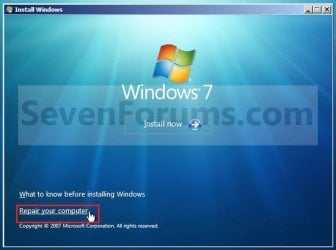
7echno7im, Yes I did choose the repair option. I tried the automatic "repair startup" option as well as using the command prompt.

I can see the the XP partition from within win7, I can copy the files over as a last resort.
 

My Computer

Computer Manufacturer/Model Number
Custom
OS
Win7 RC 7200 64bit
CPU
Phenom II 720 x4 @ 3.64
Motherboard
Gigabyte GA-M780G-UD3H
Memory
Kingston HyperX 4GB DDR2 1066
Graphics Card(s)
Sapphire 4890 @ 930 / 1050
Sound Card
Onboard
Monitor(s) Displays
23" Acer H233H 1080p 40,000:1
Screen Resolution
1920x1080
Hard Drives
750GB Western Digital Caviar Black SATA
PSU
Cooler Master 700w Silent Pro
Case
Cooler Master Storm Scout
Cooling
Cooler Master Hyper N 520 / 2x 140mm / 3x 120mm
Keyboard
Logitech G15
Mouse
MS 5 button
that is good to hear. I think we can repair the Windows XP startup then. I would try running BCDEdit again or EasyBCD and recreating a link to yiour XP installation. This will be a good place to start.
 

My Computer

Computer Manufacturer/Model Number
Built Myself
OS
Windows 7 7600.16384 x64
CPU
Intel Core i7 OC'd to 3.20 GHz
Motherboard
Gigabyte
Memory
6GB GSkillz Triple Channel DDR3 OC'd to 1600 MHz
Graphics Card(s)
Nvidia GTX 280
Sound Card
X-Fi Platinum
Monitor(s) Displays
Dual 2001FWP
Screen Resolution
1680x1050 x 2
Hard Drives
System - Dual 150GB Raptors Raid0
Doc Storage - 1TB SATA 32MB cache Samsung
TV Recordings - 1TB SATA 32MB cache Samsung
PSU
Gigawatt Antec
Case
Antec 900
Keyboard
Saitek
Mouse
logitech MX 10000
Internet Speed
30 mb/s
Seems to me what he is saying> He lost the bootmgr for XP. Since he can boot to XP with the Win7 DVD in.
Not sure but I think he only has to move the MBR files from Win7 to the XP disk. Another easier way to do this would be
insert the XP Disk, when ask do a CLEAN install, all the old XP files should then be in windows.old which he can then move.

Treat XP just like a brand new install or you can also install XP again with the UPGRADE option. Upgrade if you feel better than the clean install.
Hope you can understand sometime us old guys (66) talk differently than the younger.
 
Seems to me what he is saying> He lost the bootmgr for XP. Since he can boot to XP with the Win7 DVD in.
Not sure but I think he only has to move the MBR files from Win7 to the XP disk. Another easier way to do this would be
insert the XP Disk, when ask do a CLEAN install, all the old XP files should then be in windows.old which he can then move.

Treat XP just like a brand new install or you can also install XP again with the UPGRADE option. Upgrade if you feel better than the clean install.
Hope you can understand sometime us old guys (66) talk differently than the younger.

Well at the moment I'm not sure which one I lost. If I do not put any discs in the drive then it will automatically boot to XP. But with the Windows 7 disc in it will boot to Windows 7 only.

If I run bootrec /fixmbr & /fixboot it will display both OS's but only boot to Windows 7 properly.

When I run EasyBCD it will only boot to XP and does not show the option for Win7 (Even if I verify the Win7 info is there).
 

My Computer

Computer Manufacturer/Model Number
Custom
OS
Win7 RC 7200 64bit
CPU
Phenom II 720 x4 @ 3.64
Motherboard
Gigabyte GA-M780G-UD3H
Memory
Kingston HyperX 4GB DDR2 1066
Graphics Card(s)
Sapphire 4890 @ 930 / 1050
Sound Card
Onboard
Monitor(s) Displays
23" Acer H233H 1080p 40,000:1
Screen Resolution
1920x1080
Hard Drives
750GB Western Digital Caviar Black SATA
PSU
Cooler Master 700w Silent Pro
Case
Cooler Master Storm Scout
Cooling
Cooler Master Hyper N 520 / 2x 140mm / 3x 120mm
Keyboard
Logitech G15
Mouse
MS 5 button
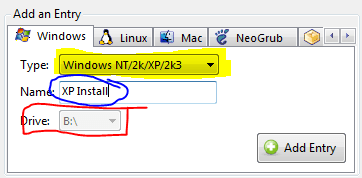
Hey Mudfrog. Go into Seven, and open EasyBCD.
Go to Add/Remove Entries.
Is XP listed, or just Seven?

If just seven is listed, then do this:
1) Find the drive letter of your XP installation
2) Open EasyBCD and go to Add/Remove Entries
3) Add your XP install at the bottom by typing the name of the install (whatever you want) and then pointing it to your drive.
4) Try rebooting, and see if it is listed. If not, you can install iReboot, and use that to boot into XP.
(see attached Screen shot)
Hope that works for you!

~Lordbob
 

Attachments

  • Capture.PNG
    Capture.PNG
    6.2 KB · Views: 5

My Computer

Computer Manufacturer/Model Number
Hera
OS
Windows 7 Ultimate x64, Mint 9
CPU
Intel i5-2500k
Motherboard
ASUS P8P67 Pro
Memory
2x 4Gb Corsair VENGEANCE DDR3-1600
Graphics Card(s)
NVidia GeForce N260GTX Twin Frozr
Sound Card
Realtek HD OnBoard Audio
Monitor(s) Displays
ASUS 24" Monitor
Screen Resolution
1920x1080
Hard Drives
G.SKILL Phoenix Series 60GB SATA II MLC Internal Solid State Drive (SSD)
SAMSUNG Spinpoint F3R 1TB 7200 RPM 32MB Cache SATA II
PSU
Cooler Master Real Power Pro 750W
Case
Cooler Master Haf 932
Cooling
Fans
Keyboard
Razer Tarantula
Mouse
Razer Lachesis
Internet Speed
not fast enough
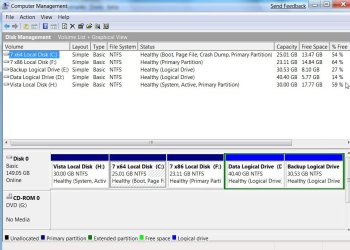
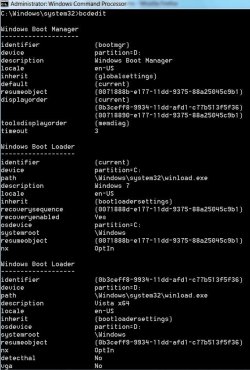
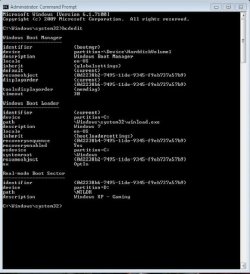
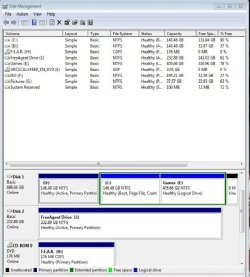
All will be revealed when we see the hard drives and bcdedit in the screenshots.
 

My Computers

System One System Two

  • Computer type
    PC/Desktop
    OS
    7 X64
    CPU
    i5 8400
    Motherboard
    gigabyte b365m ds3h
    Memory
    2x8gb 3200mhz
    Hard Drives
    various
    PSU
    pure power 11 400w cm
    Case
    Coolermaster
    Cooling
    cryorig m9i
  • Computer type
    PC/Desktop
    OS
    7x64
    CPU
    g5400
    Motherboard
    ga b365m ds3h
    Memory
    8gb ddr4 2400
    PSU
    xfx pro 450w
Hey Mudfrog. Go into Seven, and open EasyBCD.
Go to Add/Remove Entries.
Is XP listed, or just Seven?

If just seven is listed, then do this:
1) Find the drive letter of your XP installation
2) Open EasyBCD and go to Add/Remove Entries
3) Add your XP install at the bottom by typing the name of the install (whatever you want) and then pointing it to your drive.
4) Try rebooting, and see if it is listed. If not, you can install iReboot, and use that to boot into XP.
(see attached Screen shot)
Hope that works for you!

~Lordbob

Thanks for the reply!

This is exactly what I had done, I even went as far as deleting the XP entry and adding it again. Immediately after saving when I reboot it goes straight to XP, even with Win7 listed in BCDEDIT.

Now I will say this.. I dunno why but since day one XP and Win7 has seen my XP install as a different drive letter. In XP it's drive F:, in Win7 it's drive D:. I have tried using both drive letters and neither worked. Keep in mind it was like that from day one and it "used" to work.
 

My Computer

Computer Manufacturer/Model Number
Custom
OS
Win7 RC 7200 64bit
CPU
Phenom II 720 x4 @ 3.64
Motherboard
Gigabyte GA-M780G-UD3H
Memory
Kingston HyperX 4GB DDR2 1066
Graphics Card(s)
Sapphire 4890 @ 930 / 1050
Sound Card
Onboard
Monitor(s) Displays
23" Acer H233H 1080p 40,000:1
Screen Resolution
1920x1080
Hard Drives
750GB Western Digital Caviar Black SATA
PSU
Cooler Master 700w Silent Pro
Case
Cooler Master Storm Scout
Cooling
Cooler Master Hyper N 520 / 2x 140mm / 3x 120mm
Keyboard
Logitech G15
Mouse
MS 5 button

My Computer

Computer Manufacturer/Model Number
Custom
OS
Win7 RC 7200 64bit
CPU
Phenom II 720 x4 @ 3.64
Motherboard
Gigabyte GA-M780G-UD3H
Memory
Kingston HyperX 4GB DDR2 1066
Graphics Card(s)
Sapphire 4890 @ 930 / 1050
Sound Card
Onboard
Monitor(s) Displays
23" Acer H233H 1080p 40,000:1
Screen Resolution
1920x1080
Hard Drives
750GB Western Digital Caviar Black SATA
PSU
Cooler Master 700w Silent Pro
Case
Cooler Master Storm Scout
Cooling
Cooler Master Hyper N 520 / 2x 140mm / 3x 120mm
Keyboard
Logitech G15
Mouse
MS 5 button
Mudfrog, did you try using iReboot to boot into XP?

~Lordbob
 

My Computer

Computer Manufacturer/Model Number
Hera
OS
Windows 7 Ultimate x64, Mint 9
CPU
Intel i5-2500k
Motherboard
ASUS P8P67 Pro
Memory
2x 4Gb Corsair VENGEANCE DDR3-1600
Graphics Card(s)
NVidia GeForce N260GTX Twin Frozr
Sound Card
Realtek HD OnBoard Audio
Monitor(s) Displays
ASUS 24" Monitor
Screen Resolution
1920x1080
Hard Drives
G.SKILL Phoenix Series 60GB SATA II MLC Internal Solid State Drive (SSD)
SAMSUNG Spinpoint F3R 1TB 7200 RPM 32MB Cache SATA II
PSU
Cooler Master Real Power Pro 750W
Case
Cooler Master Haf 932
Cooling
Fans
Keyboard
Razer Tarantula
Mouse
Razer Lachesis
Internet Speed
not fast enough

My Computer

Computer Manufacturer/Model Number
Custom
OS
Win7 RC 7200 64bit
CPU
Phenom II 720 x4 @ 3.64
Motherboard
Gigabyte GA-M780G-UD3H
Memory
Kingston HyperX 4GB DDR2 1066
Graphics Card(s)
Sapphire 4890 @ 930 / 1050
Sound Card
Onboard
Monitor(s) Displays
23" Acer H233H 1080p 40,000:1
Screen Resolution
1920x1080
Hard Drives
750GB Western Digital Caviar Black SATA
PSU
Cooler Master 700w Silent Pro
Case
Cooler Master Storm Scout
Cooling
Cooler Master Hyper N 520 / 2x 140mm / 3x 120mm
Keyboard
Logitech G15
Mouse
MS 5 button

My Computer

Computer Manufacturer/Model Number
The HAFmeister (Custom)
OS
Windows 7 Ultimate x64 RTM + SP1
CPU
Intel Core i7 950 3.06GHZ (OC'd to 3.99Ghz)
Motherboard
Asus Rampage III Extreme x58 SATA 6GB & USB 3.0
Memory
6GB OCZ Reaper HPC Edition PC3-16000 (set 1606Mhz 8-8-8-26)
Graphics Card(s)
EVGA Nvidia Geforce GTX 570
Sound Card
Creative SB X-Fi Titanium Fatal1ty Professional Series
Monitor(s) Displays
Samsung SM2433BW 24" Widescreen Monitor
Screen Resolution
1920x1200
Hard Drives
Western Digital Caviar Black 500GB 32Mb Buffer SATA II
Western Digital Caviar Black 750GB 32Mb Buffer SATA II
Western Digital Caviar Blue 500GB 16Mb Buffer SATA II
Western Digital My Book Essential Edition 750GB USB
Samsung Spinpoint 2TB SATA II
PSU
Thermaltake Toughpower 1200w (Modular)
Case
CoolerMaster HAF-932
Cooling
Zalman Reserator XT and ZM-WB5 Plus - GPU uses Stock coolers
Keyboard
Logitech G510
Mouse
Logitech G9 Gaming Mouse
Internet Speed
3MB Profile - 350-400kbs (Real-Speed)
Other Info
IcyBox Hot-Swap Bay,
Logitech G27 Steering Wheel,
Xbox 360 Wirless Elite Controller with Microsoft Reciever and
Play & Charge Kit,
Belkin USB Wireless Adaptor,
GAME Generic Controller (Playstation Looky-Likey),
Epson SX125 All-in-One.
Reproduced your pics here :

BCD2009-07-21_144215.jpg

DISKMAN2009-07-21_144237.jpg

Where is Disk 0 in that shot ? The system partition is on that.

Which HD do you have set first in the HD boot order in BIOS?
 

My Computers

System One System Two

  • Computer type
    PC/Desktop
    OS
    7 X64
    CPU
    i5 8400
    Motherboard
    gigabyte b365m ds3h
    Memory
    2x8gb 3200mhz
    Hard Drives
    various
    PSU
    pure power 11 400w cm
    Case
    Coolermaster
    Cooling
    cryorig m9i
  • Computer type
    PC/Desktop
    OS
    7x64
    CPU
    g5400
    Motherboard
    ga b365m ds3h
    Memory
    8gb ddr4 2400
    PSU
    xfx pro 450w
No I have not.. I have not even heard of it. I will look it up.
Download it from somewhere, or use EasyBCD to get it, in the bottom tab.

This might fix it. Also try rebuilding the mbr, as suggested before.

~Lordbob
 

My Computer

Computer Manufacturer/Model Number
Hera
OS
Windows 7 Ultimate x64, Mint 9
CPU
Intel i5-2500k
Motherboard
ASUS P8P67 Pro
Memory
2x 4Gb Corsair VENGEANCE DDR3-1600
Graphics Card(s)
NVidia GeForce N260GTX Twin Frozr
Sound Card
Realtek HD OnBoard Audio
Monitor(s) Displays
ASUS 24" Monitor
Screen Resolution
1920x1080
Hard Drives
G.SKILL Phoenix Series 60GB SATA II MLC Internal Solid State Drive (SSD)
SAMSUNG Spinpoint F3R 1TB 7200 RPM 32MB Cache SATA II
PSU
Cooler Master Real Power Pro 750W
Case
Cooler Master Haf 932
Cooling
Fans
Keyboard
Razer Tarantula
Mouse
Razer Lachesis
Internet Speed
not fast enough

My Computer

Computer Manufacturer/Model Number
Custom
OS
Win7 RC 7200 64bit
CPU
Phenom II 720 x4 @ 3.64
Motherboard
Gigabyte GA-M780G-UD3H
Memory
Kingston HyperX 4GB DDR2 1066
Graphics Card(s)
Sapphire 4890 @ 930 / 1050
Sound Card
Onboard
Monitor(s) Displays
23" Acer H233H 1080p 40,000:1
Screen Resolution
1920x1080
Hard Drives
750GB Western Digital Caviar Black SATA
PSU
Cooler Master 700w Silent Pro
Case
Cooler Master Storm Scout
Cooling
Cooler Master Hyper N 520 / 2x 140mm / 3x 120mm
Keyboard
Logitech G15
Mouse
MS 5 button
Back
Top