- Local time
- 3:05 AM
- Messages
- 13
Boot Win7 DVD Repair console or Repair CD, open a Command Line to mark Win7 partition Active using DISKPART Commands given here: http://www.sevenforums.com/tutorials/71432-partition-mark-active.html
Next using the same steps as above, mark the external HD Inactive.
Now power down, unplug external HD, set Win7 as first HD to boot in BIOS setup if not already, then boot back into DVD/repair CD, accept any offered repair. When this fails to start Win7, boot back in again to run Startup Repair up to 3 separate times with reboots until Win7 starts. Startup Repair - Run 3 Separate Times - Windows 7 Forums.URL
http://www.sevenforums.com/tutorials/2083-system-repair-disc-create.html
Did you follow these steps exactly? It seems like you missed the step to unplug external HD during repair, just as you missed the link for System Repair Disk.
I do not believe the external USB install was your problem other than it was incorrectly marked active during install which is fixed by following all of the above steps. If you extracted the ISO then no files needed to be unhidden.
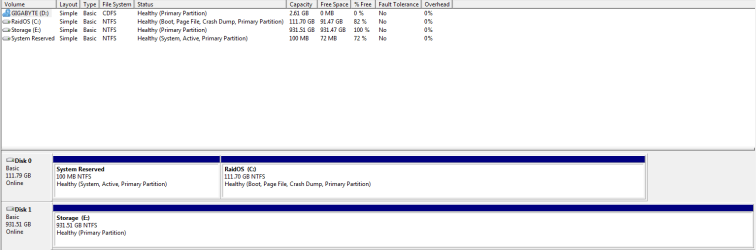
If you wil post back a screenshot of your full Disk Management drive map with the external HD connected we can confirm the problem and its solution. Use Snipping Tool in Start Menu, attach file using paper clip in reply box.
i did exactly what u said but windows repair rand for hours and didnt do anything. i had to manually power down the pc.
so besides that. i installed win7 again, this time from external optical drive (taking out my external hdd) into my raid array. now the installation made a 100mb partion and stored bcd there.... is this because of raid?
any how computer runs fine, without any problems but if u guys think this 100mb partition will be a problem let me know
Attachments
My Computer
At a glance
windows 7 ultimate x64i7 930mushkin 6gb 1600 cas 7gtx 480
- Computer Manufacturer/Model Number
- built
- OS
- windows 7 ultimate x64
- CPU
- i7 930
- Motherboard
- gigabyte x58a-ud3r
- Memory
- mushkin 6gb 1600 cas 7
- Graphics Card(s)
- gtx 480
- Sound Card
- asus xonar d1
- Monitor(s) Displays
- samsung 23in
- Hard Drives
- 2x ocz agility 2 60gb in raid 0 intel sata controller
1x seagate 1tb on jmicron sata controller
- PSU
- xfx 750w
- Case
- CM haf x
- Cooling
- air