
Need to delete the Boot/system tools partition

ElectricRider

Banned
Local time
6:56 AM
Messages
55
I see I have two partitions. Disk 1 is a small 99 MB partition with boot info and system info/tools whatever on it. Disk 2 is the main partition with Win 7 installed. I find myself needing another partition and since i can only have 4 Primary partitions, and windows is hogging 2 of them, i don't think this is fair and I want it back :-)

So er.. i want to merge disk 1 with disk 2 somehow and get the ability to create a new primary partition back.. Windows is of course already installed and currently, I'd rather not uninstall it if possible.. Is there a way to do this?
 

My Computer My Computer

Computer Manufacturer/Model Number
Compaq Presario CQ61 411WM
OS
Windows 7 64bit Home Premium Enhanced
CPU
2.1GHz AMD Sempron M120 Processor
Motherboard
Hewlett-Packard 363F with Insyde Software F.13 Bios
Memory
2x 2048MB 400.0 MHz PC2-6400 DDR2-SDRAM Micron Tech (4Gig)
Graphics Card(s)
ATI Mobility RADEON HD4200 336 MB DDR2 share 1.2 Gigs 494Mhz
Sound Card
ATI SB600-IDT High Definition Audio Controller
Monitor(s) Displays
AUO B156XW01 V2 15.6 in 1366x768 @ 60Hz Aspect Ratio 16:9
Hard Drives
Hitachi HTS725025A9A364 250 GB 7200 RPM

My Computer My Computer

Computer Manufacturer/Model Number
HP Pavilion Elite 495UK
OS
Windows 7 Ultimate SP1 64-Bit
CPU
Intel Core i7 870 @ 2.93GHz
Motherboard
MSI 2A9C (CPU1)
Memory
8Gb Dual-Channel DDR3 @ 664MHz
Graphics Card(s)
nVidia GeForce GTX 460 1024MB dedicated RAM
Sound Card
Realtek HD Audio
Monitor(s) Displays
HP2310i
Screen Resolution
1920 x 1080
Hard Drives
1x1954GB Hitachi HDS22020ALA 330 (RAID), 1x1954GB Hitachi External for backup and storage
PSU
460W
Case
HP Elite
Cooling
Air cooled
Keyboard
Logitech K750 solar-powered keyboard
Mouse
Logitech Wireless M180 mouse
Internet Speed
2Mb
Other Info
Pure Avanti Flow Internet Radio with iPod Dock, 64Gb iPod, HP USB Speakers, Sony MDR-V500 Headphones, Sony Vaio F-Series Laptop
Hello.


Removing the Windows 7 System Reserved partition is a very bad idea, sometime OEM manufacturers place important data there, needed to restore the PC back to 'factory' settings if the need ever arises.

Start with a look through Method Two of this tutorial linked below for some information and post a snip of disk mamagement for us to look at for you and be sure to post back with any further questions you may have and to keep us informed.
   Information

Before we make any specific recommendations will you please post a snip/screen-shot of the entire Windows disk management drive map with a full description as to which drive/partition is which, so we can see what you have going on as there may be a fairly simple way to resolve the situation.

In the Windows start menu right click computer and click manage, in the left pane of the "Computer Management" window that opens click disk management and post a maximized snip of that.
 

My Computer My Computer

Computer Manufacturer/Model Number
* BFK Customs *
OS
W 7 64-bit Ultimate
CPU
Intel Q9550 Yorkfield
Motherboard
ASUS P5Q Pro
Memory
8GB Dominator 8500C5D
Graphics Card(s)
ATI : XFX 5870
Sound Card
Realtek HD Audio 7-1
Monitor(s) Displays
1x 47" LCD HDMI & 3x 26" LCD HDMI
Screen Resolution
1920x1080P & 1920x1200
Hard Drives
1x 80GB Intel X25-M G2 SSD : 1x 500GB & 1x 640GB WD Caviar Black(s)
PSU
Corsair 620HX
Case
Cooler Master RC-690
Cooling
Tuniq Tower 120, 2x 140mm and 3x 120mm case fans
Keyboard
Microsoft 500
Mouse
Razer Diamondback 3G
Internet Speed
14 Mb/s
Other Info
1x Koutech 3Gb/s SATA HDD Hot Swap Rack
   Information
We always assume you have made your Recovery Disks using the OEM manufacturer's app the first day you had your new PC.
& made the Startup Repair CD​
.


First make your HP Recovery Disks.

How to make HP Recovery DVD disks:
Recover Windows Vista Operating System Using HP Recovery - HP Customer Care (United States - English)

How to make HP Recovery USB disk:
Creating a Recovery Disk on a USB Flash Disk HP Pavilion dv6700z CTO Entertainment Notebook PC - HP Customer Care (United States - English)

or
You can Order HP Recovery Disks from here:
http://h20000.www2.hp.com/bizsuppor...ortFAQ&prodSeriesId=4247485&prodTypeId=321957
 

My Computer My Computer

OS
ME/XP/Vista/Win7
Thanks for the fast answers guys. I do have factory installed backups and also a new ghost type image from yesterday. if i have a big crash it's no big deal to reinstall.. BUT

The drive image was made with Windows Imaging built in tool. Since then I shrank the drive for windows 7 to make room for two more primary partitions. If I had a problem and had to reinstall, would I be able to image the system back to this now smaller partition?

Also.. assuming this does work with no problems.. I suppose I will have to make another ghost image.. because if I then use the one I made yesterday, it will want to put the system partition back in wouldn't it?

Oh yeah the size of this partition is 199 not 99 MB, it's using 35 MB's.
 

Attachments

  • partition pic.PNG
    partition pic.PNG
    15.5 KB · Views: 40

My Computer My Computer

Computer Manufacturer/Model Number
Compaq Presario CQ61 411WM
OS
Windows 7 64bit Home Premium Enhanced
CPU
2.1GHz AMD Sempron M120 Processor
Motherboard
Hewlett-Packard 363F with Insyde Software F.13 Bios
Memory
2x 2048MB 400.0 MHz PC2-6400 DDR2-SDRAM Micron Tech (4Gig)
Graphics Card(s)
ATI Mobility RADEON HD4200 336 MB DDR2 share 1.2 Gigs 494Mhz
Sound Card
ATI SB600-IDT High Definition Audio Controller
Monitor(s) Displays
AUO B156XW01 V2 15.6 in 1366x768 @ 60Hz Aspect Ratio 16:9
Hard Drives
Hitachi HTS725025A9A364 250 GB 7200 RPM
Are the two 25gb Primary partitions empty as shown in listings?

It's possible one is the REcovery partition, so try making your Recovery Disks now per Theog's post to see if it generates the disks which means one of those partitions is Recovery and not marked as such.

Otherwise you can browse into the partitions using Disk Mgmt or free Partition Wizard bootable CD to see what is on them. If there is nothing, you can delete them and create a third partition which Disk mgmt will make Logical Extended so you can then add as many partitions as you want.

Partition Wizard should unhide the partition contents for you, but Disk mgmt may not so go Control Panel>Folder Options>View to unhide Hidden and System files to be sure.
 
Are the two 25gb Primary partitions empty as shown in listings?

It's possible one is the REcovery partition, so try making your Recovery Disks now per Theog's post to see if it generates the disks which means one of those partitions is Recovery and not marked as such.

Otherwise you can browse into the partitions using Disk Mgmt or free Partition Wizard bootable CD to see what is on them. If there is nothing, you can delete them and create a third partition which Disk mgmt will make Logical Extended so you can then add as many partitions as you want.

I also use Partition Wizard, have since ver 5 and I like it much better than Disk Mgmt. I use the bootable CD version.

No, those are being incorrectly reported as empty. They contain a wonderful PC-BSD operating system, one called Hubble and the other called Isotope. ( shameless plug)

Thats why I need another partition. The trypes of OS's I install can only be used with primary partitions, not extended partitions.
 

My Computer My Computer

Computer Manufacturer/Model Number
Compaq Presario CQ61 411WM
OS
Windows 7 64bit Home Premium Enhanced
CPU
2.1GHz AMD Sempron M120 Processor
Motherboard
Hewlett-Packard 363F with Insyde Software F.13 Bios
Memory
2x 2048MB 400.0 MHz PC2-6400 DDR2-SDRAM Micron Tech (4Gig)
Graphics Card(s)
ATI Mobility RADEON HD4200 336 MB DDR2 share 1.2 Gigs 494Mhz
Sound Card
ATI SB600-IDT High Definition Audio Controller
Monitor(s) Displays
AUO B156XW01 V2 15.6 in 1366x768 @ 60Hz Aspect Ratio 16:9
Hard Drives
Hitachi HTS725025A9A364 250 GB 7200 RPM
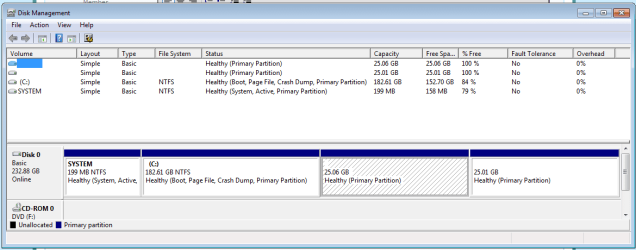
Since then I shrank the drive for windows 7 to make room for two more primary partitions.
Just a thought...

Use Partition Wizard CD to change C-partition from primary to logical (full 182GB space per your screenshot). It's got 152GB free right now.

Then shrink it (also using PW) from 182GB to say 80GB.

That gives you free space for a new 100GB logical partition, just to the right of the C logical partition. Use PW to create the new logical partition in that space.

Win7 can be on a logical partition. Doesn't have to be on a primary partition.

Am I wrong? Anybody see a flaw in this plan? Perhaps Boot Manager (in System Partition) will need to be told about the fact that bootable Win7 is now in a logical partition, instead of the 2nd primary partition, but that seems doable.
 

My Computer My Computer

Computer type
PC/Desktop
Computer Manufacturer/Model Number
Home-built, two systems (1) and (2)
OS
Windows 7 Pro x64 (1), Win7 Pro X64 (2)
CPU
i5-3350p 3.1Ghz/6MB-cache (1); E8400 3.0Ghz/6MB-cache (2)
Motherboard
ASUS P8Z77-V Pro (1); ASUS P5Q3 (2)
Memory
8GB PC3-12800 DDR3 (1); 4GB PC3-10600 DDR3 (2)
Graphics Card(s)
ATI HD7750 (1), (see TV cards); ATI R7 250 (2)
Sound Card
Realtek ALC892 HD Audio (1); Realtek ALC1200 HD Audio (2)
Monitor(s) Displays
Eizo HD2441W LCD, Eizo S2433W (1); Eizo 24" S2433W (2)
Screen Resolution
1920x1200, 1920x1200 (1); 1920x1200 (2)
Hard Drives
(1) 1TB SATA-II (7200RPM), 2x2TB SATA-III (7200RPM), 250GB SATA-III (10000RPM) for OS; 2x2TB external USB 3.0

(2) 320GB SATA-II (7200RPM), 750GB SATA-II (7200RPM), 150GB SATA-II (10000RPM) for OS; 2TB external USB 3.0
PSU
Nesteq ECS-6001 600W (1); Nesteq ECS-5001 500W (2)
Case
Acousti-Case 360 (1) and (2)
Cooling
Noctua NH-U12P SE2 for CPU, 2x120mm case fans (1) and (2)
Keyboard
IBM PS/2 (1) and (2)
Mouse
Logitech MX Revolution wireless (1); Microsoft wired (2)
Internet Speed
100mbps down / 10mbps up
Antivirus
Microsoft Security Essentials; Malwarebyte Anti-Malware Pro
Browser
Firefox
Other Info
Ceton InfiniTV 4-tuner cablecard-enabled TV card as well as Hauppauge HVR-2250 OTA/ATSC 2-tuner TV card in (1), running under Win7 WMC
In that case I'd use PW CD to convert Win7 OS partition to Logical Extended, which will work since it is booting off the 199mb SysReserved partition. Any subsequent OS's installed to a Logical subpartition will likely place their boot files on SysReserved.

If Logical is not practical for the type of OS you want to install, then you can remove the Sys Reserved partition along with any OEM tools it may contain which you don't need if you are not relying on useless factory utilities and using the better versions built into Win7.

To remove the System Reserved partition, backup your files and save a backup image of it along with Win7 so you have a path back. Then delete it with PW CD, Resize Win7 into its space to take advantage of the lower address for faster read/writes, mark Win7 partition Active, boot the DVD Repair console or Repair CD to run Startup Repair - Run 3 Separate Times or until WIn7 starts on its own.

You can then shrink to make a fourth Primary partition using PW CD.
 
Is it possible to cheat even more, by using getting rid of the system primary partition, set up another primary for another os, create with some unused space in that an extended logical partition for windows 7? This would give me 4 primaries for other OS's besides windows which would be stuck off in an extended logicall connected to one of the primaries.

I have no reason to do that ATM, just want to know if that's possible because I may need it in the future.

Tell me more about the lower address space.. you mean the space the System partition is in now? It's going to be faster than the last 25 gig OS just because of where it is placed?

If this is the case, I may want to install Isotope in that slot because it is not as optimized as well as windows for speed, and I may get some performance gain.

You see, I have been using Windows since 3.1, Windows for workgroups and swore to myself I wanted to learn something new, (besides my adventures with Linux) so PC-BSD (Hubble and Isotope) got my vote and I really like it. I'm thinking of only using Win 7 for games and use the PC-BSD's for a while for all other things. but if would be nice if they were a lil faster.
 

My Computer My Computer

Computer Manufacturer/Model Number
Compaq Presario CQ61 411WM
OS
Windows 7 64bit Home Premium Enhanced
CPU
2.1GHz AMD Sempron M120 Processor
Motherboard
Hewlett-Packard 363F with Insyde Software F.13 Bios
Memory
2x 2048MB 400.0 MHz PC2-6400 DDR2-SDRAM Micron Tech (4Gig)
Graphics Card(s)
ATI Mobility RADEON HD4200 336 MB DDR2 share 1.2 Gigs 494Mhz
Sound Card
ATI SB600-IDT High Definition Audio Controller
Monitor(s) Displays
AUO B156XW01 V2 15.6 in 1366x768 @ 60Hz Aspect Ratio 16:9
Hard Drives
Hitachi HTS725025A9A364 250 GB 7200 RPM
Is it possible to cheat even more, by using getting rid of the system primary partition, set up another primary for another os, create with some unused space in that an extended logical partition for windows 7? This would give me 4 primaries for other OS's besides windows which would be stuck off in an extended logicall connected to one of the primaries.
Sorry... I hadn't seen your later post where you described your intent for the additional partition, which was to install yet another OS. I had originally read that you wanted another partition, strictly for data.

However as Greg points out, it is likely that the other OS would want yet another primary partition.

Now, the one or more (i.e. any number) logical partitions you create all fit inside of one "extended partition". However that extended partition is, itself, one of the four allowed primary partitions.

So if you want any number of logical partitions (and, as I said before, Win7 has no problem being installed into a logical partition) you must have the one "extended partition" present as one of your four primary partitions, thus leaving only three real primary partitions for other use.

And since there must be a primary partition as "active" (that's your current 199MB System Reserved partition) where boot manager goes, that leaves only two remaining primary partitions available, which you've already got allocated and in use.

Having said that, it seems that Greg's suggestion of moving the boot manager files over to the Win7 system partition (retained as primary, not changed to logical, since the "active" boot partition MUST be primary) which will require that you also change it to "active" so that the BIOS boots there, which you can do with PW CD. You'd resize the Win7 partition and move it to the right, and then you resize the small 199MB partition to its left to pick up the space freed up by the resize/move of the Win7 partition to the right.

And that will give you your fourth primary partition, in what is currently the System Reserved partition... but enlarged. And the Win7 partition remains primary and becomes "active", and shrinks and moves to the right to free up space to give to the System Reserved partition to its left, for your new OS.

All with PW CD. Win7 System Repair can transplant the boot manager files over to the newly "active" Win7 partition, in the absence of System Reserved.

Should work.
 

My Computer My Computer

Computer type
PC/Desktop
Computer Manufacturer/Model Number
Home-built, two systems (1) and (2)
OS
Windows 7 Pro x64 (1), Win7 Pro X64 (2)
CPU
i5-3350p 3.1Ghz/6MB-cache (1); E8400 3.0Ghz/6MB-cache (2)
Motherboard
ASUS P8Z77-V Pro (1); ASUS P5Q3 (2)
Memory
8GB PC3-12800 DDR3 (1); 4GB PC3-10600 DDR3 (2)
Graphics Card(s)
ATI HD7750 (1), (see TV cards); ATI R7 250 (2)
Sound Card
Realtek ALC892 HD Audio (1); Realtek ALC1200 HD Audio (2)
Monitor(s) Displays
Eizo HD2441W LCD, Eizo S2433W (1); Eizo 24" S2433W (2)
Screen Resolution
1920x1200, 1920x1200 (1); 1920x1200 (2)
Hard Drives
(1) 1TB SATA-II (7200RPM), 2x2TB SATA-III (7200RPM), 250GB SATA-III (10000RPM) for OS; 2x2TB external USB 3.0

(2) 320GB SATA-II (7200RPM), 750GB SATA-II (7200RPM), 150GB SATA-II (10000RPM) for OS; 2TB external USB 3.0
PSU
Nesteq ECS-6001 600W (1); Nesteq ECS-5001 500W (2)
Case
Acousti-Case 360 (1) and (2)
Cooling
Noctua NH-U12P SE2 for CPU, 2x120mm case fans (1) and (2)
Keyboard
IBM PS/2 (1) and (2)
Mouse
Logitech MX Revolution wireless (1); Microsoft wired (2)
Internet Speed
100mbps down / 10mbps up
Antivirus
Microsoft Security Essentials; Malwarebyte Anti-Malware Pro
Browser
Firefox
Other Info
Ceton InfiniTV 4-tuner cablecard-enabled TV card as well as Hauppauge HVR-2250 OTA/ATSC 2-tuner TV card in (1), running under Win7 WMC
If you delete SysReserved and create a Fourth Primary partition using PW (only), you will not be allowed to have a Logical Extended which must be created as the fourth or less partition.

Disk Mgmt should offer Logical as fourth, while PW will create Logical at any time until there are four Primary partitions when it will refuse.

If offered Dynamic - which is used to span partitions on multiple HD's - do not accept it.

The additional speed gained from having OS in the lowest address (left side) of HD where the disk reader parks is small but we still like to Resize the OS that direction if an opportunity arises, and PW makes it as easy as dragging the grey slider bar.

Be aware if you're booting with GRUB on the same HD that we see Win7 corrupted irreparably by GRUB fairly often here. It's always best if possible to put OS's on separate HD's booted via BIOS boot order and one-time BIOS Boot menu key, not GRUB or even Windows boot manager. This keeps HD's independent to come and go as you please.
 
Got it. Thanks again for all the info folks. Sorry I haven't been around in a couple of days, been busy with PC-BSD.
 

My Computer My Computer

Computer Manufacturer/Model Number
Compaq Presario CQ61 411WM
OS
Windows 7 64bit Home Premium Enhanced
CPU
2.1GHz AMD Sempron M120 Processor
Motherboard
Hewlett-Packard 363F with Insyde Software F.13 Bios
Memory
2x 2048MB 400.0 MHz PC2-6400 DDR2-SDRAM Micron Tech (4Gig)
Graphics Card(s)
ATI Mobility RADEON HD4200 336 MB DDR2 share 1.2 Gigs 494Mhz
Sound Card
ATI SB600-IDT High Definition Audio Controller
Monitor(s) Displays
AUO B156XW01 V2 15.6 in 1366x768 @ 60Hz Aspect Ratio 16:9
Hard Drives
Hitachi HTS725025A9A364 250 GB 7200 RPM
You're welcome. Please mark the thread as resolved if you get a moment to spare. Thanks.
 

My Computer My Computer

Computer Manufacturer/Model Number
HP Pavilion Elite 495UK
OS
Windows 7 Ultimate SP1 64-Bit
CPU
Intel Core i7 870 @ 2.93GHz
Motherboard
MSI 2A9C (CPU1)
Memory
8Gb Dual-Channel DDR3 @ 664MHz
Graphics Card(s)
nVidia GeForce GTX 460 1024MB dedicated RAM
Sound Card
Realtek HD Audio
Monitor(s) Displays
HP2310i
Screen Resolution
1920 x 1080
Hard Drives
1x1954GB Hitachi HDS22020ALA 330 (RAID), 1x1954GB Hitachi External for backup and storage
PSU
460W
Case
HP Elite
Cooling
Air cooled
Keyboard
Logitech K750 solar-powered keyboard
Mouse
Logitech Wireless M180 mouse
Internet Speed
2Mb
Other Info
Pure Avanti Flow Internet Radio with iPod Dock, 64Gb iPod, HP USB Speakers, Sony MDR-V500 Headphones, Sony Vaio F-Series Laptop
Back
Top