Need to extract a driver from W7 X-64 for W2008 server

jimbo45

New member
Guru
Gold Member
VIP
Local time
1:37 PM
Messages
5,941
Location
Hafnarfjörður IS
Hi all
I've got an Epson printer where the only driver is one that came with Windows 7 X-64.

There hasn't been a driver for this printer since XP from Epson BTW - an A3+ size Photoprinter 1290.

There weren't even any VISTA drivers from Epson - but I skipped VISTA anyway. The printer is STILL good and I like the occasional A3+ size prints so I don't want to get rid of it -- newer printers are usually A4 max unless you spend serious money. And if a device is still perfectly functional why should I junk it.

Is there any decent tool to extract the driver out of a running W7 system and install in Windows 2008. In theory it should be possible.

Otherwise Windows 2008 server seems to run anything Windows 7 X-64 does.

Cheers
jimbo
 

My Computer My Computer

At a glance

Linux CENTOS 7 / various Windows OS'es and se...Intel i7 Intel i58GB, 16GBOn Motherboard
Computer type
PC/Desktop
Computer Manufacturer/Model Number
Custom built, several laptops HP/ASUS
OS
Linux CENTOS 7 / various Windows OS'es and servers
CPU
Intel i7 Intel i5
Memory
8GB, 16GB
Graphics Card(s)
On Motherboard
Sound Card
Realtek HD audio
Monitor(s) Displays
Apple Cinema display, Samsung LCD
Screen Resolution
1920 X 1080
Hard Drives
4 X 1TB SATA
Mouse
Toshiba wireless laser
Internet Speed
> 20MB up
The folder you want will be in the,

C:\Windows\System32\DriverStore\FileRepository

and most likely in one of the "prnep00a.inf_amd64_neutral_92a4c727cdf4c2f7" (there are 12 of these in mine, the prnep is the important part, signifies Epson). The fun part will be figuring out which one is the right one. If you can also find the DevID for the printer it would help, as some of the INF's in those folders don't show the printer name but the DevID.

Once you find it it should just be a matter of making a copy of the correct folder and transferring it to the same place in W2008.
 

My Computer My Computer

At a glance

Win 7 Ultimate x64FX-8350 @ 4.6 GHz so farADATA XPG V1 Series Black 8GB DDR3 1600Sapphire R9 270x Dual-X
Computer type
PC/Desktop
Computer Manufacturer/Model Number
Me
OS
Win 7 Ultimate x64
CPU
FX-8350 @ 4.6 GHz so far
Motherboard
Asus M5A97 EVO
Memory
ADATA XPG V1 Series Black 8GB DDR3 1600
Graphics Card(s)
Sapphire R9 270x Dual-X
Sound Card
Xonar DGX w/ Corsair Vengence 1300
Monitor(s) Displays
Acer S232HL Abid
Screen Resolution
1920x1080
Hard Drives
120 GB OCZ Vertex 3
500 GB Seagate 7200.12
PSU
Antec Earthwatts 650W Green
Case
Antec Three Hundred
Cooling
Cooler Master 212 EVO
Keyboard
Logitech G510
Mouse
Logitech G500s
Internet Speed
35000/3000
Hi there

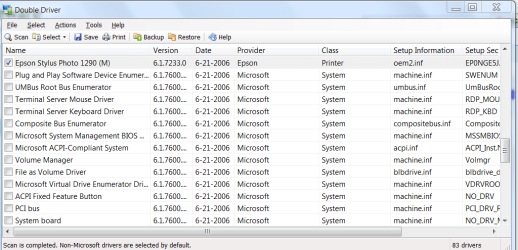
Found this BRILLIANT FREE TOOL :D:D

Called DOUBLEDRIVER
get it from here

http://www.boozet.org/download.htm

screenshot enc - extracts AND backups WITHOUT paying anything.

Little extract of the INF file for example it found for example


; Windows Inbox Printer Drivers
;
[Version]
Signature="$Windows NT$"
Provider=Epson
ClassGUID={4D36E979-E325-11CE-BFC1-08002BE10318}
Class=Printer
CatalogFile=prnep00x.cat
DriverIsolation=2
DriverVer=06/21/2006,6.1.7233.0

[Manufacturer]
"Epson"=Epson,NTamd64
[Epson.NTamd64]
"EPSON EM-930C (M)" = EP0NGJ5A.GPD,EPSONEM-930C8E14,EPSON_EM-930C_(M) ; Hardware ID
"EPSON PM-3500C (M)" = EP0NGJ5J.GPD,EPSONPM-3500C74B3,EPSON_PM-3500C_(M) ; Hardware ID
"EPSON PM-3700C (M)" = EP0NGJ7I.GPD,EPSONPM-3700CCCB2,EPSON_PM-3700C_(M) ; Hardware ID
"EPSON PM-720C (M)" = EP0NGJ5G.GPD,EPSONPM-720C6701,EPSON_PM-720C_(M) ; Hardware ID
"EPSON PM-780C (M)" = EP0NGJ5F.GPD,EPSONPM-780C6523,EPSON_PM-780C_(M) ; Hardware ID
"EPSON PM-780CS (M)" = EP0NGJ5U.GPD,EPSONPM-780CSE464,EPSON_PM-780CS_(M) ; Hardware ID
"EPSON PM-790PT (M)" = EP0NGJ5R.GPD,EPSONPM-790PTEA29,EPSON_PM-790PT_(M) ; Hardware ID
"EPSON PM-880C (M)" = EP0NGJ5I.GPD,EPSONPM-880C7120,EPSON_PM-880C_(M) ; Hardware ID
"EPSON PM-900C (M)" = EP0NGJ5H.GPD,EPSONPM-900C4FA0,EPSON_PM-900C_(M) ; Hardware ID
"EPSON PM-920C (M)" = EP0NGJ5T.GPD,EPSONPM-920C8F03,EPSON_PM-920C_(M) ; Hardware ID
"Epson Stylus C70 Series (M)" = EP0NGE6H.GPD,EPSONStylus_C706849,Epson_Stylus_C70_Series_(M) ; Hardware ID
"Epson Stylus C80 Series (M)" = EP0NGE6G.GPD,EPSONStylus_C80984C,Epson_Stylus_C80_Series_(M) ; Hardware ID
"Epson Stylus COLOR 880 (M)" = EP0NGE5B.GPD,EPSONStylus_COLOR_88FFFA,Epson_Stylus_COLOR_880_(M) ; Hardware ID
"Epson Stylus Photo 1280 (M)" = EP0NGA5O.GPD,EPSONStylus_Photo_1243D9,Epson_Stylus_Photo_1280_(M) ; Hardware ID
"Epson Stylus Photo 1290 (M)" = EP0NGE5J.GPD,EPSONStylus_Photo_12D1D8,Epson_Stylus_Photo_1290_(M) ; Hardware ID
"Epson Stylus Photo 780 (M)" = EP0NGA5N.GPD,EPSONStylus_Photo_78BE2B,Epson_Stylus_Photo_780_(M) ; Hardware ID
"Epson Stylus Photo 785EPX (M)" = EP0NGA5S.GPD,EPSONStylus_Photo_784B2D,Epson_Stylus_Photo_785EPX_(M) ; Hardware ID
"Epson Stylus Photo 790 (M)" = EP0NGE5F.GPD,EPSONStylus_Photo_792E2A,Epson_Stylus_Photo_790_(M) ; Hardware ID
"Epson Stylus Photo 825 (M)" = EP0NGA6Z.GPD,EPSONStylus_Photo_821EDD,Epson_Stylus_Photo_825_(M) ; Hardware ID
"Epson Stylus Photo 890 (M)" = EP0NGE5I.GPD,EPSONStylus_Photo_892D1A,Epson_Stylus_Photo_890_(M) ; Hardware ID
"Epson Stylus Photo 895 (M)" = EP0NGE5R.GPD,EPSONStylus_Photo_892EDA,Epson_Stylus_Photo_895_(M) ; Hardware ID
"Epson Stylus Photo 915 (M)" = EP0NGE6Z.GPD,EPSONStylus_Photo_912E8C,Epson_Stylus_Photo_915_(M) ; Hardware ID
[OEM URLS]
"Epson"="http://go.microsoft.com/fwlink/?LinkID=36&prd=10798&sbp=Printers"
[EP0NGA5N.GPD]
[email protected],@EP0NGW5F.GPD,@EP0NGX5F.GPD,@EP0NCA5N.CMB,@EP0NOA5N.DXT,@EP0NOE01.DLL,@EP0NH4D4.DLL,@EP0NRE6Z.DLL
DataFile=EP0NGA5N.GPD
CoreDriverSections="{D20EA372-DD35-4950-9ED8-A6335AFE79F0},UNIDRV.OEM,UNIDRV_DATA","{D1A22FA6-AD8D-454c-9C5A-0892168C9AA5},EP0NPP_COMMON.OEM,EP0NDW_COMMON.OEM,EP0NGR_COMMON.OEM,EP0NGN_COMMON.OEM,EP0NAR_COMMON.OEM,EP0NUI_COMMON.OEM,EP0NLU_COMMON.OEM,EP0NO0_COMMON.OEM,EP0NGX_COMMON.OEM","{5E437618-1C5B-40FD-932C-B629FEA04258},EP0SLM01_COMMON.CORE,EP0SLM01_EXT.CORE","{019FCDDA-4E0D-484b-ABCC-D07486A493EC},EP0NIP_46.OEM","{2D4F66D7-8E60-482c-B529-98A03F4D1519},EP0NDC_66.OEM","{331CDA8B-D0C8-4a0f-A092-ACE5592F7DE7},EP0NS4_21.OEM","{5A5FD519-CFA7-449b-A589-04EB31D1799C},EP0NM4_00.OEM"
[EP0NGA5O.GPD]
.................etc plus all the other bits and pieces


Worked a treat -- Now I've got Epson Printing on my W2008 Server.

(Mods - this tool is so handy I reckon you ought to sticky the link in the DRIVERS section)

Cheers
jimbo

(Ps -- How do I mark a question as solved).
 

Attachments

  • drivers.png
    drivers.png
    32.2 KB · Views: 61

My Computer My Computer

At a glance

Linux CENTOS 7 / various Windows OS'es and se...Intel i7 Intel i58GB, 16GBOn Motherboard
Computer type
PC/Desktop
Computer Manufacturer/Model Number
Custom built, several laptops HP/ASUS
OS
Linux CENTOS 7 / various Windows OS'es and servers
CPU
Intel i7 Intel i5
Memory
8GB, 16GB
Graphics Card(s)
On Motherboard
Sound Card
Realtek HD audio
Monitor(s) Displays
Apple Cinema display, Samsung LCD
Screen Resolution
1920 X 1080
Hard Drives
4 X 1TB SATA
Mouse
Toshiba wireless laser
Internet Speed
> 20MB up
Click the triangle at the top right where you give rep.
 

My Computer My Computer

At a glance

Vista Ult64, Win7600Intel Core 2 Quad Q6600 @ 2400 MHz 64bit OS4096 MB DDR3-SDRAMATI Radeon HD 3870 Series x2 Crossfired
Computer Manufacturer/Model Number
Self Build 64bit
OS
Vista Ult64, Win7600
CPU
Intel Core 2 Quad Q6600 @ 2400 MHz 64bit OS
Motherboard
Asus P5E3 Deluxe WiFi @p 64 bit OS
Memory
4096 MB DDR3-SDRAM
Graphics Card(s)
ATI Radeon HD 3870 Series x2 Crossfired
Sound Card
Realtek on board
Monitor(s) Displays
Samsung SyncMaster - 23 inches
Screen Resolution
1680x1050 pixels at 60 Hz in True Colors
Hard Drives
Hitachi (250 GB)/Samsung 750 GB. /Barracuda 160 GB.
My Book 1 TB external..
PSU
Cooler Master 1000w
Case
Cooler Master Cosmos 1000.
Cooling
Fans and fresh air,
Keyboard
Wireless
Mouse
Wireless
Internet Speed
Never fast enough
Other Info
I use a Magnum.
Click the triangle at the top right where you give rep.


Hi there
must be miissing something here -- What triangle -- I've only got Report Post.

Screenshot enc.

(Belay that -- the report post is also used for marking as solved -- a bit confusing - trust an Irishman to have the correct answer !!!!!).

A bit of a case of RTFM -- but it is confusing.

Cheers
jimbo
 

Attachments

  • snip.png
    snip.png
    1.5 KB · Views: 451

My Computer My Computer

At a glance

Linux CENTOS 7 / various Windows OS'es and se...Intel i7 Intel i58GB, 16GBOn Motherboard
Computer type
PC/Desktop
Computer Manufacturer/Model Number
Custom built, several laptops HP/ASUS
OS
Linux CENTOS 7 / various Windows OS'es and servers
CPU
Intel i7 Intel i5
Memory
8GB, 16GB
Graphics Card(s)
On Motherboard
Sound Card
Realtek HD audio
Monitor(s) Displays
Apple Cinema display, Samsung LCD
Screen Resolution
1920 X 1080
Hard Drives
4 X 1TB SATA
Mouse
Toshiba wireless laser
Internet Speed
> 20MB up
Report post is the one, click it and type in solved.
 

My Computer My Computer

At a glance

Vista Ult64, Win7600Intel Core 2 Quad Q6600 @ 2400 MHz 64bit OS4096 MB DDR3-SDRAMATI Radeon HD 3870 Series x2 Crossfired
Computer Manufacturer/Model Number
Self Build 64bit
OS
Vista Ult64, Win7600
CPU
Intel Core 2 Quad Q6600 @ 2400 MHz 64bit OS
Motherboard
Asus P5E3 Deluxe WiFi @p 64 bit OS
Memory
4096 MB DDR3-SDRAM
Graphics Card(s)
ATI Radeon HD 3870 Series x2 Crossfired
Sound Card
Realtek on board
Monitor(s) Displays
Samsung SyncMaster - 23 inches
Screen Resolution
1680x1050 pixels at 60 Hz in True Colors
Hard Drives
Hitachi (250 GB)/Samsung 750 GB. /Barracuda 160 GB.
My Book 1 TB external..
PSU
Cooler Master 1000w
Case
Cooler Master Cosmos 1000.
Cooling
Fans and fresh air,
Keyboard
Wireless
Mouse
Wireless
Internet Speed
Never fast enough
Other Info
I use a Magnum.
Back
Top