- Local time
- 12:42 PM
- Messages
- 50,634
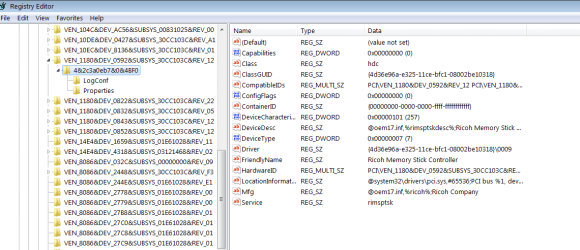
I have a Ricoh card driver that starts a service that is erroring on this install. I uninstalled in Control Panel (it's not listed in Services) but it left keys I was able to delete via a REgedit Search - except for one key which is still generating the error and may be running so it won't let me delete it.
Is there an easy way to force delete this? I tried Safe Mode. I can export the key but what editor do I use to mount and delete it and then will regedit let me reimport and overwrite the problem ControlSet PCI/VEN key?
Any ideas?
Is there an easy way to force delete this? I tried Safe Mode. I can export the key but what editor do I use to mount and delete it and then will regedit let me reimport and overwrite the problem ControlSet PCI/VEN key?
Any ideas?
Code:
Log Name:      System
Source:        Service Control Manager
Date:          1/14/2014 4:03:02 PM
Event ID:      7000
Task Category: None
Level:         Error
Keywords:      Classic
User:          N/A
Computer:      AcerAspire
Description:
The Ricoh xD-Picture Card Driver service failed to start due to the following error:
The service cannot be started, either because it is disabled or because it has no enabled devices associated with it.
Event Xml:
<Event xmlns="http://schemas.microsoft.com/win/2004/08/events/event">
  <System>
    <Provider Name="Service Control Manager" Guid="{555908d1-a6d7-4695-8e1e-26931d2012f4}" EventSourceName="Service Control Manager" />
    <EventID Qualifiers="49152">7000</EventID>
    <Version>0</Version>
    <Level>2</Level>
    <Task>0</Task>
    <Opcode>0</Opcode>
    <Keywords>0x8080000000000000</Keywords>
    <TimeCreated SystemTime="2014-01-14T21:03:02.921875000Z" />
    <EventRecordID>4360</EventRecordID>
    <Correlation />
    <Execution ProcessID="472" ThreadID="476" />
    <Channel>System</Channel>
    <Computer>AcerAspire</Computer>
    <Security />
  </System>
  <EventData>
    <Data Name="param1">Ricoh xD-Picture Card Driver</Data>
    <Data Name="param2">%%1058</Data>
  </EventData>
</Event>