Need to install Win7 over Vista - Help!

rfresh

New member
Local time
1:58 PM
Messages
8
I have a desktop PC - HP TouchSmart with Vista Home - I want to install Windows 7 but I can't get my PC to boot from its DVD. I looked at the boot up bios and the DVD is bootable but when I put my windows 7 DVD with the iso file on it, into the drive, it lights up at boot up time then switches over to the C drive.

A friend told me I can't boot from an iso file (I don't even what it is) but I downloaded the iso file from Microsofts website following their Windows 7 installation instructions. I got as far as copying the iso file onto a DVD and I *thought* the next thing was for me to boot from it, but it won't boot.
 

My Computer My Computer

OS
Vista
Hello Rfresh, and welcome to Seven Forums.

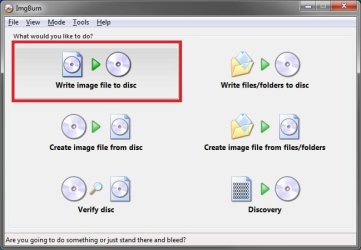
You cannot just copy the ISO to the DVD. Instead, you will need to use a program like ImgBurn to burn (extract) the ISO to the DVD. It should then boot from the DVD.

You would select this first:
Step1.jpg
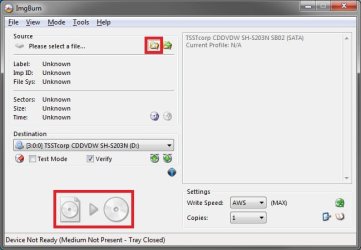
Next, select the ISO file as the Source, then click on the icon at the bottom. It will then start burning the ISO to the DVD.
Step2.jpg
Hope this helps,
Shawn
 

My Computer My Computer

Computer type
PC/Desktop
Computer Manufacturer/Model Number
Self built custom
OS
64-bit Windows 11 Pro for Workstations
CPU
Intel i7-8700K OC'd to 5 GHz
Motherboard
ASUS ROG Maximus XI Formula Z390
Memory
64 GB (4x16GB) G.SKILL TridentZ RGB DDR4 3600 MHz
Graphics Card(s)
ASUS ROG-STRIX-GTX1080TI-O11G-GAMING
Sound Card
Integrated
Monitor(s) Displays
2 x Samsung Odyssey G7 27"
Screen Resolution
2560x1440
Hard Drives
1TB Samsung 990 PRO M.2,
4TB Samsung 990 PRO PRO M.2,
TerraMaster F8 SSD Plus NAS
PSU
Seasonic Prime Titanium 850W
Case
Thermaltake Core P3
Cooling
Corsair Hydro H115i
Keyboard
Logitech wireless K800
Mouse
Logitech MX Master 4
Internet Speed
2 Gb/s Download and 100 Mb/s Upload
Antivirus
Malwarebyte Anti-Malware Premium
Browser
Google Chrome
Other Info
Logitech Z625 speaker system,
Logitech BRIO 4K Pro webcam,
HP Color LaserJet Pro MFP M477fdn,
APC SMART-UPS RT 1000 XL - SURT1000XLI,
Galaxy S23 Plus phone
Ahhh...I see...extracting the iso file was not made clear to me on the Microsoft website. Thanks for the help.
 

My Computer My Computer

OS
Vista
You're welcome. :)
 

My Computer My Computer

Computer type
PC/Desktop
Computer Manufacturer/Model Number
Self built custom
OS
64-bit Windows 11 Pro for Workstations
CPU
Intel i7-8700K OC'd to 5 GHz
Motherboard
ASUS ROG Maximus XI Formula Z390
Memory
64 GB (4x16GB) G.SKILL TridentZ RGB DDR4 3600 MHz
Graphics Card(s)
ASUS ROG-STRIX-GTX1080TI-O11G-GAMING
Sound Card
Integrated
Monitor(s) Displays
2 x Samsung Odyssey G7 27"
Screen Resolution
2560x1440
Hard Drives
1TB Samsung 990 PRO M.2,
4TB Samsung 990 PRO PRO M.2,
TerraMaster F8 SSD Plus NAS
PSU
Seasonic Prime Titanium 850W
Case
Thermaltake Core P3
Cooling
Corsair Hydro H115i
Keyboard
Logitech wireless K800
Mouse
Logitech MX Master 4
Internet Speed
2 Gb/s Download and 100 Mb/s Upload
Antivirus
Malwarebyte Anti-Malware Premium
Browser
Google Chrome
Other Info
Logitech Z625 speaker system,
Logitech BRIO 4K Pro webcam,
HP Color LaserJet Pro MFP M477fdn,
APC SMART-UPS RT 1000 XL - SURT1000XLI,
Galaxy S23 Plus phone
OK, I got Win7 installed on my HP Touch Screen IQ775.

The screen resolution however is not good. It's 1075 and I went into CP to see if I could bump it up but thats the max - and its not very sharp resolution - kind of fuzzy - very disappointing.

Is there anything I can do to get a crisper looking display and maybe higher resolution?
 

My Computer My Computer

OS
Vista
vid driver

OK, I got Win7 installed on my HP Touch Screen IQ775.

The screen resolution however is not good. It's 1075 and I went into CP to see if I could bump it up but thats the max - and its not very sharp resolution - kind of fuzzy - very disappointing.

Is there anything I can do to get a crisper looking display and maybe higher resolution?

yes first find out what your video card is then goto the manufacturer and get the driver for that video card. install it and let us know if that doesn't cure the problem

Ken
 

My Computer My Computer

Computer Manufacturer/Model Number
HP Pavillion dv-7 1005 Tx
OS
Win 8 Release candidate 8400
CPU
[email protected]
Memory
4 gigs
Graphics Card(s)
Nvidia 9600M
Sound Card
HD built-in
Monitor(s) Displays
17" Wxga
Screen Resolution
1440x900
Cooling
none
Internet Speed
45Mb down 5Mb up
I have a HP Touch Smart IQ775 Desktop PC

and my video card is a
NVidia GeForce 6100 (nForce 430 southbridge)

I went to NVidia website and downloaded the windows 7 driver and tried to install it but it said it could not find any compatible drivers with my current hardware and it aborted.


Any ideas?


My Computer My Computer

OS
Vista

My Computer My Computer

Computer Manufacturer/Model Number
Gateway GT5692
OS
Windows 7 Ulti. x64
CPU
AMD Phenom 8450 triple-core 2.10 ghz
Memory
4GB
Graphics Card(s)
ATI Radion HD 3200
Monitor(s) Displays
Gateway FPD1775W
Screen Resolution
1280x720
Hard Drives
465.6613 Gibibytes
Despite that message I got, it actually installed. I rebooted and when the desktop came up, a balloon in the lower right corner said that video drive installed successfully. The screen look *much* better too!!

Thanks for your help.
 

My Computer My Computer

OS
Vista
Despite that message I got, it actually installed. I rebooted and when the desktop came up, a balloon in the lower right corner said that video drive installed successfully. The screen look *much* better too!!

Thanks for your help.
Great news thanks for sharing your results with us. Hope that you enjoy your Windows 7 and your time here on SevenForums
 

My Computer My Computer

Computer Manufacturer/Model Number
Gateway GT5692
OS
Windows 7 Ulti. x64
CPU
AMD Phenom 8450 triple-core 2.10 ghz
Memory
4GB
Graphics Card(s)
ATI Radion HD 3200
Monitor(s) Displays
Gateway FPD1775W
Screen Resolution
1280x720
Hard Drives
465.6613 Gibibytes
Back
Top