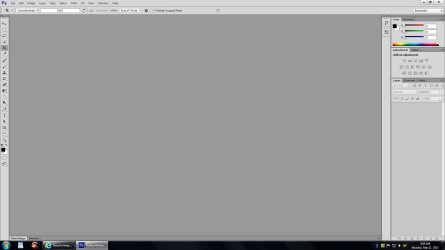
Need to keep my taskbar always on top of Photoshop CS6

ErikaFoster

New member
Local time
4:42 PM
Messages
7
Hey guys,

I've come across over 9000 solutions for scripts, codes, programs and you name it, for making your taskbar NOT on top of other applications. What I want is just the opposite.
I need a [insert anything here] that'll keep my windows' taskbar absolutely and positively always on top of everything. (or hey, just Photoshop CS6 - if you have such a specific thing lying around)
Why? Because Adobe apparently was drunk when designing their last 3 photoshop interfaces and decided that we didn't need our OS taskbar to show up while using photoshop.

If there was a third party application, a script, anything that could fix this, that would be just awesome. And if that something could be turned on/off at will, then that would be heaven (because granted, it'd kinda suck to watch movies with the taskbar just sitting there, but I'D DO IT, just to have my taskbar back in photoshop).

I'm running windows 7 profession 64 & again, the bad guy here is Photoshop CS6.

Thanks in advance for any help anyone can give!
 

My Computer My Computer

At a glance

Windows 7 Professional x64Intel Core i7-3770 @ 3.40GHz2 x 4gbGeForce GT 620
Computer type
PC/Desktop
Computer Manufacturer/Model Number
custom
OS
Windows 7 Professional x64
CPU
Intel Core i7-3770 @ 3.40GHz
Memory
2 x 4gb
Graphics Card(s)
GeForce GT 620
Hard Drives
500gb
1TB
Browser
Chrome
Have you tried auto hide the taskbar?
 

My Computer My Computer

At a glance

Win7 Pro-64 Biti7-2600-3.4GHz8 GIG DDR3onboard
Computer Manufacturer/Model Number
Put together
OS
Win7 Pro-64 Bit
CPU
i7-2600-3.4GHz
Motherboard
ASRock Z68M
Memory
8 GIG DDR3
Graphics Card(s)
onboard
Sound Card
onboard
Hard Drives
Seagate 1TB 7200RPM
PSU
680 W
Case
black
Cooling
stock fans
Keyboard
Microsoft
Mouse
Microsoft optical
Yeah, it doesn't do anything.
I heard from other frustrated people that there is a bug that'll sometimes if you keep switching hide on/off like a million times, freeze the taskbar in photoshop, but it's a lottery bug, not a fix =/
It only did it for me once, but then never again.
 

My Computer My Computer

At a glance

Windows 7 Professional x64Intel Core i7-3770 @ 3.40GHz2 x 4gbGeForce GT 620
Computer type
PC/Desktop
Computer Manufacturer/Model Number
custom
OS
Windows 7 Professional x64
CPU
Intel Core i7-3770 @ 3.40GHz
Memory
2 x 4gb
Graphics Card(s)
GeForce GT 620
Hard Drives
500gb
1TB
Browser
Chrome
Sorry that was of no use for you, maybe some one else here will have the answer/fix that you wanting. there seems to be a lot of photoshop users with this same problem.
 

My Computer My Computer

At a glance

Win7 Pro-64 Biti7-2600-3.4GHz8 GIG DDR3onboard
Computer Manufacturer/Model Number
Put together
OS
Win7 Pro-64 Bit
CPU
i7-2600-3.4GHz
Motherboard
ASRock Z68M
Memory
8 GIG DDR3
Graphics Card(s)
onboard
Sound Card
onboard
Hard Drives
Seagate 1TB 7200RPM
PSU
680 W
Case
black
Cooling
stock fans
Keyboard
Microsoft
Mouse
Microsoft optical
Odd problem, my CS6 when maximized with the button in the upper right does not cover the task bar. Do you perhaps have a custom theme installed? I really have no answer for you. :(

cs6.jpg
 

My Computer My Computer

At a glance

Windows 7 Ultimate X64 SP1Intel i5-2550K, Differing ~4.4-4.8GHz No buil...16GB G.Skill Sniper 1866MHz @ 2133MHz 2x8GBASUS GTX650TIB-DC2OC-2GD5, (650TI Boost)
Computer type
PC/Desktop
Computer Manufacturer/Model Number
Home Built Desktop By DataTech
OS
Windows 7 Ultimate X64 SP1
CPU
Intel i5-2550K, Differing ~4.4-4.8GHz No built in GPU
Motherboard
ASUS P8Z68-V PRO/GEN3
Memory
16GB G.Skill Sniper 1866MHz @ 2133MHz 2x8GB
Graphics Card(s)
ASUS GTX650TIB-DC2OC-2GD5, (650TI Boost)
Sound Card
Onboard Realtek 5-1
Monitor(s) Displays
Samsung P2570HD
Screen Resolution
1920x1080
Hard Drives
Samsung 840 Pro 256GB SSD for OS, 500GB Seagate Constellation (Enterprise drive) for Data
PSU
Corsair HX650W
Case
Inwin Dragon Rider
Cooling
Hyper 212 EVO w/two Noctua fans, push-pull, @1300 RPM
Keyboard
E-Z Eyes, bright yellow keys with large characters
Mouse
steelseries SENSEI Laser Pro Gaming
Internet Speed
48-51Mbs Mbs down, 11 Mbs up Xfinity Cable
Antivirus
Norton Internet Security 2013
Browser
IE 10, Opera, Pale Moon if needed
Other Info
4 case fans, LG BluRay-RE, ASUS DVD-RW, Mr. Fusion power supply, 1.21 gigawatts.
Oh, it's not maximized, it's the 'fullscreen with menus' mode (when you click on the bottom left most button or hit 'f'.

There's really no way around it in photoshop, I know, I looked.
So that's why I was wondering if there is just a 3rd party application to force my windows taskbar to be ontop of anything, including photoshop.
 

My Computer My Computer

At a glance

Windows 7 Professional x64Intel Core i7-3770 @ 3.40GHz2 x 4gbGeForce GT 620
Computer type
PC/Desktop
Computer Manufacturer/Model Number
custom
OS
Windows 7 Professional x64
CPU
Intel Core i7-3770 @ 3.40GHz
Memory
2 x 4gb
Graphics Card(s)
GeForce GT 620
Hard Drives
500gb
1TB
Browser
Chrome
Used Maximized then, full screen app will cover the taskbar always. It's not a CS6 bug.
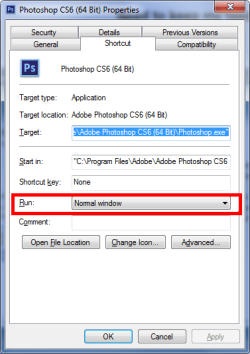
Go the the CS6 shortcut in your start menu, right click/properties. Now where it says "run" choose ""Normal window" from the drop down menu and see if that works.
 

My Computer My Computer

At a glance

Windows 7 Ultimate X64 SP1Intel i5-2550K, Differing ~4.4-4.8GHz No buil...16GB G.Skill Sniper 1866MHz @ 2133MHz 2x8GBASUS GTX650TIB-DC2OC-2GD5, (650TI Boost)
Computer type
PC/Desktop
Computer Manufacturer/Model Number
Home Built Desktop By DataTech
OS
Windows 7 Ultimate X64 SP1
CPU
Intel i5-2550K, Differing ~4.4-4.8GHz No built in GPU
Motherboard
ASUS P8Z68-V PRO/GEN3
Memory
16GB G.Skill Sniper 1866MHz @ 2133MHz 2x8GB
Graphics Card(s)
ASUS GTX650TIB-DC2OC-2GD5, (650TI Boost)
Sound Card
Onboard Realtek 5-1
Monitor(s) Displays
Samsung P2570HD
Screen Resolution
1920x1080
Hard Drives
Samsung 840 Pro 256GB SSD for OS, 500GB Seagate Constellation (Enterprise drive) for Data
PSU
Corsair HX650W
Case
Inwin Dragon Rider
Cooling
Hyper 212 EVO w/two Noctua fans, push-pull, @1300 RPM
Keyboard
E-Z Eyes, bright yellow keys with large characters
Mouse
steelseries SENSEI Laser Pro Gaming
Internet Speed
48-51Mbs Mbs down, 11 Mbs up Xfinity Cable
Antivirus
Norton Internet Security 2013
Browser
IE 10, Opera, Pale Moon if needed
Other Info
4 case fans, LG BluRay-RE, ASUS DVD-RW, Mr. Fusion power supply, 1.21 gigawatts.
You can try setting Text Size to 150% in
Screen Resolution > Make text and other items larger or smaller

You may have to change your screen resolution so everything displays the way you like it with larger text.

For me this keeps the Taskbar visible when a program is in Full Screen mode.
I don't have Photoshop so I can't test that program.

If 150% doesn't work, try a custom size such as 145%.
 

My Computer My Computer

At a glance

Multi-Boot W7_Pro_x64 W8.1_Pro_x64 W10_Pro_x6...AMD Athlon II x4 6206GB GSkill DDR2 800AMD 4670 GPU + AMD 4200 IGP
Computer type
PC/Desktop
Computer Manufacturer/Model Number
home built
OS
Multi-Boot W7_Pro_x64 W8.1_Pro_x64 W10_Pro_x64 +Linux_VMs +Chromium_VM
CPU
AMD Athlon II x4 620
Motherboard
Gigabyte GA-MA785G-UD3H
Memory
6GB GSkill DDR2 800
Graphics Card(s)
AMD 4670 GPU + AMD 4200 IGP
Sound Card
on board Realtek ALC889A
Monitor(s) Displays
RCA 40" LCD TV, Insignia 32" LCD TV, HP 15" LCD monitor
Screen Resolution
1680 x 1050
Hard Drives
OCZ Vertex 3 120GB,
Samsung F3 1TB (3),
Several others - WD, Seagate, Hitachi, ...
PSU
Corsair 500 W
Case
Rosewill mid tower
Cooling
CM 90mm rifle
Keyboard
Gyration wireless, Logitech wireless, Dell USB wired
Mouse
Gyration wireless, Logitech wireless, V7 USB wired
Internet Speed
Spectrum - 100Mbps D / 10Mbps U
Antivirus
Avast, MBAM3, EMET, WinPatrol
Browser
Pale Moon, Firefox, IE
Other Info
2 multi-boot PC's
Mainly HTPC/Office/Gen purpose (no gaming).
Trendnet USB KVM.
LG DVD burner/Blue Ray Player.
Tray system for removable SATA backup drives.

Not currently OCd, under-volted.
I use Hybrid sleep, rarely re-boot or shutdown.

Hauppauge HD-PVR, Avermedia PCIe TV Tuner, Hauppauge PCI TV Tuner.
I know it's not a CS6 bug, they intended the application to work this way - which just absolutely baffles me. CS4 & CS5 also work in this manner. CS3 was the last sane version of photoshop, seemingly.

Unfortunately, that doesn't work =/

It's as you've said, CS6 works as would a media player, it goes on top of the taskbar entirely. Which is why I want to know of a program that would place my taskbar ontop of even a media player. Because then, surely, photoshop would also be under it.
 

My Computer My Computer

At a glance

Windows 7 Professional x64Intel Core i7-3770 @ 3.40GHz2 x 4gbGeForce GT 620
Computer type
PC/Desktop
Computer Manufacturer/Model Number
custom
OS
Windows 7 Professional x64
CPU
Intel Core i7-3770 @ 3.40GHz
Memory
2 x 4gb
Graphics Card(s)
GeForce GT 620
Hard Drives
500gb
1TB
Browser
Chrome
Which didn't work?
 

My Computer My Computer

At a glance

Windows 7 Ultimate X64 SP1Intel i5-2550K, Differing ~4.4-4.8GHz No buil...16GB G.Skill Sniper 1866MHz @ 2133MHz 2x8GBASUS GTX650TIB-DC2OC-2GD5, (650TI Boost)
Computer type
PC/Desktop
Computer Manufacturer/Model Number
Home Built Desktop By DataTech
OS
Windows 7 Ultimate X64 SP1
CPU
Intel i5-2550K, Differing ~4.4-4.8GHz No built in GPU
Motherboard
ASUS P8Z68-V PRO/GEN3
Memory
16GB G.Skill Sniper 1866MHz @ 2133MHz 2x8GB
Graphics Card(s)
ASUS GTX650TIB-DC2OC-2GD5, (650TI Boost)
Sound Card
Onboard Realtek 5-1
Monitor(s) Displays
Samsung P2570HD
Screen Resolution
1920x1080
Hard Drives
Samsung 840 Pro 256GB SSD for OS, 500GB Seagate Constellation (Enterprise drive) for Data
PSU
Corsair HX650W
Case
Inwin Dragon Rider
Cooling
Hyper 212 EVO w/two Noctua fans, push-pull, @1300 RPM
Keyboard
E-Z Eyes, bright yellow keys with large characters
Mouse
steelseries SENSEI Laser Pro Gaming
Internet Speed
48-51Mbs Mbs down, 11 Mbs up Xfinity Cable
Antivirus
Norton Internet Security 2013
Browser
IE 10, Opera, Pale Moon if needed
Other Info
4 case fans, LG BluRay-RE, ASUS DVD-RW, Mr. Fusion power supply, 1.21 gigawatts.
Hey,

Ah, sorry, David posted just as I was answering you, Britton, so I meant yours.
But actually, I've now tried his solution as well, and that unfortunately didn't work out either =/ I've tried it with both 150% and 145%

Edit: and Britton, sorry, I think I might have just understood what you were saying.
I think you meant that I should use the 'standard screen mode' <- which is the mode shown on your screencapture?
The problem with that mode is that you can't drag the canvas when you are zoomed out, and I can't work like that =/
I'm not sure if you were referring to this?
 

My Computer My Computer

At a glance

Windows 7 Professional x64Intel Core i7-3770 @ 3.40GHz2 x 4gbGeForce GT 620
Computer type
PC/Desktop
Computer Manufacturer/Model Number
custom
OS
Windows 7 Professional x64
CPU
Intel Core i7-3770 @ 3.40GHz
Memory
2 x 4gb
Graphics Card(s)
GeForce GT 620
Hard Drives
500gb
1TB
Browser
Chrome
Yup I was referring to that. Play with the settings, I can drag the canvas with Normal selected.

CS6 Props.png
 

My Computer My Computer

At a glance

Windows 7 Ultimate X64 SP1Intel i5-2550K, Differing ~4.4-4.8GHz No buil...16GB G.Skill Sniper 1866MHz @ 2133MHz 2x8GBASUS GTX650TIB-DC2OC-2GD5, (650TI Boost)
Computer type
PC/Desktop
Computer Manufacturer/Model Number
Home Built Desktop By DataTech
OS
Windows 7 Ultimate X64 SP1
CPU
Intel i5-2550K, Differing ~4.4-4.8GHz No built in GPU
Motherboard
ASUS P8Z68-V PRO/GEN3
Memory
16GB G.Skill Sniper 1866MHz @ 2133MHz 2x8GB
Graphics Card(s)
ASUS GTX650TIB-DC2OC-2GD5, (650TI Boost)
Sound Card
Onboard Realtek 5-1
Monitor(s) Displays
Samsung P2570HD
Screen Resolution
1920x1080
Hard Drives
Samsung 840 Pro 256GB SSD for OS, 500GB Seagate Constellation (Enterprise drive) for Data
PSU
Corsair HX650W
Case
Inwin Dragon Rider
Cooling
Hyper 212 EVO w/two Noctua fans, push-pull, @1300 RPM
Keyboard
E-Z Eyes, bright yellow keys with large characters
Mouse
steelseries SENSEI Laser Pro Gaming
Internet Speed
48-51Mbs Mbs down, 11 Mbs up Xfinity Cable
Antivirus
Norton Internet Security 2013
Browser
IE 10, Opera, Pale Moon if needed
Other Info
4 case fans, LG BluRay-RE, ASUS DVD-RW, Mr. Fusion power supply, 1.21 gigawatts.
You can't drag your canvas around if it's zoomed out, that's how photoshop's always been =/
If you zoom in, then yes, you can use the hand tool and drag your canvas. But if you can 'see your entire canvas', in standard mode photoshop does not let you move your canvas.
This is not the case in fullscreen mode, regardless of whether you're seeing your canvas at 6% or 600% you will be able to drag it around.
 

My Computer My Computer

At a glance

Windows 7 Professional x64Intel Core i7-3770 @ 3.40GHz2 x 4gbGeForce GT 620
Computer type
PC/Desktop
Computer Manufacturer/Model Number
custom
OS
Windows 7 Professional x64
CPU
Intel Core i7-3770 @ 3.40GHz
Memory
2 x 4gb
Graphics Card(s)
GeForce GT 620
Hard Drives
500gb
1TB
Browser
Chrome

My Computer My Computer

At a glance

Multi-Boot W7_Pro_x64 W8.1_Pro_x64 W10_Pro_x6...AMD Athlon II x4 6206GB GSkill DDR2 800AMD 4670 GPU + AMD 4200 IGP
Computer type
PC/Desktop
Computer Manufacturer/Model Number
home built
OS
Multi-Boot W7_Pro_x64 W8.1_Pro_x64 W10_Pro_x64 +Linux_VMs +Chromium_VM
CPU
AMD Athlon II x4 620
Motherboard
Gigabyte GA-MA785G-UD3H
Memory
6GB GSkill DDR2 800
Graphics Card(s)
AMD 4670 GPU + AMD 4200 IGP
Sound Card
on board Realtek ALC889A
Monitor(s) Displays
RCA 40" LCD TV, Insignia 32" LCD TV, HP 15" LCD monitor
Screen Resolution
1680 x 1050
Hard Drives
OCZ Vertex 3 120GB,
Samsung F3 1TB (3),
Several others - WD, Seagate, Hitachi, ...
PSU
Corsair 500 W
Case
Rosewill mid tower
Cooling
CM 90mm rifle
Keyboard
Gyration wireless, Logitech wireless, Dell USB wired
Mouse
Gyration wireless, Logitech wireless, V7 USB wired
Internet Speed
Spectrum - 100Mbps D / 10Mbps U
Antivirus
Avast, MBAM3, EMET, WinPatrol
Browser
Pale Moon, Firefox, IE
Other Info
2 multi-boot PC's
Mainly HTPC/Office/Gen purpose (no gaming).
Trendnet USB KVM.
LG DVD burner/Blue Ray Player.
Tray system for removable SATA backup drives.

Not currently OCd, under-volted.
I use Hybrid sleep, rarely re-boot or shutdown.

Hauppauge HD-PVR, Avermedia PCIe TV Tuner, Hauppauge PCI TV Tuner.
Yes, I did try that with aero theme =/ didn't work.
Maybe I'll play around with other settings like you mentioned and see if any of them do it, but I was really hoping for a more permanent solution rather than to explore a 'bug' =/
 

My Computer My Computer

At a glance

Windows 7 Professional x64Intel Core i7-3770 @ 3.40GHz2 x 4gbGeForce GT 620
Computer type
PC/Desktop
Computer Manufacturer/Model Number
custom
OS
Windows 7 Professional x64
CPU
Intel Core i7-3770 @ 3.40GHz
Memory
2 x 4gb
Graphics Card(s)
GeForce GT 620
Hard Drives
500gb
1TB
Browser
Chrome
This is an easy fix. Command (and) +/= is the hotkey to bring up magnifier. From there will be a window or magnifying glass that will expand into that window. In that window select the dropdown menu for views and click docked.
 

My Computer My Computer

At a glance

Windows 7
Computer type
PC/Desktop
OS
Windows 7
Back
Top