
Need to move MBR, running into Bootmgr missing error

sstowell

New member
Local time
8:08 AM
Messages
23
I have what I hope is a nice clean Windows 7 install on a fairly new hard drive (C:) from earlier this year. But I recently determined that the MasterBootRec is still on a tiny old otherwise empty hard drive (Q:)I need to remove.

I tried following these instructions to move the MBR; I made my C: partition Active, in the BIOS moved this drive to the first boot position, then threw salt over my left shoulder, stood on one foot, and used my Repair Disk to run the system repair 3 times (per a Win7 tutorial).

No luck, just a BootMGR missing error msg on restart w/o the CD.

Next I followed another tutorial for fixing the BootMGR using the repair CD cmd prompt & 3 bootrec commands run on C:, the last being "bootrec /RebuildBcd" upon which I got "completed successly" but also zero Windows installation found. Sure enough, restart still showed Bootmgr missing until I put that old crummy disk back to the top of the boot list.

Please help!!
 

Attachments
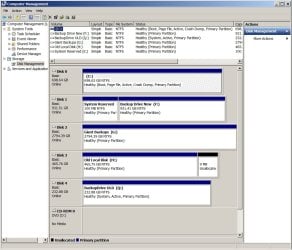
  • DiskStoragePic.jpg
    DiskStoragePic.jpg
    496.8 KB · Views: 0
Last edited:

My Computer

OS
Windows 7 Home Premium 64bit
CPU
AMD Phenom II X4 B55 3.2 GHz
Memory
8 GB
Graphics Card(s)
ATI Radeon HD 4250
Did you leave the crummy old disk connected while you tried to repair the bootrec?
 

My Computer

Computer type
PC/Desktop
Computer Manufacturer/Model Number
Mellon Labs (custom build)
OS
Win 7 Pro x64/Win 10 Pro x64 dual boot
CPU
AMD FX 8350 Vishera @ 4200
Motherboard
ASUS M5A97 R2.0
Memory
16 GB Mushkin Blackline DDR3-2400 @ 1866 (9-10-10-10-31)
Graphics Card(s)
XFX Radeon R9 280 Double D Black Edition
Sound Card
Realtek HD Audio on MB. Sounds great.
Monitor(s) Displays
Acer 24", Acer 22"
Screen Resolution
3840 x 1080
Hard Drives
1 x Mushkin Chronos 120 GB SSD (Win 10)
1 x Samsung 850 EVO 250 GB SSD (Win 7)
1 x WD 1TB SATA Blue
1 x WD 1TB SATA Green
PSU
Corsair TX-750
Case
CoolerMaster HAF 912+
Cooling
Coolermaster Seidon 240M Liquid AIO. 6 case fans
Keyboard
Logitech G710+
Mouse
Logitech G500s
Internet Speed
Much better since I got fiber, but still way overpriced.
Antivirus
MSE, Malware Bytes for scanning
Browser
Firefox
Other Info
Corsair VOID USB headphones.

A Mellon Labs X-1 - LCD Smartie driven system status display.

Brought to you by the letter E
Yes, it was marked inactive & at bottom of the BIOS boot list, but still connected.
 

My Computer

OS
Windows 7 Home Premium 64bit
CPU
AMD Phenom II X4 B55 3.2 GHz
Memory
8 GB
Graphics Card(s)
ATI Radeon HD 4250
You could try rebuilding the MBR/BootMGR with that drive disconnected and see what happens. Maybe your efforts are just rebuilding the MBR on the crummy drive because that's what the repair CD finds...
 

My Computer

Computer type
PC/Desktop
Computer Manufacturer/Model Number
Mellon Labs (custom build)
OS
Win 7 Pro x64/Win 10 Pro x64 dual boot
CPU
AMD FX 8350 Vishera @ 4200
Motherboard
ASUS M5A97 R2.0
Memory
16 GB Mushkin Blackline DDR3-2400 @ 1866 (9-10-10-10-31)
Graphics Card(s)
XFX Radeon R9 280 Double D Black Edition
Sound Card
Realtek HD Audio on MB. Sounds great.
Monitor(s) Displays
Acer 24", Acer 22"
Screen Resolution
3840 x 1080
Hard Drives
1 x Mushkin Chronos 120 GB SSD (Win 10)
1 x Samsung 850 EVO 250 GB SSD (Win 7)
1 x WD 1TB SATA Blue
1 x WD 1TB SATA Green
PSU
Corsair TX-750
Case
CoolerMaster HAF 912+
Cooling
Coolermaster Seidon 240M Liquid AIO. 6 case fans
Keyboard
Logitech G710+
Mouse
Logitech G500s
Internet Speed
Much better since I got fiber, but still way overpriced.
Antivirus
MSE, Malware Bytes for scanning
Browser
Firefox
Other Info
Corsair VOID USB headphones.

A Mellon Labs X-1 - LCD Smartie driven system status display.

Brought to you by the letter E
Thanks, I think that is the next step (for tomorrow!). Repeat the full 3 times magic of the Repairs with the drive disconnected (and while standing on one foot of course).

You just have to hate Windows... well at least I have to :-)
 

My Computer

OS
Windows 7 Home Premium 64bit
CPU
AMD Phenom II X4 B55 3.2 GHz
Memory
8 GB
Graphics Card(s)
ATI Radeon HD 4250
diskpart
sel vol q
inact
exi

Now boot repair/installation cd and run startup repair.
 

My Computers

System One System Two

  • Computer type
    PC/Desktop
    OS
    7 X64
    CPU
    i5 8400
    Motherboard
    gigabyte b365m ds3h
    Memory
    2x8gb 3200mhz
    Hard Drives
    various
    PSU
    pure power 11 400w cm
    Case
    Coolermaster
    Cooling
    cryorig m9i
  • Computer type
    PC/Desktop
    OS
    7x64
    CPU
    g5400
    Motherboard
    ga b365m ds3h
    Memory
    8gb ddr4 2400
    PSU
    xfx pro 450w
Yes that was one thing I did try. Diskpart, marked all volumes inactive accept the newer install C: drive volume. I forget exactly what happened at that point: I think it would not boot, but maybe it did boot but then Q was active again... losing track of the various steps! Anyway, until I made Q: active & boot disk, I could not boot & start Windows from hard drives... got the bootmgr missing error. Tomorrow I will try these steps again, but with Q: disconnected. My fear is that the results will not be much better... but TBD.
 

My Computer

OS
Windows 7 Home Premium 64bit
CPU
AMD Phenom II X4 B55 3.2 GHz
Memory
8 GB
Graphics Card(s)
ATI Radeon HD 4250
Back
Top