Sunnylake36
New member
- Local time
- 1:51 AM
- Messages
- 4
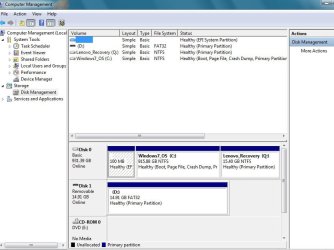
Have a new Lenovo ThinkCenter desktop. It has Windows 7 Professional 64 bit. Drive is 1 TB. I need to partition it into Drives C, D, E and F. (Lenovo also sent me a set of recovery discs and a drivers disc). A friend said Windows 7 Professional has a partitioning feature. It's accessible through START, COMPUTER, MANAGE, DISC MANAGEMENT. I went there but it only talks about shrinking or expanding an existing drive. There doesn't seem to be a partitioning option.
Question: Does anyone know if there is a partitioning feature built-in to W7P? If so, how do I access it.
If there is not one, can you recommend a simple, downloadable partitioning program that will not, at the same time, dump a bunch of unwanted "stuff" onto my computer?
This is my first post on the forum. Name is Jerry. I'm 80 - but have a fair knowledge of this as I have partitioned drives before (many years ago).
Thanks...!
Question: Does anyone know if there is a partitioning feature built-in to W7P? If so, how do I access it.
If there is not one, can you recommend a simple, downloadable partitioning program that will not, at the same time, dump a bunch of unwanted "stuff" onto my computer?
This is my first post on the forum. Name is Jerry. I'm 80 - but have a fair knowledge of this as I have partitioned drives before (many years ago).
Thanks...!
My Computer
At a glance
Windows 7 Professional 64 bit3i Intel4 GB
- Computer type
- PC/Desktop
- Computer Manufacturer/Model Number
- Lenovo - Think Center
- OS
- Windows 7 Professional 64 bit
- CPU
- 3i Intel
- Motherboard
- Unknown
- Memory
- 4 GB
- Hard Drives
- One drive - Capacity 1 TB
- Antivirus
- F-Prot
- Browser
- Chrome & Firefox