
Need to remove ghosted out folders on media HDD

JohnnyScience

New member
Power User
Local time
7:17 AM
Messages
889
Ok I've got two folders that are showing up on my media HDD ghosted out

These are showing up in my main list of main folders, so I do not want them in the list as it throws me off a little.

The two that are ghosted that I would like to get rid of are:

$RECYCLE.BIN
System Volume Information

Thanks
 

My Computer My Computer

At a glance

Windows 7 64 & Ubuntu 64Intel Quad Core Q6600 2.40GHz8gNvidia 9600 GT & 9800 GT
Computer Manufacturer/Model Number
Built it myself
OS
Windows 7 64 & Ubuntu 64
CPU
Intel Quad Core Q6600 2.40GHz
Motherboard
Asus
Memory
8g
Graphics Card(s)
Nvidia 9600 GT & 9800 GT
Sound Card
Turtle Beach 5.1
Monitor(s) Displays
Three 19" Dell's & one 46" Samsung 750
Those are put in place on each drive when Vista/Win7 are installed...

They are System Folders and should be left alone...
 

My Computer My Computer

At a glance

Vista Ultimate X64/ Windows 7 Dual-bootQ66004G OCZ PC2 8500 PlatinumEVGA 8800GTS Vid Card
Computer Manufacturer/Model Number
Self-Built
OS
Vista Ultimate X64/ Windows 7 Dual-boot
CPU
Q6600
Motherboard
ASUS P5K
Memory
4G OCZ PC2 8500 Platinum
Graphics Card(s)
EVGA 8800GTS Vid Card
Hard Drives
500G Seagate SATA
200G Seagate SATA
100G WD Caviar SATA
80G WD Caviar IDE
PSU
OCZ Elite 800W PSU
Case
RaidMax Smilodon Case
they didnt show up until a few months after I've already had my media HDD up & running.

They are throwing off my entire list of contents.

How do I make them disappear?
 

My Computer My Computer

At a glance

Windows 7 64 & Ubuntu 64Intel Quad Core Q6600 2.40GHz8gNvidia 9600 GT & 9800 GT
Computer Manufacturer/Model Number
Built it myself
OS
Windows 7 64 & Ubuntu 64
CPU
Intel Quad Core Q6600 2.40GHz
Motherboard
Asus
Memory
8g
Graphics Card(s)
Nvidia 9600 GT & 9800 GT
Sound Card
Turtle Beach 5.1
Monitor(s) Displays
Three 19" Dell's & one 46" Samsung 750
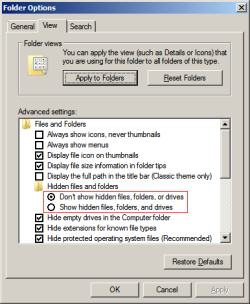
You have probably gone into Folder Options and chosen to "Show Hidden Files". Go back to Folder Options and choose "Hide System Files".
 

Attachments

  • hide-system-files.png
    hide-system-files.png
    9.9 KB · Views: 1

My Computer My Computer

At a glance

W7 64 BitAMD Phenom x4 4000Mhz8 GB DDR-2PNY-NVIDIA GeForce GTX 460 1GB GDDR5 PCI-e
Computer Manufacturer/Model Number
My own Custom Build: Asus, Corsair, Transcend, AMD, PNY, Ultra
OS
W7 64 Bit
CPU
AMD Phenom x4 4000Mhz
Memory
8 GB DDR-2
Graphics Card(s)
PNY-NVIDIA GeForce GTX 460 1GB GDDR5 PCI-e
Monitor(s) Displays
Dual: Flatron L1942T
Hard Drives
C: Drive (Agility 2 Solid State Drive 60 GB)
D: Drive (HDD Internal Western Digital 640 GB)
PSU
650 Watt
Cooling
Corsair Hydro H6 Liquid Cooler
Internet Speed
25 mbps down - 3 mbps up
You have probably gone into Folder Options and chosen to "Show Hidden Files". Go back to Folder Options and choose "Hide System Files".

k that worked, thanks.
 

My Computer My Computer

At a glance

Windows 7 64 & Ubuntu 64Intel Quad Core Q6600 2.40GHz8gNvidia 9600 GT & 9800 GT
Computer Manufacturer/Model Number
Built it myself
OS
Windows 7 64 & Ubuntu 64
CPU
Intel Quad Core Q6600 2.40GHz
Motherboard
Asus
Memory
8g
Graphics Card(s)
Nvidia 9600 GT & 9800 GT
Sound Card
Turtle Beach 5.1
Monitor(s) Displays
Three 19" Dell's & one 46" Samsung 750
Back
Top