Solved Need to replace dying hard drive in laptop.

nodsirrah

New member
Member
Local time
6:30 PM
Messages
51
I got so confused searching for a solution I decided to ask for specific detailed answer. My 80 year old brain doesn't help especially since I am not a techie, just to poor to pay to have it done!!!
I am getting notices that my 8 year old Win 7 laptop 80 GB HDD has a problem, but it still works and I haven't used it since the notices appeared.
I purchased another 80 GB HDD.
How do I clone the existing HDD to my external HDD, install the new HDD and transfer the clone to the new HDD and have it boot with all the existing programs and files working as before.
I appreciate someone's help.
Don
 

My Computer My Computer

At a glance

Windows 7 Home Premium 64 BitProcessor Pentium(R) Dual-Core CPU E5800@ 3.2...
Computer Manufacturer/Model Number
Dell 530S
OS
Windows 7 Home Premium 64 Bit
CPU
Processor Pentium(R) Dual-Core CPU E5800@ 3.20GHz, 3
You could try a clone. Or you could try an imaging procedure.

Either can work or fail.

I'd say the best tool for the job is Macrium Reflect Free Edition. It will clone or image. It's free.

Windows 7 has a built-in imaging capability, but it can be confusing if you are unfamiliar with it.

With Macrium Reflect, the general procedure would be:

Install Macrium.

Use it to make an image file. Save the image file on the external disc.

Make a "recovery" CD with Macrium.

Install your new hard drive.

Boot from the recovery CD and navigate to the image file you made.

"Restore" that image file to the new hard drive.

That's the basic procedure, but it's not foolproof. Neither is cloning.

Are you ready, willing, and able to reinstall Windows and all of your applications if cloning and imaging fail?

Have you backed up your personal data, bookmarks, and email to the external hard drive? That would probably be my first concern as the old hard drive may expire in 2 minutes for all we know.

Can you give the exact message you are getting about a bad hard drive? What is giving you this message?
 

My Computer My Computer

At a glance

Windows 7 Home Premium SP1, 64-bitIntel Skylake i5-6600K, not overclocked8 GB HyperX DDR4-2666 (2 x 4 GB)none; graphics are integrated on CPU
Computer type
PC/Desktop
Computer Manufacturer/Model Number
Ignatz Special; 4 speed manual gearbox; factory air conditioning; one of one
OS
Windows 7 Home Premium SP1, 64-bit
CPU
Intel Skylake i5-6600K, not overclocked
Motherboard
AsRock Z170M Extreme 4, micro ATX
Memory
8 GB HyperX DDR4-2666 (2 x 4 GB)
Graphics Card(s)
none; graphics are integrated on CPU
Sound Card
onboard: Realtek ALC1150; external: USB Behringer UF0-202
Monitor(s) Displays
Dell S2340M 23 inch IPS
Screen Resolution
1600 x 900
Hard Drives
System: Crucial MX100 series SSD, 128 GB;
Data: Samsung Spinpoint 103SJ, 1 TB;
Backup: WD Caviar Green WD30EZRX-00D8PB0, 3 TB
PSU
Rosewill SilentNight 500 watt fanless, semi-modular
Case
Antec Solo II
Cooling
Noctua NH-U12S; Noctua F12 intake, Noctua S12A exhaust
Keyboard
Microsoft 200 6JH-00001 USB
Mouse
Dell or Microsoft optical wired; USB
Antivirus
Microsoft Security Essentials and Malwarebytes Premium
Browser
Pale Moon
Other Info
All fans PWM; speeds at idle: CPU circa 500 rpm; intake circa 600 rpm; exhaust circa 600 rpm; CPU temps 27 idle and 47 C load in a warm room (27 C/81 F) when running Intel Extreme Tuning Utility stress test.
Depending upon exactly what is causing the notices, you would be well served to attempt to correct any errors BEFORE you clone the drive, otherwise you could clone those errors and be right back where you started but on a new drive. It's also possible that if the notifications are due to surface defects on the old drive, some data may be unrecoverable.

Before you attempt to clone, please follow ignatzatsonic's advice and post the exact message you are seeing and what program is sending the notice.http://www.sevenforums.com/members/ignatzatsonic.html
 

My Computer My Computer

At a glance

W10 Pro desktop, W11 laptop, W11 Pro tablet (...3.7Ghz 8700K i7, i7-11800H, i7-1065G716G desktop, 16G laptop, 4G tabletAMD Radeon RX580, RTX 3060, Intel Iris Plus
Computer type
PC/Desktop
Computer Manufacturer/Model Number
Home Built desktop, Dell G15 5511 Gaming laptop,MS Surface Pro 7 tablet
OS
W10 Pro desktop, W11 laptop, W11 Pro tablet (all 64-bit)
CPU
3.7Ghz 8700K i7, i7-11800H, i7-1065G7
Motherboard
ASUS TUF Z370-Pro Gaming in desktop
Memory
16G desktop, 16G laptop, 4G tablet
Graphics Card(s)
AMD Radeon RX580, RTX 3060, Intel Iris Plus
Sound Card
High Definition Audio (Built-in to mobo)
Monitor(s) Displays
Samsung U32J59 32" (2x), 15.6", 12"
Screen Resolution
3840x2160, 3840x2160, 1920x1080, 2160x1440
Hard Drives
500G SSD for OS; 2T, 10T & 15T HDDs for Data on Desktop, 1TB SSD laptop, 128G SSD tablet.
PSU
Corsair CX 750M
Case
Antec 100
Cooling
CM 212+
Keyboard
IBM Model M - used continuously since 1986
Mouse
Microsoft Pro IntelliMouse
Internet Speed
400M down 8M up
Antivirus
Windows Defender
Browser
FireFox
Other Info
Built my first computer (8Mhz 8088cpu, 640K RAM, 20MB HDD, 2 360K floppy drives) in 1985 and have been building them for myself, relatives and friends ever since.

Attachments

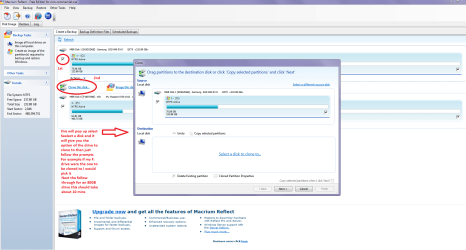
  • CLONE.PNG
    CLONE.PNG
    89.3 KB · Views: 4

My Computer My Computer

At a glance

Desk1 7 Home Prem / Desk2 10 Pro / Main lap A...Desk1 i5 3750K / Laptop i7 GTX 860M / Desk2 i...Desk1 8GB (1866) / Desk2 16GB (1333) / Laptop...Desk 1& 2NVidia GTX 650 & Laptops on board Intel
Computer type
PC/Desktop
Computer Manufacturer/Model Number
Own build (new) Desk1 / Asus ROG Win 7 / Desk2 1st build
OS
Desk1 7 Home Prem / Desk2 10 Pro / Main lap Asus ROG 10 Pro 2 laptop Toshiba 7 Pro Asus P2520 7 & 10
CPU
Desk1 i5 3750K / Laptop i7 GTX 860M / Desk2 i5 2500
Motherboard
Desk1 Asus P877-V / Desk2 Gigabyte H67 UD3H / Laptop ?
Memory
Desk1 8GB (1866) / Desk2 16GB (1333) / Laptop 8Gb DDR3
Graphics Card(s)
Desk 1& 2NVidia GTX 650 & Laptops on board Intel
Sound Card
Desk 1 & 2 -XONAR DG Realtek High Def audio Laptop
Monitor(s) Displays
Desk 1 Benq HD 2450 / Desk2 Philips 24" / Laptop 17.5"
Screen Resolution
1920x1080 D1 & D2 & Laptop 1
Hard Drives
Desk1 Samsung 120GB 830 SSD
Asus ROG 256GB 850 Pro SSD
Desk2 Samsung 840 256 SSD
Toshiba 120GB EVO
PSU
Desk 1 Corsair HX 1050/ Laptop ? / Desk 2 Corsair HX 650
Case
Desk 1 Cooler HAF XM ? Toshiba laptop / Desk2 Coolermaster
Cooling
Fans on all Desk1 -2 Desk2 - all Coolermasters 5 Laptop ?
Keyboard
Desk 1 MS Sidewinder X6 Desk 2 MS Sidewinder X 4
Mouse
Desk 1&2 - Gigabyte MS 900 gamer - laptop - Logitec wireless
Internet Speed
ADSL2+
Other Info
One other Desktop (tester) and spare Toshba laptop both with SSD's
Running Kaspersky 2016 ISS on all machines config'd identically
Logitec audio stereo systems on each machine (x3)
Canon MG5250MFC
Router/modem TP-Link running WPA2SK
Side by side, make a request to DELL for the recovery disk stating that your HDD is dead and need to be replaced. Even out of warranty DELL has been sending Reinstallation media free of cost. So try your luck.

If you get it there is nothing like it. You can do a clean install and it will selfactivate. You may have to download the necessary drivers from DELL website.

I am assuming you are in USA or Canada. Here is the online request https://www.dell.com/support/diagno...me?c=us&l=en&s=dhs&DoNotRedirect=y&redirect=1
 

My Computer My Computer

At a glance

Windows 7 Home Premium 32 bit
OS
Windows 7 Home Premium 32 bit
We got 'er dun!

The error I was getting was Re-Allocated Sector Count, a total of 183, I was pretty sure I would be able to use my new hard drive.
Finally got er dun!!! Only 4 days 12 hours a day, and more stupid errors than I can count.:mad2:
I screwed around with Windows Backup and Restore until I was red in the face.
I downloaded Macrium Reflect, I first tried to make a clone and restore it, but it would not restore. Then I made an Image, and could not restore it. The external hard drive I was using is a WD2500ME known as the Passport Essential which only uses the USB voltage. I switched to my "My Book Essentials" which uses its own power adapter. After I made an Image on it everything worked. After loading the image on the laptop HDD I could not start it up without using the rescue disk even after I changed the Bios boot sequence to internal HDD. I started it with the rescue disk and all of a sudden it started updating off the Internet, when it finished about 30 minutes later I rebooted it the boot sequenced to the Internal HDD and it has been booted off the HDD ever since! I guess part of the updating included adding the boot sequence to the HDD, anyway its working and the old HDD is in the recycle bin and my system is reactivated.
Only $38.00 for the new HDD, 48 hours of my time and special help from you people, no more popup windows telling me to do a backup because the HDD has holes in it!
My time is free because I am retired, Macrium was free, your advice was free and we had 4 days of either rain or cold weather, and best of all I have time to talk to my patient wife. Life is good!:thumbsup:......
Thanks...
 
Last edited:

My Computer My Computer

At a glance

Windows 7 Home Premium 64 BitProcessor Pentium(R) Dual-Core CPU E5800@ 3.2...
Computer Manufacturer/Model Number
Dell 530S
OS
Windows 7 Home Premium 64 Bit
CPU
Processor Pentium(R) Dual-Core CPU E5800@ 3.20GHz, 3
Glad you got it done. A real learning experience! :party:
 

My Computer My Computer

At a glance

W10 Pro desktop, W11 laptop, W11 Pro tablet (...3.7Ghz 8700K i7, i7-11800H, i7-1065G716G desktop, 16G laptop, 4G tabletAMD Radeon RX580, RTX 3060, Intel Iris Plus
Computer type
PC/Desktop
Computer Manufacturer/Model Number
Home Built desktop, Dell G15 5511 Gaming laptop,MS Surface Pro 7 tablet
OS
W10 Pro desktop, W11 laptop, W11 Pro tablet (all 64-bit)
CPU
3.7Ghz 8700K i7, i7-11800H, i7-1065G7
Motherboard
ASUS TUF Z370-Pro Gaming in desktop
Memory
16G desktop, 16G laptop, 4G tablet
Graphics Card(s)
AMD Radeon RX580, RTX 3060, Intel Iris Plus
Sound Card
High Definition Audio (Built-in to mobo)
Monitor(s) Displays
Samsung U32J59 32" (2x), 15.6", 12"
Screen Resolution
3840x2160, 3840x2160, 1920x1080, 2160x1440
Hard Drives
500G SSD for OS; 2T, 10T & 15T HDDs for Data on Desktop, 1TB SSD laptop, 128G SSD tablet.
PSU
Corsair CX 750M
Case
Antec 100
Cooling
CM 212+
Keyboard
IBM Model M - used continuously since 1986
Mouse
Microsoft Pro IntelliMouse
Internet Speed
400M down 8M up
Antivirus
Windows Defender
Browser
FireFox
Other Info
Built my first computer (8Mhz 8088cpu, 640K RAM, 20MB HDD, 2 360K floppy drives) in 1985 and have been building them for myself, relatives and friends ever since.
Back
Top