

I have had Windows 7 installed on an SSD for a long time. I am used to a fast boot up. I installed Windows 8.1 as a dual boot on a partition of my HDD. I thought I would on occasion get familiar with Windows 8, After the installation I noticed and expected a longer boot time because the new OS is on the mechanical drive. The screen is black with increasing dots going across the top as if loading information. Then the screen goes through a few black to a lite-black, back and forth changes and then finally to the screen that you choose the OS you wish to boot screen. I use Windows 7 95% of the time and really haven't put forth the effort yet (as planned) to become familiar with Win 8. I have become quite annoyed with the long boot process. I plan to reinstall Win 8 in VMware so I can return to the boot time being SSD quick. I deleted Windows 8 using msconfig. Now when my PC starts it goes straight to Windows 7 desktop however the long loading still occurs increasing dots across the screen 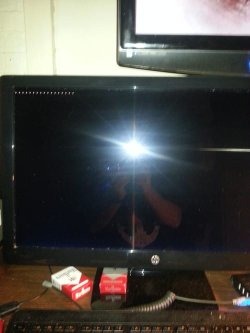 . I suppose you can see by now what my question will be. How do I get my PC to boot they way it used to. Thank you for your replies.
Marshall
. I suppose you can see by now what my question will be. How do I get my PC to boot they way it used to. Thank you for your replies.Marshall
My Computer
At a glance
Windows 7 Ultimate x64Intel i7 2600KG.SKILL Sniper Series 16GB (4 x 4GB) 1866Gigabyte AMD Radeon HD 7870 GV-R787OC-2GD
- Computer type
- PC/Desktop
- Computer Manufacturer/Model Number
- Custom Build
- OS
- Windows 7 Ultimate x64
- CPU
- Intel i7 2600K
- Motherboard
- Gigabyte Technology Co. - Model GA-Z68X-UD5-B3
- Memory
- G.SKILL Sniper Series 16GB (4 x 4GB) 1866
- Graphics Card(s)
- Gigabyte AMD Radeon HD 7870 GV-R787OC-2GD
- Sound Card
- Asus Xonar Essence STX
- Monitor(s) Displays
- HP 2711x 27 inch
- Screen Resolution
- 1920x1080
- Hard Drives
- SSD OCZ Vertex 4 256 GB
Western Digital WD3001FAEX 3TB 7200 SATA 6Gb/s 64MB
HDD 1.5T|HITACHI 7K3000
- PSU
- CORSAIR Professional Series HX650 (Modular)
- Case
- CASE ZALMAN | Z9 R
- Cooling
- COOLER MASTER Hyper 212 EVO
- Keyboard
- Logitech K800 Illuminated Wireless
- Mouse
- Logitech M600 Touch Mouse
- Antivirus
- Norton Internet Security
- Browser
- WaterFox 64 bit
- Other Info
- Audioengine A5+ w/S8 sub and Audio-Technica ATH M50 headphones

