Need to set up a network for file transfer from Win7 64

JohnnyScience

New member
Power User
Local time
6:29 PM
Messages
889
Ok I'm totally new to networks & everything so bear with me.

My computer is the main machine.

I have Win 7 64 & the other computer, which is my buddies is XP Pro 32.

I currently have an N wireless Netgear router that both computers are hooked up via ethernet & my machine also has the N wireless dongle from Netgear, but they dont have drivers for 64 yet.

Now I want to send a couple of files to my other computer which is my buddies. I want him to also be able to send me files, but he tends to surf the net a little less carelessly than I would and I want to make sure when hes sending or receiving info from my particular computer that I dont get a virus or anything.

So how do I set up a network between a Win 7 64 computer & an XP Pro 32 computer, making sure to extra safeguard my main machine?
 

My Computer My Computer

At a glance

Windows 7 64 & Ubuntu 64Intel Quad Core Q6600 2.40GHz8gNvidia 9600 GT & 9800 GT
Computer Manufacturer/Model Number
Built it myself
OS
Windows 7 64 & Ubuntu 64
CPU
Intel Quad Core Q6600 2.40GHz
Motherboard
Asus
Memory
8g
Graphics Card(s)
Nvidia 9600 GT & 9800 GT
Sound Card
Turtle Beach 5.1
Monitor(s) Displays
Three 19" Dell's & one 46" Samsung 750
First make sure both machines are on the same workgroup. My Computer>Properties>Computer Name for XP and Computer>Properties>Advanced System Settings Computer Name for 7... they should both be defaulted to WORKGROUP, you can change it if you want but not necessary.

Now on both machines make sure you have Computer Browser, SSDP Discovery, TCP/IP NetBIOS Helper, Server and Workstation services running. You can check this in Control Panel>Administrative Tools>Services

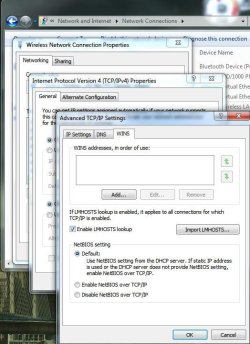
Also make sure on both Machines that your TCP/IP v4 settings for WINS has NetBIOS over TCP/IP set to Default or Enabled.

On 7 open up the run command and run gpedit.msc then go to Computer Configuration>Security Settings>Network List Manager Policies Under Network name your network the same as on your other machines(they should be the same) and under Unidentified and Identifying Networks set to private. This will force Windows 7 to connect to the default network you just set in gpedit and bypass the "Network Detection" feature. ( easier and guaranteed to work first time)

Now in Network and Sharing Center under Change Advanced Sharing Settings>Home Network Check Turn Off Network Discovery, Turn On File and Printer Sharing, Turn Off Public Folder Sharing, Turn On Password Protected Sharing.

On the XP machine make sure at least one folder is shared.

Now The XP machine should bae able to see the 7 machine but have no access, and the 7 machine will see the XP machine and have access to whatever you set to share on the XP machine.
 

My Computer My Computer

At a glance

Windows 7 Ultimate x64 RTMAMD Athlon II X2 240 @ 3.2Ghz6GB Mushkin DDR3 PC-1333ATI Radeon HD 4200 IGP Hybrid CrossFireX w\ S...
Computer Manufacturer/Model Number
Home Built
OS
Windows 7 Ultimate x64 RTM
CPU
AMD Athlon II X2 240 @ 3.2Ghz
Motherboard
Gigabyte GA-MA785GMT-UD2H
Memory
6GB Mushkin DDR3 PC-1333
Graphics Card(s)
ATI Radeon HD 4200 IGP Hybrid CrossFireX w\ Sapphire HD3450
Sound Card
Onboard Realtek HD audio controller
Monitor(s) Displays
D-SUB: LG W2343T-PF 23" LCD HDMI: LG 32LH20 32" LCD
Screen Resolution
1920*1080
Hard Drives
WD Caviar Green 1TB SATA3
PSU
Cooler Master Elite Power 400W
Case
Cooler Master Elite 360
Cooling
AMD Stock :)
Keyboard
Crappy wirelss logitech
Mouse
crappy wireless logitech
Internet Speed
792k
Now on both machines make sure you have Computer Browser, SSDP Discovery, TCP/IP NetBIOS Helper, Server and Workstation services running. You can check this in Control Panel>Administrative Tools>Services

I cant find admin tools in control panel to run all these programs?

I have 7 64.
 

My Computer My Computer

At a glance

Windows 7 64 & Ubuntu 64Intel Quad Core Q6600 2.40GHz8gNvidia 9600 GT & 9800 GT
Computer Manufacturer/Model Number
Built it myself
OS
Windows 7 64 & Ubuntu 64
CPU
Intel Quad Core Q6600 2.40GHz
Motherboard
Asus
Memory
8g
Graphics Card(s)
Nvidia 9600 GT & 9800 GT
Sound Card
Turtle Beach 5.1
Monitor(s) Displays
Three 19" Dell's & one 46" Samsung 750
Services.msc

copy and paste that to start menu search box, hit enter.

You can right click taskbar, properties, start menu tab, customize

Scroll down near bottom. You will see choices to add tools to start menu.
 

My Computer My Computer

At a glance

7600.20510 x86P4 550 3.4 GHz HT running at 3.5 GHzOCZ 2 GB(2x1GB) DDR400mHz running @ 414 mHzHIS Radeon HD 3850 IceQ 3 Turbo HDMI Dual DL-...
Computer Manufacturer/Model Number
self built
OS
7600.20510 x86
CPU
P4 550 3.4 GHz HT running at 3.5 GHz
Motherboard
MSI PM8M3-V (MS-7211 v1.x) Micro-ATX mainboard
Memory
OCZ 2 GB(2x1GB) DDR400mHz running @ 414 mHz
Graphics Card(s)
HIS Radeon HD 3850 IceQ 3 Turbo HDMI Dual DL-DVI AGP
Sound Card
MOTU Traveler firewire studio interface 192 kHz 24 bit
Monitor(s) Displays
22" widescreen Acer X223W LCD, 17" Compaq P75 CRT
Screen Resolution
1680x1050 and 1280x1024
Hard Drives
SATA I x2 WD, 400 GB and 120 GB, SATA 2 WD Caviar Black 1 TB
PSU
350W generic
Case
Cybertronpc, it glows blue
Cooling
stock cpu fan, Ice-Q 3 gpu and system, many case fans
Keyboard
Logitch Classical Keyboard 200
Mouse
Logitech Mediaplay cordless
Internet Speed
1792/448 kbits/sec
Other Info
SATA II PCI fake RAID adapter, 1 GB Readyboost, original ATI Remote Wonder (even works with WMC perfectly), Logitech Rumblepad 2 game controller x2
Also make sure on both Machines that your TCP/IP v4 settings for WINS has NetBIOS over TCP/IP set to Default or Enabled.

Ok, how/where do I do this step on both comps?
 

My Computer My Computer

At a glance

Windows 7 64 & Ubuntu 64Intel Quad Core Q6600 2.40GHz8gNvidia 9600 GT & 9800 GT
Computer Manufacturer/Model Number
Built it myself
OS
Windows 7 64 & Ubuntu 64
CPU
Intel Quad Core Q6600 2.40GHz
Motherboard
Asus
Memory
8g
Graphics Card(s)
Nvidia 9600 GT & 9800 GT
Sound Card
Turtle Beach 5.1
Monitor(s) Displays
Three 19" Dell's & one 46" Samsung 750
You want enabled. I've known default to be flaky under circumstances.

Network and sharing center. Click local area connection. Click properties. Double click IPv4 line. Click advanced. Click WINS tab.

Or do like me. Make that disabled and install NETBeui instead to machines on your network. :p More secure/efficient.
 

My Computer My Computer

At a glance

7600.20510 x86P4 550 3.4 GHz HT running at 3.5 GHzOCZ 2 GB(2x1GB) DDR400mHz running @ 414 mHzHIS Radeon HD 3850 IceQ 3 Turbo HDMI Dual DL-...
Computer Manufacturer/Model Number
self built
OS
7600.20510 x86
CPU
P4 550 3.4 GHz HT running at 3.5 GHz
Motherboard
MSI PM8M3-V (MS-7211 v1.x) Micro-ATX mainboard
Memory
OCZ 2 GB(2x1GB) DDR400mHz running @ 414 mHz
Graphics Card(s)
HIS Radeon HD 3850 IceQ 3 Turbo HDMI Dual DL-DVI AGP
Sound Card
MOTU Traveler firewire studio interface 192 kHz 24 bit
Monitor(s) Displays
22" widescreen Acer X223W LCD, 17" Compaq P75 CRT
Screen Resolution
1680x1050 and 1280x1024
Hard Drives
SATA I x2 WD, 400 GB and 120 GB, SATA 2 WD Caviar Black 1 TB
PSU
350W generic
Case
Cybertronpc, it glows blue
Cooling
stock cpu fan, Ice-Q 3 gpu and system, many case fans
Keyboard
Logitch Classical Keyboard 200
Mouse
Logitech Mediaplay cordless
Internet Speed
1792/448 kbits/sec
Other Info
SATA II PCI fake RAID adapter, 1 GB Readyboost, original ATI Remote Wonder (even works with WMC perfectly), Logitech Rumblepad 2 game controller x2

Attachments

  • Noname.jpg
    Noname.jpg
    62.3 KB · Views: 73

My Computer My Computer

At a glance

Windows 7 Ultimate 64BitGenuineIntel Intel(R) Core(TM) DuoCore T2400 ...2.00 GBMobile Intel(R) 945 Express Chipset
Computer Manufacturer/Model Number
Lenovo ThinkPad T60
OS
Windows 7 Ultimate 64Bit
CPU
GenuineIntel Intel(R) Core(TM) DuoCore T2400 @ 1.83GHz
Motherboard
Intel(R) 82801G (ICH7 Family)
Memory
2.00 GB
Graphics Card(s)
Mobile Intel(R) 945 Express Chipset
Sound Card
SoundMAX Integrated Digital HD Audio
Monitor(s) Displays
ThinkPad Display
Screen Resolution
1400x1050
Hard Drives
100Gb SATA
Keyboard
Standard Keyboard
Mouse
HID-compliant Mouse
Internet Speed
Cable Broadband - 54Mbps
Other Info
Intel(R) PRO/1000 PL Network Connection
11a/b/g Wireless LAN Mini PCI Express Adapter
You want enabled. I've known default to be flaky under circumstances.

Network and sharing center. Click local area connection. Click properties. Double click IPv4 line. Click advanced. Click WINS tab.

Or do like me. Make that disabled and install NETBeui instead to machines on your network. :p More secure/efficient.

Ok I found it in win 7, but I cant find IPv4 on the XP Pro computer?
 

My Computer My Computer

At a glance

Windows 7 64 & Ubuntu 64Intel Quad Core Q6600 2.40GHz8gNvidia 9600 GT & 9800 GT
Computer Manufacturer/Model Number
Built it myself
OS
Windows 7 64 & Ubuntu 64
CPU
Intel Quad Core Q6600 2.40GHz
Motherboard
Asus
Memory
8g
Graphics Card(s)
Nvidia 9600 GT & 9800 GT
Sound Card
Turtle Beach 5.1
Monitor(s) Displays
Three 19" Dell's & one 46" Samsung 750
It's similar, not exact. Right click the lan adapter icon next to time, in system tray to start. Properties I think. I'm not on XP so hard to remember.
 

My Computer My Computer

At a glance

7600.20510 x86P4 550 3.4 GHz HT running at 3.5 GHzOCZ 2 GB(2x1GB) DDR400mHz running @ 414 mHzHIS Radeon HD 3850 IceQ 3 Turbo HDMI Dual DL-...
Computer Manufacturer/Model Number
self built
OS
7600.20510 x86
CPU
P4 550 3.4 GHz HT running at 3.5 GHz
Motherboard
MSI PM8M3-V (MS-7211 v1.x) Micro-ATX mainboard
Memory
OCZ 2 GB(2x1GB) DDR400mHz running @ 414 mHz
Graphics Card(s)
HIS Radeon HD 3850 IceQ 3 Turbo HDMI Dual DL-DVI AGP
Sound Card
MOTU Traveler firewire studio interface 192 kHz 24 bit
Monitor(s) Displays
22" widescreen Acer X223W LCD, 17" Compaq P75 CRT
Screen Resolution
1680x1050 and 1280x1024
Hard Drives
SATA I x2 WD, 400 GB and 120 GB, SATA 2 WD Caviar Black 1 TB
PSU
350W generic
Case
Cybertronpc, it glows blue
Cooling
stock cpu fan, Ice-Q 3 gpu and system, many case fans
Keyboard
Logitch Classical Keyboard 200
Mouse
Logitech Mediaplay cordless
Internet Speed
1792/448 kbits/sec
Other Info
SATA II PCI fake RAID adapter, 1 GB Readyboost, original ATI Remote Wonder (even works with WMC perfectly), Logitech Rumblepad 2 game controller x2
It's similar, not exact. Right click the lan adapter icon next to time, in system tray to start. Properties I think. I'm not on XP so hard to remember.

Let me rephrase that, I found the spot, but IPv4 is not there, other ones are though.
 

My Computer My Computer

At a glance

Windows 7 64 & Ubuntu 64Intel Quad Core Q6600 2.40GHz8gNvidia 9600 GT & 9800 GT
Computer Manufacturer/Model Number
Built it myself
OS
Windows 7 64 & Ubuntu 64
CPU
Intel Quad Core Q6600 2.40GHz
Motherboard
Asus
Memory
8g
Graphics Card(s)
Nvidia 9600 GT & 9800 GT
Sound Card
Turtle Beach 5.1
Monitor(s) Displays
Three 19" Dell's & one 46" Samsung 750
You want enabled. I've known default to be flaky under circumstances.

Network and sharing center. Click local area connection. Click properties. Double click IPv4 line. Click advanced. Click WINS tab.

Or do like me. Make that disabled and install NETBeui instead to machines on your network. :p More secure/efficient.

Ok I found it in win 7, but I cant find IPv4 on the XP Pro computer?

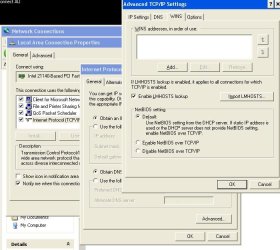
Here.
 

Attachments

  • Noname.jpg
    Noname.jpg
    62.9 KB · Views: 19

My Computer My Computer

At a glance

Windows 7 Ultimate 64BitGenuineIntel Intel(R) Core(TM) DuoCore T2400 ...2.00 GBMobile Intel(R) 945 Express Chipset
Computer Manufacturer/Model Number
Lenovo ThinkPad T60
OS
Windows 7 Ultimate 64Bit
CPU
GenuineIntel Intel(R) Core(TM) DuoCore T2400 @ 1.83GHz
Motherboard
Intel(R) 82801G (ICH7 Family)
Memory
2.00 GB
Graphics Card(s)
Mobile Intel(R) 945 Express Chipset
Sound Card
SoundMAX Integrated Digital HD Audio
Monitor(s) Displays
ThinkPad Display
Screen Resolution
1400x1050
Hard Drives
100Gb SATA
Keyboard
Standard Keyboard
Mouse
HID-compliant Mouse
Internet Speed
Cable Broadband - 54Mbps
Other Info
Intel(R) PRO/1000 PL Network Connection
11a/b/g Wireless LAN Mini PCI Express Adapter
It's similar, not exact. Right click the lan adapter icon next to time, in system tray to start. Properties I think. I'm not on XP so hard to remember.

He doesnt have any icon like that next to time...
 

My Computer My Computer

At a glance

Windows 7 64 & Ubuntu 64Intel Quad Core Q6600 2.40GHz8gNvidia 9600 GT & 9800 GT
Computer Manufacturer/Model Number
Built it myself
OS
Windows 7 64 & Ubuntu 64
CPU
Intel Quad Core Q6600 2.40GHz
Motherboard
Asus
Memory
8g
Graphics Card(s)
Nvidia 9600 GT & 9800 GT
Sound Card
Turtle Beach 5.1
Monitor(s) Displays
Three 19" Dell's & one 46" Samsung 750
You want enabled. I've known default to be flaky under circumstances.

Network and sharing center. Click local area connection. Click properties. Double click IPv4 line. Click advanced. Click WINS tab.

Or do like me. Make that disabled and install NETBeui instead to machines on your network. :p More secure/efficient.

Ok I found it in win 7, but I cant find IPv4 on the XP Pro computer?

Here.

Ok got it thanks. Now I'm doing the next step...
 

My Computer My Computer

At a glance

Windows 7 64 & Ubuntu 64Intel Quad Core Q6600 2.40GHz8gNvidia 9600 GT & 9800 GT
Computer Manufacturer/Model Number
Built it myself
OS
Windows 7 64 & Ubuntu 64
CPU
Intel Quad Core Q6600 2.40GHz
Motherboard
Asus
Memory
8g
Graphics Card(s)
Nvidia 9600 GT & 9800 GT
Sound Card
Turtle Beach 5.1
Monitor(s) Displays
Three 19" Dell's & one 46" Samsung 750
Start> Control Panel > Click "Network Connections" icon. Right-click Local Area Connection > Properties. Select Internet Protocol (TCP/IP). Click Properties, Then Advance button. Then WINS tab.
 

My Computer My Computer

At a glance

Windows 7 Ultimate 64BitGenuineIntel Intel(R) Core(TM) DuoCore T2400 ...2.00 GBMobile Intel(R) 945 Express Chipset
Computer Manufacturer/Model Number
Lenovo ThinkPad T60
OS
Windows 7 Ultimate 64Bit
CPU
GenuineIntel Intel(R) Core(TM) DuoCore T2400 @ 1.83GHz
Motherboard
Intel(R) 82801G (ICH7 Family)
Memory
2.00 GB
Graphics Card(s)
Mobile Intel(R) 945 Express Chipset
Sound Card
SoundMAX Integrated Digital HD Audio
Monitor(s) Displays
ThinkPad Display
Screen Resolution
1400x1050
Hard Drives
100Gb SATA
Keyboard
Standard Keyboard
Mouse
HID-compliant Mouse
Internet Speed
Cable Broadband - 54Mbps
Other Info
Intel(R) PRO/1000 PL Network Connection
11a/b/g Wireless LAN Mini PCI Express Adapter
First make sure both machines are on the same workgroup. My Computer>Properties>Computer Name for XP and Computer>Properties>Advanced System Settings Computer Name for 7... they should both be defaulted to WORKGROUP, you can change it if you want but not necessary.

Now on both machines make sure you have Computer Browser, SSDP Discovery, TCP/IP NetBIOS Helper, Server and Workstation services running. You can check this in Control Panel>Administrative Tools>Services

Also make sure on both Machines that your TCP/IP v4 settings for WINS has NetBIOS over TCP/IP set to Default or Enabled.

On 7 open up the run command and run gpedit.msc then go to Computer Configuration>Security Settings>Network List Manager Policies Under Network name your network the same as on your other machines(they should be the same) and under Unidentified and Identifying Networks set to private. This will force Windows 7 to connect to the default network you just set in gpedit and bypass the "Network Detection" feature. ( easier and guaranteed to work first time)

Now in Network and Sharing Center under Change Advanced Sharing Settings>Home Network Check Turn Off Network Discovery, Turn On File and Printer Sharing, Turn Off Public Folder Sharing, Turn On Password Protected Sharing.

On the XP machine make sure at least one folder is shared.

Now The XP machine should bae able to see the 7 machine but have no access, and the 7 machine will see the XP machine and have access to whatever you set to share on the XP machine.

Ok, now how do I setup the folder that is actually going to be shared?

I do that on the XP desktop I assume?
 

My Computer My Computer

At a glance

Windows 7 64 & Ubuntu 64Intel Quad Core Q6600 2.40GHz8gNvidia 9600 GT & 9800 GT
Computer Manufacturer/Model Number
Built it myself
OS
Windows 7 64 & Ubuntu 64
CPU
Intel Quad Core Q6600 2.40GHz
Motherboard
Asus
Memory
8g
Graphics Card(s)
Nvidia 9600 GT & 9800 GT
Sound Card
Turtle Beach 5.1
Monitor(s) Displays
Three 19" Dell's & one 46" Samsung 750
I refer you to post #3 here:

http://www.sevenforums.com/network-sharing/33199-2-windows-7-computers-lan.html

Please feel free to ask anything you want. It may be a lot to take in, but once you gain some sort of understanding, you'll be very glad you did.

This part will be most helpful to you:

"In Windows Explorer, it's a good idea to click organize, folder and search options, view tab. Scroll to bottom. Uncheck the box for "Use Sharing Wizard (Recommended)"

If you want to share a single folder, right click it, properties, sharing tab, click advanced sharing. The rest is self explanatory, besides you should hit permissions. This is where you type everyone.
 

My Computer My Computer

At a glance

7600.20510 x86P4 550 3.4 GHz HT running at 3.5 GHzOCZ 2 GB(2x1GB) DDR400mHz running @ 414 mHzHIS Radeon HD 3850 IceQ 3 Turbo HDMI Dual DL-...
Computer Manufacturer/Model Number
self built
OS
7600.20510 x86
CPU
P4 550 3.4 GHz HT running at 3.5 GHz
Motherboard
MSI PM8M3-V (MS-7211 v1.x) Micro-ATX mainboard
Memory
OCZ 2 GB(2x1GB) DDR400mHz running @ 414 mHz
Graphics Card(s)
HIS Radeon HD 3850 IceQ 3 Turbo HDMI Dual DL-DVI AGP
Sound Card
MOTU Traveler firewire studio interface 192 kHz 24 bit
Monitor(s) Displays
22" widescreen Acer X223W LCD, 17" Compaq P75 CRT
Screen Resolution
1680x1050 and 1280x1024
Hard Drives
SATA I x2 WD, 400 GB and 120 GB, SATA 2 WD Caviar Black 1 TB
PSU
350W generic
Case
Cybertronpc, it glows blue
Cooling
stock cpu fan, Ice-Q 3 gpu and system, many case fans
Keyboard
Logitch Classical Keyboard 200
Mouse
Logitech Mediaplay cordless
Internet Speed
1792/448 kbits/sec
Other Info
SATA II PCI fake RAID adapter, 1 GB Readyboost, original ATI Remote Wonder (even works with WMC perfectly), Logitech Rumblepad 2 game controller x2
I refer you to post #3 here:

http://www.sevenforums.com/network-sharing/33199-2-windows-7-computers-lan.html

Please feel free to ask anything you want. It may be a lot to take in, but once you gain some sort of understanding, you'll be very glad you did.

This part will be most helpful to you:

"In Windows Explorer, it's a good idea to click organize, folder and search options, view tab. Scroll to bottom. Uncheck the box for "Use Sharing Wizard (Recommended)"

If you want to share a single folder, right click it, properties, sharing tab, click advanced sharing. The rest is self explanatory, besides you should hit permissions. This is where you type everyone.

Do I just create a folder on each desktop? Or do I just create one on mine? I guess I'm a little confused on this part. The rest is already done though, thanks.

Open Windows explorer | click map network drive

I cant find this to do?

There are two check boxes describing the actions available as I've described.

When you're sharing a folder from a machine, to make it simple as possible, grant everyone permission by actually typing out everyone.

In Windows Explorer, it's a good idea to click organize, folder and search options, view tab. Scroll to bottom. Uncheck the box for "Use Sharing Wizard (Recommended)"

I did however get this step taken care of.

Do I also have to do this step on the XP Pro computer?
 

My Computer My Computer

At a glance

Windows 7 64 & Ubuntu 64Intel Quad Core Q6600 2.40GHz8gNvidia 9600 GT & 9800 GT
Computer Manufacturer/Model Number
Built it myself
OS
Windows 7 64 & Ubuntu 64
CPU
Intel Quad Core Q6600 2.40GHz
Motherboard
Asus
Memory
8g
Graphics Card(s)
Nvidia 9600 GT & 9800 GT
Sound Card
Turtle Beach 5.1
Monitor(s) Displays
Three 19" Dell's & one 46" Samsung 750
If you want the XP machine to have access to files and folders on the 7 machine from the XP machine then yes.

If you don't set any shares on the XP machine 7 will still see it, but won't be able to access anything. However from the XP machine, if you have shares setup on 7, you will be able to send and retrieve and vice-versa if you set it up the other way.


For example in my house we have 3 systems, my wifes netbook, the main/media pc and my sons. all on the same network, however on the main system I have password protected sharing on and also not sharing anything and no accounts set up to gain access the computer is only visible on the network not accessible. The netbook has the documents folder shared and sons computer is full access with a printer so from the main pc i can send, retrieve, print and change files and folders on sons, and my wife can swap out movie files from the main to her netbook.
 

My Computer My Computer

At a glance

Windows 7 Ultimate x64 RTMAMD Athlon II X2 240 @ 3.2Ghz6GB Mushkin DDR3 PC-1333ATI Radeon HD 4200 IGP Hybrid CrossFireX w\ S...
Computer Manufacturer/Model Number
Home Built
OS
Windows 7 Ultimate x64 RTM
CPU
AMD Athlon II X2 240 @ 3.2Ghz
Motherboard
Gigabyte GA-MA785GMT-UD2H
Memory
6GB Mushkin DDR3 PC-1333
Graphics Card(s)
ATI Radeon HD 4200 IGP Hybrid CrossFireX w\ Sapphire HD3450
Sound Card
Onboard Realtek HD audio controller
Monitor(s) Displays
D-SUB: LG W2343T-PF 23" LCD HDMI: LG 32LH20 32" LCD
Screen Resolution
1920*1080
Hard Drives
WD Caviar Green 1TB SATA3
PSU
Cooler Master Elite Power 400W
Case
Cooler Master Elite 360
Cooling
AMD Stock :)
Keyboard
Crappy wirelss logitech
Mouse
crappy wireless logitech
Internet Speed
792k
If you want the XP machine to have access to files and folders on the 7 machine from the XP machine then yes.

If you don't set any shares on the XP machine 7 will still see it, but won't be able to access anything. However from the XP machine, if you have shares setup on 7, you will be able to send and retrieve and vice-versa if you set it up the other way.


For example in my house we have 3 systems, my wifes netbook, the main/media pc and my sons. all on the same network, however on the main system I have password protected sharing on and also not sharing anything and no accounts set up to gain access the computer is only visible on the network not accessible. The netbook has the documents folder shared and sons computer is full access with a printer so from the main pc i can send, retrieve, print and change files and folders on sons, and my wife can swap out movie files from the main to her netbook.

Ok so since I just want the XP computer to be able to access just the file I put on its desktop, I dont need to do anything in windows manager?

How/where do I setup the folder on desktops?
 

My Computer My Computer

At a glance

Windows 7 64 & Ubuntu 64Intel Quad Core Q6600 2.40GHz8gNvidia 9600 GT & 9800 GT
Computer Manufacturer/Model Number
Built it myself
OS
Windows 7 64 & Ubuntu 64
CPU
Intel Quad Core Q6600 2.40GHz
Motherboard
Asus
Memory
8g
Graphics Card(s)
Nvidia 9600 GT & 9800 GT
Sound Card
Turtle Beach 5.1
Monitor(s) Displays
Three 19" Dell's & one 46" Samsung 750
If you want to make a dedicated folder for the purpose of sharing right click on the desktop and select New>Folder and then it to share this folder and then add Everyone to its permissions if its not already there. It should now show up in the network places under the computer name that it is on.

Also I just to clarify so I can help better... which computer specifically do you want to access? do you want to send and retrieve from 7 to XP(meaning sit at your 7 machine and send files to the XP) or XP to 7
 

My Computer My Computer

At a glance

Windows 7 Ultimate x64 RTMAMD Athlon II X2 240 @ 3.2Ghz6GB Mushkin DDR3 PC-1333ATI Radeon HD 4200 IGP Hybrid CrossFireX w\ S...
Computer Manufacturer/Model Number
Home Built
OS
Windows 7 Ultimate x64 RTM
CPU
AMD Athlon II X2 240 @ 3.2Ghz
Motherboard
Gigabyte GA-MA785GMT-UD2H
Memory
6GB Mushkin DDR3 PC-1333
Graphics Card(s)
ATI Radeon HD 4200 IGP Hybrid CrossFireX w\ Sapphire HD3450
Sound Card
Onboard Realtek HD audio controller
Monitor(s) Displays
D-SUB: LG W2343T-PF 23" LCD HDMI: LG 32LH20 32" LCD
Screen Resolution
1920*1080
Hard Drives
WD Caviar Green 1TB SATA3
PSU
Cooler Master Elite Power 400W
Case
Cooler Master Elite 360
Cooling
AMD Stock :)
Keyboard
Crappy wirelss logitech
Mouse
crappy wireless logitech
Internet Speed
792k
Back
Top