
Need to shrink Partition C

stevebirks

New member
Local time
8:04 AM
Messages
10
Hi all,

Firstly, apologies if I posted in the wrong section, but this seems to be the most appropriate place for my question. I also apologise if there is a ready made tutorial but I cant seem to find one that uses Partition Wizard.

I would like to shrink my C partition and make the D (data) partition bigger as it seems to me to make sense to have most of HDD space allocated to Data rather than the OS etc.

So my question is two fold.

1) What would be the recommended size for the OS partition, assuming I have no requirement to install any more software at this time.

2) I am somewhat confused as to the exact process to achieve what I want. I have partition wizard home edition already installed, please see my snippet of my my disk layout. Any advice as to the process would be appreciated.

Thanks in advance for any help from this great forum.
 

Attachments
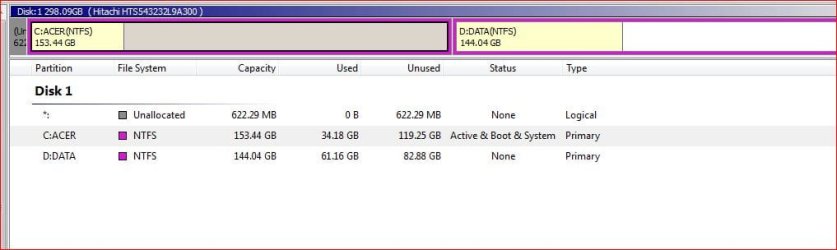
  • disk management.JPG
    disk management.JPG
    37.2 KB · Views: 201

My Computer My Computer

Computer Manufacturer/Model Number
ACER ASPIRE 6530
OS
win 7 home premium (32 bit), OS Version: 6.1.7600,
CPU
AMD Turion(tm) X2 Dual-Core Mobile RM-72 hypertransport 3.0
Motherboard
AMD M780 Chipset
Memory
3Gb DDR2
Graphics Card(s)
ATI Radeon HD3200
Sound Card
Realtek HD audio (model no. ???)
Monitor(s) Displays
generic PnP
Screen Resolution
1024*768
Hard Drives
320 Gb
Other Info
Clean (custom install). Windows.old deleted. AV is AVG 9.0 (FREE), MalwareBytes, SPybot S+D.
Hi all,

Firstly, apologies if I posted in the wrong section, but this seems to be the most appropriate place for my question. I also apologise if there is a ready made tutorial but I cant seem to find one that uses Partition Wizard.

I would like to shrink my C partition and make the D (data) partition bigger as it seems to me to make sense to have most of HDD space allocated to Data rather than the OS etc.

So my question is two fold.

1) What would be the recommended size for the OS partition, assuming I have no requirement to install any more software at this time.

2) I am somewhat confused as to the exact process to achieve what I want. I have partition wizard home edition already installed, please see my snippet of my my disk layout. Any advice as to the process would be appreciated.

Thanks in advance for any help from this great forum.

Hi Steve and welcome

1-50 gigs is more than enough for win 7.
2- process is simple but i am not familar with partition wizard. you shrink the OS partition and enlarge the data.

Five us some info on partition wizard and we cn give you more detailed info

Ken J+
 

My Computer My Computer

Computer Manufacturer/Model Number
HP Pavillion dv-7 1005 Tx
OS
Win 8 Release candidate 8400
CPU
[email protected]
Memory
4 gigs
Graphics Card(s)
Nvidia 9600M
Sound Card
HD built-in
Monitor(s) Displays
17" Wxga
Screen Resolution
1440x900
Cooling
none
Internet Speed
45Mb down 5Mb up
The best and only advice I can give you is to back up your system first. Many things could go wrong with this process, including human errors, so make sure your data is safe before you proceed.
 

My Computer My Computer

OS
Windows 7 Ultimate x64 SP1
CPU
Intel Core i7-2600
Motherboard
Gigabyte GA-P67A-UD3P-B3
Memory
12 GB Patriot Extreme DDR3-1333
Graphics Card(s)
Nvidia GTX 470
Monitor(s) Displays
Dell UltraSharp 2209WA
Hard Drives
OCZ Agility3 240 GB, WD5001AALS, WD7501AALS
PSU
OCZ ModStream 700W
Case
CoolerMaster HAF 912 Advanced
Cooling
CoolerMaster Hyper 212 Plus
Thanks Guys,

I just went for it (as I had a system image) and all worked out OK. It was just a case of dragging the right hand edge of C to the left and then dragging the Left hand edge of D to the left. Partition Wizard took care of the rest and I rebooted succesfully after about 15 minutes.
 

My Computer My Computer

Computer Manufacturer/Model Number
ACER ASPIRE 6530
OS
win 7 home premium (32 bit), OS Version: 6.1.7600,
CPU
AMD Turion(tm) X2 Dual-Core Mobile RM-72 hypertransport 3.0
Motherboard
AMD M780 Chipset
Memory
3Gb DDR2
Graphics Card(s)
ATI Radeon HD3200
Sound Card
Realtek HD audio (model no. ???)
Monitor(s) Displays
generic PnP
Screen Resolution
1024*768
Hard Drives
320 Gb
Other Info
Clean (custom install). Windows.old deleted. AV is AVG 9.0 (FREE), MalwareBytes, SPybot S+D.
Thanks Guys,

I just went for it (as I had a system image) and all worked out OK. It was just a case of dragging the right hand edge of C to the left and then dragging the Left hand edge of D to the left. Partition Wizard took care of the rest and I rebooted succesfully after about 15 minutes.

if this is soled can you check the red tringle on the right and type in solved so it can be marked

Thanks

Ken J+
 

My Computer My Computer

Computer Manufacturer/Model Number
HP Pavillion dv-7 1005 Tx
OS
Win 8 Release candidate 8400
CPU
[email protected]
Memory
4 gigs
Graphics Card(s)
Nvidia 9600M
Sound Card
HD built-in
Monitor(s) Displays
17" Wxga
Screen Resolution
1440x900
Cooling
none
Internet Speed
45Mb down 5Mb up

My Computer My Computer

Computer Manufacturer/Model Number
Cheap $399.00 E-Machine
OS
Windows 7 Pro & Vista Home Premium
CPU
Athlon 64 3800+ (Orleans) 2.40GHz
Motherboard
Winfast
Memory
2GB DDR2 RAM DIMM
Graphics Card(s)
NVIDIA GeForce 8500 GT 512 MB memory HDMI out
Sound Card
creative X-Fi Exteme 7..1 channel
Monitor(s) Displays
Acer V223W 22" widescreen DVI
Screen Resolution
1680x1050
Hard Drives
WDC WD5 500GB
WDC WD25 250GB
PSU
OCZ 550 watt
Case
Gateway
Cooling
2 fans
Keyboard
Dell
Mouse
Sony Vaio
Internet Speed
18MB/s down - .72MB /s up
Thanks Guys,

I just went for it (as I had a system image) and all worked out OK. It was just a case of dragging the right hand edge of C to the left and then dragging the Left hand edge of D to the left. Partition Wizard took care of the rest and I rebooted succesfully after about 15 minutes.

Good job Steve.

Just some additional info: in case your boot partition was to the right, you would probably have problems booting (windows don't like when it "moves"). In that case, you have to run a repair install 3 times and it should fix it.

This is just in case you need to make more changes, otherwise you are good to go the way it is
 

My Computer My Computer

Computer Manufacturer/Model Number
Wally, Innc.
OS
Windows 7 x64 finally!
CPU
AMD Athlon II X2 240
Motherboard
Biostar TA790GX XE
Memory
OCZ Platinum 4GB DDR2 1066 (will not work past 800MHz)
Graphics Card(s)
MSI R4670-MD1G Radeon HD 4670 1GB 128-bit GDDR3
Sound Card
ATI High Definition Audio Device Realtek ALC888
Monitor(s) Displays
HP w19e
Screen Resolution
1440x900
Hard Drives
Western Digital Caviar Green WD5000AADS 500GB SATA
Western Digital Caviar Blue WD5000AAKS 500GB SATA
PSU
Athena Power Micro ATX 400W
Case
HEC 6T 6T10BB Black MicroATX Mini Tower
Cooling
stock
Keyboard
wired, many keys
Mouse
HP wireless, 2 buttons, 1 wheel
Internet Speed
DSL 2Mb (recently getting 1.65M!)
Partition Wizard is the best automated way to do this.

Right click the Windows 7 partition and Resize/Move the right border back to the size you want Win7.

Then right click on Data partition and Resize/Move the left border given over snugly against the Win7 partition.

Apply all steps.

Any Moving operation needs to first have files externally backed up.
 
Didn't notice zigzag3143 post.

50GB is fine.
 

My Computer My Computer

Computer Manufacturer/Model Number
Cheap $399.00 E-Machine
OS
Windows 7 Pro & Vista Home Premium
CPU
Athlon 64 3800+ (Orleans) 2.40GHz
Motherboard
Winfast
Memory
2GB DDR2 RAM DIMM
Graphics Card(s)
NVIDIA GeForce 8500 GT 512 MB memory HDMI out
Sound Card
creative X-Fi Exteme 7..1 channel
Monitor(s) Displays
Acer V223W 22" widescreen DVI
Screen Resolution
1680x1050
Hard Drives
WDC WD5 500GB
WDC WD25 250GB
PSU
OCZ 550 watt
Case
Gateway
Cooling
2 fans
Keyboard
Dell
Mouse
Sony Vaio
Internet Speed
18MB/s down - .72MB /s up
Back
Top