Need Urgent help with booting

Ray1935

New member
Local time
8:50 PM
Messages
3
Made an inadvertant error on my Win7 computer details are:

Hard drive 1TB - partioned as:

Drive C - 200GB
Drive D - 100MB - system drive
Drive E - 300Gb
Drive F - 487GB

I decided to split Drive F into 2 drives, so using the Disk Management routine I shrunk Drive F by 200GB and then created a new volume with the 200GB, setting the drive as S.

I then installed MSFlight Simulator X onto drive S. I came up with a problem while it was installing Direct X and after downloading directx webinstall and receiving an error pointing to my dvd drive I just used the Restart option to reboot my machine.

The reboot now stops at the Loading Operating System message and that's it. It has occurred to me that perhaps the computer is now trying to boot from the new drive S that I created and not from my original C drive.

Could someone advise me how to change the boot drive back to Drive C, I have tried to Google an answer but after several hours it appears pointless so I'm hoping that some forum member will have an answer for me.

Thanks

Ray
 

My Computer

Computer Manufacturer/Model Number
Custom
OS
Win7 Ultimate
CPU
Amd Phenom II 965 BE
Motherboard
Gigabyte GA-MA790XTA-UD4
Memory
8GB Kingston HyperX DDR3-1600
Graphics Card(s)
Galaxy GT9800GT
Monitor(s) Displays
Viewsonic 24"
Hard Drives
Samsung sata 1TB
PSU
PC Power and Cooloing 750 Crossfire
Case
Lancool pc-k62
Cooling
Prolima Megahalems

My Computer

Computer type
PC/Desktop
Computer Manufacturer/Model Number
Self Built
OS
Win 10 Pro x64
CPU
Intel I5-2500K @3.3GHz
Motherboard
Asrock P67 Extreme4
Memory
16GB G.Skill Ripjaws X (4x4GB)
Graphics Card(s)
EVGA GeForce 750 Ti SC 2GB
Sound Card
ASUS Xonar DG 5.1 Channels 24-bit 96KHz PCI Interface Sound
Monitor(s) Displays
auria eq2367
Screen Resolution
1920 x 1080
Hard Drives
250GB Samsung 850 EVO SSD
1TB WD Blue
1TB Hitachi
PSU
SeaSonic X 650W 80 Plus Gold
Case
Corsair Obsidian 750D
Cooling
Corsair H60, Three 140mm case fans
Keyboard
Logitech Wireless Keyboard K520
Mouse
Logitech Wireless Mouse M310
Internet Speed
Wave Broadband ~ 100 dn 5 up
Antivirus
Windows Defender, Malwarebytes Premium
Browser
Edge, IE11, Chrome
Other Info
Laptop specs: HP g7-1365dx /
CPU: AMD A6-3420M APU with Radeon(tm) HD Graphics /
RAM: Crucial 8Gb (2x4Gb) /
SSD: Crucial M4-CT128M4SSD2 ATA Device/ FW 000F /
GFX: AMD Radeon HD 6520G /
OS: Windows 10 Pro x64
Thanks for the replies, however the Startup Repair does seem to point to the fact that the system is somehow not starting correctly. I do not think that this is the problem at all. My thoughts are that the creation of the additional drive resulted in Windows assigning the active patition to the new drive and this drive has NO operating system on it. As I see it the resolution is:

a) Delete the new partition Drive S
b) Re activate the original Active partition Drive C.

Under other windows this would have been achieved by simply running Fdisk, assigning the Active drive and rebooting the machine, however fdisk does not seem to recognise NTFS or Sata disks and therein I believe lies the problem.

What I'm looking for is some routine like fdisk which will do just that. Our advancing technology has surely kept up with Windows 98. (I hope)

Ray
 

My Computer

Computer Manufacturer/Model Number
Custom
OS
Win7 Ultimate
CPU
Amd Phenom II 965 BE
Motherboard
Gigabyte GA-MA790XTA-UD4
Memory
8GB Kingston HyperX DDR3-1600
Graphics Card(s)
Galaxy GT9800GT
Monitor(s) Displays
Viewsonic 24"
Hard Drives
Samsung sata 1TB
PSU
PC Power and Cooloing 750 Crossfire
Case
Lancool pc-k62
Cooling
Prolima Megahalems
click start and type "System Configuration" in the Search bar.
Click on "System Configuration" at the top of the list which brings up:
General | Boot | Services | Startup | Tools (tabs)

You should be able to point to the partition that Windows resides on in the Boot tab
 

My Computer

Computer Manufacturer/Model Number
Systemax N2000 Gaming PC
OS
Windows 7 Ultimate x64
CPU
Q6600 @2.4ghz (G0 stepping)
Motherboard
XFX nforce 680i LT
Memory
8 gb OCZ vista essential sli PC-6400
Graphics Card(s)
Dual 9800gt in SLI mode
Sound Card
Integrated 8.1 High Definition Audio
Monitor(s) Displays
Dual Sceptre x246w 24 inch monitors
Screen Resolution
1920 x 1200 each monitor
Hard Drives
500 GB SATA II / 7500 rpm
PSU
Cooler Master Real Power Pro 1250W
Case
N2000 server tower
Cooling
Thermaltake Bigwater 760 is
Keyboard
MS Intelitype 6000 v2.0
Mouse
MS Intelipoint 6000
Internet Speed
Wi-power 1.5GB up / 512k down
Other Info
Windows 7 Ultimate x64, Windows 7 Pro x64, Windows Home Premium X86, Windows XP pro, Windows Home Server x86, Ubuntu 10.4 x86 and x64, Ubuntu server 10.4, SQL Server 2005, MySQL 5.0
Hello Ray1935, welcome to Seven Forums!


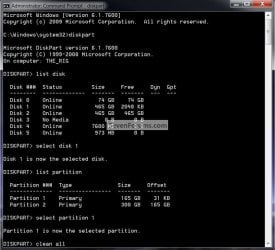
If you know for a fact the partition number that the flight sim is on you can use diskpart to zero that partition; you may have to do it from a command window at boot (see the "note" in the tutorial) then maybe you can get it to start in safe mode to mark C: as active then do at least 3 startup repairs to fix it (it takes at least 3) to finish the repair.
BTW, diskpart takes a while to zero a partition, it took 2 hours to do a 300GB drive for me, diskpart will tell you when it's finished just let it do its thing.

Have a look at the tutorial and the snip below.


http://www.sevenforums.com/tutorials/52129-disk-clean-clean-all-diskpart-command.html?ltr=D

click this image to enlarge
Diskpart.jpg
 

My Computer

Computer Manufacturer/Model Number
* BFK Customs *
OS
W 7 64-bit Ultimate
CPU
Intel Q9550 Yorkfield
Motherboard
ASUS P5Q Pro
Memory
8GB Dominator 8500C5D
Graphics Card(s)
ATI : XFX 5870
Sound Card
Realtek HD Audio 7-1
Monitor(s) Displays
1x 47" LCD HDMI & 3x 26" LCD HDMI
Screen Resolution
1920x1080P & 1920x1200
Hard Drives
1x 80GB Intel X25-M G2 SSD : 1x 500GB & 1x 640GB WD Caviar Black(s)
PSU
Corsair 620HX
Case
Cooler Master RC-690
Cooling
Tuniq Tower 120, 2x 140mm and 3x 120mm case fans
Keyboard
Microsoft 500
Mouse
Razer Diamondback 3G
Internet Speed
14 Mb/s
Other Info
1x Koutech 3Gb/s SATA HDD Hot Swap Rack
Thanks everyone for the suggestions however the problem was caused when I reduced the drive size and added another partition (My Drive S). I finally discovered a free Partition Manager which allowed me to delete the newly created partition and recover all my lost partitions. My system is now back to normal.

For anyone interested the partition manager was Partition Wizard.

Ray
 

My Computer

Computer Manufacturer/Model Number
Custom
OS
Win7 Ultimate
CPU
Amd Phenom II 965 BE
Motherboard
Gigabyte GA-MA790XTA-UD4
Memory
8GB Kingston HyperX DDR3-1600
Graphics Card(s)
Galaxy GT9800GT
Monitor(s) Displays
Viewsonic 24"
Hard Drives
Samsung sata 1TB
PSU
PC Power and Cooloing 750 Crossfire
Case
Lancool pc-k62
Cooling
Prolima Megahalems
Glad you got it sorted out and thanks for posting your solution.
Derek
 

My Computer

Computer type
PC/Desktop
Computer Manufacturer/Model Number
Self Built
OS
Win 10 Pro x64
CPU
Intel I5-2500K @3.3GHz
Motherboard
Asrock P67 Extreme4
Memory
16GB G.Skill Ripjaws X (4x4GB)
Graphics Card(s)
EVGA GeForce 750 Ti SC 2GB
Sound Card
ASUS Xonar DG 5.1 Channels 24-bit 96KHz PCI Interface Sound
Monitor(s) Displays
auria eq2367
Screen Resolution
1920 x 1080
Hard Drives
250GB Samsung 850 EVO SSD
1TB WD Blue
1TB Hitachi
PSU
SeaSonic X 650W 80 Plus Gold
Case
Corsair Obsidian 750D
Cooling
Corsair H60, Three 140mm case fans
Keyboard
Logitech Wireless Keyboard K520
Mouse
Logitech Wireless Mouse M310
Internet Speed
Wave Broadband ~ 100 dn 5 up
Antivirus
Windows Defender, Malwarebytes Premium
Browser
Edge, IE11, Chrome
Other Info
Laptop specs: HP g7-1365dx /
CPU: AMD A6-3420M APU with Radeon(tm) HD Graphics /
RAM: Crucial 8Gb (2x4Gb) /
SSD: Crucial M4-CT128M4SSD2 ATA Device/ FW 000F /
GFX: AMD Radeon HD 6520G /
OS: Windows 10 Pro x64
Hello again Ray.


We're glad you found a solution that works for you, thanks for the update.
 

My Computer

Computer Manufacturer/Model Number
* BFK Customs *
OS
W 7 64-bit Ultimate
CPU
Intel Q9550 Yorkfield
Motherboard
ASUS P5Q Pro
Memory
8GB Dominator 8500C5D
Graphics Card(s)
ATI : XFX 5870
Sound Card
Realtek HD Audio 7-1
Monitor(s) Displays
1x 47" LCD HDMI & 3x 26" LCD HDMI
Screen Resolution
1920x1080P & 1920x1200
Hard Drives
1x 80GB Intel X25-M G2 SSD : 1x 500GB & 1x 640GB WD Caviar Black(s)
PSU
Corsair 620HX
Case
Cooler Master RC-690
Cooling
Tuniq Tower 120, 2x 140mm and 3x 120mm case fans
Keyboard
Microsoft 500
Mouse
Razer Diamondback 3G
Internet Speed
14 Mb/s
Other Info
1x Koutech 3Gb/s SATA HDD Hot Swap Rack
Thanks everyone for the suggestions however the problem was caused when I reduced the drive size and added another partition (My Drive S). I finally discovered a free Partition Manager which allowed me to delete the newly created partition and recover all my lost partitions. My system is now back to normal.

For anyone interested the partition manager was Partition Wizard.

Ray
Glad you have it sorted out and thanks for posting the solution.
 

My Computer

Computer Manufacturer/Model Number
Home built
OS
Windows 7 Ultimate 32 bit
CPU
Intel(R) Pentium(R) 4 CPU 3.00GHz
Motherboard
ASUS P4P800-VM Motherboard Chipset: Intel 865G + ICH5
Memory
2.50 GB RAM
Graphics Card(s)
NVIDIA GeForce 7600 GS
Sound Card
SoundMax Integrated Digital Audio (Chip)
Monitor(s) Displays
ViewSonic VX 1962 wm
Screen Resolution
1680 X 1050
Hard Drives
Seagate Barracuda 7200.10 80 GB
ST380215A ATA Device 18.6 GB
Western Digital "My Book" external hard drive 750 GB
Cooling
Fan based
Keyboard
Microsoft Comfort Curve Keyboard 2000 v10 USB
Mouse
Logitec optic USB
Internet Speed
3.01 Mb/s download 0.64 Mb/s upload
Back
Top