need word 2007 AND word 2010, how to set file associations

OnTheRoad41

New member
Local time
8:02 PM
Messages
3
Because I do teaching for people who have both versions (2007 & 2010) of Word, I have to keep both on my computer. How do I get .doc and .docx to associate with Word 2010?

Because I work mostly in 2010, I want to default to opening with 2010 but I can't do it. When I do try to correct the association (through the Control Panel) it WON'T associate with 2010. I go to the winword.exe in the correct folder for 2010 and click on it but it just stays the same, still associated with winword.exe in the 2007 folder.
 

My Computer My Computer

At a glance

Win 7 Home Premium 64 bit
OS
Win 7 Home Premium 64 bit
FileTypesManager is pretty good in cases like this one.

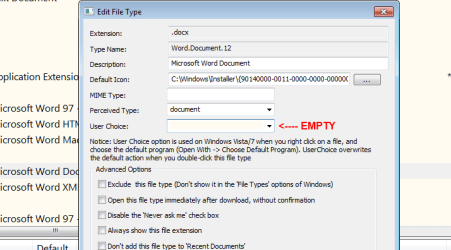
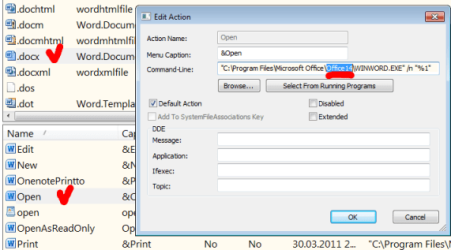
Download this free application, run it, look for docx. Hightlight it and press F2. In a new window delete anything in the User Choice field. Close that window and find Open coomand for docx in main Window. Make sure that command-line leads to Office14. Repeat for doc.
 

Attachments

  • F2a.png
    F2a.png
    14.1 KB · Views: 38
  • F2.png
    F2.png
    23.5 KB · Views: 34

My Computer My Computer

At a glance

Windows 8.1 ; Windows 7 x86 (Dec2008-Jan2013)
Computer type
PC/Desktop
OS
Windows 8.1 ; Windows 7 x86 (Dec2008-Jan2013)
Other Info
"The scale icon at the top right of a post or tutorial is how you can give rep to the member."
FileTypesManager is pretty good in cases like this one.

Download this free application, run it, look for docx. Hightlight it and press F2. In a new window delete anything in the User Choice field. Close that window and find Open coomand for docx in main Window. Make sure that command-line leads to Office14. Repeat for doc.
Thanks for the quick help and I tried your suggestion with FileTypesMan. Using F2 the User Choice is blank and the command line for both .doc and .docx now reads "C:\Program Files\Microsoft Office\Office14\WINWORD.EXE" "%1" and everything .doc or .docx still opens in Word2007!:( What am I missing?
 

My Computer My Computer

At a glance

Win 7 Home Premium 64 bit
OS
Win 7 Home Premium 64 bit
Command line for option OPEN? What about command line for other options?

Myself, I would create a portable version of Office 2007, so it won't interfere with Office 2010.
 

My Computer My Computer

At a glance

Windows 8.1 ; Windows 7 x86 (Dec2008-Jan2013)
Computer type
PC/Desktop
OS
Windows 8.1 ; Windows 7 x86 (Dec2008-Jan2013)
Other Info
"The scale icon at the top right of a post or tutorial is how you can give rep to the member."
Here's a pretty simple solution that usually works:

  1. Right click on a file
  2. Click open with
  3. Choose the program that you wish to open the file with (If necessary, browse for the program)
  4. Check the box "Always use the selected program to open this kind of file" box
  5. Hit OK

Then your file should always open with the selected program. :)
 

My Computer My Computer

At a glance

Windows 7 Professional 32bitsIntel (R) Celeron (R) CPU 900 @ 2.20 GHzMobile Intel (R) Series Express Chipset Family
Computer Manufacturer/Model Number
TOSHIBA Satellite L305
OS
Windows 7 Professional 32bits
CPU
Intel (R) Celeron (R) CPU 900 @ 2.20 GHz
Graphics Card(s)
Mobile Intel (R) Series Express Chipset Family
Sound Card
Realtek (Driver - High Defenition Audio Device by Microsoft)
Monitor(s) Displays
Built-in display (Laptop)
Screen Resolution
1280x800 pixels
Hard Drives
1) C - 147 GB [Windows 7]
Keyboard
Built-in (laptop)
Mouse
Snaptics TouchPad
Internet Speed
51 mbps
Other Info
Webcam: Logitech Webcam c210
Antivirus: Microsoft Security Essentials
Internet Browser: Google Chrome
Here's a pretty simple solution that usually works:

  1. Right click on a file
  2. Click open with
  3. Choose the program that you wish to open the file with (If necessary, browse for the program)
  4. Check the box "Always use the selected program to open this kind of file" box
  5. Hit OK

Then your file should always open with the selected program. :)
Yes, I knew about that but the only program I could access that way was Word2007. Although I could start Word2010, it was not available to "Open with" and I have no idea why. I have uninstalled Word2007 and will deal with it when and if I have to later, perhaps on another computer. It was causing too many problems.
 

My Computer My Computer

At a glance

Win 7 Home Premium 64 bit
OS
Win 7 Home Premium 64 bit
I'm having the exact same problem as OnTheRoad41. you are not alone my friend. I have also uninstalled Word2007. The only way we are still tolerating this problem is the ability to open an office program first through the Start menu, then once loaded, go to file - open, and select the file you want to work with.
Strange thing I found is there are no .exe file for Word2010, Excel2010 or any of the Microsoft Office Home and Student (English) package. Its all being initiated via some crazy "Virtualization Handler"
 
Last edited:

My Computer My Computer

At a glance

Windows 7 Home Premium 64bit
OS
Windows 7 Home Premium 64bit
Back
Top