Solved Needed or Not Needed Microsoft Visual C++

iNiffy

New member
Local time
10:42 PM
Messages
25
Good Day


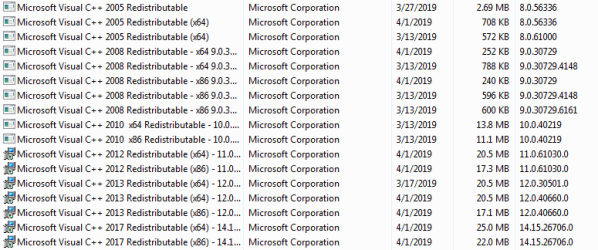
I'm having a little problem with Microsoft Visual C++, I have so many versions of them and I don't know which ones I need. How do I know which Microsoft Visual C++ versions I need and which ones not needed?
 

Attachments

  • Capture.PNG
    Capture.PNG
    52.4 KB · Views: 0

My Computer

Computer type
PC/Desktop
Computer Manufacturer/Model Number
MSI
OS
Microsoft Windows 7 Ultimate 64-bit 7601 Multiprocessor Free Service Pack 1
CPU
AMD A8-7650K Radeon R7, 10 Compute Cores 4C+6G
Motherboard
MSI A68HM-E33 V2 (MS-7721)
Memory
4.00 GB (3.46 GB Usable)
Graphics Card(s)
AMD Radeon(TM) R7 Graphics
Sound Card
RV635 HDMI Audio [Radeon HD 3650/3730/3750]
Screen Resolution
1366 x 768
Hard Drives
HUAWEI MMC Storage USB Device
Seagate Backup+ BK USB Device
TOSHIBA DT01ACA100 ATA Device
Antivirus
Malwarebytes
Browser
Opera
I don't think there really is a way to know what version you need or not. They may be used by some of the programs you have installed on your computer. Some programs need a certain version of Visual C++.

Sometimes these Visual C++ versions are installed along with the program you install, but not always and require you to download it for the program to run.

What issue are you having exactly? Is there an error code?

You could see what version of Visual C++ is causing problems and uninstall it and reinstall it.
 

My Computer

Computer type
PC/Desktop
OS
Windows 7 Ultimate x64
Nope

I don't think there really is a way to know what version you need or not. They may be used by some of the programs you have installed on your computer. Some programs need a certain version of Visual C++.

Sometimes these Visual C++ versions are installed along with the program you install, but not always and require you to download it for the program to run.

What issue are you having exactly? Is there an error code?

You could see what version of Visual C++ is causing problems and uninstall it and reinstall it.
I don't really have a big problem here. I just want to clean up some unneeded versions of microsoft visual c++. by the way I installed many software before and did not uninstall them, just deleted them. So the version of visual c++ did not get uninstalled. So that explains why I have so many of them.
 

My Computer

Computer type
PC/Desktop
Computer Manufacturer/Model Number
MSI
OS
Microsoft Windows 7 Ultimate 64-bit 7601 Multiprocessor Free Service Pack 1
CPU
AMD A8-7650K Radeon R7, 10 Compute Cores 4C+6G
Motherboard
MSI A68HM-E33 V2 (MS-7721)
Memory
4.00 GB (3.46 GB Usable)
Graphics Card(s)
AMD Radeon(TM) R7 Graphics
Sound Card
RV635 HDMI Audio [Radeon HD 3650/3730/3750]
Screen Resolution
1366 x 768
Hard Drives
HUAWEI MMC Storage USB Device
Seagate Backup+ BK USB Device
TOSHIBA DT01ACA100 ATA Device
Antivirus
Malwarebytes
Browser
Opera
Hi iNiffy,

I don't really have a big problem here. I just want to clean up some unneeded versions of microsoft visual c++. by the way I installed many software before and did not uninstall them, just deleted them. So the version of visual c++ did not get uninstalled. So that explains why I have so many of them.

When you have software that you no longer want, the worst thing you can do is to just delete them!

They need to be uninstalled properly. They can be uninstalled in Programs and Features [which can still leave bits behind], or you can download and run Revo Uninstaller [FREE] from here => Revo Uninstaller.

When you run scan for leftover items make sure that you use the Advanced Scan option, then tick everything and delete it.

As far as M$ Visual C++ is concerned, there is no benefit in uninstalling them. You might download a program in the future that needs them!

I hope this helps!
 

My Computer

Computer type
Laptop
Computer Manufacturer/Model Number
Fujitsu LIFEBOOK
OS
Win 7 HP SP1 64-bit Vista HB SP2 32-bit Linux Mint 18.3
CPU
Intel(R) Pentium(R) CPU P6200 @ 2.13GHz
Motherboard
FUJITSU FJNBB06
Memory
4.00 GB
Graphics Card(s)
Intel(R) Graphics Media Accelerator HD
Sound Card
[1] Realtek High Definition Audio [2] Intel(R) Display Audio
Screen Resolution
1366 x 768 x 32 bits (4294967296 colors) @ 59 Hz
Hard Drives
TOSHIBA MK5076GSX
Antivirus
AVG FREE
Hi iNiffy,


When you have software that you no longer want, the worst thing you can do is to just delete them!

They need to be uninstalled properly. They can be uninstalled in Programs and Features [which can still leave bits behind], or you can download and run Revo Uninstaller [FREE] from here => Revo Uninstaller.

When you run scan for leftover items make sure that you use the Advanced Scan option, then tick everything and delete it.

As far as M$ Visual C++ is concerned, there is no benefit in uninstalling them. You might download a program in the future that needs them!

I hope this helps!
Thanks Paul Black


I really know how to uninstall applications properly as I am an experienced user in windows 7 (not in windows 8 or 10) but I get how lazy I am just deleted the application directory. But thanks for the suggestion in using Revo Uninstaller, I will try it out later :D.
 

My Computer

Computer type
PC/Desktop
Computer Manufacturer/Model Number
MSI
OS
Microsoft Windows 7 Ultimate 64-bit 7601 Multiprocessor Free Service Pack 1
CPU
AMD A8-7650K Radeon R7, 10 Compute Cores 4C+6G
Motherboard
MSI A68HM-E33 V2 (MS-7721)
Memory
4.00 GB (3.46 GB Usable)
Graphics Card(s)
AMD Radeon(TM) R7 Graphics
Sound Card
RV635 HDMI Audio [Radeon HD 3650/3730/3750]
Screen Resolution
1366 x 768
Hard Drives
HUAWEI MMC Storage USB Device
Seagate Backup+ BK USB Device
TOSHIBA DT01ACA100 ATA Device
Antivirus
Malwarebytes
Browser
Opera
I really know how to uninstall applications properly as I am an experienced user in windows 7 (not in windows 8 or 10) but I get how lazy I am just deleted the application directory. But thanks for the suggestion in using Revo Uninstaller, I will try it out later :D.
:thumbsup:
 

My Computer

Computer type
Laptop
Computer Manufacturer/Model Number
Fujitsu LIFEBOOK
OS
Win 7 HP SP1 64-bit Vista HB SP2 32-bit Linux Mint 18.3
CPU
Intel(R) Pentium(R) CPU P6200 @ 2.13GHz
Motherboard
FUJITSU FJNBB06
Memory
4.00 GB
Graphics Card(s)
Intel(R) Graphics Media Accelerator HD
Sound Card
[1] Realtek High Definition Audio [2] Intel(R) Display Audio
Screen Resolution
1366 x 768 x 32 bits (4294967296 colors) @ 59 Hz
Hard Drives
TOSHIBA MK5076GSX
Antivirus
AVG FREE
Just be aware that when you use Revouninstaller you actually try to scroll though all of the registry and files left over and make a good educated guess as to whether that registry key or file should be deleted. It's mostly pertaining to registry keys though. I've uninstalled a program once and for some reason some of the registry keys that Revouninstaller thought were part of that program actually were core keys for other things in Windows, etc. But the good part is that you should have the option in Revouninstaller create a System Restore point prior to uninstallation of that program so in case it does delete something it shouldn't you can roll back the changes through system restore. This isn't true for the majority of programs you may uninstall, but I think for things like VMware, etc it uses keys that the OS and other programs use and Revouninstaller mismarks them as belonging solely to that application. Or, instead of messing with System Restore which can and will pose issues in some circumstances, you can just go to your registry and backup the whole thing prior to uninstalling a very heavy program like VMware, etc. I use VMware as an example. I can't remember now what program it was that carried non-related registry keys with it.
 

My Computer

Computer type
PC/Desktop
OS
Windows 7 Ultimate x64
Back
Top