.NET FRAMEWORK 4 Issue

dbzx

New member
Local time
10:08 AM
Messages
8
Hello,

I have a problem with .net framework 4 for Window 7 x64 Ultimate. After installing it, certain application such as Aion still gives me the error "this application require .net framework v4.030319" even though its already installed. Is there a fix for this problem?

Thanks in advance guys.
 

My Computer

OS
Window 7 Ultimate x64
CPU
i7 920 2.66 ghz
Motherboard
ASUS P6X58D Premium
Memory
OCZ Gold 6gb RAM 8-8-8-24 1600 mhz
Graphics Card(s)
XFX ATI 5850
Monitor(s) Displays
Dell ST2210
Hard Drives
Hitatchi 1 TB 7200 RPM
PSU
CORSAIR 850TX 850W
Case
CM Storm Sniper
Cooling
Scythe Mugen II
Hello,

I have a problem with .net framework 4 for Window 7 x64 Ultimate. After installing it, certain application such as Aion still gives me the error "this application require .net framework v4.030319" even though its already installed. Is there a fix for this problem?

Thanks in advance guys.

Hi, Try first to enable the previous version of NetFramework v2 in the Services.

Control Panel=>Administration Tools=>Services, and set to manual the two entries of NetFramework v2. The NetFramework should be set Automatic (delayed).

If you installed the Netframework v4 without the Windows Update, you should whenever check which version x32 or x64 had been installed.
 

My Computer

Computer type
PC/Desktop
Computer Manufacturer/Model Number
Custom Build
OS
Windows 7 Professional SP1 - x64 [Non-UEFI Boot]
CPU
Ivy Bridge Core i5 3570K (Delidded)
Motherboard
Asus P8Z77-V LE PLUS
Memory
G.Skill "Ares" DDR3 PC3-12800 - 1600MHz (16Gb)
Graphics Card(s)
Asus Dual-RX480-O4G
Sound Card
Creative Sound Blaster Z w/5.1 sound system
Monitor(s) Displays
Asus IPS 23"
Screen Resolution
16/9
Hard Drives
Internal:
500Go Sata 6Gb/s (x2)
500Go Sata 3Gb/s (x2)
SSD 60Go Sata 6Gb/s
PSU
In Win C 900W Series 80+ Platinum
Case
Thermaltake Chaser A71
Cooling
Custom Water Cooling Loop
Keyboard
Cooler Master QuickFire XTi
Mouse
Razer Imperator 2012 (4G)
Antivirus
MSE
Browser
IE 11.0.xxx Rtm
Other Info
"Raid0" with Intel Smart Response Technology (HDD/SSD)
I tried doing what you said but I did not see netframework v2 in the services but I know that its installed in my system.

Thanks for the reply.

EDIT: nvm I found it, testing if its working now.
EDIT2: tested your method and its still not working.
 

My Computer

OS
Window 7 Ultimate x64
CPU
i7 920 2.66 ghz
Motherboard
ASUS P6X58D Premium
Memory
OCZ Gold 6gb RAM 8-8-8-24 1600 mhz
Graphics Card(s)
XFX ATI 5850
Monitor(s) Displays
Dell ST2210
Hard Drives
Hitatchi 1 TB 7200 RPM
PSU
CORSAIR 850TX 850W
Case
CM Storm Sniper
Cooling
Scythe Mugen II
I tried doing what you said but I did not see netframework v2 in the services but I know that its installed in my system.

Thanks for the reply.

EDIT: nvm I found it, testing if its working now.
EDIT2: tested your method and its still not working.

Uninstall the Net v4 and reinstall it.
Do the same manner after v4 installed to reenable the Net v2.
 

My Computer

Computer type
PC/Desktop
Computer Manufacturer/Model Number
Custom Build
OS
Windows 7 Professional SP1 - x64 [Non-UEFI Boot]
CPU
Ivy Bridge Core i5 3570K (Delidded)
Motherboard
Asus P8Z77-V LE PLUS
Memory
G.Skill "Ares" DDR3 PC3-12800 - 1600MHz (16Gb)
Graphics Card(s)
Asus Dual-RX480-O4G
Sound Card
Creative Sound Blaster Z w/5.1 sound system
Monitor(s) Displays
Asus IPS 23"
Screen Resolution
16/9
Hard Drives
Internal:
500Go Sata 6Gb/s (x2)
500Go Sata 3Gb/s (x2)
SSD 60Go Sata 6Gb/s
PSU
In Win C 900W Series 80+ Platinum
Case
Thermaltake Chaser A71
Cooling
Custom Water Cooling Loop
Keyboard
Cooler Master QuickFire XTi
Mouse
Razer Imperator 2012 (4G)
Antivirus
MSE
Browser
IE 11.0.xxx Rtm
Other Info
"Raid0" with Intel Smart Response Technology (HDD/SSD)
reinstalled, reenabled .net framework v2, but it still doesnt work.

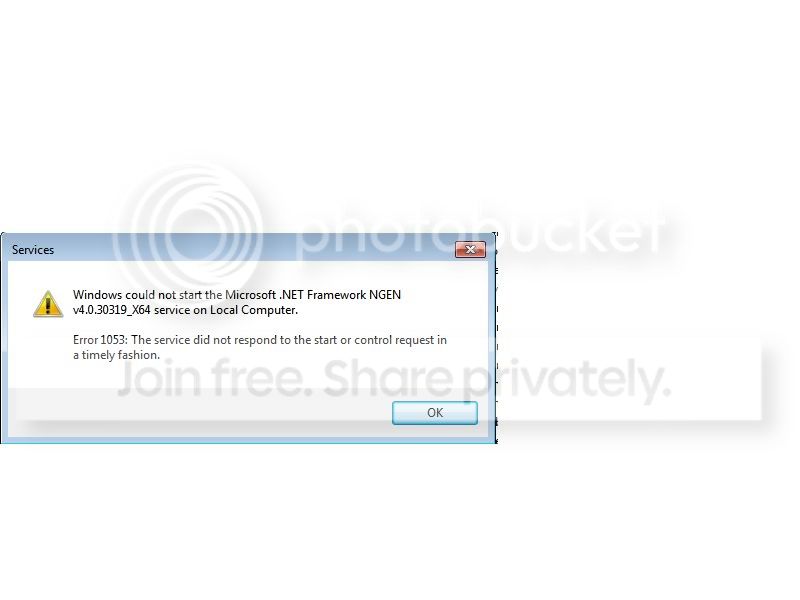
EDIT : I tried to right click th e dot .net framwork 4 x64 and start it, but this error pops up as it was trying to start:

"Windows could not start the Microsoft .net Framework NGEN v4.030319_X64 service on Local COmputer.
Error 1053: The service did not respond to the start or control request ina timely fashion."
 

My Computer

OS
Window 7 Ultimate x64
CPU
i7 920 2.66 ghz
Motherboard
ASUS P6X58D Premium
Memory
OCZ Gold 6gb RAM 8-8-8-24 1600 mhz
Graphics Card(s)
XFX ATI 5850
Monitor(s) Displays
Dell ST2210
Hard Drives
Hitatchi 1 TB 7200 RPM
PSU
CORSAIR 850TX 850W
Case
CM Storm Sniper
Cooling
Scythe Mugen II
reinstalled, reenabled .net framework v2, but it still doesnt work.

EDIT : I tried to right click th e dot .net framwork 4 x64 and start it, but this error pops up as it was trying to start:

"Windows could not start the Microsoft .net Framework NGEN v4.030319_X64 service on Local COmputer.
Error 1053: The service did not respond to the start or control request ina timely fashion."

I do not think you should start it manually, it triggers on needs.
It could be something to do with "Programs & Features=>Windows Features, to enable.

Can you provide a screenshot?

You could try aswell to install (see attached thumbnail), those are same versions as .Net v4 (030319). it won't do anything bad:
 

Attachments

  • Capture.PNG
    Capture.PNG
    7.1 KB · Views: 790
Last edited:

My Computer

Computer type
PC/Desktop
Computer Manufacturer/Model Number
Custom Build
OS
Windows 7 Professional SP1 - x64 [Non-UEFI Boot]
CPU
Ivy Bridge Core i5 3570K (Delidded)
Motherboard
Asus P8Z77-V LE PLUS
Memory
G.Skill "Ares" DDR3 PC3-12800 - 1600MHz (16Gb)
Graphics Card(s)
Asus Dual-RX480-O4G
Sound Card
Creative Sound Blaster Z w/5.1 sound system
Monitor(s) Displays
Asus IPS 23"
Screen Resolution
16/9
Hard Drives
Internal:
500Go Sata 6Gb/s (x2)
500Go Sata 3Gb/s (x2)
SSD 60Go Sata 6Gb/s
PSU
In Win C 900W Series 80+ Platinum
Case
Thermaltake Chaser A71
Cooling
Custom Water Cooling Loop
Keyboard
Cooler Master QuickFire XTi
Mouse
Razer Imperator 2012 (4G)
Antivirus
MSE
Browser
IE 11.0.xxx Rtm
Other Info
"Raid0" with Intel Smart Response Technology (HDD/SSD)
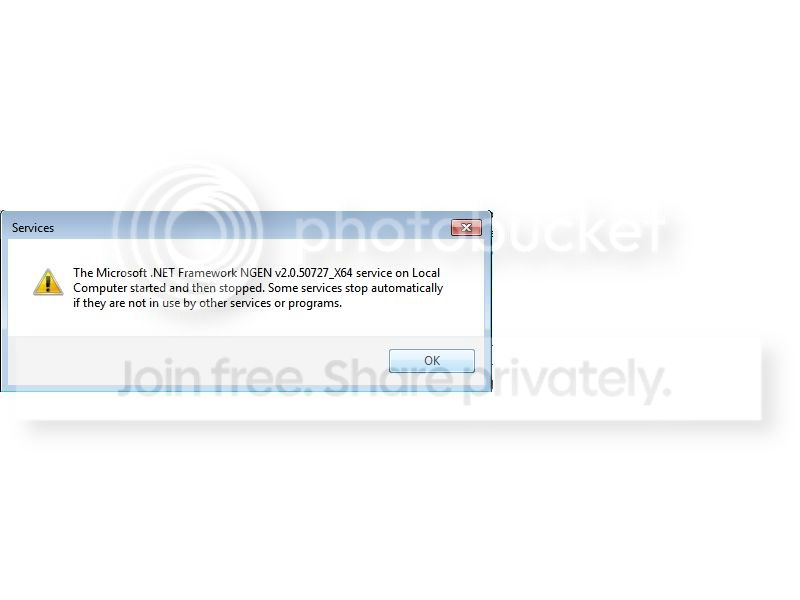
Ok, normally when I try to start .net framework and if it works (tried with .net framework 2) i would get a message like this:

message1.jpg


However if i try to start .net framework 4 , i get this error :

message2.jpg


I also just tried reformatting win 7 x64 again, same error though. I also have the Microsoft Visual C++ 2010 installed both times still no clue why it isnt working.

I do not know what the problem is.
 

My Computer

OS
Window 7 Ultimate x64
CPU
i7 920 2.66 ghz
Motherboard
ASUS P6X58D Premium
Memory
OCZ Gold 6gb RAM 8-8-8-24 1600 mhz
Graphics Card(s)
XFX ATI 5850
Monitor(s) Displays
Dell ST2210
Hard Drives
Hitatchi 1 TB 7200 RPM
PSU
CORSAIR 850TX 850W
Case
CM Storm Sniper
Cooling
Scythe Mugen II

My Computer

Computer Manufacturer/Model Number
Custom made
OS
Windows 7 Professional x64 PL
CPU
AMD Athlon 4450e
Motherboard
Giga-Byte GA-MA69G-S3H
Memory
GoodRam DDR2 2x2048MB (FSB 800MHz)
Graphics Card(s)
nVidia GeForce 9600GT (G94-300) 1024 MB
Monitor(s) Displays
SAMSUNG SyncMaster HS2P301688
Hard Drives
Seagate ST3750330AS 750GB
PSU
Corsair 550W
Cooling
AeroCool ExtremeEngine 3T
Yes , it is corrupt...i was waiting to up this tool for you, because it is an XP tool and didn't know if it works well on 7.
 

My Computer

Computer type
PC/Desktop
Computer Manufacturer/Model Number
Custom Build
OS
Windows 7 Professional SP1 - x64 [Non-UEFI Boot]
CPU
Ivy Bridge Core i5 3570K (Delidded)
Motherboard
Asus P8Z77-V LE PLUS
Memory
G.Skill "Ares" DDR3 PC3-12800 - 1600MHz (16Gb)
Graphics Card(s)
Asus Dual-RX480-O4G
Sound Card
Creative Sound Blaster Z w/5.1 sound system
Monitor(s) Displays
Asus IPS 23"
Screen Resolution
16/9
Hard Drives
Internal:
500Go Sata 6Gb/s (x2)
500Go Sata 3Gb/s (x2)
SSD 60Go Sata 6Gb/s
PSU
In Win C 900W Series 80+ Platinum
Case
Thermaltake Chaser A71
Cooling
Custom Water Cooling Loop
Keyboard
Cooler Master QuickFire XTi
Mouse
Razer Imperator 2012 (4G)
Antivirus
MSE
Browser
IE 11.0.xxx Rtm
Other Info
"Raid0" with Intel Smart Response Technology (HDD/SSD)
Yes , it is corrupt...i was waiting to up this tool for you, because it is an XP tool and didn't know if it works well on 7.

You mean NET Framework Cleanup Tool?Of course it is compatible with Vista/Win 7 too

:sarc:

from official link:

Supported products

The .NET Framework cleanup tool supports removing the following products:

* .NET Framework - All Versions
* .NET Framework - All Versions (Tablet PC and Media Center)
* .NET Framework - All Versions (Windows Server 2003)
* .NET Framework - All Versions (Windows Vista and Windows Server 2008)
* .NET Framework 1.0
* .NET Framework 1.1
* .NET Framework 2.0
* .NET Framework 3.0
* .NET Framework 3.5
* .NET Framework 4
Not all of the above products will appear in the UI for the .NET Framework cleanup tool on every operating system. The cleanup tool contains logic so that if it is run on an OS version that includes the .NET Framework as an OS component, it will not offer the option to clean it up. This means that running the cleanup tool on Windows XP Media Center Edition or Tablet PC Edition will not offer the option to clean up the .NET Framework 1.0, running it on Windows Server 2003 will not offer the option to clean up the .NET Framework 1.1 and running it on Windows Vista or Windows Server 2008 will not offer the option to clean up the .NET Framework 2.0 or the .NET Framework 3.0.

Besides many time I used it on Vista.The only exception -you cannot uninstall build-in NET Frameworks i.e you cannot uninstall NET Framework 2.0 or 3.5 in Windows 7 because they are stricly system components.You can only use NET Framework Cleanup Tool to remove NET Framework 1.0 or 4.0 in Windows 7 :sarc:
 

My Computer

Computer Manufacturer/Model Number
Custom made
OS
Windows 7 Professional x64 PL
CPU
AMD Athlon 4450e
Motherboard
Giga-Byte GA-MA69G-S3H
Memory
GoodRam DDR2 2x2048MB (FSB 800MHz)
Graphics Card(s)
nVidia GeForce 9600GT (G94-300) 1024 MB
Monitor(s) Displays
SAMSUNG SyncMaster HS2P301688
Hard Drives
Seagate ST3750330AS 750GB
PSU
Corsair 550W
Cooling
AeroCool ExtremeEngine 3T
thx guys, i am going to try these method. if it works out , ill let you guys know.
 

My Computer

OS
Window 7 Ultimate x64
CPU
i7 920 2.66 ghz
Motherboard
ASUS P6X58D Premium
Memory
OCZ Gold 6gb RAM 8-8-8-24 1600 mhz
Graphics Card(s)
XFX ATI 5850
Monitor(s) Displays
Dell ST2210
Hard Drives
Hitatchi 1 TB 7200 RPM
PSU
CORSAIR 850TX 850W
Case
CM Storm Sniper
Cooling
Scythe Mugen II
Back
Top