Net Lag and Freeze in games and Browsers

11tarot33

New member
Local time
11:49 AM
Messages
22
Location
Banja Luka
Hi, I have problem with internet...:cry:

Well, Before Windows 7, I was using XP, and all things with internet were great, but now they are not.... When I play Counter Strike 1.6 or League of Legends, Dota (w3) or I just go to surf on the net with browser, every 8-10 minutes something happens and it all stops for 5-10 secunds. (On CS 1.6 it showes a message "CL_FlushEntityPacket"). (Only Internet stops, not computer), That is big problem becouse I am a good player... I use ADSL internet 1MB speed..... I dont have any viruses or anything like that 100%. I scanned it y-day with 2 antiviruses, now I use only 1...
and I use
Realtek RTL 8139/810x Family Fast Etherner Nic driver on that net card but I have one integrated in motherboard which I dont use its on Realtek RTL8168c(p) Family..... I dont know what is a problem, so please help me! I need to fix it...
Pleeeeeeasssssseee :cry:
 

My Computer My Computer

At a glance

Windows 7Intel pentium IV 2.6 Ghz160 GB hard disk - 2GB RAMRadeon 3650
OS
Windows 7
CPU
Intel pentium IV 2.6 Ghz
Memory
160 GB hard disk - 2GB RAM
Graphics Card(s)
Radeon 3650
Monitor(s) Displays
Monitor Flatron l1918s
Mouse
Logitech L1 laser mouse
I need more info before I can help in any way. Please answer the following:
What browser are you using?
What are your pc specs?
When was the last time it worked - or did it ever?
The people here are awesome and someone will be able to help you!
 

My Computer My Computer

At a glance

Win 7 Ultimate 64 biti7 Q7204 GB DDR3ATI Mobility Radeon HD 4670
Computer Manufacturer/Model Number
Dell Studio XPS
OS
Win 7 Ultimate 64 bit
CPU
i7 Q720
Memory
4 GB DDR3
Graphics Card(s)
ATI Mobility Radeon HD 4670
Screen Resolution
1600 x 900
Case
Red and very pretty ;-)
Keyboard
integrated
Internet Speed
slow cause I'm in the north...
Ty, I will

Ok, first of.. I am using Internet Explorer 9(beta), I was using Chrome and Firefox also... always a same result...
My PC spec: 2GB Ram, 2.5Ghz Dual Core Proc. 160GB HDD, ATI Radeon 3650 (512mb)...
Well, everything is working, but when I play Cs 1.6 or LoL or something like that, every few (10) minutes there is huge wave of lag or Freeze (couse I cant move or do anything)... it lasts for few secconds (mostly 10) and it dissapears... and everything is great for a rest of a time. It happens on Net browsing too, but its hard to see it couse I am not always changing pages, but I see it when I do... Also, when Lag in game apeared I was checking a mail and that service did not work too... so its not something in games .. its in my system... my internet speed is good... 1Mb packet .... speed of download nearly 120kb/s and uppload 20Kb/s, thats enough for games...
last time everything worked great when I had XP, after instaling w7 it was not good, I reinstaled it and... I have the same problem...
I think that I said all that I needed... Please help me... Cry
 

My Computer My Computer

At a glance

Windows 7Intel pentium IV 2.6 Ghz160 GB hard disk - 2GB RAMRadeon 3650
OS
Windows 7
CPU
Intel pentium IV 2.6 Ghz
Memory
160 GB hard disk - 2GB RAM
Graphics Card(s)
Radeon 3650
Monitor(s) Displays
Monitor Flatron l1918s
Mouse
Logitech L1 laser mouse
Windows 7 automatically includes ipv6 addressing, QoS packet scheduler, and link-layer topology technology. Some systems once upgraded don't do well if these are left on. You can turn off the QoS and the Link-Layer topology without harming your internet connection. If you do not know how to do this I can walk you through it. It may not help but that is what I would try first based on my experience working in a Windows 7 environment.
 

My Computer My Computer

At a glance

Win 7 Ultimate 64 biti7 Q7204 GB DDR3ATI Mobility Radeon HD 4670
Computer Manufacturer/Model Number
Dell Studio XPS
OS
Win 7 Ultimate 64 bit
CPU
i7 Q720
Memory
4 GB DDR3
Graphics Card(s)
ATI Mobility Radeon HD 4670
Screen Resolution
1600 x 900
Case
Red and very pretty ;-)
Keyboard
integrated
Internet Speed
slow cause I'm in the north...
If you need to start disabling services to fix problems then there is an underlying problem else where in the network. I would start by updating the routers firmware then look into finding a better driver also be sure and get all the Windows updates that your system requires.
 

My Computer My Computer

At a glance

Windows 7 Ult, Windows 8.1 Pro,Q9650-4.275GHz, E8600 4.5GHz, E6750-3.8GHzG.Skill PC2 9600 1200Mhz 5 5 5 15 2TGTX480
Computer type
PC/Desktop
Computer Manufacturer/Model Number
Home built
OS
Windows 7 Ult, Windows 8.1 Pro,
CPU
Q9650-4.275GHz, E8600 4.5GHz, E6750-3.8GHz
Motherboard
Evga 780i FTW
Memory
G.Skill PC2 9600 1200Mhz 5 5 5 15 2T
Graphics Card(s)
GTX480
Sound Card
Asus Xonar D2
Monitor(s) Displays
HannsG
Screen Resolution
1680X1050
Hard Drives
GSkill Phoenix Pro 120GB SSD
PSU
ThermalTake Toughpower 1000Watt modular
Case
ThermalTake XaserV
Cooling
Xigmatek S1283
Keyboard
Logitech G15
Mouse
Logitech G9
Internet Speed
T1
Hm, I have updated all drivers... by automatic updates. (I was in Device Manager and I updated all)... but it doesnt help. I use ADSL 1MB packet... I dont have any driver for that couse it is wired ethernet connection (not an USB)... so I dont know what more should I do. ITChick I would like to try that, but I am affraid that it will have bad consequences... but Ill get that a try.. so pls instruct me...
 

My Computer My Computer

At a glance

Windows 7Intel pentium IV 2.6 Ghz160 GB hard disk - 2GB RAMRadeon 3650
OS
Windows 7
CPU
Intel pentium IV 2.6 Ghz
Memory
160 GB hard disk - 2GB RAM
Graphics Card(s)
Radeon 3650
Monitor(s) Displays
Monitor Flatron l1918s
Mouse
Logitech L1 laser mouse
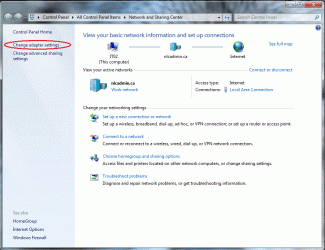
You will need to get into your Network and Sharing Center. You can do this either by

  1. Right-click your Network icon and go to Properties or,
  2. Go to Control Panel, double-click Network and Sharing Center
Once you are in there you need to click on Change Adapter Settings which is on the left of the screen:
Network and Sharing Center.gif

This will open a window that will display your current network connections.
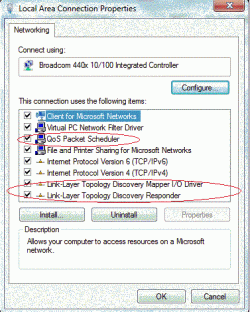
Right-click on the network adapter that you are using (I believe you mentioned that it is wired so don't change the wireless one) and go to Properties.

This will open the following window:
Local area Properties.gif

You only want to turn off the QoS and the Link-Layer Topology technologies. Do not turn off anything else in here. You turn off a service by removing the checkmark.
Things to turn off.gif

I'm not sure if this will work for you but I have used it to fix slow browsers at work. If your network doesn't support these new technologies then they are just slowing down your browser in the background. Try this and let me know how it works.
 

My Computer My Computer

At a glance

Win 7 Ultimate 64 biti7 Q7204 GB DDR3ATI Mobility Radeon HD 4670
Computer Manufacturer/Model Number
Dell Studio XPS
OS
Win 7 Ultimate 64 bit
CPU
i7 Q720
Memory
4 GB DDR3
Graphics Card(s)
ATI Mobility Radeon HD 4670
Screen Resolution
1600 x 900
Case
Red and very pretty ;-)
Keyboard
integrated
Internet Speed
slow cause I'm in the north...
Ok, I tested your thing, ty for that .. but... no results.. same problem... something else? pls
 

My Computer My Computer

At a glance

Windows 7Intel pentium IV 2.6 Ghz160 GB hard disk - 2GB RAMRadeon 3650
OS
Windows 7
CPU
Intel pentium IV 2.6 Ghz
Memory
160 GB hard disk - 2GB RAM
Graphics Card(s)
Radeon 3650
Monitor(s) Displays
Monitor Flatron l1918s
Mouse
Logitech L1 laser mouse
Have you cleared your Internet cache recently? Have you updated your browser recently? Do you have a pop-up blocker turned on? If you are using IE have you turned off Protected Mode?
Here's another question, do you have a firewall turned on? Windows7 enables the firewall by default so maybe it is interfering.
I'm just trying to help troubleshoot but I'm getting stumped too. It might not even be an Internet issue but may have to do with your plug-in settings like DirectX and Java.
 

My Computer My Computer

At a glance

Win 7 Ultimate 64 biti7 Q7204 GB DDR3ATI Mobility Radeon HD 4670
Computer Manufacturer/Model Number
Dell Studio XPS
OS
Win 7 Ultimate 64 bit
CPU
i7 Q720
Memory
4 GB DDR3
Graphics Card(s)
ATI Mobility Radeon HD 4670
Screen Resolution
1600 x 900
Case
Red and very pretty ;-)
Keyboard
integrated
Internet Speed
slow cause I'm in the north...
Back
Top