net view in Command Prompt does not work

Ztruker

New member
Guru
Gold Member
VIP
Local time
3:39 AM
Messages
6,285
Location
Space Coast of Florida
When I try to run net view in a Command Prompt window on my Windows 7 Pro X64, I get this error:

Code:
>net view
The service has not been started.

More help is available by typing NET HELPMSG 2184.
I have spent days over the last year or two looking for:

1. What service is not started (why doesn't Windows tell me what service?).
2. How to fix this problem.

It seems to come and go. At the moment I have two computers on my network.

Desktop - Windows 10 Pro x64 running Creators Update plus all updates.
Webserver - Windows 7 Pro X64 SP1 plus all updates.

All was well until I updated Windows 10 to the Creator Update version. That update change the workgroup name from HOME to WORKGROUP. I changed it back, rebooted and now net view works correctly on Windows 10.

I installed 6 updates on Windows 7 then rebooted. Now net view doesn't work at at all.

Anyone know what service the error message is referring to? This is a list of services running on Windows 7:

Code:
These Windows services are started:

   Apache2.2
   Application Experience
   Background Intelligent Transfer Service
   Base Filtering Engine
   COM+ Event System
   Computer Browser
   Cryptographic Services
   DCOM Server Process Launcher
   Desktop Window Manager Session Manager
   DHCP Client
   Diagnostic Policy Service
   Diagnostic Service Host
   Diagnostic System Host
   Diagnostics Tracking Service
   DirectUpdate engine
   Distributed Link Tracking Client
   DNS Client
   Function Discovery Provider Host
   Function Discovery Resource Publication
   Group Policy Client
   HomeGroup Provider
   IKE and AuthIP IPsec Keying Modules
   IP Helper
   IPsec Policy Agent
   Microsoft .NET Framework NGEN v4.0.30319_X64
   Microsoft .NET Framework NGEN v4.0.30319_X86
   Microsoft Antimalware Service
   Microsoft Network Inspection
   Multimedia Class Scheduler
   MySQL
   Network Connections
   Network List Service
   Network Location Awareness
   Network Store Interface Service
   Offline Files
   Plug and Play
   PnP-X IP Bus Enumerator
   Power
   Print Spooler
   Program Compatibility Assistant Service
   Remote Procedure Call (RPC)
   RPC Endpoint Mapper
   Security Accounts Manager
   Security Center
   Server
   Shell Hardware Detection
   SSDP Discovery
   Superfetch
   System Event Notification Service
   Task Scheduler
   TCP/IP NetBIOS Helper
   Themes
   User Profile Service
   Windows Audio
   Windows Audio Endpoint Builder
   Windows Connect Now - Config Registrar
   Windows Event Log
   Windows Firewall
   Windows Font Cache Service
   Windows Live ID Sign-in Assistant
   Windows Management Instrumentation
   Windows Modules Installer
   Windows Search
   Windows Update
   WinHTTP Web Proxy Auto-Discovery Service
   Workstation

The command completed successfully.
 

My Computer

Computer type
PC/Desktop
Computer Manufacturer/Model Number
Lenovo IdeaCenter 450
OS
Windows 10 Pro X64
CPU
Intel Quad Core i7-4770 @ 3.4Ghz
Memory
16.0GB PC3-12800 DDR3 SDRAM 1600 MHz
Graphics Card(s)
Intel Integrated HD Graphics
Sound Card
Realtek HD Audio
Monitor(s) Displays
HP 22" LCD
Screen Resolution
1680 x 1050
Hard Drives
250GB Samsung EVO SATA-3 SSD
2TB Seagate ST2000DM001 SATA-2
1.5TB Seagate ST3150041AS SATA
Keyboard
Dell USB
Mouse
Lenovo USB
Internet Speed
Cable via Road Runner 3MB Upload, 30MB Download
Antivirus
Windows Defender, MBAM Pro, MBAE
Browser
Seamonkey
Other Info
UEFI/GPT
PLDS DVD-RW DH16AERSH
Hello Rich Ztruker, :)

You would need to have the two services below running for the "net view" command to work.

  • Workstation
  • Computer Browser
 

My Computer

Computer type
PC/Desktop
Computer Manufacturer/Model Number
Self built custom
OS
64-bit Windows 11 Pro for Workstations
CPU
Intel i7-8700K OC'd to 5 GHz
Motherboard
ASUS ROG Maximus XI Formula Z390
Memory
64 GB (4x16GB) G.SKILL TridentZ RGB DDR4 3600 MHz
Graphics Card(s)
ASUS ROG-STRIX-GTX1080TI-O11G-GAMING
Sound Card
Integrated
Monitor(s) Displays
2 x Samsung Odyssey G7 27"
Screen Resolution
2560x1440
Hard Drives
1TB Samsung 990 PRO M.2,
4TB Samsung 990 PRO PRO M.2,
TerraMaster F8 SSD Plus NAS
PSU
Seasonic Prime Titanium 850W
Case
Thermaltake Core P3
Cooling
Corsair Hydro H115i
Keyboard
Logitech wireless K800
Mouse
Logitech MX Master 4
Internet Speed
2 Gb/s Download and 100 Mb/s Upload
Antivirus
Malwarebyte Anti-Malware Premium
Browser
Google Chrome
Other Info
Logitech Z625 speaker system,
Logitech BRIO 4K Pro webcam,
HP Color LaserJet Pro MFP M477fdn,
APC SMART-UPS RT 1000 XL - SURT1000XLI,
Galaxy S23 Plus phone
They are running (see the list I posted).

This is caused by something in the Creators Update for Win 10. Didn't have the problem until I installed it.
 

My Computer

Computer type
PC/Desktop
Computer Manufacturer/Model Number
Lenovo IdeaCenter 450
OS
Windows 10 Pro X64
CPU
Intel Quad Core i7-4770 @ 3.4Ghz
Memory
16.0GB PC3-12800 DDR3 SDRAM 1600 MHz
Graphics Card(s)
Intel Integrated HD Graphics
Sound Card
Realtek HD Audio
Monitor(s) Displays
HP 22" LCD
Screen Resolution
1680 x 1050
Hard Drives
250GB Samsung EVO SATA-3 SSD
2TB Seagate ST2000DM001 SATA-2
1.5TB Seagate ST3150041AS SATA
Keyboard
Dell USB
Mouse
Lenovo USB
Internet Speed
Cable via Road Runner 3MB Upload, 30MB Download
Antivirus
Windows Defender, MBAM Pro, MBAE
Browser
Seamonkey
Other Info
UEFI/GPT
PLDS DVD-RW DH16AERSH
I'm at a loss as well. :(
 

My Computer

Computer type
PC/Desktop
Computer Manufacturer/Model Number
Self built custom
OS
64-bit Windows 11 Pro for Workstations
CPU
Intel i7-8700K OC'd to 5 GHz
Motherboard
ASUS ROG Maximus XI Formula Z390
Memory
64 GB (4x16GB) G.SKILL TridentZ RGB DDR4 3600 MHz
Graphics Card(s)
ASUS ROG-STRIX-GTX1080TI-O11G-GAMING
Sound Card
Integrated
Monitor(s) Displays
2 x Samsung Odyssey G7 27"
Screen Resolution
2560x1440
Hard Drives
1TB Samsung 990 PRO M.2,
4TB Samsung 990 PRO PRO M.2,
TerraMaster F8 SSD Plus NAS
PSU
Seasonic Prime Titanium 850W
Case
Thermaltake Core P3
Cooling
Corsair Hydro H115i
Keyboard
Logitech wireless K800
Mouse
Logitech MX Master 4
Internet Speed
2 Gb/s Download and 100 Mb/s Upload
Antivirus
Malwarebyte Anti-Malware Premium
Browser
Google Chrome
Other Info
Logitech Z625 speaker system,
Logitech BRIO 4K Pro webcam,
HP Color LaserJet Pro MFP M477fdn,
APC SMART-UPS RT 1000 XL - SURT1000XLI,
Galaxy S23 Plus phone
Hi,
FWIW this is all I get not sure what the readout is suppose to be though :o
I am using 10 and cu on another machine at the moment I did it :/
net view.PNG

Same readout on 10 cu too.
 

My Computer

Computer type
PC/Desktop
Computer Manufacturer/Model Number
Custom assembled by me :}
OS
Win-7-Pro64bit 7-H-Prem-64bit
CPU
i7-5930K 2nd i9-9940x both water blocked VRM's too
Motherboard
ASUS SABERTOOTH X99 2nd ASUS x299 Apex
Memory
Trident-z 3200C14 2nd Trident-z 3600C16
Graphics Card(s)
EVGA 1080ti ftw3 2nd Titan Xp both water blocked
Sound Card
Built-in Realtek
Monitor(s) Displays
1-AOC G2460PG 24"G-Sync 144Hz/ 2nd 1-ASUS VG248QE 24" 144Hz
Screen Resolution
1920 x 1080 144Hz
Hard Drives
2-Samsung M.2 Evo & Evo Plus
2-Samsung 850 EVO 500GB SSD's/ 3-2.5 W.D. Black 1tb-&3-1tb/3-3.5 WD Black 1tb hdd's
PSU
EVGA SuperNOVA 1000-P2 2nd 1200-P2
Case
2-Corsair Obsidian Series 450D Black ATX Mid Tower
Cooling
Custom water loops
Keyboard
Logitech G710+/ 2nd Logitech G910
Mouse
2-RedDragon M901 Perdition 16400 dpi Gaming mouse = wired
Internet Speed
Comcast Ping 19ms 89.31mbps download speed 6.12mbps upload
Antivirus
Malwarebytes Pro/ Superantispyware Pro
Browser
FireFox & Pale moon
Other Info
2nd ASUS X299 Apex/Intel i9-9940x with Custom water loop/7H-Prem-x64/Corsair 450D case/Ram Trident-z 3600C16 4x8gb / Samsung970Evo plus 500gb SSD/Dual ssd EZ swap evo/PSU EVGA SuperNova 1200w-P2 80+Platinum/GPU Titan Xp /8-ML-140 on push-pull on 2-280GTX rads
Ztruker, if you can run the following command and upload the output file,
Code:
Get-Service | Export-Clixml $env:UserProfile\Desktop\services.txt
I’ll cross check the status of your services with mine, spot the differences and hopefully find the faulty service.
 

My Computer

Computer type
PC/Desktop
OS
Windows 10, Windows 8.1 Pro, Windows 7 Professional, OS X El Capitan
Here is the output:

Just run net start from a Command Prompt to get a nice, readable list of started services like I shoed in my original post. The powershell output is in XML format from what I can see, very hard to read.
 

Attachments

Last edited:

My Computer

Computer type
PC/Desktop
Computer Manufacturer/Model Number
Lenovo IdeaCenter 450
OS
Windows 10 Pro X64
CPU
Intel Quad Core i7-4770 @ 3.4Ghz
Memory
16.0GB PC3-12800 DDR3 SDRAM 1600 MHz
Graphics Card(s)
Intel Integrated HD Graphics
Sound Card
Realtek HD Audio
Monitor(s) Displays
HP 22" LCD
Screen Resolution
1680 x 1050
Hard Drives
250GB Samsung EVO SATA-3 SSD
2TB Seagate ST2000DM001 SATA-2
1.5TB Seagate ST3150041AS SATA
Keyboard
Dell USB
Mouse
Lenovo USB
Internet Speed
Cable via Road Runner 3MB Upload, 30MB Download
Antivirus
Windows Defender, MBAM Pro, MBAE
Browser
Seamonkey
Other Info
UEFI/GPT
PLDS DVD-RW DH16AERSH
The XML represents a serialised object that’s to be read by PowerShell. I don’t really want to sift through a list by hand.

Here were the services that weren’t running on your machine but were on my Windows 7 VM test environment.
Code:
Appinfo
KeyIso
p2pimsvc
p2psvc
PNRPsvc
sppsvc
upnphost
WdiSystemHost
WinDefend
WinHttpAutoProxySvc
WMPNetworkSvc
I stopped each of these, except for “Appinfo” which absolutely refused to (how did you manage to stop this service?), but my net view was fine.

I was able to replicate the “service has not been started” error by stopping the “LanmanWorkstation (Workstation)” service, but the file you sent me says Workstation was running? :sarc:
 

My Computer

Computer type
PC/Desktop
OS
Windows 10, Windows 8.1 Pro, Windows 7 Professional, OS X El Capitan
Thank you for looking at this.

I'm leaning toward a Master Browser problem, probably introduced in Win 10 Creator Update.
 

My Computer

Computer type
PC/Desktop
Computer Manufacturer/Model Number
Lenovo IdeaCenter 450
OS
Windows 10 Pro X64
CPU
Intel Quad Core i7-4770 @ 3.4Ghz
Memory
16.0GB PC3-12800 DDR3 SDRAM 1600 MHz
Graphics Card(s)
Intel Integrated HD Graphics
Sound Card
Realtek HD Audio
Monitor(s) Displays
HP 22" LCD
Screen Resolution
1680 x 1050
Hard Drives
250GB Samsung EVO SATA-3 SSD
2TB Seagate ST2000DM001 SATA-2
1.5TB Seagate ST3150041AS SATA
Keyboard
Dell USB
Mouse
Lenovo USB
Internet Speed
Cable via Road Runner 3MB Upload, 30MB Download
Antivirus
Windows Defender, MBAM Pro, MBAE
Browser
Seamonkey
Other Info
UEFI/GPT
PLDS DVD-RW DH16AERSH
hmm having the same problem at the moment and all the same services are running... (sorry to zombify this thread)
 

My Computer

Computer type
PC/Desktop
OS
windows 7 64-bit
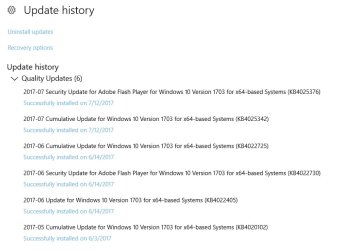
Something in Windows 10 got fixed recently as NET VIEW in Windows 7 now works again.These are the updates sine June:

2017-08-05 23_21_44-Settings.jpg
 

My Computer

Computer type
PC/Desktop
Computer Manufacturer/Model Number
Lenovo IdeaCenter 450
OS
Windows 10 Pro X64
CPU
Intel Quad Core i7-4770 @ 3.4Ghz
Memory
16.0GB PC3-12800 DDR3 SDRAM 1600 MHz
Graphics Card(s)
Intel Integrated HD Graphics
Sound Card
Realtek HD Audio
Monitor(s) Displays
HP 22" LCD
Screen Resolution
1680 x 1050
Hard Drives
250GB Samsung EVO SATA-3 SSD
2TB Seagate ST2000DM001 SATA-2
1.5TB Seagate ST3150041AS SATA
Keyboard
Dell USB
Mouse
Lenovo USB
Internet Speed
Cable via Road Runner 3MB Upload, 30MB Download
Antivirus
Windows Defender, MBAM Pro, MBAE
Browser
Seamonkey
Other Info
UEFI/GPT
PLDS DVD-RW DH16AERSH
Back
Top