Netflix error message n8010 and 'in private browsing' and Silverlight

deric

New member
Local time
1:51 AM
Messages
3
I keep getting the message that a storage problem with 'in private browsing' is keeping Silverlight from letting the movie play. Message #8010. Netflix is no help on this. I have removed and reinstalled Silverlight many times. I've tried to turn off 'in private' -don't know if it worked or not. Tried to open Netflix as administrator by holding the shift and control key when opening it- in addition to other ways. Additionally Netflix has sent me emails to download Silverlight which I don't need but anyway the mails are corrupted-scrambled and unreadable. Those emails are unreadable on my other computer/laptop as well but Netflix works fine on the laptop. I've looked here for advice in how to run as administrator and how to turn off in private browsing but it gets too complicated. I'm using win vista and IE 9 on the problem computer, win 7 and IE 8 on the laptop.
Open for suggestions
 
Last edited:

My Computer My Computer

At a glance

win 7 64bit
OS
win 7 64bit
Have you tried clearing all the Temp Internet Files, and resetting IE9 to defaults?
This often will cure many issues, and at least worth a try if you have not tried it yet.


Just press the gear icon in the top right corner and choose internet options.


On the General tab, choose delete and check everything.
clear.jpg


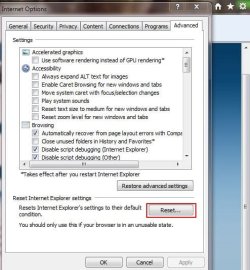
Then, on the Advanced Tab reset to defaults.
reset.jpg
 

My Computer My Computer

At a glance

Windows 7 Home Premium 64bitIntel Core i7 2700k8GB Mushkin Redline Ridgebacks @1866EVGA GTX570 SC
Computer Manufacturer/Model Number
Custom (Self Build)
OS
Windows 7 Home Premium 64bit
CPU
Intel Core i7 2700k
Motherboard
eVGA P67 SLI
Memory
8GB Mushkin Redline Ridgebacks @1866
Graphics Card(s)
EVGA GTX570 SC
Sound Card
XiFi Titanium HD
Monitor(s) Displays
LG W2453V
Screen Resolution
1920x1080
Hard Drives
Intel 320 80GB -- Intel X25-V 40GB --WD Black 1TB x2 -- WD Blue 640GB
PSU
Seasonic x750
Case
Corsair 600T SE White
Cooling
eVGA Superclocked CPU Cooler
Keyboard
Saitek Cyborg
Antivirus
Kaspersky
Browser
IE
Other Info
LG BD/DVD
resetting explorer

I did that and it didn't help. But worth a try thank you. Now however my iphone is not showing up under 'my computer' when I have it plugged in. Suggestions?
 

My Computer My Computer

At a glance

win 7 64bit
OS
win 7 64bit
I did that and it didn't help. But worth a try thank you. Now however my iphone is not showing up under 'my computer' when I have it plugged in. Suggestions?

You try googling the error?


"Your browser's private browsing mode is restricting Netflix from storing settings on your computer. Please turn off the private mode browsing feature in your browser and try again"


Assuming you don't have your browser in private browsing mode, this problem seems to be related to having an invalid entry under App Storage in Silverlight. Try deleting C:\Users\%username%\AppData\LocalLow\Microsoft\Silverlight\


Or


Search for "Microsoft Silverlight" in the Start menu and launch the program. Choose the "Application Storage" tab and hit "Delete All" in the lower right corner. Check the box in the lower left-hand corder to "Enable Application Storage." Hit OK to save your settings.


Thanks to Wik146 in the Silverlight forums:
http://forums.silverlight.net/forums/t/188943.aspx
 

My Computer My Computer

At a glance

Win 8 Release candidate 8400[email protected]4 gigsNvidia 9600M
Computer Manufacturer/Model Number
HP Pavillion dv-7 1005 Tx
OS
Win 8 Release candidate 8400
CPU
[email protected]
Memory
4 gigs
Graphics Card(s)
Nvidia 9600M
Sound Card
HD built-in
Monitor(s) Displays
17" Wxga
Screen Resolution
1440x900
Cooling
none
Internet Speed
45Mb down 5Mb up
How I fixed my silverlight netflix problem.

Right click error message
click on silverlight
go to app storage
highlight netflix and delete it
refresh browser
YAY!!!!
worked for me
 

My Computer My Computer

At a glance

win 7 home prem 64bit
OS
win 7 home prem 64bit
Fix error in Inprivate browsing

Follow these guidelines:

Step 1: Go to Start, then Run and type in gpedit.msc.

Step 2: Now navigate to the following section:

Computer Configuration / Administrative Templates / Windows Components / Internet Explorer / InPrivate

Step 3: Now on the right-hand side, go ahead and double-click Turn off InPrivate Browsing and choose Enabled.

You can turn it off for only the currently logged on user by simply going under User Configuration first.

If you keep looking, you will also see the options for turning off InPrivate Filtering, not collecting InPrivate Filtering data, and setting the InPrivate Filtering Threshold. Enjoy!

Clearing cookies might also fix this problem.
 

My Computer My Computer

At a glance

Windows 7 Ultimate x64
OS
Windows 7 Ultimate x64
error N8010

To solve this, completely uninstall silverlight; make sure that all silverlight entries in the registry are deleted too. Reinstall silverlight from silverlight.net.
 

My Computer My Computer

At a glance

windows 7 Home Premiumintel64 MB ramstandard VGA
Computer Manufacturer/Model Number
Intel
OS
windows 7 Home Premium
CPU
intel
Motherboard
intel
Memory
64 MB ram
Graphics Card(s)
standard VGA
Sound Card
Realtek
Monitor(s) Displays
samsung
Hard Drives
80GB Seagate
Case
metal
Cooling
fan
Me too
Thanks


Right click error message
click on silverlight
go to app storage
highlight netflix and delete it
refresh browser
YAY!!!!
worked for me
 

My Computer My Computer

At a glance

xp
OS
xp
Back
Top