
Netflix - Still not working...

cabrey

New member
Local time
3:46 PM
Messages
5
Hey guys,

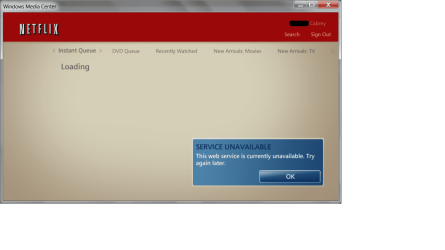
I'm just wondering if anybody else had the problem where the Netflix application refuses to work for them. The funny thing is that the same thing happened under Vista and 7 is supposed to be better than Vista :eek:...

I attached a picture of the error. If anybody has any idea how to get this thing to work, it would be much appreciated!

Thanks in advanced!
 

Attachments
  • netflinx_not_working.png
    netflinx_not_working.png
    66.5 KB · Views: 293

My Computer

Computer Manufacturer/Model Number
Self-built
OS
Windows 7 32-bit
CPU
Athlon X2
Motherboard
Gigabyte
Memory
4GB
Graphics Card(s)
ATI Radeon HD 4350
Sound Card
Onboard Intel
Monitor(s) Displays
TV
Hey guys,

I'm just wondering if anybody else had the problem where the Netflix application refuses to work for them. The funny thing is that the same thing happened under Vista and 7 is supposed to be better than Vista :eek:...

I attached a picture of the error. If anybody has any idea how to get this thing to work, it would be much appreciated!

Thanks in advanced!

what firewall are you using?

What antivrus?

What router?

Ken
 

My Computer

Computer Manufacturer/Model Number
HP Pavillion dv-7 1005 Tx
OS
Win 8 Release candidate 8400
CPU
[email protected]
Memory
4 gigs
Graphics Card(s)
Nvidia 9600M
Sound Card
HD built-in
Monitor(s) Displays
17" Wxga
Screen Resolution
1440x900
Cooling
none
Internet Speed
45Mb down 5Mb up
No software or hardware firewall (besides router I guess).

No antivirus (unless common sense is counted ;)

Router: Actiontec Ml424WR
 

My Computer

Computer Manufacturer/Model Number
Self-built
OS
Windows 7 32-bit
CPU
Athlon X2
Motherboard
Gigabyte
Memory
4GB
Graphics Card(s)
ATI Radeon HD 4350
Sound Card
Onboard Intel
Monitor(s) Displays
TV
No software or hardware firewall (besides router I guess).

No antivirus (unless common sense is counted ;)

Router: Actiontec Ml424WR


cabrey

Im sorry that went right over my head. The service on your computer seems to be the problem not the connectivity issue I thought.

Can you type services.msc in search and look at the desciptions for the services. Netflix will have its own. You want to make sure it can be started and that it is in auto mode.

I have never used that app but its worth a shot

Let us know if it doesn't or if you need help

Ken
 

My Computer

Computer Manufacturer/Model Number
HP Pavillion dv-7 1005 Tx
OS
Win 8 Release candidate 8400
CPU
[email protected]
Memory
4 gigs
Graphics Card(s)
Nvidia 9600M
Sound Card
HD built-in
Monitor(s) Displays
17" Wxga
Screen Resolution
1440x900
Cooling
none
Internet Speed
45Mb down 5Mb up
Weird, I don't have a Netflix service. Media Center installed the app so I don't know how I can uninstall it to reinstall it.
 

My Computer

Computer Manufacturer/Model Number
Self-built
OS
Windows 7 32-bit
CPU
Athlon X2
Motherboard
Gigabyte
Memory
4GB
Graphics Card(s)
ATI Radeon HD 4350
Sound Card
Onboard Intel
Monitor(s) Displays
TV
Weird, I don't have a Netflix service. Media Center installed the app so I don't know how I can uninstall it to reinstall it.


Even if media center installed it you still should be able to remove it in ADD/Remove control panel. If you cant, go to the directory where it is and see if there is an un-installer there

Ken
 

My Computer

Computer Manufacturer/Model Number
HP Pavillion dv-7 1005 Tx
OS
Win 8 Release candidate 8400
CPU
[email protected]
Memory
4 gigs
Graphics Card(s)
Nvidia 9600M
Sound Card
HD built-in
Monitor(s) Displays
17" Wxga
Screen Resolution
1440x900
Cooling
none
Internet Speed
45Mb down 5Mb up
OK I uninstalled it and reinstalled it but it still doesn't work and there still isn't any netflix service.
 

My Computer

Computer Manufacturer/Model Number
Self-built
OS
Windows 7 32-bit
CPU
Athlon X2
Motherboard
Gigabyte
Memory
4GB
Graphics Card(s)
ATI Radeon HD 4350
Sound Card
Onboard Intel
Monitor(s) Displays
TV
OK I uninstalled it and reinstalled it but it still doesn't work and there still isn't any netflix service.

Is there a control panel to configure, or someting like it? What do yoou use this for?

Ken
 

My Computer

Computer Manufacturer/Model Number
HP Pavillion dv-7 1005 Tx
OS
Win 8 Release candidate 8400
CPU
[email protected]
Memory
4 gigs
Graphics Card(s)
Nvidia 9600M
Sound Card
HD built-in
Monitor(s) Displays
17" Wxga
Screen Resolution
1440x900
Cooling
none
Internet Speed
45Mb down 5Mb up
There doesn't seem to be a options panel for it. It's used to stream Netflix's instant watch library directly to media center so one doesn't have to use a web browser. It would be fantastic if it worked. *sigh*
 

My Computer

Computer Manufacturer/Model Number
Self-built
OS
Windows 7 32-bit
CPU
Athlon X2
Motherboard
Gigabyte
Memory
4GB
Graphics Card(s)
ATI Radeon HD 4350
Sound Card
Onboard Intel
Monitor(s) Displays
TV
There doesn't seem to be a options panel for it. It's used to stream Netflix's instant watch library directly to media center so one doesn't have to use a web browser. It would be fantastic if it worked. *sigh*

sounds interesting. If it is important enough you could consider a clean re-install then insall the netflix app

Ken
 

My Computer

Computer Manufacturer/Model Number
HP Pavillion dv-7 1005 Tx
OS
Win 8 Release candidate 8400
CPU
[email protected]
Memory
4 gigs
Graphics Card(s)
Nvidia 9600M
Sound Card
HD built-in
Monitor(s) Displays
17" Wxga
Screen Resolution
1440x900
Cooling
none
Internet Speed
45Mb down 5Mb up
I'm new here, but I have had this problem before in Win7 RC and Vista. I tried for hours and hours to no avail.

The problem? Netflix was updating the servers my account was on or something of the sort.

Make sure you can sign in to the site and watch something through instant play. It might be netflix instead of WMC.
 

My Computer

OS
Win Vista/7
I am having trouble even SEEING the Netflix app in my WMC.
I use Win7Pro, and I have the sinking feeling that because the Netflix site says "W7HP, and W7U" but skips over mentioning Pro, that it is unavailable...

Has anyone else confirmed this either way?
 

My Computer

OS
Windows 7 Professional
did you actually update to have it?

If not, go through tasks>settings>general>automatic update settings

then click scan now.

It should show up under internet tv and movies.
 

My Computer

OS
Win Vista/7
did you actually update to have it?

If not, go through tasks>settings>general>automatic update settings

then click scan now.

It should show up under internet tv and movies.

I cannot tell you how many times I had done that to have it still not show up.

I then re-ran the WMC setup and magically it appeared... so, who knows what was causing it to not show up... Maybe the "tubes" were clogged all weekend or something.
 

My Computer

OS
Windows 7 Professional
win 7 netflix not working

in IE10 (i guess previous versions) -> tools -> manage add ons , scroll down to silverlight 32 bit and ENABLE - worked for me
 

My Computer

Computer type
PC/Desktop
OS
win 7 64 bit
Hey guys,

I'm just wondering if anybody else had the problem where the Netflix application refuses to work for them. The funny thing is that the same thing happened under Vista and 7 is supposed to be better than Vista :eek:...

I attached a picture of the error. If anybody has any idea how to get this thing to work, it would be much appreciated!

Thanks in advanced!

what firewall are you using?

What antivrus?

What router?

Ken


in IE10 -> tools->manage add ons, scroll down to silver 32bit and ENABLE
 

My Computer

Computer type
PC/Desktop
OS
win 7 64 bit
Back
Top