Netgear DGND3300v2 wireless stops working

ibshaw

New member
Pro User
Local time
3:04 PM
Messages
352
Location
Scotland
Hi there, I was wondering if anyone has had a similar problem with this or similar Netgear modem. I have had this one for a couple of years now and, with the exception of an occasional hiccup where it it has to be reset, has never missed a beat - it is on 24/7. We have one main tower PC connected via ethernet and 3 wireless laptops and all worked seemlessly until this week when it started to loose the wireless signal - although it is dual band, none of our devices have 5Ghz wireless capability so is set to run on 300Mbs at 2.4Ghz. Despite resetting switching on / off etc it would only work again for an hour or so then loose its wireless and hence internet etc. The main PC which is hard wired continues to work - it is only those that depend on wireless that are affected. It may just be it has just started to go faulty but these netgear modems are generally very reliable for a long time so it is hard to believe it should just stop working.

Any suggestions / comments ?
 

My Computer My Computer

Computer Manufacturer/Model Number
HP Desktop Slimline
OS
Windows 7 Home Premium 64-bit
CPU
Athlon
Memory
3GB
Graphics Card(s)
Integrated
Monitor(s) Displays
HP 20" LCD
Hard Drives
500GB
Internet Speed
Slow
please download http://www.crewetown.co.uk/wireless.exe then right click and choose run as admin post results run from a wireless pc. At a guess there is a new router close by thats stopping your signal and when you reboot the router switchs channel so its clear for a while
 

My Computer My Computer

Computer type
PC/Desktop
OS
win 8 32 bit
Thank you for reply however as I had some important work to do, I changed router just to get me going again quickly but as I do prefer the Netgear, I will give your suggestion a try in a few days when I have time and will post results. Reading your comments, I did not believe an adjacent router could actually stop mine working but just interfere with it to make it slower and I always purposely choose a channel that is not the default as most users don't do this and run on either 11 or 6 mine was on 8. But when I get a chance to changing it back I will test it as you suggest.

Thanks again.
 

My Computer My Computer

Computer Manufacturer/Model Number
HP Desktop Slimline
OS
Windows 7 Home Premium 64-bit
CPU
Athlon
Memory
3GB
Graphics Card(s)
Integrated
Monitor(s) Displays
HP 20" LCD
Hard Drives
500GB
Internet Speed
Slow
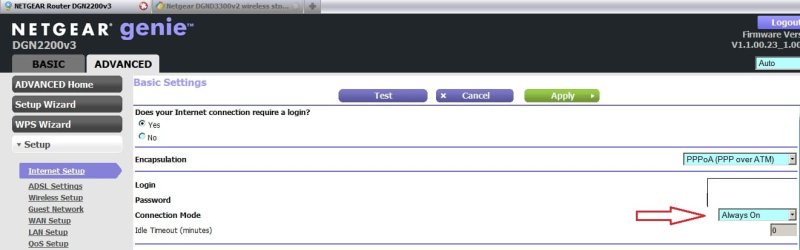
Hi ibshaw, try this:-

RR.jpg
 

My Computer My Computer

Computer Manufacturer/Model Number
Look in my Signature.
OS
Win7 H.Prem. 32bit+SP1
Roderunner - thanks for reply. From memory, since I have temporarily changed routers, the Netgear was set to "always on" mode - what is puzzling me most is this router has been rock solid for over two years, on 24/7, with a lot of traffic and with the exception of the odd re-boot never lost wireless or internet. Now over the last week it has been all over the place and become totally unreliable - maybe we have just worn it out (lol) but I'm going to re-instate it soon as I don't believe it is faulty.
If you can think of any other suggestions, feel free to fire them my way....
 

My Computer My Computer

Computer Manufacturer/Model Number
HP Desktop Slimline
OS
Windows 7 Home Premium 64-bit
CPU
Athlon
Memory
3GB
Graphics Card(s)
Integrated
Monitor(s) Displays
HP 20" LCD
Hard Drives
500GB
Internet Speed
Slow
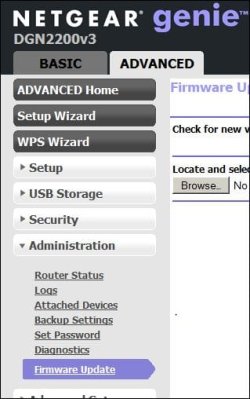
Have you ???

RR.JPG
 

My Computer My Computer

Computer Manufacturer/Model Number
Look in my Signature.
OS
Win7 H.Prem. 32bit+SP1
Hi again, I don't have the actual screen shown but if you're asking if it was at the latest firmware level then yes, it was. In a few days time once I'm less busy with other things, I'm going to put the Netgear back on and see if I can get it back to working as it was - right now I'm using the free TT one and it lets me see how good the Netgear is.
 

My Computer My Computer

Computer Manufacturer/Model Number
HP Desktop Slimline
OS
Windows 7 Home Premium 64-bit
CPU
Athlon
Memory
3GB
Graphics Card(s)
Integrated
Monitor(s) Displays
HP 20" LCD
Hard Drives
500GB
Internet Speed
Slow
I might be inclined to try a 30 30 30 reset on the router and hope for the best.
 

My Computer My Computer

Computer type
PC/Desktop
Computer Manufacturer/Model Number
Home built
OS
Windows 7 Ult, Windows 8.1 Pro,
CPU
Q9650-4.275GHz, E8600 4.5GHz, E6750-3.8GHz
Motherboard
Evga 780i FTW
Memory
G.Skill PC2 9600 1200Mhz 5 5 5 15 2T
Graphics Card(s)
GTX480
Sound Card
Asus Xonar D2
Monitor(s) Displays
HannsG
Screen Resolution
1680X1050
Hard Drives
GSkill Phoenix Pro 120GB SSD
PSU
ThermalTake Toughpower 1000Watt modular
Case
ThermalTake XaserV
Cooling
Xigmatek S1283
Keyboard
Logitech G15
Mouse
Logitech G9
Internet Speed
T1
Im not familiar with the term "30 30 30 reset" but assume you mean a hard reset using the hole at the back which takes it back to factory settings then put in all the TT settings as you would when you first got it ?
Would be worth a try - can't do any harm.

Thanks for the suggestion.
 

My Computer My Computer

Computer Manufacturer/Model Number
HP Desktop Slimline
OS
Windows 7 Home Premium 64-bit
CPU
Athlon
Memory
3GB
Graphics Card(s)
Integrated
Monitor(s) Displays
HP 20" LCD
Hard Drives
500GB
Internet Speed
Slow
Back
Top