Solved Wireless connection not connecting to Router (Netgear)

famguy03

New member
Local time
3:29 PM
Messages
3
Greetings, My Laptop will not connect to my Netgear Router anymore today. It was working earlier (that's what mum said), and then it wouldn't connect anymore. All I get is the 6 bars that is grey with a yellow sun over it and under the Network Connections it say's its "Attempting to authenticate". I don't know what happen however last night the power went out for a couple of seconds so I don't know if that played a part or not but you can't rule out anything yet. Oh and I did a hard reset on the router and modem. I even went as far as to try advice I found on google but nothing worked. I tried deleting/uninstalling the wireless card under device manager and waited for it to restart but that didn't work. I even tried a system restore and that too didn't work. I also did the whole ipconfig /release, /renew, /flushdns and nothing worked. Before some people ask this question I will answer it: I did connect ethernet cable and it did work just fine. So I'm thinking its more of the wireless card that is messing up or something like that because I can connect using the Ethernet port. I am at a lost of what I can do now. Thanks for the help to all those who reply. :)
 

My Computer My Computer

At a glance

Windows 7 Home Premium 64bit
Computer type
PC/Desktop
Computer Manufacturer/Model Number
Compaq Presario CQ57
OS
Windows 7 Home Premium 64bit
I did another test in which I used a USB Wireless adapter (54Mbps), and It didn't want to connect. So I'm now pretty sure its a Router problem but I don't see how that could be because I did a hard reset and I did backup recovery before I did a reset so I can restore it.

Here is an image from Xiirus Wi-Fi Inspector. Please note I did change the Channel to 8 after I noticed that someone else was also on that channel.

xirruswifiinspectorimage_zps464047da.jpg
 

My Computer My Computer

At a glance

Windows 7 Home Premium 64bit
Computer type
PC/Desktop
Computer Manufacturer/Model Number
Compaq Presario CQ57
OS
Windows 7 Home Premium 64bit
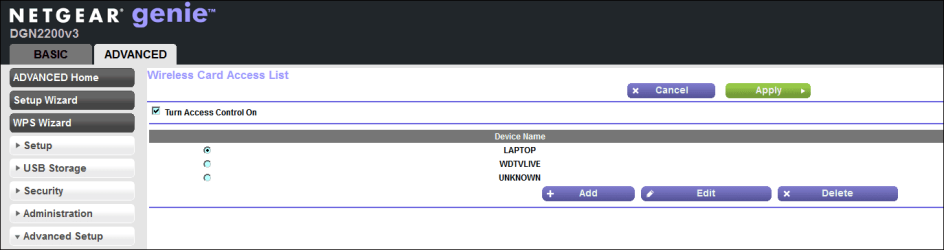
Is this feature ON / OFF on your pc. ?

Capture.PNG
 

My Computer My Computer

At a glance

Win7 H.Prem. 32bit+SP1
Computer Manufacturer/Model Number
Look in my Signature.
OS
Win7 H.Prem. 32bit+SP1
Is this feature ON / OFF on your pc. ?

View attachment 327458


Sorry for the late reply.

I don't use that feature at all. I did use it on my old linksys one.

I did finally get it to work after all. I did another upgrade to the Firmware which I already had and just override it with the same Firmware upgrade and after I did that It finally connected to the router but with limited access. I then did a hard rest and just started fresh (no backup) and just reentered my passwords and it finally worked. Oh and I also renamed my SSID.

This might help others who run into the same problem as me.
 

My Computer My Computer

At a glance

Windows 7 Home Premium 64bit
Computer type
PC/Desktop
Computer Manufacturer/Model Number
Compaq Presario CQ57
OS
Windows 7 Home Premium 64bit
Good to hear you fixed it.
 

My Computer My Computer

At a glance

Win7 H.Prem. 32bit+SP1
Computer Manufacturer/Model Number
Look in my Signature.
OS
Win7 H.Prem. 32bit+SP1
Back
Top