Netgear wn311b install

awilsonlee

New member
Local time
11:41 PM
Messages
28
Hi.
Bear with me, I am new to this forum thing.
I am running windows 7 64-bit on a brand new pc, Intel core duo E7500, 2.93ghz, 4.00gb Ram.
My problem is getting a Netgear wn311b pci wireless card to work. I have tried installing it with Netgear's instructions followed to the letter. when I try and start the Smart Wizard app It does absolutely nothing. So I tried starting it in XP compatibility mode, ah! now it tells me that,"Netgear Wn311b wireless adaptor is not inserted". checking in device manager it seems Windows has found a Broadcom driver and installed it. Looking In Network and sharing centre, there it is "Broadcom 802.11N Network adaptor" Not connected, and it will not connect when asked, not even showing as recognising any networks. I uninstalled everything. Re installed without Netgear's software and let Windows find the drivers. Same result, shows up as there but doesn't do anything.
Help!! Please, If anyone can, I would be so gratefull, I am pulling my hair out here.

Andy.

Oh, I tried installing it all in an old XP machine and away it goes,absolutely perfect,so I know the hardware is ok.
 

My Computer

Computer Manufacturer/Model Number
Pc Specialist
OS
7
CPU
Intel Core Duo (tm)2 E7500 2.93ghz
Motherboard
ASUS P5QL/EPU
Memory
4.00gb
Graphics Card(s)
NVIDIA Geforce GTS 250
Sound Card
VIA HD Aucio
Monitor(s) Displays
LG 1440x900
Hard Drives
Seagate 500Gb
Hi.
Bear with me, I am new to this forum thing.
I am running windows 7 64-bit on a brand new pc, Intel core duo E7500, 2.93ghz, 4.00gb Ram.
My problem is getting a Netgear wn311b pci wireless card to work. I have tried installing it with Netgear's instructions followed to the letter. when I try and start the Smart Wizard app It does absolutely nothing. So I tried starting it in XP compatibility mode, ah! now it tells me that,"Netgear Wn311b wireless adaptor is not inserted". checking in device manager it seems Windows has found a Broadcom driver and installed it. Looking In Network and sharing centre, there it is "Broadcom 802.11N Network adaptor" Not connected, and it will not connect when asked, not even showing as recognising any networks. I uninstalled everything. Re installed without Netgear's software and let Windows find the drivers. Same result, shows up as there but doesn't do anything.
Help!! Please, If anyone can, I would be so gratefull, I am pulling my hair out here.

Andy.

Oh, I tried installing it all in an old XP machine and away it goes,absolutely perfect,so I know the hardware is ok.

Hi and welcome to sevenforums

can you go into device mgr and find the driver version number?

Another thing to check. see if there are errors in event viewer relating to this device

type event viewer in search>windows logs>application tab. Errors have red in left hand column. look for any that have device source


Hope this helps

Ken J
 

My Computer

Computer Manufacturer/Model Number
HP Pavillion dv-7 1005 Tx
OS
Win 8 Release candidate 8400
CPU
[email protected]
Memory
4 gigs
Graphics Card(s)
Nvidia 9600M
Sound Card
HD built-in
Monitor(s) Displays
17" Wxga
Screen Resolution
1440x900
Cooling
none
Internet Speed
45Mb down 5Mb up
Netgear Adaptor

Hi.

Thanks for your response. I checked the Driver,5.30.21.0. Checked the error logs.there was nothing related to the problem. I have however eventually had a response from the Netgear support team. They tell me that the Application is not compatible with 7 yet, but they are working on it. But that the card should work ok with the drivers that allegedly come with Windows 7.

Andy.
 

My Computer

Computer Manufacturer/Model Number
Pc Specialist
OS
7
CPU
Intel Core Duo (tm)2 E7500 2.93ghz
Motherboard
ASUS P5QL/EPU
Memory
4.00gb
Graphics Card(s)
NVIDIA Geforce GTS 250
Sound Card
VIA HD Aucio
Monitor(s) Displays
LG 1440x900
Hard Drives
Seagate 500Gb
Andy, welcome. If I may, I would like to suggest the following:
  • Follow the pasted link, download the driver.
  • Answer
  • Find the driver/executible and point your mouse to it.
  • Right click your mouse and you will see a drop down menu
  • In the middle of the menu you will see compatability, there you will see "Vista 32-64 compatability mode, click on the appropriate mode.
  • Come up to Administrator, left click on this and begin the installation
  • After the install reboot.
If this works alls well, if not we will need to remove the card and re-connect and re-install.

Adrian
 

My Computer

Computer Manufacturer/Model Number
Custom Build
OS
Windows 7 7600 1 X64
CPU
AMD PHENOM II X 550 PROCESSOR 3.1 ghz
Motherboard
ASUS M4A78-TE
Memory
Corsair 4 gig ddr 3
Graphics Card(s)
ati radeon 3300
Sound Card
ati hd
Monitor(s) Displays
syncmaster 2033sw
Screen Resolution
1600X900 60 hz refresh
Hard Drives
twin_seagates SATA's 1 TB & 500 Gig, hitachi_slimline 160 gig
PSU
antec_550 watt
Case
cooler master GLite
Cooling
stock_heat sink
Internet Speed
20mbs up/ 1.5mbs down
Other Info
favorite child "stewie"
favorite dog "brian"
same exact problem

I'm having the same problem. I've run all the updates and tried different drivers, but can't seem to get windows 7 to recognize the card.
 

My Computer

Computer Manufacturer/Model Number
asus
OS
Windows 7
Hi Adrian.

Thanks for that. I can't seem to get to the .exe file in the download. It's just a package not a folder. Anyway, right click on the package then "troubleshoot compatibility" I would assume does the same job?

I Installed it in Vista compatability mode. After install the program will only run when I right click, "run as administrator" and then it reverts to the original problem. "wireless adaptor not inserted".

I did try removing the card and ran the install as per Netgears instructions. Still the same.

Andy.
 

My Computer

Computer Manufacturer/Model Number
Pc Specialist
OS
7
CPU
Intel Core Duo (tm)2 E7500 2.93ghz
Motherboard
ASUS P5QL/EPU
Memory
4.00gb
Graphics Card(s)
NVIDIA Geforce GTS 250
Sound Card
VIA HD Aucio
Monitor(s) Displays
LG 1440x900
Hard Drives
Seagate 500Gb
Good morning Andy, welcome back.
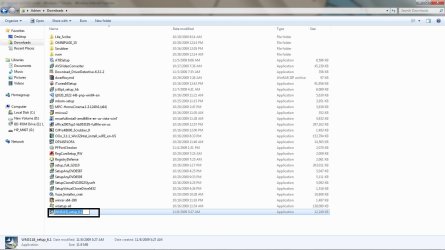
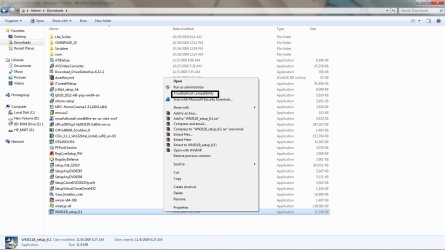
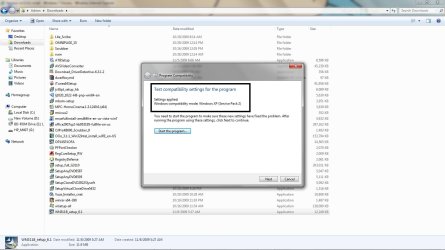
I was able to download the netgear update and I tried running a few things. I'll show you the screen shots.
The first pix shows you the location of the netgear app.
The second pix shows you that I'm looking for compatability mode
3rd. Is troubleshoot compatability, it looks like windows wants to use xp mode and etc. CHeck it out and try it again.
 

Attachments

  • netgear.jpg
    netgear.jpg
    114.9 KB · Views: 876
  • netgear_comp.jpg
    netgear_comp.jpg
    119.8 KB · Views: 804
  • net_xp.jpg
    net_xp.jpg
    115.6 KB · Views: 841
  • admin.jpg
    admin.jpg
    127.4 KB · Views: 687

My Computer

Computer Manufacturer/Model Number
Custom Build
OS
Windows 7 7600 1 X64
CPU
AMD PHENOM II X 550 PROCESSOR 3.1 ghz
Motherboard
ASUS M4A78-TE
Memory
Corsair 4 gig ddr 3
Graphics Card(s)
ati radeon 3300
Sound Card
ati hd
Monitor(s) Displays
syncmaster 2033sw
Screen Resolution
1600X900 60 hz refresh
Hard Drives
twin_seagates SATA's 1 TB & 500 Gig, hitachi_slimline 160 gig
PSU
antec_550 watt
Case
cooler master GLite
Cooling
stock_heat sink
Internet Speed
20mbs up/ 1.5mbs down
Other Info
favorite child "stewie"
favorite dog "brian"
Hi Adrian.
That's exactly how I did it, except I downloaded it to the desktop. I have now tried it in Vista and XP compatibility mode and still the app doesn't see it so will not run. The driver seems to install ok, and as I said the shortcut shows up in Network Connections. It just doesn't want to detect any Network, it's almost as if the radio is turned off. It has installed the driver as a Broadcom 802.11n adaptor not Netgear, so I guess it's just seeing the chip.

Andy.
 

My Computer

Computer Manufacturer/Model Number
Pc Specialist
OS
7
CPU
Intel Core Duo (tm)2 E7500 2.93ghz
Motherboard
ASUS P5QL/EPU
Memory
4.00gb
Graphics Card(s)
NVIDIA Geforce GTS 250
Sound Card
VIA HD Aucio
Monitor(s) Displays
LG 1440x900
Hard Drives
Seagate 500Gb
Netgear wireless issues with 7

We tried the netgear USB adapter and the adapter that you install in the computer which both said they were compatible with Windows 7 but was not able to get the computer to recognize that the device was there. Out of frustration we returned both to BestBuy and got a Linksys USB adapter and it is actually compatible and it actually works. I don't know if this is an option for you but you might want to consider switching to Linkysis.
 

My Computer

Computer Manufacturer/Model Number
asus
OS
Windows 7
Hi Adrian.
That's exactly how I did it, except I downloaded it to the desktop. I have now tried it in Vista and XP compatibility mode and still the app doesn't see it so will not run. The driver seems to install ok, and as I said the shortcut shows up in Network Connections. It just doesn't want to detect any Network, it's almost as if the radio is turned off. It has installed the driver as a Broadcom 802.11n adaptor not Netgear, so I guess it's just seeing the chip.

Andy.
Can you reset your router back to the original settings.
 

My Computer

Computer Manufacturer/Model Number
Custom Build
OS
Windows 7 7600 1 X64
CPU
AMD PHENOM II X 550 PROCESSOR 3.1 ghz
Motherboard
ASUS M4A78-TE
Memory
Corsair 4 gig ddr 3
Graphics Card(s)
ati radeon 3300
Sound Card
ati hd
Monitor(s) Displays
syncmaster 2033sw
Screen Resolution
1600X900 60 hz refresh
Hard Drives
twin_seagates SATA's 1 TB & 500 Gig, hitachi_slimline 160 gig
PSU
antec_550 watt
Case
cooler master GLite
Cooling
stock_heat sink
Internet Speed
20mbs up/ 1.5mbs down
Other Info
favorite child "stewie"
favorite dog "brian"
Tried that, still the same. I just borrowed an Edimax card from a friend, that works ok, although it's down on speed.

I guess I had better wait until Netgear,s R&D come up with some 7 compatible software. Until then I will just have to use an old 802.11 g usb adaptor that I found in the bottom of a drawer, that works ok, ish.
It's just very frustrating, I have this pathological hatred of things that don't work properly. Especially things I have spent hard earned cash on!!

Again, thanks a lot for your help.

Andy.
 

My Computer

Computer Manufacturer/Model Number
Pc Specialist
OS
7
CPU
Intel Core Duo (tm)2 E7500 2.93ghz
Motherboard
ASUS P5QL/EPU
Memory
4.00gb
Graphics Card(s)
NVIDIA Geforce GTS 250
Sound Card
VIA HD Aucio
Monitor(s) Displays
LG 1440x900
Hard Drives
Seagate 500Gb
Tried that, still the same. I just borrowed an Edimax card from a friend, that works ok, although it's down on speed.

I guess I had better wait until Netgear,s R&D come up with some 7 compatible software. Until then I will just have to use an old 802.11 g usb adaptor that I found in the bottom of a drawer, that works ok, ish.
It's just very frustrating, I have this pathological hatred of things that don't work properly. Especially things I have spent hard earned cash on!!

Again, thanks a lot for your help.

Andy.

Netgear WG311T works just fine with Windows 7 x64. The drivers that come with it are not compatible so need to download new drivers from Netgear (version 5_0 is the only windows 7 compatiable version of the driver according to their site (in properties of file download/details: File version 12.0.0.49974).
 

My Computer

Computer Manufacturer/Model Number
Systemax N2000 Gaming PC
OS
Windows 7 Ultimate x64
CPU
Q6600 @2.4ghz (G0 stepping)
Motherboard
XFX nforce 680i LT
Memory
8 gb OCZ vista essential sli PC-6400
Graphics Card(s)
Dual 9800gt in SLI mode
Sound Card
Integrated 8.1 High Definition Audio
Monitor(s) Displays
Dual Sceptre x246w 24 inch monitors
Screen Resolution
1920 x 1200 each monitor
Hard Drives
500 GB SATA II / 7500 rpm
PSU
Cooler Master Real Power Pro 1250W
Case
N2000 server tower
Cooling
Thermaltake Bigwater 760 is
Keyboard
MS Intelitype 6000 v2.0
Mouse
MS Intelipoint 6000
Internet Speed
Wi-power 1.5GB up / 512k down
Other Info
Windows 7 Ultimate x64, Windows 7 Pro x64, Windows Home Premium X86, Windows XP pro, Windows Home Server x86, Ubuntu 10.4 x86 and x64, Ubuntu server 10.4, SQL Server 2005, MySQL 5.0
Yes maybe I should try a different adaptor, send the other one off to the great Ebay in the sky. But I hate giving up!
 

My Computer

Computer Manufacturer/Model Number
Pc Specialist
OS
7
CPU
Intel Core Duo (tm)2 E7500 2.93ghz
Motherboard
ASUS P5QL/EPU
Memory
4.00gb
Graphics Card(s)
NVIDIA Geforce GTS 250
Sound Card
VIA HD Aucio
Monitor(s) Displays
LG 1440x900
Hard Drives
Seagate 500Gb
Minor Netgear WN311B problems

I had a NETGEAR WN311B installed when I bought a new Compaq Windows7
desktop. Generally it works well, but occasionally the Netgear 'Smart Wizard'
disappears & the wireless connection becomes unstable. I have understood
that the WN311B is running with standard wireless-N drivers, that the
Netgear accessory is not exactly necessary, and my experience bears this
out, although the 'Network Adapter not inserted' message is definitely
disconcerting, while the network continues to function. Netgear stated
that the WN311B was 'Windows7 ready', and so it seems to be, sort of.
 
Last edited:

My Computer

Computer Manufacturer/Model Number
HP/Compaq CQ5210
OS
Windows 7
CPU
AMD Athlon II
Result from Netgear.

Thanks for that. That's more or less what Netgear kept telling me. However as I was working away the other day, the phone rings, and it's a very nice guy from thier support department. With a "quick courtesy call" to inform me that they are aware of a problem with the Windows generic drivers and that there will be a dedicated Windows 7 software update to download by the end of the month (December).

It remains to be seen whether it will happen or not, but I was suitably impressed by the call.

Keep checking thier support site for it to arrive, and maybe it will sort out your niggles as well.Click this link,it will take you straight there. Answer.

Andy
 

My Computer

Computer Manufacturer/Model Number
Pc Specialist
OS
7
CPU
Intel Core Duo (tm)2 E7500 2.93ghz
Motherboard
ASUS P5QL/EPU
Memory
4.00gb
Graphics Card(s)
NVIDIA Geforce GTS 250
Sound Card
VIA HD Aucio
Monitor(s) Displays
LG 1440x900
Hard Drives
Seagate 500Gb
Updates?

Is there any updates on this thread?
When I click the NETGEAR icon on the deskop it gives me the message "NETGEAR adapter not inserted". This is really frustrating! I'm running Windows 7 64-bit. And I know really well that the card is inserted.
Installed all the latest Windows Updates, and 6.1 update from netgears site.
Please help!
 

My Computer

OS
Windows 7 x64 Ultimate
CPU
AMD Phenom II X4 955 Black edition
Motherboard
Gigabyte GA-790XTA-UD4
Memory
Corsair Dominator DDR3 1600MHz 4GB CL9
Graphics Card(s)
Sapphire Radeon HD 5770 1GB GDDR5
Case
Cooler Master HAF 922
Still Waiting

Hi. The only updates that I am aware of are still to arrive from Netgear. There is allegedly a Windows 7 upgrade in the pipeline. It was supposed to be ready by the end of December. Still waiting!

Answer

Keep checking this link.

Andy.
 

My Computer

Computer Manufacturer/Model Number
Pc Specialist
OS
7
CPU
Intel Core Duo (tm)2 E7500 2.93ghz
Motherboard
ASUS P5QL/EPU
Memory
4.00gb
Graphics Card(s)
NVIDIA Geforce GTS 250
Sound Card
VIA HD Aucio
Monitor(s) Displays
LG 1440x900
Hard Drives
Seagate 500Gb

My Computer

Computer Manufacturer/Model Number
HP dv6 1238nr, Custom Built
OS
Windows 7 Ultimate 64 bit, Windows 7 Professional 64 bit
CPU
AMD Turion X2 Ultra, Pentium Dual Core
Motherboard
Quanta 3059, Asus P5QPL-AM
Memory
4096MB DDR2 PC 6400, 4096MB OCZ Gold DDR@
Graphics Card(s)
ATI Radeon 3200, ATI Radeon 4350
Sound Card
ATI HD Audio, Intel HD Audio
Monitor(s) Displays
AUO 1366x768, LG 22" W2253TQ 1920x1080 HD Widescreen
Hard Drives
WDC 3200, HD 500G|WD 7K 16M SATA2 WD5000AAKS
PSU
OEM, APEVIA(ASP)|ATX-CW500WP4 RT
Case
HP , Coolermaster
Cooling
OEM, Coolermaster 120mm LED Blue
Well done that man.
I meant to post this a few days ago,but I forgot.
I found a way round the problem as well. If you can find Broadcom Driver ver no 4.170.25.19 dated 25/10/2007 cnet or softpedia both have it.Install it ignore all windows attempts to get you to upgrade it. No need for the Netgear utility, works a treat. Straight up to 250Mbps.
 

My Computer

Computer Manufacturer/Model Number
Pc Specialist
OS
7
CPU
Intel Core Duo (tm)2 E7500 2.93ghz
Motherboard
ASUS P5QL/EPU
Memory
4.00gb
Graphics Card(s)
NVIDIA Geforce GTS 250
Sound Card
VIA HD Aucio
Monitor(s) Displays
LG 1440x900
Hard Drives
Seagate 500Gb
HMMMM

I found the broadcom driver 4.170.25.19. downloaded it. Opened the file and clicked set up. After that i then unplugged my yellow cable which was keeping me online and disconnected straight away.Done the obvious things like turn router off and on. Uninstalled netgear program too. I'm a noob and wondered if thats all i had to do because it doesnt work :( . Netgear even recomended this adapter to me on my win7 64bit pc.how could they lol. I need instructions spelt out plain and simple lol. Helpppppppppp!!
 

My Computer

Computer Manufacturer/Model Number
Compaq presario
OS
windows 7
Back
Top