Network 2 computers

Johnny Doe

New member
Local time
12:05 AM
Messages
7
Hi guys,

I was wondering if anyone can help me to network my 2 computers so I can share files between them. I am just trying to create a simple network with a etheret cable. The desktop is a novatech barebones that I have had for a long time and the other is a new Acer 5750 laptop. They are both running the same version of Windows 7 ultimte edition. On the desktop 'network and sharing' page I see this...
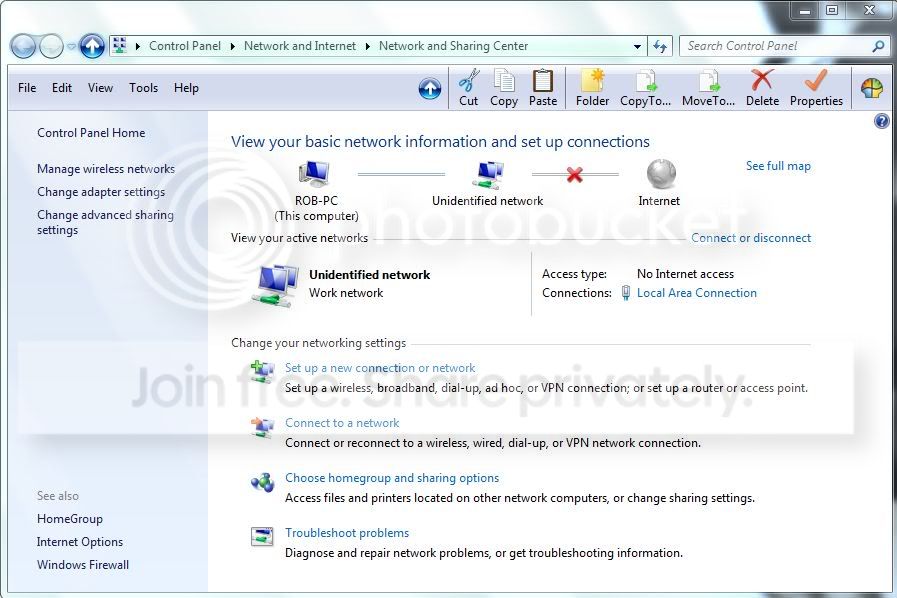
Network.jpg


When I d-click on the 'unidentified network' icon it 'sees' the laptop but when i d-click on that it says...

"Laptop is not accessible You might not have permission to use this network resource. Contact the admiistraotr of this server to find out if you have access permissions.

The Server service is not started."

On the laptops 'network and sharing' page i see this...
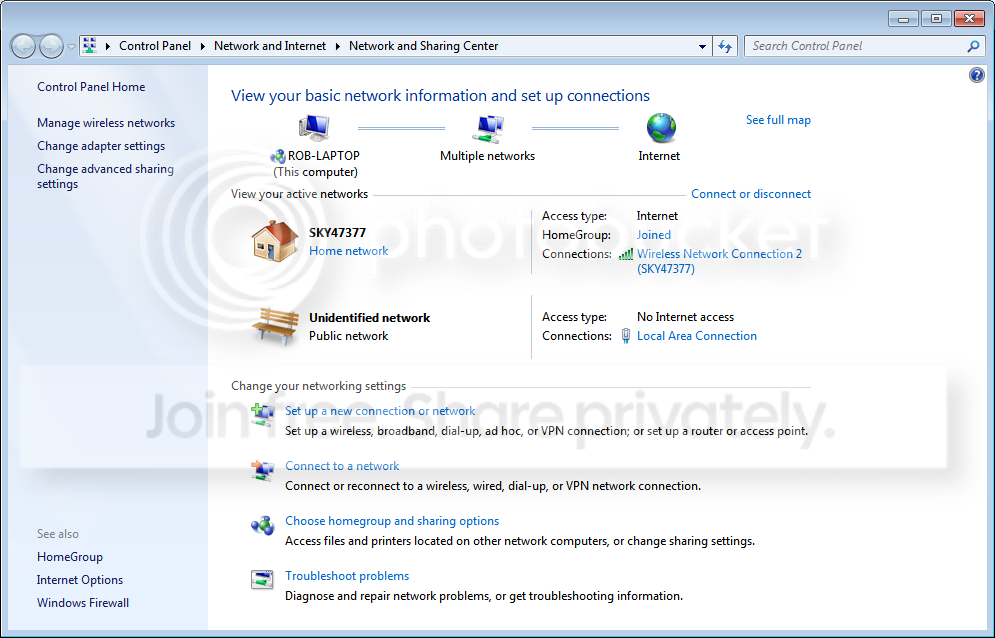
Network2.png


and when I d-click on the multiple networks icon at the top it just shows the laptop and a laptop media area. No desktop. If I d-click on the park bench icon it tells me to name the network and choose an icon but then wont let me make any changes.

Can anybody tell me what I need to do to get these to computers to communicate properly? I'm quite happy to start again from scratch, creating a new network as obviously what I've done so far is obviously not correct as its not working properly. Please feel free to ask any questions as I'll happily give any information you need in order to help me get this sorted. I am a noob to networking though so the more straight-forward and simple you can make this the better for me. Step-by-step would be perfect but anything that helps me with this will be very much appreciated. Thanks.
 

My Computer

OS
Windows 7 64bit
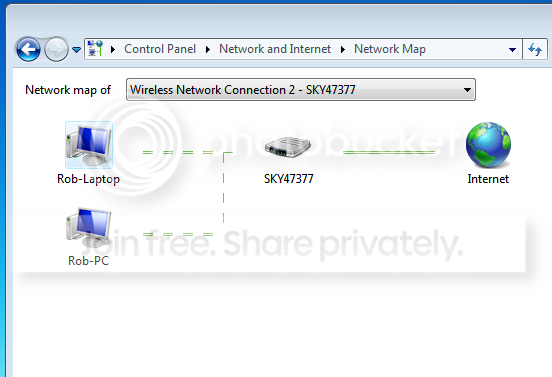
Also, when I click "see full network map" I get this...

Network3.png


I can drop down the bar at the top and select the direct connection between the two computers but then it tells me...

"Windows cannot create the network map because the network type is set to public. In order to view the network map, you must set the networks location type to Home or Work in Network and Sharing center."

Going back to the network and sharing center I cannot find anything clickable that will make these changes. This is on the laptop. When doing the same thing on the desktop I get the same map and when I drop the tab down and select the 'unidentified network' I get...

"Windows cannot create the network map. Responses from the other devices on the network are delayed or there is an incompatible router on the network."

hope this helps.
 

My Computer

OS
Windows 7 64bit
You could just use the network setup wizarrd, just tick the right boxes and the OS does the rest. Go to the start menu and type network in the run box, from the list select create an ad-hoc (computer to computer) network.

It is a good idea to read the documents though so you know about the possible pitfalls.
 

My Computer

Computer Manufacturer/Model Number
DIY
OS
Windows 7 home premium x64
CPU
AMD FX-4100 AM3+ 3.6GHz 12MB Black Edition
Motherboard
Asus M5A97 Pro
Memory
Crsair vengeance 12Gb DDR3 1600MHz CL9
Graphics Card(s)
Asus GTX 560 1GB
Sound Card
Realtek onboard
Monitor(s) Displays
Hanns G 1680x1050 native
Hard Drives
OCZ 128Gb Petrol ssd
2x500 Gb Samsung
PSU
OCZ StealthXstream II 500W
Internet Speed
8Mb or better
There's some good video's on the subject via youtube.
 

My Computer

Computer Manufacturer/Model Number
Custom built
OS
Windows 7 Ultimate 64 bit
CPU
AMD Phenom II X4 965 Black Edition
Motherboard
Gigabyte GA-MA790X-DS4
Memory
GSkill 4 X 2 GB PC 8500
Graphics Card(s)
XFX Radeon HD 6790 D
Sound Card
On board RealTek HD
Monitor(s) Displays
Dual monitors:Samsung SyncMaster S20B300
Screen Resolution
1600 X 900
Hard Drives
Seagate Barracuda 1TB (primary)
Seagate Barracuda 2 X 320 GB
PSU
Ultra X4 750 watt fully modular
Case
Thermaltake Overseer RX 1 full tower
Cooling
Core-Contact 92 mm CPU Cooler
Keyboard
Logitech G510
Mouse
Razor DeathAdder
Internet Speed
50/5 Mbps UL/DL
Other Info
Optical: Super Muliti DVD burner w/lightscribe, Hauppauge WinTV HVR-1800
Thanks for your answers guys, I think these are going to be invaluable when I actually get to the stage where I'm sharing files/folders. Right now though I cannot even get the two comps to recognise each other. The desktop acknowledges the name of the laptop but you can't do anyhing with it. The laptop recognises that something is plugged into it but nothing more than that. Just comes up with 'unidentified network' and will not let me make any changes to it. Doesn't come up with the wizard like it does when I connect it to my wireless internet connection. Fairly sure that the problem lies with the Acer Aspire 5750 Lan connection not being configured properly but cannot, for the life of me, figure out what it is. Really pulling my hair out on this one!
 

My Computer

OS
Windows 7 64bit
Thanks for your answers guys, I think these are going to be invaluable when I actually get to the stage where I'm sharing files/folders. Right now though I cannot even get the two comps to recognise each other. The desktop acknowledges the name of the laptop but you can't do anyhing with it. The laptop recognises that something is plugged into it but nothing more than that. Just comes up with 'unidentified network' and will not let me make any changes to it. Doesn't come up with the wizard like it does when I connect it to my wireless internet connection. Fairly sure that the problem lies with the Acer Aspire 5750 Lan connection not being configured properly but cannot, for the life of me, figure out what it is. Really pulling my hair out on this one!
Read this, http://www.sevenforums.com/tutorials/9733-screenshots-files-upload-post-seven-forums.html it will help you to help us to help you.
 

My Computer

Computer Manufacturer/Model Number
Look in my Signature.
OS
Win7 H.Prem. 32bit+SP1
Thanks for your help guys. I got this working in the end. I cant tell you everything I did to make this work as there was so many little adjustments I made. I can tell you that I had to disconnect both internet connections and force the desktop to leave the homegroup that the laptop couldn't connect to. After this things started to move along a bit. I created a new homegroup on the laptop and very nearly managed to connect the desktop to that. Still had to make a couple more adjustments, the last of which being making sure the clocks were exactly synced to internet time. From there they both connected and the file sharing part was a breeze. So thanks for your suggestions. Problem solved.
 

My Computer

OS
Windows 7 64bit
Back
Top