"Network 2" really means no network. >:(

Golbez

New member
Local time
1:45 AM
Messages
12
So here's my issue. My Win.7 64bit computer goes into sleep mode after about 20 minutes of being idle. When it wakes up, it has to reestablish its connection to the internet. And I only know this because it'll create a new network and not connect. Looks like this:

network2.png


My solution is a temporary yet effective one, and it's clicking on that "Local Area Connection" link in the bottom right hand corner of the image, disabling the internet, letting that box magically disappear on its own (rather than staying open so I can just re-enable it.. :mad:), then clicking on the newly formed red X just beyond "Golbez (This Computer)" at the top left of the image. It re-establishes the connection, and it will either randomly choose just "Network" or "Network 2." Network works 99% of the time. Network 2 always fails. Always. If it's Network 2, I just go through the process again. Never takes more than like 3 or 4 attempts, but mostly does it the first try. In the bottom left hand corner of this image is the Park Bench icon. I can click this image while I'm connected to regular "Network" and it will allow me to merge/delete networks. I can delete Network 2, but my computer will recreate it randomly sometimes when I awaken it from sleep mode yet again. So it wants to create this phantom Network 2 so that my internet will temporarily not work. So every day after work I have to deal with this.

Well, to my good fortune, I've stumbled across this post, and so I've identified the following:

devicemanagernetworks.png


I'm hesitant to delete all these networks, and I would just like conformation that this is the correct solution. Or perhaps there is another. Please and thanks. :) Let me know if you need any more information. I would like to permanently ban Network 2. I'm saddened that deleting it wasn't the cure.
 

My Computer

OS
Windows 7 Home Premium
Can anyone confirm the "delete all network adapters" method? Or point me in the right direction? Or is this an unknown issue?
 

My Computer

OS
Windows 7 Home Premium
That advice by me is only meant to delate extra network adaptors so may not help in your case.

I think in your case the driver you are using is having problems with the sleep settings which is fairly common with certain drivers that weren't exactly made for Windows 7. The fix for that problem is to find a driver that is made for Windows 7 or turn off the sleep settings in power options.

It might also help to switch over to a private network.
http://www.sevenforums.com/tutorials/71408-unidentified-networks-set-private-public.html?filter
 

My Computer

Computer type
PC/Desktop
Computer Manufacturer/Model Number
Home built
OS
Windows 7 Ult, Windows 8.1 Pro,
CPU
Q9650-4.275GHz, E8600 4.5GHz, E6750-3.8GHz
Motherboard
Evga 780i FTW
Memory
G.Skill PC2 9600 1200Mhz 5 5 5 15 2T
Graphics Card(s)
GTX480
Sound Card
Asus Xonar D2
Monitor(s) Displays
HannsG
Screen Resolution
1680X1050
Hard Drives
GSkill Phoenix Pro 120GB SSD
PSU
ThermalTake Toughpower 1000Watt modular
Case
ThermalTake XaserV
Cooling
Xigmatek S1283
Keyboard
Logitech G15
Mouse
Logitech G9
Internet Speed
T1
If it's a desktop, you can solve this problem semi-permanently by turning off and disabling the network list service, network location awareness service and the windows firewall. I've seen this problem before on too many different hardware and software configurations for it to be anything but a flaw in windows seven that nobody wants to admit the possibility of, let alone try to find a solution for. Hopefully when enough people have complained about it Microsoft will pull it's head out of the sand and come up with a solution. (doubtful because it has existed since before windows 7 went RTM)
 
Thanks for the replies. When my connection is established, it's listed as a "home network." It was just the "Network 2" that I had defined as "public" so that it'd be another red flag that it was goofed up. I'll have to look for those drivers.

I'm looking up this Network List Service, and it seems like something I don't want to disable, especially concerning my computer's propensity to disconnect itself from the internet:

Disable unnecessary services the quick and easy way | Vista Rewired
"Network List Service
Description:

Identifies networks you are connected to and maintains a list of properties for them. The service will notify applications when these properties change.
Effects of Disabling:

The network icon in your system tray will disappear. You will no longer be notified when your connection with the internet is lost or present.
Why disable?

For most who don’t encounter Internet problems regularly, you really don’t need a service to tell you if your Internet is working.
As well, if you are not connected to a network, disable this."

For Network Location Awareness: Disable unnecessary services the quick and easy way | Vista Rewired

Not sure if that would solve the problem of establishing/connecting to a Network 2.

And the firewall doesn't prevent me from connecting. I'm not blocked, so I'm missing how that would force and connect to a Network 2 as well.

Thanks for the suggestions though. I'm learning a little about this anyways.

I'll check back after I can spend some time looking for drivers. Thanks again, guys.
 

My Computer

OS
Windows 7 Home Premium
Thanks for the replies. When my connection is established, it's listed as a "home network." It was just the "Network 2" that I had defined as "public" so that it'd be another red flag that it was goofed up. I'll have to look for those drivers.

I'm looking up this Network List Service, and it seems like something I don't want to disable, especially concerning my computer's propensity to disconnect itself from the internet:

Disable unnecessary services the quick and easy way | Vista Rewired
"Network List Service
Description:

Identifies networks you are connected to and maintains a list of properties for them. The service will notify applications when these properties change.
Effects of Disabling:

The network icon in your system tray will disappear. You will no longer be notified when your connection with the internet is lost or present.
Why disable?

For most who don’t encounter Internet problems regularly, you really don’t need a service to tell you if your Internet is working.
As well, if you are not connected to a network, disable this."

For Network Location Awareness: Disable unnecessary services the quick and easy way | Vista Rewired

Not sure if that would solve the problem of establishing/connecting to a Network 2.

And the firewall doesn't prevent me from connecting. I'm not blocked, so I'm missing how that would force and connect to a Network 2 as well.

Thanks for the suggestions though. I'm learning a little about this anyways.

I'll check back after I can spend some time looking for drivers. Thanks again, guys.
It's something about the three services combined that causes some people to have internet connectivity problems on some windows 7 systems, even when other computers connected to the same network have no trouble accessing the internet...

I would not have suggested it if it I hadn't successfully solved a similar problem using the same method before, and it doesn't make any changes you can't reverse if it doesn't solve your problem.
 
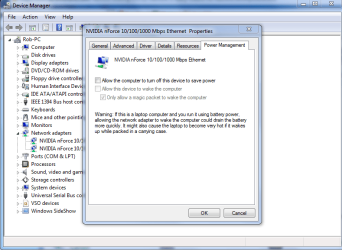
Ah, the reversibility sweetens the deal. I took some of these links and information to start my search, and ended up with this link, which while not a technical fix, does solve my problem. The work-around solution is to uncheck the box that allows the network card to be turned off during the sleep mode. Now I just leave it on, and it doesn't have weird connectiony problems.

7 can't identify network when starting up from sleep mode

It's solution 2.

As an added resource, here's a link to Microsoft's driver updates (although I don't know which one it'd be):
http://www.microsoft.com/windows/co... & Internet&subcategory=Networking&results=50
 

My Computer

OS
Windows 7 Home Premium
That advice by me is only meant to delate extra network adaptors so may not help in your case.

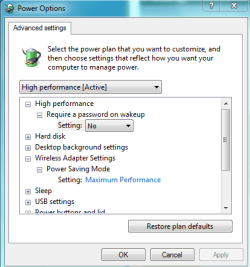
I think in your case the driver you are using is having problems with the sleep settings which is fairly common with certain drivers that weren't exactly made for Windows 7. The fix for that problem is to find a driver that is made for Windows 7 or turn off the sleep settings in power options.

It might also help to switch over to a private network.
http://www.sevenforums.com/tutorials/71408-unidentified-networks-set-private-public.html?filter

I have a picture of this setting because this problem comes up all the time. Sometimes it helps to make some adjustments in the power options window "second window".

Method 2:
If the issue persists you may check the Power Management settings for the device network adapter. To correct the settings please follow these steps.
  1. ClickStart, type device in the Start Search box, and then clickDevice Manager in the Programs list.
  2. In theUser Account Control dialog box, click Continue.
  3. In Device Manager, expandNetwork adapters.
  4. Right-click the network driver and then clickProperties.
  5. Click thePower Management tab.
  6. Click touncheck the Allow the computer to turn off this device to save powercheck box, and then click OK. If the option is checked, then uncheck the option and apply the settings.
 

Attachments

  • network adaptor turn off to save power.PNG
    network adaptor turn off to save power.PNG
    34.6 KB · Views: 33
  • power plan network adaptor settings.PNG
    power plan network adaptor settings.PNG
    13.3 KB · Views: 29

My Computer

Computer type
PC/Desktop
Computer Manufacturer/Model Number
Home built
OS
Windows 7 Ult, Windows 8.1 Pro,
CPU
Q9650-4.275GHz, E8600 4.5GHz, E6750-3.8GHz
Motherboard
Evga 780i FTW
Memory
G.Skill PC2 9600 1200Mhz 5 5 5 15 2T
Graphics Card(s)
GTX480
Sound Card
Asus Xonar D2
Monitor(s) Displays
HannsG
Screen Resolution
1680X1050
Hard Drives
GSkill Phoenix Pro 120GB SSD
PSU
ThermalTake Toughpower 1000Watt modular
Case
ThermalTake XaserV
Cooling
Xigmatek S1283
Keyboard
Logitech G15
Mouse
Logitech G9
Internet Speed
T1
Ah, sorry. I misinterpreted what you were saying earlier. I thought you wanted me to disable my sleep setting entirely, not just for the network card device.

And actually, this morning when I woke up the computer, the connection was disabled still (unsolved). So I may have to try disabling the combination of those 3 aforementioned processes. >:x
 

My Computer

OS
Windows 7 Home Premium
Back
Top