
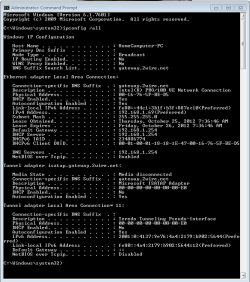
Command Prompt... Network snip attached
I simply want to be able to share files between my laptop and pc on my home network--both are running windows 7 home premium 32 bit.
First, I ran into the "windows 7 cannot setup a homegroup on this computer" on both computers. It seems some people have been helped by solutions offered here: "Windows cannot set up homegroup on this computer", but I'm among the ones who still can't get homegroups to work. I decided that if I could just share directly via network folders that'd still be ok with me. So unless someone has a pearl of wisdom regarding resolving my homegroup problem, I'll make my question more about what follows.
So, second, I was able to access each of the computers for a day or so from each other via "Network." One thing that was odd was that I when typing in my standard administrator credentials for the *other* computer it wouldn't let me login. I discovered that if I created another user account with admin status that this would let me log into the other computer.
HOWEVER, something has happened. Now, on my laptop, when I go to Network > [Desktop Name] > Users I would normally expect to see my main user account. However, it is missing and the only folders there are "default" and "public."
QUESTION: What do I need to do to fix this?
I've tried everything here: Why are computers missing from the network map? and turning off windows firewall on the home network (it didn't work so it's back on). I, of course, have tried rebooting at the same time and basic things like that. The desktop is wired directly to my 2wire router and my laptop is accessing it wirelessly.
I'm not very techy, just had my fifth baby boy, and simply want to be able to share things like photos between the two computers.
I'm usually one that is able to hunt out solutions, but I'm at the end of my rope and would love to see if anyone here can help me.
Thanks so much!
I simply want to be able to share files between my laptop and pc on my home network--both are running windows 7 home premium 32 bit.
First, I ran into the "windows 7 cannot setup a homegroup on this computer" on both computers. It seems some people have been helped by solutions offered here: "Windows cannot set up homegroup on this computer", but I'm among the ones who still can't get homegroups to work. I decided that if I could just share directly via network folders that'd still be ok with me. So unless someone has a pearl of wisdom regarding resolving my homegroup problem, I'll make my question more about what follows.
So, second, I was able to access each of the computers for a day or so from each other via "Network." One thing that was odd was that I when typing in my standard administrator credentials for the *other* computer it wouldn't let me login. I discovered that if I created another user account with admin status that this would let me log into the other computer.
HOWEVER, something has happened. Now, on my laptop, when I go to Network > [Desktop Name] > Users I would normally expect to see my main user account. However, it is missing and the only folders there are "default" and "public."
QUESTION: What do I need to do to fix this?
I've tried everything here: Why are computers missing from the network map? and turning off windows firewall on the home network (it didn't work so it's back on). I, of course, have tried rebooting at the same time and basic things like that. The desktop is wired directly to my 2wire router and my laptop is accessing it wirelessly.
I'm not very techy, just had my fifth baby boy, and simply want to be able to share things like photos between the two computers.
I'm usually one that is able to hunt out solutions, but I'm at the end of my rope and would love to see if anyone here can help me.
Thanks so much!
Attachments
Last edited:
My Computer
At a glance
Windows 7 Home Premium 32bit
- OS
- Windows 7 Home Premium 32bit

 I'm still hoping I can get this issue resolved.

