Network adapter not recognised after Win7 clean install

jovan

New member
Local time
8:48 PM
Messages
1
Hi,

I decided to do a clean install of my Windows 7 Ultimate on my PC (not a brand model, but one that was assembled together in-store). While everything worked fine before the install (it was slow, hence the clean install), the installation went well except that the network adapter cannot be recognised at all now.

It's not just a matter of installing drivers, because I did that (downloaded them on the laptop and copied them over), but rather that it seems as if the network adapter is physically not present, yet it is and was working fine before the clean install.

I have searched and Googled for hours and tried various "solutions", but nothing has solved the problem.
I tried installing new drivers, that didn't work. I tried going into "Change adapter settings", but there are none. I looked through the BIOS but found no solution there. I even went as far as to reinstall Windows, but with no luck either.

What could the issue be and how can it be resolved, without me having to take the machine in to an IT store and have them waste my time and money or try and convince me that I need a new network adapter and/or new motherboard?

Any useful help will be kindly appreciated.

Regards.
 

My Computer

Computer type
PC/Desktop
OS
Windows 7 Ultimate 64bit
I`m in the same boat, it`s my dad`s PC, I installed Win 7 on it cause mouse and keyboard where not being detected, so after install of Win 7 they worked,but I can only connect to the net via Ethernet, I don`t know what else to try....
 

My Computer

Computer type
PC/Desktop
Computer Manufacturer/Model Number
HP A6000
OS
Shipped with Vista, installed Win 7 Premium over it
Hello and welcome jovan mate without some system specs it is very hard to help you out so give us those at least
http://www.sevenforums.com/tutorials/180324-system-info-see-your-system-specs.html

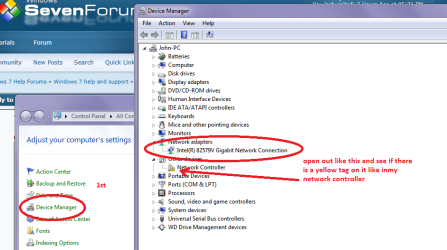
In the control panel what do you see under device manager for the adaptor if there is then there is something wrong.

The driver for it should be downloaded (and I think that is what you are saying you have done) from the manufacturers - the Windows feature is not up to the job in my mind.
Also best done on the machine but if you cannot hook up then it will be not possible.
 

Attachments

  • NETWORK.PNG
    NETWORK.PNG
    43.7 KB · Views: 0

My Computer

Computer type
PC/Desktop
Computer Manufacturer/Model Number
Own build (new) Desk1 / Asus ROG Win 7 / Desk2 1st build
OS
Desk1 7 Home Prem / Desk2 10 Pro / Main lap Asus ROG 10 Pro 2 laptop Toshiba 7 Pro Asus P2520 7 & 10
CPU
Desk1 i5 3750K / Laptop i7 GTX 860M / Desk2 i5 2500
Motherboard
Desk1 Asus P877-V / Desk2 Gigabyte H67 UD3H / Laptop ?
Memory
Desk1 8GB (1866) / Desk2 16GB (1333) / Laptop 8Gb DDR3
Graphics Card(s)
Desk 1& 2NVidia GTX 650 & Laptops on board Intel
Sound Card
Desk 1 & 2 -XONAR DG Realtek High Def audio Laptop
Monitor(s) Displays
Desk 1 Benq HD 2450 / Desk2 Philips 24" / Laptop 17.5"
Screen Resolution
1920x1080 D1 & D2 & Laptop 1
Hard Drives
Desk1 Samsung 120GB 830 SSD
Asus ROG 256GB 850 Pro SSD
Desk2 Samsung 840 256 SSD
Toshiba 120GB EVO
PSU
Desk 1 Corsair HX 1050/ Laptop ? / Desk 2 Corsair HX 650
Case
Desk 1 Cooler HAF XM ? Toshiba laptop / Desk2 Coolermaster
Cooling
Fans on all Desk1 -2 Desk2 - all Coolermasters 5 Laptop ?
Keyboard
Desk 1 MS Sidewinder X6 Desk 2 MS Sidewinder X 4
Mouse
Desk 1&2 - Gigabyte MS 900 gamer - laptop - Logitec wireless
Internet Speed
ADSL2+
Other Info
One other Desktop (tester) and spare Toshba laptop both with SSD's
Running Kaspersky 2016 ISS on all machines config'd identically
Logitec audio stereo systems on each machine (x3)
Canon MG5250MFC
Router/modem TP-Link running WPA2SK
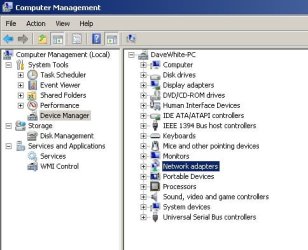
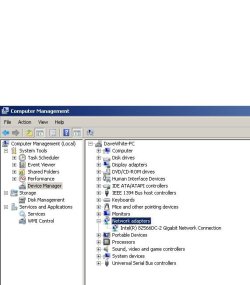
This is what`s in my Device Manager...
 

Attachments

  • Untitled.jpg
    Untitled.jpg
    34.8 KB · Views: 13
  • Untitled 1.jpg
    Untitled 1.jpg
    38.3 KB · Views: 13

My Computer

Computer type
PC/Desktop
Computer Manufacturer/Model Number
HP A6000
OS
Shipped with Vista, installed Win 7 Premium over it
jovan mate just what did you reinstall from? Was it a disk that the makers gave you or some version of Windows you have bought?

You could have used this


REINSTALL

Forinstalling I prefer a disk to be honest but if you want to try again this isthe one to follow
Clean Reinstall - Factory OEM Windows 7 makesure it is the right version ie Home Premium or Ultimate whatever you have acode for and then the language and do not use the ones with a large"N" or "old" beside them. If you are wondering why the N itis because that will not include the Windows Media Player and while it is notmuch to get it it is tedious.
You can use a disk or USB stick with this. This way you could have saved a lot of expense if you have bought another edition.


Now mloc33 you are confusing the issue here mate it might have been better to start a new thread but the driver from Intel is here https://downloadcenter.intel.com/Detail_Desc.aspx?agr=Y&ProdId=2775&DwnldID=18713&ProductFamily=Ethernet+Components&ProductLine=Ethernet+Controllers&ProductProduct=Intel%c2%ae+82566+Gigabit+Ethernet+PHY&lang=eng make sure you pick the right bit version. However it might still not be the one you need.

The HP site is a right shambles and as you are converting the old Vista to 7 there may be problems with the drivers for that machine .

That is one of the reasons I asked for the system specs so we could pin the hardware down a bit better especially the motherboard.

Just as a matter of curiosity on your dads machine did you install a new hard drive or wipe the old one before installing 7 or just run the OEM disk on the machine?
 

My Computer

Computer type
PC/Desktop
Computer Manufacturer/Model Number
Own build (new) Desk1 / Asus ROG Win 7 / Desk2 1st build
OS
Desk1 7 Home Prem / Desk2 10 Pro / Main lap Asus ROG 10 Pro 2 laptop Toshiba 7 Pro Asus P2520 7 & 10
CPU
Desk1 i5 3750K / Laptop i7 GTX 860M / Desk2 i5 2500
Motherboard
Desk1 Asus P877-V / Desk2 Gigabyte H67 UD3H / Laptop ?
Memory
Desk1 8GB (1866) / Desk2 16GB (1333) / Laptop 8Gb DDR3
Graphics Card(s)
Desk 1& 2NVidia GTX 650 & Laptops on board Intel
Sound Card
Desk 1 & 2 -XONAR DG Realtek High Def audio Laptop
Monitor(s) Displays
Desk 1 Benq HD 2450 / Desk2 Philips 24" / Laptop 17.5"
Screen Resolution
1920x1080 D1 & D2 & Laptop 1
Hard Drives
Desk1 Samsung 120GB 830 SSD
Asus ROG 256GB 850 Pro SSD
Desk2 Samsung 840 256 SSD
Toshiba 120GB EVO
PSU
Desk 1 Corsair HX 1050/ Laptop ? / Desk 2 Corsair HX 650
Case
Desk 1 Cooler HAF XM ? Toshiba laptop / Desk2 Coolermaster
Cooling
Fans on all Desk1 -2 Desk2 - all Coolermasters 5 Laptop ?
Keyboard
Desk 1 MS Sidewinder X6 Desk 2 MS Sidewinder X 4
Mouse
Desk 1&2 - Gigabyte MS 900 gamer - laptop - Logitec wireless
Internet Speed
ADSL2+
Other Info
One other Desktop (tester) and spare Toshba laptop both with SSD's
Running Kaspersky 2016 ISS on all machines config'd identically
Logitec audio stereo systems on each machine (x3)
Canon MG5250MFC
Router/modem TP-Link running WPA2SK
Back
Top