Network Adaptor Reset keeps Ocurring

rybosix

New member
Member
Local time
12:40 AM
Messages
88
New to PC and first post here.
Using Win. 7 Ultimate 32 bit, Intel 1.73Ghz T2080 chip
2 GB memory.

Using IE 9. Mostly ok but seems as tho more frequently I get the yellow triangle no connection, so I diagnaose and repairs( fixed ) and all is ok.

I looked at Devince manager/Network Adapator Atheros wireless connection/driver details and I'm using Atheros 8.0.0.225 Built by winddk.

I went to atheros adaptors page
DriverMax - Network Adapters - TP-LINK - Atheros AR5007EG Wireless Network Adapter Computer Driver Updates

And I see that my adaptor is made for the 64 bit Win 7, and the one for my 32 bit is 8.0.0.228 not the .225 one I mention above and is my current driver.

The obvious answer is to inload the .229 driver for my 32 bit system.

Since I'm reltively new to PC's, I wanted to see if any here might have some knowlege in this area before attempting this.

I guess and additional question, would be, can I have both drivers installed and one be the active one and the other not?

Thanks ahead of time. Not sure if the problem is becoming more frequent or just certain web sites cause it to dissconnect or cause take to long at one site...I dunno and maybe nobody knows for sure.

Now I will check and make sure I am suscribed to this thread I've started.

Rybosix
update page
 

My Computer

Computer Manufacturer/Model Number
Toshiba Satelite
OS
Windows 7 ultimate 32
CPU
1.73 T2080 intel
Memory
2Ghz
Hard Drives
60GB
1. no need to 'diagnose and repair' --just go to Device Manager then right click adapter--select 'disable' then select 'enable'--much faster simpler fix.

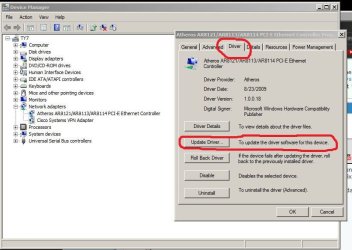
2. to correct or update driver--go to device manager--right click adapter, select properties>driver tab--use update driver button (see attached)

3. NO you shouldn't have multiple driver versions installed
 

Attachments

  • Capture.JPG
    Capture.JPG
    67 KB · Views: 8

My Computer

Computer Manufacturer/Model Number
SALEON model 2.2b
OS
win7 ultimate 32bit
CPU
core2 Extreme QX6850-OCd to 3.15 GHz
Motherboard
ASUS P5G41-M LE
Memory
4 GB
Graphics Card(s)
NVidia 8600 GT
Monitor(s) Displays
23" acer
Hard Drives
one SATA 250GB partitioned equally in half
one SATA 160GB-internal storage
PSU
500W Thermaltake
Case
mini tower
Network Adpator reset

TMAN] 1. no need to 'diagnose and repair' --just go to Device Manager then right click adapter--select 'disable' then select 'enable'--much faster simpler fix.

Ok, either way will fix the problem temporarily. thanks

TMAN] 2. to correct or update driver--go to device manager--right click adapter, select properties>driver tab--use update driver button (see attached)

Yeah, that makes sense as maybe it will install the one for 32 bit system. I guess I will try that, and If it does not work well at least I know the one for 64 bit system did work.

TMAN] 3. NO you shouldn't have multiple driver versions installed

Ok, that is significant info. thanks so much TMAN. I can see how there is catch 22 possible here tho, when I click update, the old version has to replace itself with the new version, so there is a transition zone in there, where they both cannot be in the system, or at least active in my OS at same time.

This will take some time to see if all is fixed, cause the problem hasn't happen every time I'm on IE accessing internet.

Rybosix
 

My Computer

Computer Manufacturer/Model Number
Toshiba Satelite
OS
Windows 7 ultimate 32
CPU
1.73 T2080 intel
Memory
2Ghz
Hard Drives
60GB
Hi Tman, or others, I tried the update that you suggested and PC did a online search and stated, that, my network adapator was up to date. So I'm back to my original quandry regarding the network adaptors at the following link.

DriverMax - Network Adapters - TP-LINK - Atheros AR5007EG Wireless Network Adapter Computer Driver Updates

I.e. I'm using the adpator on that page that is shown to be for 64 bit OS-- .225 ---and I'm using 32 bit OS. So my quandry is whether or not to try install the one that is design for the 32 bit OS-- the .238 adaptor --.

Since I'm new at this sort of thing, I was checking to see if any others new for sure or had any suggestions in regards inloading and installing the one that appears to be designed for my 32 bit OS.

Thanks for any have experience or idea of best pathway to go abput this.

Rybosix


TMAN] 1. no need to 'diagnose and repair' --just go to Device Manager then right click adapter--select 'disable' then select 'enable'--much faster simpler fix.

Ok, either way will fix the problem temporarily. thanks

TMAN] 2. to correct or update driver--go to device manager--right click adapter, select properties>driver tab--use update driver button (see attached)

Yeah, that makes sense as maybe it will install the one for 32 bit system. I guess I will try that, and If it does not work well at least I know the one for 64 bit system did work.

TMAN] 3. NO you shouldn't have multiple driver versions installed

Ok, that is significant info. thanks so much TMAN. I can see how there is catch 22 possible here tho, when I click update, the old version has to replace itself with the new version, so there is a transition zone in there, where they both cannot be in the system, or at least active in my OS at same time.

This will take some time to see if all is fixed, cause the problem hasn't happen every time I'm on IE accessing internet.

Rybosix
 

My Computer

Computer Manufacturer/Model Number
Toshiba Satelite
OS
Windows 7 ultimate 32
CPU
1.73 T2080 intel
Memory
2Ghz
Hard Drives
60GB

My Computer

Computer Manufacturer/Model Number
SALEON model 2.2b
OS
win7 ultimate 32bit
CPU
core2 Extreme QX6850-OCd to 3.15 GHz
Motherboard
ASUS P5G41-M LE
Memory
4 GB
Graphics Card(s)
NVidia 8600 GT
Monitor(s) Displays
23" acer
Hard Drives
one SATA 250GB partitioned equally in half
one SATA 160GB-internal storage
PSU
500W Thermaltake
Case
mini tower
Back
Top