
Network Authentication-username & password???

vlbridges

New member
Local time
12:55 PM
Messages
2
I have a Windows7 64 bit desktop and a Windows7 64 bit laptop. My desktop is wired to the internet, my laptop uses wireless for internet access. My router is a Linksys WRT54GP2. I have not previously had my router secured. I was advised to secure it using at least a WPA level of security...my router has only the following choices...WPA PreShared Key, WPA Radius, and WEP. I initially secured the router using WPA Radius, however, I was not able to get my laptop to access the internet. I went back to the router and selected WEP, the weakest level of security, made the necessary changes on my laptop and now have internet access.

When I had the router secured using the WPA Radius and tired to connect using linksys a popup window appeared asking for a Network Authentication username and password. I do not know what username and password Windows Security is looking for here.

Can you help?

Thank you,
Valerie
 

Attachments
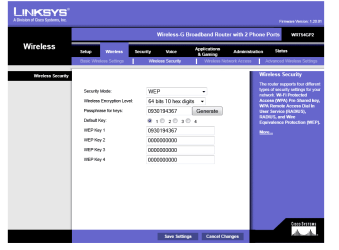
  • Linksys Router-Wireless-Security.PNG
    Linksys Router-Wireless-Security.PNG
    17.4 KB · Views: 208

My Computer

Computer Manufacturer/Model Number
ACER
OS
Windows 7 Home Premium 64 Bit
CPU
Intel Pentium P6100
Memory
4gb
RADIUS is a authentication method that uses a RADIUS server with a list of users along with a certificate key to authenticate access. Basically it was asking for the Username/Password that it will use to authenticate your computer with the RADIUS server.

Judging by the description of your network setup you would not require such authentication. You have the option of use WPA PreShared Key authentication, i would recommend using that instead.

When setting up WPA-PSK:

There will be a field where you are required to type a Key ( basically some form of password eg. Password1 ) which, when you try to connect to the internet on your PC, the router will challenge you with a field requiring you to enter that same key.

Enter the key, save the credentials and you will connect automatically using these credentials when the PC is started up next.

Here is a guide you might like to read on the subject.
 

My Computer

OS
Windows 7 Professional x64 Backtrack 4 R2
CPU
Intel Core i5-650
Motherboard
Gigabyte P55-UD3
Memory
4 GB Geil PC3 12800
Graphics Card(s)
HIS HD 4870 X2
Sound Card
Sound Blaster X-Fi Titanium Fatal1ty Champion
Monitor(s) Displays
BenQ 22" G2220HD
Hard Drives
Seagate Barracuda 7200.12 500GB
PSU
Antec High Current Gamer 620W Power Supply
Case
Thermaltake Armor+ MX
Keyboard
Microsoft SideWinder X6
Mouse
Razer Abyssus
Thank you so much for your prompt reply. After posting I continued to research my problem and did learn about the WPA Radius option and that it was not appropriate for my needs. I was still unsure as to which option to chose from those available to provide the highest level of security. Thank you for advising me to use WPA-PSK. When I have recovered from this latest exercise :-) I will work on making the change. I assume once I make the change to WPA-PSK others who use my wireless (grandkids with all manner of wireless stuff) will be required to enter the "credentials" for access?
 

My Computer

Computer Manufacturer/Model Number
ACER
OS
Windows 7 Home Premium 64 Bit
CPU
Intel Pentium P6100
Memory
4gb
I assume once I make the change to WPA-PSK others who use my wireless (grandkids with all manner of wireless stuff) will be required to enter the "credentials" for access?

That is correct, glad i was of some assistance. :)
 

My Computer

OS
Windows 7 Professional x64 Backtrack 4 R2
CPU
Intel Core i5-650
Motherboard
Gigabyte P55-UD3
Memory
4 GB Geil PC3 12800
Graphics Card(s)
HIS HD 4870 X2
Sound Card
Sound Blaster X-Fi Titanium Fatal1ty Champion
Monitor(s) Displays
BenQ 22" G2220HD
Hard Drives
Seagate Barracuda 7200.12 500GB
PSU
Antec High Current Gamer 620W Power Supply
Case
Thermaltake Armor+ MX
Keyboard
Microsoft SideWinder X6
Mouse
Razer Abyssus
Back
Top