Network Bridge connection down?

cashng

New member
Local time
5:33 AM
Messages
49
Location
Taipei
Have a question, when i bridged 2 connections in my laptop, why is it that, the other computers are unable to connect to the internet and that include mine...is there a way to fix it? Please advise. Thank you.
 

My Computer

Computer Manufacturer/Model Number
Acer Aspire 4730Z
OS
Windows 7 Ultimate 32-bit
CPU
Intel Pentium @2.00GHz Merom 65nm Technology
Motherboard
Acer Aspire 4730Z (uPGA-478)
Memory
4.0 Dual-Channel DDR2 @ 332MHz 5-5-5-15
Graphics Card(s)
Mobile Intel(R) 4 Series Express Chipset Family
Monitor(s) Displays
Generic PnP Monitor
Screen Resolution
1280x800
Hard Drives
160GB Hitachi
Hi cashng.... it's hard to say without you bein a little more specific.

Could you please describe your exact network layout? a picture of your network map would be helpful too. (Open network and sharing centre and click "see full map" on the top right hand corner
 

My Computer

Computer type
PC/Desktop
Computer Manufacturer/Model Number
Medion Erazer (note to self: insert model number) - with custom additions
OS
Windows 10 Pro x64
CPU
Intel Core i5 7400 @ 3.00GHz
Motherboard
OEM supllied with PC
Memory
8GB 2133Mhz DDR4 (OEM supplied)
Graphics Card(s)
Gygabyte Windforce GTX 1050Ti (Factory Overclocked)
Sound Card
Realtek
Monitor(s) Displays
Acer Al1980 + HKC
Screen Resolution
1360*768(HKC) / 1280*1024(Acer)
Hard Drives
1TB Toshiba
1TB WD Caviar Green
120GB Samsung Evo 840
PSU
OEM supplied (no power rating on case)
Case
OEM Supplied
Cooling
Stock
Keyboard
Logitech Wireless
Mouse
Logitect Wireless
Internet Speed
40Mb/s Down 10Mb/s Up
Antivirus
Defender
Browser
Firefox
Network Bridge

My OS Windows 7

I had a similar problem. In my case it turned out that the bridge (switch) could not handle IP in Windows 7.

I had to buy a new, one which resolved the problem.
 

My Computer

Computer Manufacturer/Model Number
Vaio VPCEB 11FX
OS
Windows 7
CPU
Core I3
Motherboard
Sony
Memory
4 G
Graphics Card(s)
Integratd Intel HD
Sound Card
Bult Inte (Laptop)
Monitor(s) Displays
Laptop
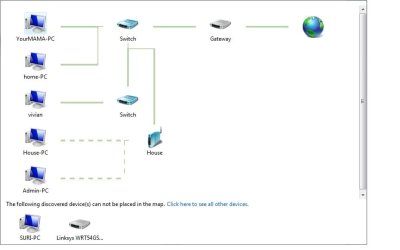
file attached is my network map. When I select my wireless and wired connection, to add them to bridge, once successfully added, all the computers within my network will down, which means they will not have the access to the internet. That includes mine. I even changed my bridge connection to a static ip, or the google open DNS, i am still unable to connect to the internet.
 

Attachments

  • networkmap.jpg
    networkmap.jpg
    24.4 KB · Views: 84

My Computer

Computer Manufacturer/Model Number
Acer Aspire 4730Z
OS
Windows 7 Ultimate 32-bit
CPU
Intel Pentium @2.00GHz Merom 65nm Technology
Motherboard
Acer Aspire 4730Z (uPGA-478)
Memory
4.0 Dual-Channel DDR2 @ 332MHz 5-5-5-15
Graphics Card(s)
Mobile Intel(R) 4 Series Express Chipset Family
Monitor(s) Displays
Generic PnP Monitor
Screen Resolution
1280x800
Hard Drives
160GB Hitachi
replies anyone?
 

My Computer

Computer Manufacturer/Model Number
Acer Aspire 4730Z
OS
Windows 7 Ultimate 32-bit
CPU
Intel Pentium @2.00GHz Merom 65nm Technology
Motherboard
Acer Aspire 4730Z (uPGA-478)
Memory
4.0 Dual-Channel DDR2 @ 332MHz 5-5-5-15
Graphics Card(s)
Mobile Intel(R) 4 Series Express Chipset Family
Monitor(s) Displays
Generic PnP Monitor
Screen Resolution
1280x800
Hard Drives
160GB Hitachi
sorry cashng I have been away:

Holy crap thats a complicated network ;) Ok is there any reason they need to be "bridged"? or do you simply want the network to function as one entity?
 

My Computer

Computer type
PC/Desktop
Computer Manufacturer/Model Number
Medion Erazer (note to self: insert model number) - with custom additions
OS
Windows 10 Pro x64
CPU
Intel Core i5 7400 @ 3.00GHz
Motherboard
OEM supllied with PC
Memory
8GB 2133Mhz DDR4 (OEM supplied)
Graphics Card(s)
Gygabyte Windforce GTX 1050Ti (Factory Overclocked)
Sound Card
Realtek
Monitor(s) Displays
Acer Al1980 + HKC
Screen Resolution
1360*768(HKC) / 1280*1024(Acer)
Hard Drives
1TB Toshiba
1TB WD Caviar Green
120GB Samsung Evo 840
PSU
OEM supplied (no power rating on case)
Case
OEM Supplied
Cooling
Stock
Keyboard
Logitech Wireless
Mouse
Logitect Wireless
Internet Speed
40Mb/s Down 10Mb/s Up
Antivirus
Defender
Browser
Firefox
file attached is my network map. When I select my wireless and wired connection, to add them to bridge, once successfully added, all the computers within my network will down, which means they will not have the access to the internet. That includes mine. I even changed my bridge connection to a static ip, or the google open DNS, i am still unable to connect to the internet.

Is the one named "house" a wireless router "second router" or a wireless access point? Considering that your WRT54GS can't be placed on the map I'd guess you are using two routers in the same network. :sarc:
 

My Computer

Computer type
PC/Desktop
Computer Manufacturer/Model Number
Home built
OS
Windows 7 Ult, Windows 8.1 Pro,
CPU
Q9650-4.275GHz, E8600 4.5GHz, E6750-3.8GHz
Motherboard
Evga 780i FTW
Memory
G.Skill PC2 9600 1200Mhz 5 5 5 15 2T
Graphics Card(s)
GTX480
Sound Card
Asus Xonar D2
Monitor(s) Displays
HannsG
Screen Resolution
1680X1050
Hard Drives
GSkill Phoenix Pro 120GB SSD
PSU
ThermalTake Toughpower 1000Watt modular
Case
ThermalTake XaserV
Cooling
Xigmatek S1283
Keyboard
Logitech G15
Mouse
Logitech G9
Internet Speed
T1
yes, i am using 2 routers and 2 switches in my house, so when bridged ethernet and wireless together, all the computer in my network cannot access the internet. so any help?
 

My Computer

Computer Manufacturer/Model Number
Acer Aspire 4730Z
OS
Windows 7 Ultimate 32-bit
CPU
Intel Pentium @2.00GHz Merom 65nm Technology
Motherboard
Acer Aspire 4730Z (uPGA-478)
Memory
4.0 Dual-Channel DDR2 @ 332MHz 5-5-5-15
Graphics Card(s)
Mobile Intel(R) 4 Series Express Chipset Family
Monitor(s) Displays
Generic PnP Monitor
Screen Resolution
1280x800
Hard Drives
160GB Hitachi
As I suspected you are trying to use a dual router network but havn't set your routers up properly to work in such an arrangement.

For dual router set ups you need to set one to assign DHCP IP's and the other is basically used as a switch. The set up guide below should help you with the required set up. Otherwise the routers fight each other on which one is the DHCP host.

This sure is coming up a lot lately.

I think it's wise to point out that you would be better off using a router that has both wired and wireless capiblity or you could use a single router for the wired connection and a wireless access point for the wireless connection. It's much easier to set up that way. The tutorial below should help you set up both routers for a dual router network. Good luck and post back with any questions you might have.

http://www.sevenforums.com/tutorials/91791-multi-router-network-configure.html?filter
 

My Computer

Computer type
PC/Desktop
Computer Manufacturer/Model Number
Home built
OS
Windows 7 Ult, Windows 8.1 Pro,
CPU
Q9650-4.275GHz, E8600 4.5GHz, E6750-3.8GHz
Motherboard
Evga 780i FTW
Memory
G.Skill PC2 9600 1200Mhz 5 5 5 15 2T
Graphics Card(s)
GTX480
Sound Card
Asus Xonar D2
Monitor(s) Displays
HannsG
Screen Resolution
1680X1050
Hard Drives
GSkill Phoenix Pro 120GB SSD
PSU
ThermalTake Toughpower 1000Watt modular
Case
ThermalTake XaserV
Cooling
Xigmatek S1283
Keyboard
Logitech G15
Mouse
Logitech G9
Internet Speed
T1
As I suspected you are trying to use a dual router network but havn't set your routers up properly to work in such an arrangement.

For dual router set ups you need to set one to assign DHCP IP's and the other is basically used as a switch. The set up guide below should help you with the required set up. Otherwise the routers fight each other on which one is the DHCP host.

This sure is coming up a lot lately.

I think it's wise to point out that you would be better off using a router that has both wired and wireless capiblity or you could use a single router for the wired connection and a wireless access point for the wireless connection. It's much easier to set up that way. The tutorial below should help you set up both routers for a dual router network. Good luck and post back with any questions you might have.

http://www.sevenforums.com/tutorials/91791-multi-router-network-configure.html?filter

I agree. However what I don't understand is why you are bridging in your Laptop. With the listed equipment in your diagram there should be no need ever to use a windows software bridge.

I think it might help, atleast me, to know what your end goal is, what exactly are you trying to do?

Thanks,

H.
 

My Computer

Computer Manufacturer/Model Number
Home Built
OS
Windows 7; Server 08; Window Home Server; Vista; XP
CPU
Intel E8400 @ 3.4Ghz
Motherboard
Gigabyte P35 DS3L
Memory
8 Gb Patriot DDr2 800
Graphics Card(s)
NVidia GTX460 OC
Sound Card
Onboard
Monitor(s) Displays
Samsung 21"
Screen Resolution
1920x1080
Hard Drives
Seagate 160Gb x2
Samsung 250Gb
PSU
Cooler Master 650w 52a on 12v
Case
Antec 300
Cooling
Stock
Keyboard
HP Standard USB
Mouse
Logitech 518
Internet Speed
25Mbit Down 1.5Mbit up
Other Info
http://www.speedtest.net/result/723924362.png
reason why i raised up this question is because one day, feeling nothing better to do, and i take a lan cable connect to my laptop and on the wireless to do the bridging. well, nothing better to do. so when i bridged the connection, it told me, there is a ip conflict, so i changed the ip to 1 which no one is use that address, but after when i bridged, the whole network in my house, down.......so that is the reason why i posted this.
 

My Computer

Computer Manufacturer/Model Number
Acer Aspire 4730Z
OS
Windows 7 Ultimate 32-bit
CPU
Intel Pentium @2.00GHz Merom 65nm Technology
Motherboard
Acer Aspire 4730Z (uPGA-478)
Memory
4.0 Dual-Channel DDR2 @ 332MHz 5-5-5-15
Graphics Card(s)
Mobile Intel(R) 4 Series Express Chipset Family
Monitor(s) Displays
Generic PnP Monitor
Screen Resolution
1280x800
Hard Drives
160GB Hitachi
Hi cashng. To be perfectly honest, I have NEVER got Windows software bridging to work properly. The easiest way to do what you want to do is to follow my tutorial on Multi Router setups, which Chev has already posted
 

My Computer

Computer type
PC/Desktop
Computer Manufacturer/Model Number
Medion Erazer (note to self: insert model number) - with custom additions
OS
Windows 10 Pro x64
CPU
Intel Core i5 7400 @ 3.00GHz
Motherboard
OEM supllied with PC
Memory
8GB 2133Mhz DDR4 (OEM supplied)
Graphics Card(s)
Gygabyte Windforce GTX 1050Ti (Factory Overclocked)
Sound Card
Realtek
Monitor(s) Displays
Acer Al1980 + HKC
Screen Resolution
1360*768(HKC) / 1280*1024(Acer)
Hard Drives
1TB Toshiba
1TB WD Caviar Green
120GB Samsung Evo 840
PSU
OEM supplied (no power rating on case)
Case
OEM Supplied
Cooling
Stock
Keyboard
Logitech Wireless
Mouse
Logitect Wireless
Internet Speed
40Mb/s Down 10Mb/s Up
Antivirus
Defender
Browser
Firefox
Back
Top