

greeneggsam
New member
- Local time
- 4:28 PM
- Messages
- 8
Hello:
The problem I am having occurs when I make a Network bridge connecting my Local Area Connection with my Wireless Area Network to create a MAC Bridge Miniport. I have used this daily for connecting my Xbox 360 to Xbox Live and up till now has not given me any problems.
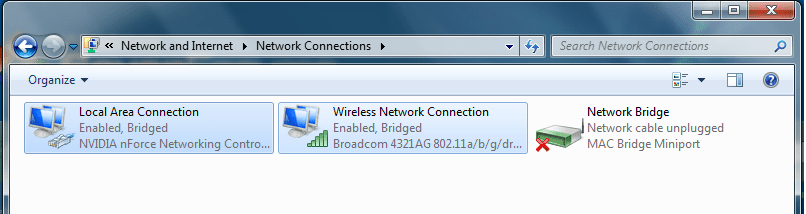
I commonly deleted the bridge to get a better connection and the other day I deleted the Network Bridge and an error popped up saying that an error occurred while removing bridge. Now a red X appears on the Network Bridge, under Network Connections, every time a new bridge is made, also stating that the Network Cable is unplugged, although it is.
The following are the attempts I have made to fix the problem but were unsuccessful.
Attempt 1: Replaced Ethernet Cord with several different cords - Simple fixes are always tried first.
Result 1: Network Bridge still states that the Network Cable is Unplugged.
Attempt 2: Deleted Network Drivers, then Restarted Computer to automatically reinstall drivers.
Result 2: The Problem still exist with nothing new.
Attempt 3: Used the command prompt using it as an Administrator and...
Reset TCP/IP stack to installation defaults, by typing: netsh int ip reset reset.log
Reset WINSOCK entries to installation defaults, by typing: netsh winsock reset catalog
... Then reset the Computer as the command prompt suggested.
Result 3: Problem still occurs.
The next thing I am going to dude is reinstall Windows 7 again... but I want to do this as a last resort. I have done some research to see if anyone else has had the problem and they have but the 3 main fixes were listed above and are not helping me.
It should also be noted that when the Network Bridge is created I am no longer connected to the Internet through the WAN.
I provided a screen shot of the Network Connection Window. Net1.png (81.3 KB)
The problem I am having occurs when I make a Network bridge connecting my Local Area Connection with my Wireless Area Network to create a MAC Bridge Miniport. I have used this daily for connecting my Xbox 360 to Xbox Live and up till now has not given me any problems.
I commonly deleted the bridge to get a better connection and the other day I deleted the Network Bridge and an error popped up saying that an error occurred while removing bridge. Now a red X appears on the Network Bridge, under Network Connections, every time a new bridge is made, also stating that the Network Cable is unplugged, although it is.
The following are the attempts I have made to fix the problem but were unsuccessful.
Attempt 1: Replaced Ethernet Cord with several different cords - Simple fixes are always tried first.
Result 1: Network Bridge still states that the Network Cable is Unplugged.
Attempt 2: Deleted Network Drivers, then Restarted Computer to automatically reinstall drivers.
Result 2: The Problem still exist with nothing new.
Attempt 3: Used the command prompt using it as an Administrator and...
Reset TCP/IP stack to installation defaults, by typing: netsh int ip reset reset.log
Reset WINSOCK entries to installation defaults, by typing: netsh winsock reset catalog
... Then reset the Computer as the command prompt suggested.
Result 3: Problem still occurs.
The next thing I am going to dude is reinstall Windows 7 again... but I want to do this as a last resort. I have done some research to see if anyone else has had the problem and they have but the 3 main fixes were listed above and are not helping me.
It should also be noted that when the Network Bridge is created I am no longer connected to the Internet through the WAN.
I provided a screen shot of the Network Connection Window. Net1.png (81.3 KB)
Attachments
Last edited:
My Computer
- Computer Manufacturer/Model Number
- HP Pavillion dv6646
- OS
- Windows 7 Ultimate 64-bit
- Memory
- 4gb
- Graphics Card(s)
- Nvidia