
Network cabling access for new office

James Colbert

New member
Guru
Local time
2:30 PM
Messages
1,127
Location
Ellesmere Island
I'm creating office space for my current business and a transition into a tech service business, which will include taking in computers. I anticipate that I will often realize the need to connect to a network and the internet. I also aniticpate that I will have a few work stations, perhaps more as time goes on.

I have questions for different aspects of this 'venture', but at the moment my questions are regarding roughing in for cabling, jacks, work stations, etc. Nothing complicated, but efficient and versatile.

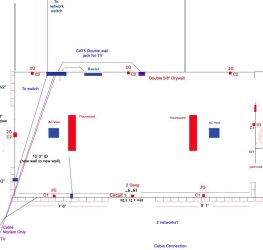
Given that I'm just starting research on this, I'm not quite sure what would work well under these circumstances or even what the norm is. I've attached a diagram of what might be viable, but am looking for ideas. Thanks for any insights.
Network Cabling.JPG
 

My Computer

OS
Win7U 64 RTM
CPU
Q9550
Motherboard
GA-EP45-UD3R
Memory
8GB Gskill
Graphics Card(s)
ASUS|EAH4850/HTDI/1GD3/A
Sound Card
xfi Plat
Monitor(s) Displays
Dell 2405fpw
Screen Resolution
1920x1200
Hard Drives
Seagate & WD sata Drives
PSU
Antec
Case
Antec
Keyboard
MS Natural Ergonomic 4000
Mouse
Logitech MX610 USB Cordless
If this is a classic office building laying new lan behind the walls is very easy because of the removable panels in the cieling. If not you might find yourself in for a bit more work.
I suggest a switch in place of a router as you would normally use at home. It allows more connections with better bandwidth management. An AP can be plugged directly into the switch for wireless as well.

Do you know who the service provider is going to be?
Because that can be a big thing to consider here too. Many t1 services will come out and do a certain amount of setup for you.
 

My Computer

Computer Manufacturer/Model Number
Insane hobo technologies. ;-)
OS
Windows 7 x64
CPU
Intel i7 2600k
Motherboard
Asrock z68 extreme 4 gen 3
Memory
G.skill Ripjaw 16gigs @ 1866
Graphics Card(s)
Nvidia gtx580 (evga)
Sound Card
Integrated HD audio + hdmi
Monitor(s) Displays
24" ASUS widescreen + 42" insignia
Screen Resolution
1080p (1920x1080)
Hard Drives
128 Samsung 830
256 Samsung 840
3 x 1tb storage drive (various)
1 western digital 1tb (eSATA)
1 Seagate 1tb (eSATA)
PSU
1 kilowatt SLI/Crossfire rated Silverstone modular
Case
NZXT Phantom + additional 220 fan
Cooling
Zalmann
Keyboard
Microsoft wireless 3000 (v2)
Mouse
MS - wireless 5000 (bluetrack)
Internet Speed
depends on if you ask me or my provider.
Other Info
The above information is provided as is, and the author assumes no responsibility for issues it may cause with your sanity or fanboyism.
Hi Maguscreed. Thanks for your response. THis is actually a gutted space with wood studs, so running cabling, etc. is not a problem. My IP is a large cable provider, to which I am now connected using a modem, wired router, wireless AP and a switch for local NW traffic. I prefer to keep the router in front for the firewall.

My question is not really about topology, but more about the logistics of getting the network access to different areas of the space. In example, is there some type of 'load center' that will accommodate 6-8 cat 5 jacks, or is a multi jack wall plate the best option? What about the diagram? Inefficient?

My requirements aren't initially demanding, but I'm looking for the most efficient way to accomplish access to different areas of the space that will also be versatile to the layout for possible changes in furniture or work station arrangement. It's possible that what I'm asking is to abstract for a comprehensive reply. I'm really just looking for ideas.

Thanks,
James
 

My Computer

OS
Win7U 64 RTM
CPU
Q9550
Motherboard
GA-EP45-UD3R
Memory
8GB Gskill
Graphics Card(s)
ASUS|EAH4850/HTDI/1GD3/A
Sound Card
xfi Plat
Monitor(s) Displays
Dell 2405fpw
Screen Resolution
1920x1200
Hard Drives
Seagate & WD sata Drives
PSU
Antec
Case
Antec
Keyboard
MS Natural Ergonomic 4000
Mouse
Logitech MX610 USB Cordless
The wall mount seems an incredible waste of cabling to me. I don't know what switch you are using but you should be able to get away with a single wall mount point into a very basic router. It can actually be a very cheap model since you already have what I'm assuming is a decent one controlling the firewall at the point of entry. Basically lan cable is pricey these days. I would be looking for ways to avoid using a lot of it if I didn't need too. Basic wired routers are so tiny now you can just hide them on the floor behind a desk.
I'm not entirely sure I'm completely understanding the diagram as you have it there. I don't understand what placement you are planning on using.
 

My Computer

Computer Manufacturer/Model Number
Insane hobo technologies. ;-)
OS
Windows 7 x64
CPU
Intel i7 2600k
Motherboard
Asrock z68 extreme 4 gen 3
Memory
G.skill Ripjaw 16gigs @ 1866
Graphics Card(s)
Nvidia gtx580 (evga)
Sound Card
Integrated HD audio + hdmi
Monitor(s) Displays
24" ASUS widescreen + 42" insignia
Screen Resolution
1080p (1920x1080)
Hard Drives
128 Samsung 830
256 Samsung 840
3 x 1tb storage drive (various)
1 western digital 1tb (eSATA)
1 Seagate 1tb (eSATA)
PSU
1 kilowatt SLI/Crossfire rated Silverstone modular
Case
NZXT Phantom + additional 220 fan
Cooling
Zalmann
Keyboard
Microsoft wireless 3000 (v2)
Mouse
MS - wireless 5000 (bluetrack)
Internet Speed
depends on if you ask me or my provider.
Other Info
The above information is provided as is, and the author assumes no responsibility for issues it may cause with your sanity or fanboyism.
I would install, at the minimum, a four port cat5e block on each wall. That would give you flexibility when positioning your work benches. I would also install a pass through patch panel (a bit more expensive than a standard 110 punch down version, but so much easier to use - just crimp on the ends and you are done) and terminate all of your cabling there. Install the switch in the same area (I'd get a small free standing server cabinet or a small wall mounted server cabinet), and then you can just run one single cat5e wire to your router. The patch panel will allow you to make direct computer connections without running a single long cable across your floor, allow the ability to make any number of your lan jacks into phone jacks when used with a Leviton 1 to 6 phone splitter (I do this at home, and it's come in handy quite a few times), and probably more options than I can remember right now.

In my opinion, it's best to put as many jacks in the room right now to allow for future expansion later.
 

My Computer

Computer Manufacturer/Model Number
Dell XPS 15 L502x
OS
Windows 7 Ultimate x64 SP1
CPU
Core i7-2670QM
Memory
8GB DDR3 PC3-10600
Graphics Card(s)
Intel HD Graphics 3000 + GeForce GT 540M
Screen Resolution
1920x1080
Hard Drives
1TB 5400RPM Seagate
The wall mount seems an incredible waste of cabling to me. I don't know what switch you are using but you should be able to get away with a single wall mount point into a very basic router. It can actually be a very cheap model since you already have what I'm assuming is a decent one controlling the firewall at the point of entry. Basically lan cable is pricey these days. I would be looking for ways to avoid using a lot of it if I didn't need too. Basic wired routers are so tiny now you can just hide them on the floor behind a desk.
I'm not entirely sure I'm completely understanding the diagram as you have it there. I don't understand what placement you are planning on using.

Apologies for not being clearer...too many details to handle, I guess. But what I'm really after is a way to minimize cabling running around the perimiter of the space and maximize efficiency, i.e., have an access within convenient reach without having to string cat5 across and behind furniture to gain access.

The problem is that my inexperience leaves me ignorant of what to use and how to employ it, thus the ambiguous posting.

Thanks!
 

My Computer

OS
Win7U 64 RTM
CPU
Q9550
Motherboard
GA-EP45-UD3R
Memory
8GB Gskill
Graphics Card(s)
ASUS|EAH4850/HTDI/1GD3/A
Sound Card
xfi Plat
Monitor(s) Displays
Dell 2405fpw
Screen Resolution
1920x1200
Hard Drives
Seagate & WD sata Drives
PSU
Antec
Case
Antec
Keyboard
MS Natural Ergonomic 4000
Mouse
Logitech MX610 USB Cordless
I would install, at the minimum, a four port cat5e block on each wall. That would give you flexibility when positioning your work benches. I would also install a pass through patch panel (a bit more expensive than a standard 110 punch down version, but so much easier to use - just crimp on the ends and you are done) and terminate all of your cabling there. Install the switch in the same area (I'd get a small free standing server cabinet or a small wall mounted server cabinet), and then you can just run one single cat5e wire to your router. The patch panel will allow you to make direct computer connections without running a single long cable across your floor, allow the ability to make any number of your lan jacks into phone jacks when used with a Leviton 1 to 6 phone splitter (I do this at home, and it's come in handy quite a few times), and probably more options than I can remember right now.

In my opinion, it's best to put as many jacks in the room right now to allow for future expansion later.

Hi Kegobeer. Your suggestions seem to be exactly what I'm after, and indeed, with the walls open, now is the time! Can you suggest sites where these items would be available, and if you know of one, a site(s) that provides information and perhaps examples of their use (tutorials, etc.)? Thanks for your clarity.

James
 

My Computer

OS
Win7U 64 RTM
CPU
Q9550
Motherboard
GA-EP45-UD3R
Memory
8GB Gskill
Graphics Card(s)
ASUS|EAH4850/HTDI/1GD3/A
Sound Card
xfi Plat
Monitor(s) Displays
Dell 2405fpw
Screen Resolution
1920x1200
Hard Drives
Seagate & WD sata Drives
PSU
Antec
Case
Antec
Keyboard
MS Natural Ergonomic 4000
Mouse
Logitech MX610 USB Cordless
You can buy cat5e bulk cable, crimpers, single gang boxes, four port keystone face plates, and cat5e connectors (crimp on and punch down for the keystone panels) from Home Depot, Lowes, or online (just google for cat5e bulk). Google for server racks to find something that meets your needs, but be prepared for a bit of sticker shock, because server cabinets are definitely not cheap. StayOnline makes affordable pass through patch panels, found here: StayOnline.com: Feed-Thru Patch Panels

If you need a guide on how to crimp cables, etc, I'd just google for cat5e wiring. You should find something that will help. I've never bought a guide, I've always just done some research for what I need. I've been doing this kind of stuff for about 10 years now, so most of my knowledge is hands-on/OJT/trial and error.
 

My Computer

Computer Manufacturer/Model Number
Dell XPS 15 L502x
OS
Windows 7 Ultimate x64 SP1
CPU
Core i7-2670QM
Memory
8GB DDR3 PC3-10600
Graphics Card(s)
Intel HD Graphics 3000 + GeForce GT 540M
Screen Resolution
1920x1080
Hard Drives
1TB 5400RPM Seagate
Thanks, KoB. That does help. The fact that I'm not exactly sure what my needs are muddies the waters somewhat, but your responses have given me initial direction. The crimping won't be an issue, but by googling some of the terms and ideas you'vew mentioned, I've run across some good sites. For now, I'm concerning myself with the rough-in requirements before sheetrocking. I guess basically, that will involve the gang boxes, faceplates and cabling (I have a 250' roll of CAT5e, connectore and crimping tool already).

I don't guess patch panels or server racks will be an issue at the moment, and likely something I'll grow into.

That said, any subsequent opinions, comments, links or suggestions from all are welcome.

I've kept a small scale network (several machines, router, 8 port switch, AP) to accomodate my business and home machines (business is operated out of house), but I anticipate that my needs for this new space will expand beyond my current level of expertise.

Thanks,
James
 

My Computer

OS
Win7U 64 RTM
CPU
Q9550
Motherboard
GA-EP45-UD3R
Memory
8GB Gskill
Graphics Card(s)
ASUS|EAH4850/HTDI/1GD3/A
Sound Card
xfi Plat
Monitor(s) Displays
Dell 2405fpw
Screen Resolution
1920x1200
Hard Drives
Seagate & WD sata Drives
PSU
Antec
Case
Antec
Keyboard
MS Natural Ergonomic 4000
Mouse
Logitech MX610 USB Cordless
If you're renting, this is not a big deal, but if you are in a more or less permanent location you might consider running conduit between the wall boxes. This would allow you to easily fish additional cables from point to point, or replace it entirely when the "next great thing" in technology becomes available. I know lots of people who wired their home with 300-Ohm TV cable who were kicking themselves once 75-Ohm coax became the standard.
 

My Computer

Computer Manufacturer/Model Number
Self
OS
Main - Windows 7 Pro SP1 64-Bit; 2nd - Windows Server 2008 R2
CPU
Main - Core i7 2600K; 2nd - Core i7 920
Motherboard
Main - Asus P8Z68-V Pro/Gen3; 2nd - Gigabyte GA-EX58-UDR3
Memory
Main - 16GB Corsair Vengeance; 2nd - 12GB Corsair Vengeance
Graphics Card(s)
Main - XFX Radeon 6870 1GB; 2nd - XFX Radeon 4870 1GB
Sound Card
Both: Onboard Realtek Azalia
Monitor(s) Displays
Main - Hann 25" + I-INC 25" + Acer 23"; 2nd - Upgrading Soon
Screen Resolution
Main - 1920x1080 (All Three Monitors); 2nd - Upgrading Soon
Hard Drives
Main - (1) Crucial M4 128GB (Boot)
Main - (1) Seagate 2TB 64MB Cache (Data)
Main - (1) Seagate 2TB 64MB Cache (Data Backup)
2nd - (1) Intel X25-M SSD 80GB (Boot)
2nd - (3) Seagate 1TB 32MB Cache (Data Backup)
2nd - (1) Seagate 320GB (Because)
PSU
Main - OCZ 600W Modular; 2nd - OCZ 600W
Case
Main - Thermaltake Element G; 2nd - NZXT something or other
Cooling
Main - Corsair H80; 2nd - Prolimatech Megahalems
Keyboard
Main - Razer Reclusa; 2nd - Old MS Keyboard
Mouse
Main - Logitech MX Revolution; 2nd - Old MS Mouse
Internet Speed
20Mbps Time-Warner Cable
If you're renting, this is not a big deal, but if you are in a more or less permanent location you might consider running conduit between the wall boxes. This would allow you to easily fish additional cables from point to point, or replace it entirely when the "next great thing" in technology becomes available. I know lots of people who wired their home with 300-Ohm TV cable who were kicking themselves once 75-Ohm coax became the standard.

Excellent idea, prof. I think vertically installed from the attic for ease of future replacement in a diameter large enough to accomodate easy replacemnt of multiple cables. Thanks!
 

My Computer

OS
Win7U 64 RTM
CPU
Q9550
Motherboard
GA-EP45-UD3R
Memory
8GB Gskill
Graphics Card(s)
ASUS|EAH4850/HTDI/1GD3/A
Sound Card
xfi Plat
Monitor(s) Displays
Dell 2405fpw
Screen Resolution
1920x1200
Hard Drives
Seagate & WD sata Drives
PSU
Antec
Case
Antec
Keyboard
MS Natural Ergonomic 4000
Mouse
Logitech MX610 USB Cordless
Can anyone think of a reason not to go with CAT6 cabling and connectors (albeit a bit more expensive...)? Will CAT6 work with my current router and switches? My understanding is that, although the standards are still CAT5, CAT6 gives better performance due to a cleaner signal and better handling of crosstalk?
 

My Computer

OS
Win7U 64 RTM
CPU
Q9550
Motherboard
GA-EP45-UD3R
Memory
8GB Gskill
Graphics Card(s)
ASUS|EAH4850/HTDI/1GD3/A
Sound Card
xfi Plat
Monitor(s) Displays
Dell 2405fpw
Screen Resolution
1920x1200
Hard Drives
Seagate & WD sata Drives
PSU
Antec
Case
Antec
Keyboard
MS Natural Ergonomic 4000
Mouse
Logitech MX610 USB Cordless
Cat5e supports gigabit ethernet. If you want to spend the extra cash, now's the time to do it. But honestly there's no real reason to upgrade, IMHO. You'd have to be sending tons of data over a gig-e network to notice any difference, and from what you'll be doing I highly doubt you'd actually notice any real world difference.
 

My Computer

Computer Manufacturer/Model Number
Dell XPS 15 L502x
OS
Windows 7 Ultimate x64 SP1
CPU
Core i7-2670QM
Memory
8GB DDR3 PC3-10600
Graphics Card(s)
Intel HD Graphics 3000 + GeForce GT 540M
Screen Resolution
1920x1080
Hard Drives
1TB 5400RPM Seagate
Thanks KoB. :geek:
 

My Computer

OS
Win7U 64 RTM
CPU
Q9550
Motherboard
GA-EP45-UD3R
Memory
8GB Gskill
Graphics Card(s)
ASUS|EAH4850/HTDI/1GD3/A
Sound Card
xfi Plat
Monitor(s) Displays
Dell 2405fpw
Screen Resolution
1920x1200
Hard Drives
Seagate & WD sata Drives
PSU
Antec
Case
Antec
Keyboard
MS Natural Ergonomic 4000
Mouse
Logitech MX610 USB Cordless
But remember the people who put in all the 300ohm wiring.;)

If you can decide where you want the work benches, I would have a shelf or two above them or cabinets and shelves below the bench. Space out Ethernet wall boxes about 18"-24" along the bench wall. After you figure out how you will wire it of course. you won't be sorry if you have "too many" wall boxes. Oh at least one 120V receptacle for each Ethernet box too.
 

My Computer

Computer type
PC/Desktop
Computer Manufacturer/Model Number
Home Built Desktop By DataTech
OS
Windows 7 Ultimate X64 SP1
CPU
Intel i5-2550K, Differing ~4.4-4.8GHz No built in GPU
Motherboard
ASUS P8Z68-V PRO/GEN3
Memory
16GB G.Skill Sniper 1866MHz @ 2133MHz 2x8GB
Graphics Card(s)
ASUS GTX650TIB-DC2OC-2GD5, (650TI Boost)
Sound Card
Onboard Realtek 5-1
Monitor(s) Displays
Samsung P2570HD
Screen Resolution
1920x1080
Hard Drives
Samsung 840 Pro 256GB SSD for OS, 500GB Seagate Constellation (Enterprise drive) for Data
PSU
Corsair HX650W
Case
Inwin Dragon Rider
Cooling
Hyper 212 EVO w/two Noctua fans, push-pull, @1300 RPM
Keyboard
E-Z Eyes, bright yellow keys with large characters
Mouse
steelseries SENSEI Laser Pro Gaming
Internet Speed
48-51Mbs Mbs down, 11 Mbs up Xfinity Cable
Antivirus
Norton Internet Security 2013
Browser
IE 10, Opera, Pale Moon if needed
Other Info
4 case fans, LG BluRay-RE, ASUS DVD-RW, Mr. Fusion power supply, 1.21 gigawatts.
The CAT5e should be sufficient. CAT6 is a good idea if your wire runs are excessive in length.

Be sure that your CAT5 has solid copper conductors. I don't know if stranded-copper CAT5 is still around, but I have run across some at times. AVOID stranded-copper at all cost! It can cause intermittent connectivity problems that will confound even the best repair techs!
 

My Computer

Computer type
PC/Desktop
Computer Manufacturer/Model Number
Custom Build
OS
Windows 7 Professional 64 Bit SP1
CPU
Intel i7-3770K. Mild Overclock to 4.2 Ghz
Motherboard
ASUS Sabertooth Z77
Memory
Crucial Ballistix Sport 32GB DDR3-1600 (PC3-12800)
Graphics Card(s)
Intel 4000 - On CPU
Sound Card
On Board
Monitor(s) Displays
HP w2408h
Screen Resolution
1920 x 1200
Hard Drives
Samsung 840 Pro 256Gb SSD, --
Two - WDC WD1001FALS-00J7B0 SATA
PSU
Antec EarthWatts Green Series 650 Watt ATX
Case
Fractal Design Core 3000 ATX
Cooling
Corsair H80i Water Cooled
Keyboard
Logitech Illuminated
Mouse
Logitech Wireless Trackball M570 + Touchpad T650
Internet Speed
9.5 Mbps down - 25.4 Mbps upload
Antivirus
MSE
Browser
IE 10, Chrome
Back
Top