
Network Computers and File Sharing Error.

Rush1hour

New member
Local time
10:39 AM
Messages
13
Hey wondering if anyone can assist me on this issue.
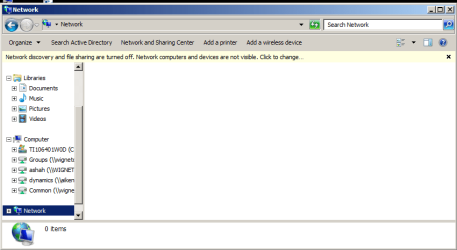
When i click on Computer>>>Network (on the rt side of the panel)>>> I get the error message
Network Discovery and file sharing are turned off. Network computers and devices are not visible. click to change.
I click on it and nothing seem to work.
Thanks in advance.
 

Attachments
  • Capture.PNG
    Capture.PNG
    15.2 KB · Views: 5

My Computer

Computer type
PC/Desktop
Computer Manufacturer/Model Number
toshiba
OS
window 7 professional 64bit
Memory
6gb

My Computer

Computer type
PC/Desktop
Computer Manufacturer/Model Number
Custom assembled by me :}
OS
Win-7-Pro64bit 7-H-Prem-64bit
CPU
i7-5930K 2nd i9-9940x both water blocked VRM's too
Motherboard
ASUS SABERTOOTH X99 2nd ASUS x299 Apex
Memory
Trident-z 3200C14 2nd Trident-z 3600C16
Graphics Card(s)
EVGA 1080ti ftw3 2nd Titan Xp both water blocked
Sound Card
Built-in Realtek
Monitor(s) Displays
1-AOC G2460PG 24"G-Sync 144Hz/ 2nd 1-ASUS VG248QE 24" 144Hz
Screen Resolution
1920 x 1080 144Hz
Hard Drives
2-Samsung M.2 Evo & Evo Plus
2-Samsung 850 EVO 500GB SSD's/ 3-2.5 W.D. Black 1tb-&3-1tb/3-3.5 WD Black 1tb hdd's
PSU
EVGA SuperNOVA 1000-P2 2nd 1200-P2
Case
2-Corsair Obsidian Series 450D Black ATX Mid Tower
Cooling
Custom water loops
Keyboard
Logitech G710+/ 2nd Logitech G910
Mouse
2-RedDragon M901 Perdition 16400 dpi Gaming mouse = wired
Internet Speed
Comcast Ping 19ms 89.31mbps download speed 6.12mbps upload
Antivirus
Malwarebytes Pro/ Superantispyware Pro
Browser
FireFox & Pale moon
Other Info
2nd ASUS X299 Apex/Intel i9-9940x with Custom water loop/7H-Prem-x64/Corsair 450D case/Ram Trident-z 3600C16 4x8gb / Samsung970Evo plus 500gb SSD/Dual ssd EZ swap evo/PSU EVGA SuperNova 1200w-P2 80+Platinum/GPU Titan Xp /8-ML-140 on push-pull on 2-280GTX rads
office domain network

Hey thanks so much, but I am trying to enable my office domain sharing for window 7 professional.
 

My Computer

Computer type
PC/Desktop
Computer Manufacturer/Model Number
toshiba
OS
window 7 professional 64bit
Memory
6gb

My Computer

Computer type
PC/Desktop
Computer Manufacturer/Model Number
Custom Built
OS
Windows 7 Professional x64 SP1 ; Windows Server 2012 R2 Standard
CPU
Intel Core i5 2400 @ 3.10GHz
Motherboard
Foxconn H67MP-S/-V/H67MP
Memory
8.0GB DDR3 @ 665MHz (2GBx4)
Graphics Card(s)
AMD Radeon HD 6870
Sound Card
Realtek High Definition Audio
Monitor(s) Displays
AOC 2243W & SMB1930NW
Screen Resolution
1440x900 & 1920x1080
Hard Drives
977GB Seagate ST31000524AS ATA Drive (SATA)
250GB WD iSCSI attached Drive
PSU
750W Gaming PSU
Case
Novatech Night
Cooling
Fan
Keyboard
Dell Standard PS/2 Keyboard
Mouse
R.A.T 07 Gaming Mouse
Internet Speed
Download: 10 Mbps Ping: 30ms Upload: 0.81 Mbps
Browser
Google Chrome
Other Info
Optiarc DVD RW AD-5260S ATA Device
Hey wondering if anyone can assist me on this issue.
When i click on Computer>>>Network (on the rt side of the panel)>>> I get the error message
Network Discovery and file sharing are turned off. Network computers and devices are not visible. click to change.
I click on it and nothing seem to work.
Thanks in advance.

If Network discovery appears to be turning itself off after you turn it on then you have a fairly serious problem.

I've seen this problem many times and assuming that you made sure all networking services are enabled and set to Automatic then everything should be working, if not, this problem won't go away on it's own.

In most cases it's required that you repair the Base Filtering Engine service in order to fix this problem which is caused from a Virus. The repair utility from ESET can fix this problem, it doesn't matter if you were running ESET or not.

Everyone seems to be getting this problem lately and the only fix is to repair the base filtering engine service which requires that you follow the directions in the link below.

Here it is: I receive the message that my ESET installation ended prematurely - ESET Knowledgebase
 

My Computer

Computer type
PC/Desktop
Computer Manufacturer/Model Number
Home built
OS
Windows 7 Ult, Windows 8.1 Pro,
CPU
Q9650-4.275GHz, E8600 4.5GHz, E6750-3.8GHz
Motherboard
Evga 780i FTW
Memory
G.Skill PC2 9600 1200Mhz 5 5 5 15 2T
Graphics Card(s)
GTX480
Sound Card
Asus Xonar D2
Monitor(s) Displays
HannsG
Screen Resolution
1680X1050
Hard Drives
GSkill Phoenix Pro 120GB SSD
PSU
ThermalTake Toughpower 1000Watt modular
Case
ThermalTake XaserV
Cooling
Xigmatek S1283
Keyboard
Logitech G15
Mouse
Logitech G9
Internet Speed
T1
Hey wondering if anyone can assist me on this issue.
When i click on Computer>>>Network (on the rt side of the panel)>>> I get the error message
Network Discovery and file sharing are turned off. Network computers and devices are not visible. click to change.
I click on it and nothing seem to work.
Thanks in advance.

If Network discovery appears to be turning itself off after you turn it on then you have a fairly serious problem.

I've seen this problem many times and assuming that you made sure all networking services are enabled and set to Automatic then everything should be working, if not, this problem won't go away on it's own.

In most cases it's required that you repair the Base Filtering Engine service in order to fix this problem which is caused from a Virus. The repair utility from ESET can fix this problem, it doesn't matter if you were running ESET or not.

Everyone seems to be getting this problem lately and the only fix is to repair the base filtering engine service which requires that you follow the directions in the link below.

Here it is: I receive the message that my ESET installation ended prematurely - ESET Knowledgebase
Just popping in to say thanks for that link. I had a user that was missing all firewall rules (incoming and outgoing) and I could not import them from a known good install. The ESET tool rebuilt those default rules :-)

...hope the tool helps the OP.
 

My Computer

Computer type
Laptop
Computer Manufacturer/Model Number
Employer provided Dell Latitude
OS
W7 Pro SP1 64bit
CPU
i7
Memory
8GB
Graphics Card(s)
Intel HD Graphics
Hard Drives
crappy SSD
Antivirus
Employer mandated Symantec Endpoint Protection
Browser
Pale Moon 64bit, IE11 64bit & Chrome 64bit
Hey wondering if anyone can assist me on this issue.
When i click on Computer>>>Network (on the rt side of the panel)>>> I get the error message
Network Discovery and file sharing are turned off. Network computers and devices are not visible. click to change.
I click on it and nothing seem to work.
Thanks in advance.

If Network discovery appears to be turning itself off after you turn it on then you have a fairly serious problem.

I've seen this problem many times and assuming that you made sure all networking services are enabled and set to Automatic then everything should be working, if not, this problem won't go away on it's own.

In most cases it's required that you repair the Base Filtering Engine service in order to fix this problem which is caused from a Virus. The repair utility from ESET can fix this problem, it doesn't matter if you were running ESET or not.

Everyone seems to be getting this problem lately and the only fix is to repair the base filtering engine service which requires that you follow the directions in the link below.

Here it is: I receive the message that my ESET installation ended prematurely - ESET Knowledgebase
Just popping in to say thanks for that link. I had a user that was missing all firewall rules (incoming and outgoing) and I could not import them from a known good install. The ESET tool rebuilt those default rules :-)

...hope the tool helps the OP.

Yes that link is coming in handy lately as this Network Discovery won't stay on problem is caused from a virus wrecking havoc on the firewall rules.
 

My Computer

Computer type
PC/Desktop
Computer Manufacturer/Model Number
Home built
OS
Windows 7 Ult, Windows 8.1 Pro,
CPU
Q9650-4.275GHz, E8600 4.5GHz, E6750-3.8GHz
Motherboard
Evga 780i FTW
Memory
G.Skill PC2 9600 1200Mhz 5 5 5 15 2T
Graphics Card(s)
GTX480
Sound Card
Asus Xonar D2
Monitor(s) Displays
HannsG
Screen Resolution
1680X1050
Hard Drives
GSkill Phoenix Pro 120GB SSD
PSU
ThermalTake Toughpower 1000Watt modular
Case
ThermalTake XaserV
Cooling
Xigmatek S1283
Keyboard
Logitech G15
Mouse
Logitech G9
Internet Speed
T1
Back
Top