Network DC Issue.. with a twist.

Bec

New member
Local time
8:02 AM
Messages
4
Location
Sydney
Heyas,

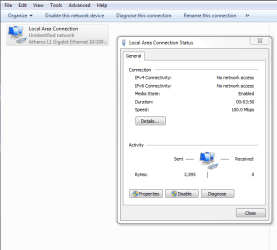
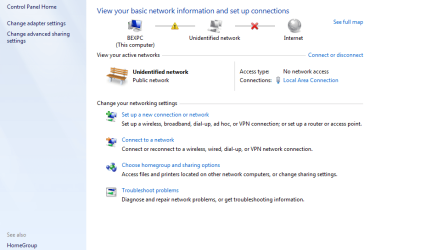
So I am having to the same problem that a lot of other people are having. And my housemate refuses to blame anything other than Windows 7. It was fine for about 2 days, then I get the dreaded Triangle, and it saying I have 'No Network Access', I troubleshoot to no avail, at first it was just that I was connected to the network, but no access type.

I have tried everything. BUT on top of this constant disconnection every few hours, my housemate says his Limited or No Connectivity is because of this. He refuses to believe otherwise, because it all started messing up once I got Windows 7, he has XP btw - we share nothing except Internet.

We did have duplicate IPs when my network decided to reconnect at some random time, so I did a /release /renew and it seems to have fixed that. But its almost like we both cant be on at the same time.

I have disabled IPv6. And I checked, both my firewall, and his.
And I also reloaded the Firmware to the router, but cant get the newest one because it downloads as a .chk file and my router doesn't accept that file type (if anyone can give me some pointers on that too)

The router is a Netgear DG834v5. This is the firmware I cant seem to use -

Answer

My network card is a Atheros L1 Gigabit Ethernet 10/100/1000Base-T Controller, with up to date drivers.

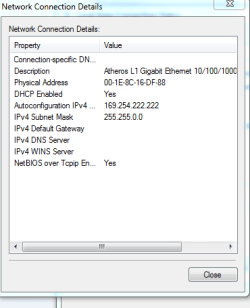
Screenshots included for extra thoroughness..

Please help, or hes going to make me uninstall.. or just keep me unplugged. And yes.. he IS what your thinking.
 

Attachments
  • Capture4.PNG
    Capture4.PNG
    28.9 KB · Views: 33
  • Capture6.PNG
    Capture6.PNG
    9.1 KB · Views: 38

My Computer

OS
Windows 7 RC
CPU
Intel core 2 Duo CPU E6850 @3GHz
Motherboard
ASUS P5KPL
Memory
2gig RAM
Graphics Card(s)
NVIDIA Geforce 8600GT 512mb
Sound Card
Realtek High Def Audio
Monitor(s) Displays
Dual Monitors - Acer 24" + Acer 19"
Screen Resolution
1920x1200
Hard Drives
2 x ATA Hard Drives
Case
Generic with PRETTY BLUE LIGHTS! lol
Keyboard
G15 Gaming Keyboard
Mouse
Logitech MX Revolution
Internet Speed
ADSL
What if you gave yourself a static I.P.?
 

My Computer

Computer Manufacturer/Model Number
Made myself
OS
Windows 7 Ultmate 32 bit 6.1.7600 Build 7600
CPU
Intel(R) Core(TM)2 CPU 6400 @ 2.13GHz
Motherboard
Biostar P4M890-M7 PCI-E
Memory
2.00 GB PC2-4200 DDR2-SDRAM UDIMM
Graphics Card(s)
Onboard VIA/S3G Unichrome Pro IGP (Had to use Vista Driver)
Sound Card
Integrated Realtek AC 97 Audio
Monitor(s) Displays
Optiquest 22inch
Screen Resolution
1024x768
Hard Drives
WDC 80gig 8mbcache Primary Sata
WDC 160gig 16mbcache Slave Sata
PSU
Allied 500w
Case
X-Blade
Cooling
Rosewill Heatsink/Fan
Keyboard
Microsoft Natural
Mouse
Microsoft Intellimouse
Internet Speed
too slow for me/Cable
Other Info
Memory Led/Case Fan Led/Lito On DVD-RW Drive.
The 169. ip address means your router is not giving access to your pc for whatever reason. This seems like a router configuration issue to me.

Personally, I always run without the use of DHCP and assign an ip to each machine by hand.

rajinisback09 is probably setting you right here though with his question...Under the IPv4 properties page, enter 255.255.255.0 for subnet mask, the router's ip address for default gateway (almost sure your router is defaulted at 192.168.0.1), the router's ip address again for preferred dns server, and finally, pick an ip address for yourself that's the same as the router, except change .1 to anything new. See if that sets you up well.

Also, you say, "It was fine for about 2 days, then I get the dreaded Triangle." Well, if you didn't change anything on your end, maybe your roommate is playing some trickery here and purposely set this router to disallow access by mac addresses or something? hmmmmm lol
 

My Computer

Computer Manufacturer/Model Number
self built
OS
7600.20510 x86
CPU
P4 550 3.4 GHz HT running at 3.5 GHz
Motherboard
MSI PM8M3-V (MS-7211 v1.x) Micro-ATX mainboard
Memory
OCZ 2 GB(2x1GB) DDR400mHz running @ 414 mHz
Graphics Card(s)
HIS Radeon HD 3850 IceQ 3 Turbo HDMI Dual DL-DVI AGP
Sound Card
MOTU Traveler firewire studio interface 192 kHz 24 bit
Monitor(s) Displays
22" widescreen Acer X223W LCD, 17" Compaq P75 CRT
Screen Resolution
1680x1050 and 1280x1024
Hard Drives
SATA I x2 WD, 400 GB and 120 GB, SATA 2 WD Caviar Black 1 TB
PSU
350W generic
Case
Cybertronpc, it glows blue
Cooling
stock cpu fan, Ice-Q 3 gpu and system, many case fans
Keyboard
Logitch Classical Keyboard 200
Mouse
Logitech Mediaplay cordless
Internet Speed
1792/448 kbits/sec
Other Info
SATA II PCI fake RAID adapter, 1 GB Readyboost, original ATI Remote Wonder (even works with WMC perfectly), Logitech Rumblepad 2 game controller x2
hmmm. interesting... as i have a belkin adapter aka atheros chip and driver. This could be true i am afraid as its happening to me here with the desktop and laptop, laptop never has had any connections with its adapter when on xp or 7 beta, now the RC is creating havoc on the network and i believe it may be due to the driver itself, atheros. My router is not an atheros chipset now come to think of it as well. Whether this has much weight to the idea, i'm still not sure. Once this adapter goes nuts here on the desktop, it brings down the whole wifi network, laptop loses connection.
If only using laptop with desktop shutdown, this problem has never happened when stressing out the network via laptop itself.


edit: as for your pic, thats just where the adapter has become confused after enabling/disabling it, and its not cleared itself. Should easily be done by doing a ipconfig /release and then a ipconfig /renew . If not, which it may not release, do a cold boot, shut down pc for bout 5 min, shutdown router also during this time 5 min, then boot pc first, then router.

with the above mentioned advice, i would highly recommend atleast to use the router ip as the dns in the tcp/ip4 settings.

edit #2: just to add, the laptop has an intel (pro a/b/g ) chip for the wireless
 

My Computer

Computer Manufacturer/Model Number
CUSTOM
OS
XP/win7 x86 build 7127
CPU
Athlon64 X2 DUAL 4200+ 2.21ghz
Motherboard
ASUS K8 PRO SLI
Memory
2GB Dual Chan DDR2 Corsair
Graphics Card(s)
Nvidia 6800GT
Sound Card
nvidia
Monitor(s) Displays
19' LCD
Screen Resolution
1280x1024
Hard Drives
WD 250, 2x500, 2x1TB IDE/USB
WD 250 SATA (system)
SEAGATE 120 Sata
PSU
coolermaster 450
Case
SUPERFLOWER
Cooling
1 HDD bay fan, 5x80mm Case Fans, AEROGATE II Fan/Temp
Keyboard
MS wireless
Mouse
MS Wireless
Internet Speed
fassssssssst
I fixed the same problem this way.
1. made sure XP would boot to router and access to internet was OK.
2. shutdown system
3. unplugged router from computer
4. started computer in Win7 mode
5. entered Network & sharing center
6. delete the network connection.
7. restart and manually add the connection- in options -advanced- enter your log name and pass.
8. plug in cable.
9. finish and close network sharing center
10. click connect to internet.
11. make sure you also set the NIC adapter in both OS's to do not - unclick "allow computer to shutdown this device to save power".
this takes a tab bit more time since it uses your log/pass to enter the internet but it should stop the hassle... and XP will use the log/pass entered in the router and Win7 will bypass and use its which resets the ipconfig. automatic
 
Last edited:
lol torrentg.. he just seriously isn't tech savvy at all. he has no idea what to do. he says norton controls everything on his pc... anyways. i have tried to manually enter in the config to no avail, i cant access the router to change it off dhcp when it does go down, do i need to do that if im putting the ip in manually, cos if so. I didn't do that, and will need too before the next crash. And if I do assign IP's for each computer, or can it just be for my own, willl it stop this from happening, because my housemate isn't going to let me touch his pc if its not going to keep him connected and fully functionable. (He doesn't get troubleshooting....I tried to explain it.) He just gets limited or no connectivity, unplugs my computer, turns off the router, and plugs it back in then he is fine, and when he plugs my cable back in. I'm obviously back up too. I also couldn't do the ipconfig /release /renew as it came back with an error.

its just really hard, because i dont have easy access to the router. as it is in his section of the house. its never been an issue before.. but now. its hell. :(

sorry for the wall of text, it went down again last night mid research. and i was up very late troubleshooting - gah
 

My Computer

OS
Windows 7 RC
CPU
Intel core 2 Duo CPU E6850 @3GHz
Motherboard
ASUS P5KPL
Memory
2gig RAM
Graphics Card(s)
NVIDIA Geforce 8600GT 512mb
Sound Card
Realtek High Def Audio
Monitor(s) Displays
Dual Monitors - Acer 24" + Acer 19"
Screen Resolution
1920x1200
Hard Drives
2 x ATA Hard Drives
Case
Generic with PRETTY BLUE LIGHTS! lol
Keyboard
G15 Gaming Keyboard
Mouse
Logitech MX Revolution
Internet Speed
ADSL
I gave myself a static IP. i reconnected straight away. So i will see how I go. and report back, my pc was off for the day, which never happens. So it might be a reason why I haven't had an issue this evening, its only been a few hours. so who knows.

I also changed to Public Network, so Im just going to see how that goes. I <3 troubleshooting... to a point.

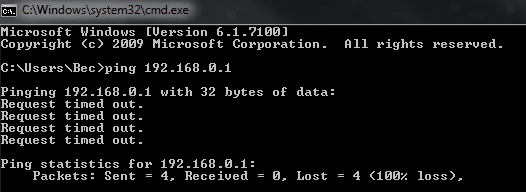
Edit: Gave me a 'gateway error this morning', also tried to ping router, no better, starting to lose it.
 

Attachments

  • Capture8.PNG
    Capture8.PNG
    15.7 KB · Views: 22
  • Capture9.PNG
    Capture9.PNG
    5.1 KB · Views: 15
Last edited:

My Computer

OS
Windows 7 RC
CPU
Intel core 2 Duo CPU E6850 @3GHz
Motherboard
ASUS P5KPL
Memory
2gig RAM
Graphics Card(s)
NVIDIA Geforce 8600GT 512mb
Sound Card
Realtek High Def Audio
Monitor(s) Displays
Dual Monitors - Acer 24" + Acer 19"
Screen Resolution
1920x1200
Hard Drives
2 x ATA Hard Drives
Case
Generic with PRETTY BLUE LIGHTS! lol
Keyboard
G15 Gaming Keyboard
Mouse
Logitech MX Revolution
Internet Speed
ADSL
I gave myself a static IP. i reconnected straight away. So i will see how I go. and report back, my pc was off for the day, which never happens. So it might be a reason why I haven't had an issue this evening, its only been a few hours. so who knows.

I also changed to Public Network, so Im just going to see how that goes. I <3 troubleshooting... to a point.

Edit: Gave me a 'gateway error this morning', also tried to ping router, no better, starting to lose it.


I am also having trouble setting a fixed IP on Windows 7 x64. In standard configuration (DHCP enabled) it kind of crashes my Billion 7404VGP modem / router when the lease expires only. So I figured I would set a fixed IP for my Win 7 machine only. It seems to setup ok but after a few minutes I am not able to connect to the web. When I check the modem / router there is no fixed IP shown and my Win 7 machine just isn't there.
When I use the troubleshooter...it just starts "obtain DHCP automatically" and goes back to the default settings.
I have a feeling it is to do with IPv6 connectivity. I had a similar problem with build 7057 as well....but 7077 came along and fixed that....
So...who has managed to set a fixed IP on 7100 x64 successfully? And how exactly.
It might help me and Bec.
 

My Computer

Computer Manufacturer/Model Number
Home Build
OS
Windows 7 RTM Ultimate - Activated (Technet)
CPU
Athlon 4800+
Motherboard
Gigabyte M56S-S3
Memory
2 gig
Graphics Card(s)
ATI Radeon 2400+
Sound Card
On board
Monitor(s) Displays
Samsung 22" LCD
Screen Resolution
1680 x 1050
Hard Drives
WD 250 gig Sata
PSU
550 w
Case
Antec LS100
Keyboard
Logitech MX5000 BT
Mouse
Logitech MX 5000 BT
Internet Speed
ADSL 2+
well I did the static IP.. it just kept losing the IP.

i found some firmware, did that. havent dc'd for almost 24 hours. so when my housemate comes back. fingers crossed its still ok.
 

My Computer

OS
Windows 7 RC
CPU
Intel core 2 Duo CPU E6850 @3GHz
Motherboard
ASUS P5KPL
Memory
2gig RAM
Graphics Card(s)
NVIDIA Geforce 8600GT 512mb
Sound Card
Realtek High Def Audio
Monitor(s) Displays
Dual Monitors - Acer 24" + Acer 19"
Screen Resolution
1920x1200
Hard Drives
2 x ATA Hard Drives
Case
Generic with PRETTY BLUE LIGHTS! lol
Keyboard
G15 Gaming Keyboard
Mouse
Logitech MX Revolution
Internet Speed
ADSL
Back
Top