Network Degrading - Card seems to lock up

boconnel

New member
Local time
9:51 PM
Messages
25
Location
Long Island, NY
Lightening fast network speed has slowed to a crawl. The machine has two wireless network cards:
-TP-Link 450 Mbps Wireless N adaptor
-Ralink RT61 Turbo

With the "Local Area Connection Status" window open I could see the computer receiving a good volume of download and then it would stop. Sometimes it might recover briefly, other times not. To complete a download, I had to disable/enable the network card and then a burst of good download activity before it stalled again. This is a Win7/64 machine. Another Win7/64 machine on the same network is having no problem.

Checked that the latest drivers are installed. Disabled both cards in Device Manager. Enabled the Ralink card when it came active it also brought along "Microsoft Virtual WiFi miniport adaptor." No clue why this popped up. I have an internet connection (a very slow one - 0.5-1 Mbps download with a 50Mbps connection to the ISP - Verizon FIOS). Although I have a connection, in the system tray there is a big red "X" on the wireless icon. Don't know if that is a clue or a quirk

Physically removed the NIC cards, removed the power cord, powered on without the cord to drain any residual memory. Reinstalled one at a time. No change, except Windows is complaining about the driver on the TP-Link card. Will try to find a fresh copy of that driver that was originally downloaded from the Internet.

Have scanned for spyware, virusus, malicious software, System Mechanic - no change.

Any and all suggestions welcome!:confused:
 

My Computer My Computer

At a glance

Windows 7 Ultimate x64Intel Core i724GbNvidia GeForce
Computer type
PC/Desktop
Computer Manufacturer/Model Number
Dell XPS
OS
Windows 7 Ultimate x64
CPU
Intel Core i7
Memory
24Gb
Graphics Card(s)
Nvidia GeForce
Hard Drives
1Tb internal
2 Tb external
Antivirus
Zone Alarm
Browser
IE 10, Chrome v 26
I found what I believe are newer drivers, but when I try to install them, although I get a message saying drivers installed successfully, in Device Manager, they still have the same version and date 9.2.0.310 and 2/2010, while the drivers I found are from 2011 and 2013. When I try to use the adaptor it fails. I run the troubleshooter, which says, "Windows couldn't automatically bind the IP protocol stack to the network adaptor."
 

My Computer My Computer

At a glance

Windows 7 Ultimate x64Intel Core i724GbNvidia GeForce
Computer type
PC/Desktop
Computer Manufacturer/Model Number
Dell XPS
OS
Windows 7 Ultimate x64
CPU
Intel Core i7
Memory
24Gb
Graphics Card(s)
Nvidia GeForce
Hard Drives
1Tb internal
2 Tb external
Antivirus
Zone Alarm
Browser
IE 10, Chrome v 26
Have you tried using Windows update to find the drivers?

The Msoft Virtual WiFi miniport adaptor comes with Msoft WHQL approved drivers, it's only for setting up a hosted wireless network.

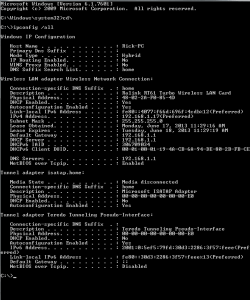
If you can post a screen shot of the ipconfig/all from this machine it may be helpful for diagnosing this problem. :)
 

My Computer My Computer

At a glance

Windows 7 Ult, Windows 8.1 Pro,Q9650-4.275GHz, E8600 4.5GHz, E6750-3.8GHzG.Skill PC2 9600 1200Mhz 5 5 5 15 2TGTX480
Computer type
PC/Desktop
Computer Manufacturer/Model Number
Home built
OS
Windows 7 Ult, Windows 8.1 Pro,
CPU
Q9650-4.275GHz, E8600 4.5GHz, E6750-3.8GHz
Motherboard
Evga 780i FTW
Memory
G.Skill PC2 9600 1200Mhz 5 5 5 15 2T
Graphics Card(s)
GTX480
Sound Card
Asus Xonar D2
Monitor(s) Displays
HannsG
Screen Resolution
1680X1050
Hard Drives
GSkill Phoenix Pro 120GB SSD
PSU
ThermalTake Toughpower 1000Watt modular
Case
ThermalTake XaserV
Cooling
Xigmatek S1283
Keyboard
Logitech G15
Mouse
Logitech G9
Internet Speed
T1
All Windows Updates are current and installed.

Here is the screenshot:
ipconfig.png
 

My Computer My Computer

At a glance

Windows 7 Ultimate x64Intel Core i724GbNvidia GeForce
Computer type
PC/Desktop
Computer Manufacturer/Model Number
Dell XPS
OS
Windows 7 Ultimate x64
CPU
Intel Core i7
Memory
24Gb
Graphics Card(s)
Nvidia GeForce
Hard Drives
1Tb internal
2 Tb external
Antivirus
Zone Alarm
Browser
IE 10, Chrome v 26

My Computer My Computer

At a glance

Windows 7 Ult, Windows 8.1 Pro,Q9650-4.275GHz, E8600 4.5GHz, E6750-3.8GHzG.Skill PC2 9600 1200Mhz 5 5 5 15 2TGTX480
Computer type
PC/Desktop
Computer Manufacturer/Model Number
Home built
OS
Windows 7 Ult, Windows 8.1 Pro,
CPU
Q9650-4.275GHz, E8600 4.5GHz, E6750-3.8GHz
Motherboard
Evga 780i FTW
Memory
G.Skill PC2 9600 1200Mhz 5 5 5 15 2T
Graphics Card(s)
GTX480
Sound Card
Asus Xonar D2
Monitor(s) Displays
HannsG
Screen Resolution
1680X1050
Hard Drives
GSkill Phoenix Pro 120GB SSD
PSU
ThermalTake Toughpower 1000Watt modular
Case
ThermalTake XaserV
Cooling
Xigmatek S1283
Keyboard
Logitech G15
Mouse
Logitech G9
Internet Speed
T1
I found what I believe are newer drivers, but when I try to install them, although I get a message saying drivers installed successfully, in Device Manager, they still have the same version and date 9.2.0.310 and 2/2010, while the drivers I found are from 2011 and 2013. When I try to use the adaptor it fails. I run the troubleshooter, which says, "Windows couldn't automatically bind the IP protocol stack to the network adaptor."

The TP-Link card had worked previously and I can't understand why it has degraded. I found a newer driver, but for some reason it won't bind to the IP stack in the network adaptor.
 

My Computer My Computer

At a glance

Windows 7 Ultimate x64Intel Core i724GbNvidia GeForce
Computer type
PC/Desktop
Computer Manufacturer/Model Number
Dell XPS
OS
Windows 7 Ultimate x64
CPU
Intel Core i7
Memory
24Gb
Graphics Card(s)
Nvidia GeForce
Hard Drives
1Tb internal
2 Tb external
Antivirus
Zone Alarm
Browser
IE 10, Chrome v 26
I found what I believe are newer drivers, but when I try to install them, although I get a message saying drivers installed successfully, in Device Manager, they still have the same version and date 9.2.0.310 and 2/2010, while the drivers I found are from 2011 and 2013. When I try to use the adaptor it fails. I run the troubleshooter, which says, "Windows couldn't automatically bind the IP protocol stack to the network adaptor."

The TP-Link card had worked previously and I can't understand why it has degraded. I found a newer driver, but for some reason it won't bind to the IP stack in the network adaptor.

The network stack may be corrupted.

Run the file below which will reset the TCP/IP stack, reset winsock, flush the DNS, renew the IP etc. your machine will reboot automatically. Let me know if anything changes.
 

Attachments

My Computer My Computer

At a glance

Windows 7 Ult, Windows 8.1 Pro,Q9650-4.275GHz, E8600 4.5GHz, E6750-3.8GHzG.Skill PC2 9600 1200Mhz 5 5 5 15 2TGTX480
Computer type
PC/Desktop
Computer Manufacturer/Model Number
Home built
OS
Windows 7 Ult, Windows 8.1 Pro,
CPU
Q9650-4.275GHz, E8600 4.5GHz, E6750-3.8GHz
Motherboard
Evga 780i FTW
Memory
G.Skill PC2 9600 1200Mhz 5 5 5 15 2T
Graphics Card(s)
GTX480
Sound Card
Asus Xonar D2
Monitor(s) Displays
HannsG
Screen Resolution
1680X1050
Hard Drives
GSkill Phoenix Pro 120GB SSD
PSU
ThermalTake Toughpower 1000Watt modular
Case
ThermalTake XaserV
Cooling
Xigmatek S1283
Keyboard
Logitech G15
Mouse
Logitech G9
Internet Speed
T1
No luck with the IPResetAll fix.
 

My Computer My Computer

At a glance

Windows 7 Ultimate x64Intel Core i724GbNvidia GeForce
Computer type
PC/Desktop
Computer Manufacturer/Model Number
Dell XPS
OS
Windows 7 Ultimate x64
CPU
Intel Core i7
Memory
24Gb
Graphics Card(s)
Nvidia GeForce
Hard Drives
1Tb internal
2 Tb external
Antivirus
Zone Alarm
Browser
IE 10, Chrome v 26
Back
Top