Network error - Multiple connections not allowed

archie456

New member
Local time
11:27 PM
Messages
3
Hi,

I have a several Windows 7 and 8.1 PCs around the house, all access a Windows 7 Desktop which I store files on (kinda like a server). I have a share on this PC which I map as Z on all of the other PCs.

All work fine, but when I reboot one of the PCs I cannot access the share and get this error:

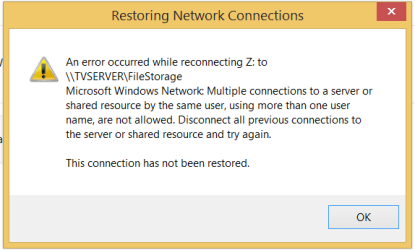
An error occurred while reconnecting to z: Microsoft Window Network: Multiple connections to a server using more than one username are not allowed: This connection has not been restored.

I then have to delete and remap the drive.

I map the drive with the /USER switch, so I don't understand why I'm receiving this error.

This is a real pain, what can I do to stop this error occurring?

Any pointers would be appreciated.
 

My Computer

Computer type
PC/Desktop
OS
Windows 7 32 and 64 bit
Some ideas:
- Does this happen on the same PC always, or the one you happen to restart?
- If you shut down one of the PCs, and restart the other do you still get this error?
 

My Computer

Computer type
PC/Desktop
Computer Manufacturer/Model Number
Custom Build
OS
Windows 7 Ultimate x64 SP1
CPU
AMD Phenom 2 1090T
Motherboard
Gigabyte GA-890FXA-UD5
Memory
2x8GB Kingston HyperX Fury Black 1600Mhz Unganged
Graphics Card(s)
MSI GTX 970 Gaming 4G
Sound Card
Realtek On-Board HD 7.1 Audio / Logitech G35
Monitor(s) Displays
3xAcer GD245HQ
Screen Resolution
1920x1080
Hard Drives
Samsung 850 Pro 512GB SSD - OS /
WD Caviar Black SATA 3 - 1 TBx2 - Dynamic RAID 0 /
WD Caviar Green SATA 2 - 640GBx2 - Dynamic RAID 0 /
WD Caviar Green SATA 2 - 640GB - Internal Backup /
Seagate Barracude SATA 3 - 3TB - External Backup/ Sync
PSU
HighPower 1000W
Case
Cooler Master HAF 932
Cooling
Noctua NH-D14
Keyboard
Logitech G19
Mouse
Logitech G500
Internet Speed
100/4 Mbit Cable (100GB quota)
Antivirus
ZoneAlarm Extreme Security / MBAM Pro / MBAE Free / SAS Free
Browser
IE 11 - Firefox - Chrome
Other Info
Logitech F710/ G27/ G940/ Z5500 // TrackIR 5 // Nvidia 3D Surround Vision
I did some tests to see when it occurs:

The desktop I'm storing my files on which has the share is called TVSERVER, I have another 4 Windows 7 and 8.1 PCs, which all get the error.

Using a laptop, I map the share on TVSERVER with net use z: \\TVSERVER\FileStorage /USER:TVSERVER\access password. User 'access' is a user account on TVSERVER.

If I map the drive on my laptop, when I sleep the laptop, and wake it, I can still access the share ok.

If I shutdown the laptop and restart it, the drive appears with a cross and I get the error when I click on it, I have to delete all connections and remap it to use.

All computers give the same errors as above.

I've attached a PNG of the error.
 

Attachments

  • network error.PNG
    network error.PNG
    7.2 KB · Views: 8

My Computer

Computer type
PC/Desktop
OS
Windows 7 32 and 64 bit
Making guesses now:

- Try the command with IP of tvserver instead? Assign a static IP, or make a DHCP reservation if this method works, so you won't have to reconfigure if IP somehow changes

- Did you try just browsing to the share and manually entering the credentials and checking the remember checkbox? also try this with IP if name fails
 

My Computer

Computer type
PC/Desktop
Computer Manufacturer/Model Number
Custom Build
OS
Windows 7 Ultimate x64 SP1
CPU
AMD Phenom 2 1090T
Motherboard
Gigabyte GA-890FXA-UD5
Memory
2x8GB Kingston HyperX Fury Black 1600Mhz Unganged
Graphics Card(s)
MSI GTX 970 Gaming 4G
Sound Card
Realtek On-Board HD 7.1 Audio / Logitech G35
Monitor(s) Displays
3xAcer GD245HQ
Screen Resolution
1920x1080
Hard Drives
Samsung 850 Pro 512GB SSD - OS /
WD Caviar Black SATA 3 - 1 TBx2 - Dynamic RAID 0 /
WD Caviar Green SATA 2 - 640GBx2 - Dynamic RAID 0 /
WD Caviar Green SATA 2 - 640GB - Internal Backup /
Seagate Barracude SATA 3 - 3TB - External Backup/ Sync
PSU
HighPower 1000W
Case
Cooler Master HAF 932
Cooling
Noctua NH-D14
Keyboard
Logitech G19
Mouse
Logitech G500
Internet Speed
100/4 Mbit Cable (100GB quota)
Antivirus
ZoneAlarm Extreme Security / MBAM Pro / MBAE Free / SAS Free
Browser
IE 11 - Firefox - Chrome
Other Info
Logitech F710/ G27/ G940/ Z5500 // TrackIR 5 // Nvidia 3D Surround Vision
The computer with the share has a static IP.

I thinking that the problem is that I map the drive with a username from the computer with the share.

i.e. net use z: \\TVSERVER\FileStorage /USER:TVSERVER\user password

I started using the password in the mapping sometime ago due to an issue - cant remember what it was - Without the user and password doesn't seem to causing the issue, I'm going to try that for a while to see what happens...
 

My Computer

Computer type
PC/Desktop
OS
Windows 7 32 and 64 bit
Back
Top