
Solved Network/ External Adapter (TP-Link WN822N Troubleshooting?)

xTheFallenOnesx

New member
Local time
9:39 PM
Messages
10
Is this a wired or wireless connection issue?
[Wireless]

Who is your Internet Service Provider (ISP)?
[Comcast?]

3. What type of Broadband connection are you using?
[Unsure]


4. What is the exact Make and Model of your Modem, Router or Modem/Router Combo
[NetGear Wireless-N 150Router, Model WNR1000v2]

5. What is the Name of the Anti-Virus, Security or Firewall Software
[None], Malware-bytes Anti-malware Home Premium


DxDiag In Attachment with IPConfig.txt


I've already asked the TP-link support people for help on as to why My external Adapter (TP-Link WN822N) Says it is connected to the internet, but either will not load pages or Go super slow? And Transition between the two, Most of the time saying DNS Is not responding only to work again for a short time with a slow speed. I have had it working and rather speedy beforehand And i have already tried posting on another Troubleshooting site to only never be responded to Stating this

[I have a Compaq Presario A900 Laptop, It has a Qualcomm Atheros AR5007 802/11 b|g WiFi Adapter, And with some trial and error i can get it to recognise a signal From across the street. Which the neighbors allow me to use, Though it is only at 2 Wi-fi Bars and has a Signal Strength of around 20-30 ish

It is very slow, and if i move my laptop at all it will drop the signal as i have to be in a very specific spot to even get the signal. But the issue is, I was trying to get a better signal so i went out and bought a TP-Link Adapter that plugs into my usb Model number: TL-WN822N, Ver 3.0. And when i first got it with the Driver that came with the CD, It did not work so i went to go and Get the default driver my computer installs Called "Realtek RTL8192CU Wireless LAN 802.11 n USB Network Adapter [, And that worked for a time with about 40-50 Signal strength and a good 4-5 bars. But recently within the past week or more, it has not been working at all even with a signal strength of 60 or more now and 3-5 Bars if it does at all,With the Driver it came with or the Driver that is by default installed It is worse than my much older Laptops internal adapter. that does not even have Wireless-N Capabilities

I can't get a stable connection and even with the 'Newish' Adapter i bought with better signal Quality and connection bars. Is there something wrong? I've been trying flushing DNS and even changing to one that says it was better but nothing seems to be working]

So i am not sure what is going on exactly Network or just some wrong setting in Adapter or router, I have tried changing a few things but it has only seemed to make it worse and only made me change them back

Note: IP Config with both adapters, Internal Atheros and External one with issue, TP-Link WN822N
 

Attachments
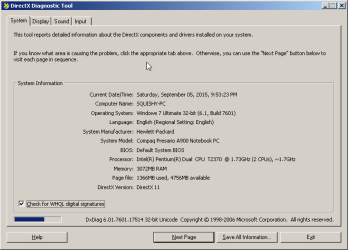
  • 2015-09-05_21-53-51.png
    2015-09-05_21-53-51.png
    9.7 KB · Views: 0
  • ipconfig.txt
    ipconfig.txt
    2.2 KB · Views: 1
Last edited:

My Computer My Computer

Computer type
Laptop
Computer Manufacturer/Model Number
Compaq Presario A900 Notebook PC
OS
Windows 7 Ultimate 32-Bit (6.1, Build 7601)
CPU
Intel Pentium Dual CPU T2370 @ 1.73GHz (2CPUs), ~1.7GHz
Memory
3072MB RAM
Graphics Card(s)
Mobile Intel 965 Express Chipset Family (358MB)
Hard Drives
WDC WD1600BEVS-60RST0ATA Device
Antivirus
None
Browser
Firefox
You should disable the Atheros adapter and try again. Also change new adapter to automatic DNS.

Once disabled, run in cmd:
Code:
ping 172.16.0.1
then
Code:
ping 8.8.8.8

If you are getting replies then run:
Code:
ping Google.com
Do you get a reply from this one as well?

As a side note, you are risking it by not running an AV. MBAM works great with an AV but insufficient all by itself.
 

My Computer My Computer

Computer type
PC/Desktop
Computer Manufacturer/Model Number
Custom Build
OS
Windows 7 Ultimate x64 SP1
CPU
AMD Phenom 2 1090T
Motherboard
Gigabyte GA-890FXA-UD5
Memory
2x8GB Kingston HyperX Fury Black 1600Mhz Unganged
Graphics Card(s)
MSI GTX 970 Gaming 4G
Sound Card
Realtek On-Board HD 7.1 Audio / Logitech G35
Monitor(s) Displays
3xAcer GD245HQ
Screen Resolution
1920x1080
Hard Drives
Samsung 850 Pro 512GB SSD - OS /
WD Caviar Black SATA 3 - 1 TBx2 - Dynamic RAID 0 /
WD Caviar Green SATA 2 - 640GBx2 - Dynamic RAID 0 /
WD Caviar Green SATA 2 - 640GB - Internal Backup /
Seagate Barracude SATA 3 - 3TB - External Backup/ Sync
PSU
HighPower 1000W
Case
Cooler Master HAF 932
Cooling
Noctua NH-D14
Keyboard
Logitech G19
Mouse
Logitech G500
Internet Speed
100/4 Mbit Cable (100GB quota)
Antivirus
ZoneAlarm Extreme Security / MBAM Pro / MBAE Free / SAS Free
Browser
IE 11 - Firefox - Chrome
Other Info
Logitech F710/ G27/ G940/ Z5500 // TrackIR 5 // Nvidia 3D Surround Vision
Yes i make sure my Atheros is Disabled before trying to use my External one, Which i am doing now My external adapter seems to work better during the Early morning or Late night, But sometimes not even then and when it does work, It just drops out again, While my Atheros will keep going as long as it has a connection of 24 or Higher.

The TP-Link Adapter has been set to Obtain DNS Auto for some time, I changed it lastnight-ish to Manually and entered the Routers DNS addresses it receives from the ISP Automatically which would be 75.75.75.75 and 75.75.76.76

I'm doing the ping stuff now, But the adapter is Working currently so everything may seem normal.

~Pinging CMD Added to Attachments, With 75.75.75.75 and 75.75.76.76. These are also the Current DNS the Adapter itself is using, Should i switch it to auto and try again?

Also on the AV part, My computer is pretty old and i have tried AVG before, Any excess programs just seem to slow down my already slow and low memory laptop, I've also tried win 8, 8.1 and 10 the like, But only encounter issues, Windows 7 x32Bit seems to have worked the best i suppose i can go try to find an AV though.

!Edit! Huh well i went and got a AV, Avast to be specific, The second it finished installing My Adapter stopped? It still shows connected, And internet access but won't load any pages. No yellow ! Or anything to show there is anything wrong, I went and did the pingtests again and all Just timed out, Even when it appears there was no issue, but i can't load pages or anything involving internet. I had to unplug the adapter a few times and reconnect it for it to work again.
 

Attachments

  • 2015-09-06_08-48-51.png
    2015-09-06_08-48-51.png
    13.3 KB · Views: 0
  • 2015-09-06_09-34-53.png
    2015-09-06_09-34-53.png
    22.3 KB · Views: 0
Last edited:

My Computer My Computer

Computer type
Laptop
Computer Manufacturer/Model Number
Compaq Presario A900 Notebook PC
OS
Windows 7 Ultimate 32-Bit (6.1, Build 7601)
CPU
Intel Pentium Dual CPU T2370 @ 1.73GHz (2CPUs), ~1.7GHz
Memory
3072MB RAM
Graphics Card(s)
Mobile Intel 965 Express Chipset Family (358MB)
Hard Drives
WDC WD1600BEVS-60RST0ATA Device
Antivirus
None
Browser
Firefox
Since you have MBAM premium best would be Microsoft Security Essentials (as it is lightweight) but don't bother for now.

Try changing the wireless channel on your router's wireless configuration page. Try them one by one. You will have to visit the neighbor for this I believe.

Then lets see if it is your PC or the card has an issue, download and make a bootable Linux Mint MATE DVD/USB, and boot with it (no installation needed). Also try the adapter on another PC.
 

My Computer My Computer

Computer type
PC/Desktop
Computer Manufacturer/Model Number
Custom Build
OS
Windows 7 Ultimate x64 SP1
CPU
AMD Phenom 2 1090T
Motherboard
Gigabyte GA-890FXA-UD5
Memory
2x8GB Kingston HyperX Fury Black 1600Mhz Unganged
Graphics Card(s)
MSI GTX 970 Gaming 4G
Sound Card
Realtek On-Board HD 7.1 Audio / Logitech G35
Monitor(s) Displays
3xAcer GD245HQ
Screen Resolution
1920x1080
Hard Drives
Samsung 850 Pro 512GB SSD - OS /
WD Caviar Black SATA 3 - 1 TBx2 - Dynamic RAID 0 /
WD Caviar Green SATA 2 - 640GBx2 - Dynamic RAID 0 /
WD Caviar Green SATA 2 - 640GB - Internal Backup /
Seagate Barracude SATA 3 - 3TB - External Backup/ Sync
PSU
HighPower 1000W
Case
Cooler Master HAF 932
Cooling
Noctua NH-D14
Keyboard
Logitech G19
Mouse
Logitech G500
Internet Speed
100/4 Mbit Cable (100GB quota)
Antivirus
ZoneAlarm Extreme Security / MBAM Pro / MBAE Free / SAS Free
Browser
IE 11 - Firefox - Chrome
Other Info
Logitech F710/ G27/ G940/ Z5500 // TrackIR 5 // Nvidia 3D Surround Vision
It has been working for now, As to why it is i am not sure, it is still early morning though unless it magically fixed itself when i started to post this, As things usually do. I've tried changing the wireless channel a few times, it seems to re-direct where it is coming from slightly, or have more interferrence as the signal quality drops out of my Atheros adapters range, ch1 seems to be the best other programs recommend switching to a differen't channel, but i have tried that and only get more issues so I'm unsure.

I can try downloading
Linux Mint 17.2 "Rafaela" - Cinnamon (32-bit) But it is going to be a bit, and i do not currently have Access to a Flashdrive big enough that i am not currently using

!Edit! Cleaning up a flashdrive, Going to attempt downloading the linux mint as well, I suspect adapter might cut out while doing it though

!Edit2! Posting form the linux Mint now, The adapter is still working here, I don't know if thats important or not though as the Adapter is still working from earlier, It did cut out a but ago, but unplugging and putting it back in a few times let pages load again. Getting an unidentified network, but conneted when on windows 7? Confused at everything now s its working here on the linuxmint, i switched back and forth a few times
 

Attachments

  • 2015-09-06_15-54-39.png
    2015-09-06_15-54-39.png
    4.3 KB · Views: 22
Last edited:

My Computer My Computer

Computer type
Laptop
Computer Manufacturer/Model Number
Compaq Presario A900 Notebook PC
OS
Windows 7 Ultimate 32-Bit (6.1, Build 7601)
CPU
Intel Pentium Dual CPU T2370 @ 1.73GHz (2CPUs), ~1.7GHz
Memory
3072MB RAM
Graphics Card(s)
Mobile Intel 965 Express Chipset Family (358MB)
Hard Drives
WDC WD1600BEVS-60RST0ATA Device
Antivirus
None
Browser
Firefox
-Bump- Still Unsure what the issue is, It continues to work for a bit, and then cease even though it says Connected. Even unplugging and plugging it back in doesn't seem to always work, there has to be some sort of network error or something, It only happens with the TP-link Adapter, I have wiped and reinstallled OS's before Windows 7,8,8.1,10 But even with a clean install it still doesn't seem to work right, The Driver it came with, or the realtek one it is using now.
 

My Computer My Computer

Computer type
Laptop
Computer Manufacturer/Model Number
Compaq Presario A900 Notebook PC
OS
Windows 7 Ultimate 32-Bit (6.1, Build 7601)
CPU
Intel Pentium Dual CPU T2370 @ 1.73GHz (2CPUs), ~1.7GHz
Memory
3072MB RAM
Graphics Card(s)
Mobile Intel 965 Express Chipset Family (358MB)
Hard Drives
WDC WD1600BEVS-60RST0ATA Device
Antivirus
None
Browser
Firefox

My Computer My Computer

Computer type
PC/Desktop
Computer Manufacturer/Model Number
Custom Build
OS
Windows 7 Ultimate x64 SP1
CPU
AMD Phenom 2 1090T
Motherboard
Gigabyte GA-890FXA-UD5
Memory
2x8GB Kingston HyperX Fury Black 1600Mhz Unganged
Graphics Card(s)
MSI GTX 970 Gaming 4G
Sound Card
Realtek On-Board HD 7.1 Audio / Logitech G35
Monitor(s) Displays
3xAcer GD245HQ
Screen Resolution
1920x1080
Hard Drives
Samsung 850 Pro 512GB SSD - OS /
WD Caviar Black SATA 3 - 1 TBx2 - Dynamic RAID 0 /
WD Caviar Green SATA 2 - 640GBx2 - Dynamic RAID 0 /
WD Caviar Green SATA 2 - 640GB - Internal Backup /
Seagate Barracude SATA 3 - 3TB - External Backup/ Sync
PSU
HighPower 1000W
Case
Cooler Master HAF 932
Cooling
Noctua NH-D14
Keyboard
Logitech G19
Mouse
Logitech G500
Internet Speed
100/4 Mbit Cable (100GB quota)
Antivirus
ZoneAlarm Extreme Security / MBAM Pro / MBAE Free / SAS Free
Browser
IE 11 - Firefox - Chrome
Other Info
Logitech F710/ G27/ G940/ Z5500 // TrackIR 5 // Nvidia 3D Surround Vision
It is currently working, I will give it a few more days and see if there are anymore issues. If not i will Mark as solved

So far i have only run the Elevated CMD Command, Not the internet repair, It may also just be the adapter choosing to work again
 

My Computer My Computer

Computer type
Laptop
Computer Manufacturer/Model Number
Compaq Presario A900 Notebook PC
OS
Windows 7 Ultimate 32-Bit (6.1, Build 7601)
CPU
Intel Pentium Dual CPU T2370 @ 1.73GHz (2CPUs), ~1.7GHz
Memory
3072MB RAM
Graphics Card(s)
Mobile Intel 965 Express Chipset Family (358MB)
Hard Drives
WDC WD1600BEVS-60RST0ATA Device
Antivirus
None
Browser
Firefox
Sure, no need to fix something that works :)
 

My Computer My Computer

Computer type
PC/Desktop
Computer Manufacturer/Model Number
Custom Build
OS
Windows 7 Ultimate x64 SP1
CPU
AMD Phenom 2 1090T
Motherboard
Gigabyte GA-890FXA-UD5
Memory
2x8GB Kingston HyperX Fury Black 1600Mhz Unganged
Graphics Card(s)
MSI GTX 970 Gaming 4G
Sound Card
Realtek On-Board HD 7.1 Audio / Logitech G35
Monitor(s) Displays
3xAcer GD245HQ
Screen Resolution
1920x1080
Hard Drives
Samsung 850 Pro 512GB SSD - OS /
WD Caviar Black SATA 3 - 1 TBx2 - Dynamic RAID 0 /
WD Caviar Green SATA 2 - 640GBx2 - Dynamic RAID 0 /
WD Caviar Green SATA 2 - 640GB - Internal Backup /
Seagate Barracude SATA 3 - 3TB - External Backup/ Sync
PSU
HighPower 1000W
Case
Cooler Master HAF 932
Cooling
Noctua NH-D14
Keyboard
Logitech G19
Mouse
Logitech G500
Internet Speed
100/4 Mbit Cable (100GB quota)
Antivirus
ZoneAlarm Extreme Security / MBAM Pro / MBAE Free / SAS Free
Browser
IE 11 - Firefox - Chrome
Other Info
Logitech F710/ G27/ G940/ Z5500 // TrackIR 5 // Nvidia 3D Surround Vision
SP1

It also might help downloading service pack 1.

Roy
 

My Computer My Computer

Computer type
PC/Desktop
Computer Manufacturer/Model Number
medionl/Aspire 6930G/acer x55a
OS
W7 home premium 32bit/W7HP 64bit/w10 tp insider ring
CPU
E5300 dual core
Motherboard
medion MS7366
Memory
3gb
Graphics Card(s)
Nvidia Geforce 7100 Nforce 630i
Monitor(s) Displays
avixc
Internet Speed
n (isp resticted to 72)
Antivirus
mse/pands
Browser
palemoon
Other Info
Belkin Fd7050 n USB using Railink RT2870 drivers, more upto date
Roy, it looks like SP1. 7601 everywhere referenced, why did you think it was RTM?
 

My Computer My Computer

Computer type
PC/Desktop
Computer Manufacturer/Model Number
Custom Build
OS
Windows 7 Ultimate x64 SP1
CPU
AMD Phenom 2 1090T
Motherboard
Gigabyte GA-890FXA-UD5
Memory
2x8GB Kingston HyperX Fury Black 1600Mhz Unganged
Graphics Card(s)
MSI GTX 970 Gaming 4G
Sound Card
Realtek On-Board HD 7.1 Audio / Logitech G35
Monitor(s) Displays
3xAcer GD245HQ
Screen Resolution
1920x1080
Hard Drives
Samsung 850 Pro 512GB SSD - OS /
WD Caviar Black SATA 3 - 1 TBx2 - Dynamic RAID 0 /
WD Caviar Green SATA 2 - 640GBx2 - Dynamic RAID 0 /
WD Caviar Green SATA 2 - 640GB - Internal Backup /
Seagate Barracude SATA 3 - 3TB - External Backup/ Sync
PSU
HighPower 1000W
Case
Cooler Master HAF 932
Cooling
Noctua NH-D14
Keyboard
Logitech G19
Mouse
Logitech G500
Internet Speed
100/4 Mbit Cable (100GB quota)
Antivirus
ZoneAlarm Extreme Security / MBAM Pro / MBAE Free / SAS Free
Browser
IE 11 - Firefox - Chrome
Other Info
Logitech F710/ G27/ G940/ Z5500 // TrackIR 5 // Nvidia 3D Surround Vision
Coz i didn't see it in his screenshot directx
This comp also only came with Vista.
Roy

rats missed the 01
 

My Computer My Computer

Computer type
PC/Desktop
Computer Manufacturer/Model Number
medionl/Aspire 6930G/acer x55a
OS
W7 home premium 32bit/W7HP 64bit/w10 tp insider ring
CPU
E5300 dual core
Motherboard
medion MS7366
Memory
3gb
Graphics Card(s)
Nvidia Geforce 7100 Nforce 630i
Monitor(s) Displays
avixc
Internet Speed
n (isp resticted to 72)
Antivirus
mse/pands
Browser
palemoon
Other Info
Belkin Fd7050 n USB using Railink RT2870 drivers, more upto date
Back
Top