
I’m not sure how to describe this but I’ve recently had a connectivity problem that is rather odd.
I’ve been using Win 7 since beta without problems.
With in the last week I’ve started experiencing network connectivity loss.
When I boot the machine up either I will have internet access or I won’t. I can connect to anything on the internal network but I can not connect to anything external.
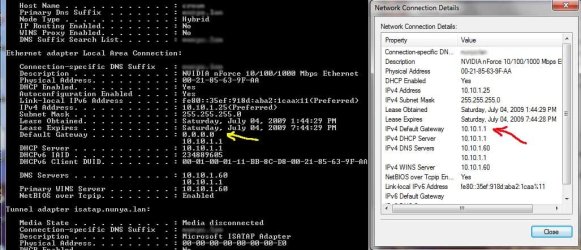
I’ve traced it down to the system losing the default gateway but at the same time not.
See attached photo.
If I do “ipconfig /all” in a command prompt I get:
Default Gateway . . . . . . . . . : 0.0.0.0
But when I look at the properties in the graphical interface I get:
Default Gateway . . . . . . . . . : 10.10.1.1
This does not occur every time, it’s random per reboot.
I did a system restore back a week and the issue persisted.
I tried to reinstall the network drivers, still didn’t work.
The workaround that I did find was to uninstall the network card from the hardware manager then refresh and have the system re-install it.
Just wanted to post and see if anyone else had this issue.
Thanks
I’ve been using Win 7 since beta without problems.
With in the last week I’ve started experiencing network connectivity loss.
When I boot the machine up either I will have internet access or I won’t. I can connect to anything on the internal network but I can not connect to anything external.
I’ve traced it down to the system losing the default gateway but at the same time not.
See attached photo.
If I do “ipconfig /all” in a command prompt I get:
Default Gateway . . . . . . . . . : 0.0.0.0
But when I look at the properties in the graphical interface I get:
Default Gateway . . . . . . . . . : 10.10.1.1
This does not occur every time, it’s random per reboot.
I did a system restore back a week and the issue persisted.
I tried to reinstall the network drivers, still didn’t work.
The workaround that I did find was to uninstall the network card from the hardware manager then refresh and have the system re-install it.
Just wanted to post and see if anyone else had this issue.
Thanks
Attachments
My Computer
- Computer Manufacturer/Model Number
- custom build
- OS
- Windows 7, build 7100 (RC)
- CPU
- AMD Phenom II X4 940 Deneb 3.0GHz Socket AM2+ 125W Quad-Core
- Motherboard
- MSI K9N2 SLI Platinum AM2+/AM2 NVIDIA nForce 750a SLI
- Memory
- 4GB (2 x 2GB) 240-Pin DDR2 SDRAM DDR2 1066
- Graphics Card(s)
- NX8500GT - NVIDIA GeForce 8600 (GF 8500 + GF 8200)
- Sound Card
- onboard
- Monitor(s) Displays
- Dell 1707FP (Digital)
- Hard Drives
- 250G SATA
- PSU
- 500W
- Case
- RAIDMAX SMILODON ATX-612WBP Black
- Cooling
- CPU Stock fan
