network help

wkgbn

New member
Local time
5:51 PM
Messages
51
can some one help me out with this home work ? please explain in detail.
thankyou in advance

say you have two computers in your home. One is a Pentium II, 350 running Windows 98 the other is a P-IV system running Windows XP. The XP system has an HP Photosmart 7150 printer attached to it, connected via a USB cable. Currently, only the Windows XP system has internet access, using DSL connection through the Integrated Ethernet card on the P-IV motherboard. Present your requirements for the hardware that would be required, and describe the steps you would take to establish a network between the two computers to share internet access and the printer that is attached to the P-IV computer system. Justify your selection for hardware.
 

My Computer

OS
win7
Well, first you want to purchase a router with an integrated 4 port switch. Something like the Linksys BEFSR41 (Newegg.com - LINKSYS BEFSR41 10/100Mbps EtherFast Cable/DSL Router with 4-Port Switch 1 x 10/100Mbps WAN Ports 4 x 10/100Mbps LAN Ports - Wired Routers).

You will then plug your internet connection into the WAN port on the router, and you will plug your P4 system into 1 of the switch ports on the router.

You will also have to get a network card for the P2 system since it didn't mention having one. Something like this Intel 10/100 card would work just fine (Newegg.com - Intel PWLA8391GT 10/ 100/ 1000Mbps PCI PRO/1000 GT Desktop Adapter 1 x RJ45 - Network Interface Cards). Then you will take a network cable and connect the P2 to an available switch port on the router.

From the P4 machine, you would share the printer. From the P2 machine, you would connect to the P4 machine and click on the printer to map it to your machine.

I went with a wired router rather than a wireless router because it saves a couple of bucks and keeps everything secure...and with this old hardware...it doesn't seem like wireless is necessary.

I went with the Intel card because Intel makes good cards with good driver support and compatibility.

Hope that helps.
 

My Computer

Computer Manufacturer/Model Number
Self-Built in July 2009
OS
Windows 7 Ultimate x64
CPU
Intel Q9550 2.83Ghz OC'd to 3.40Ghz
Motherboard
Gigabyte GA-EP45-UD3R rev. 1.1, F12 BIOS
Memory
8GB G.Skill PI DDR2-800, 4-4-4-12 timings
Graphics Card(s)
EVGA 1280MB Nvidia GeForce GTX570
Sound Card
Realtek ALC899A 8 channel onboard audio
Monitor(s) Displays
23" Acer x233H
Screen Resolution
1920x1080
Hard Drives
Intel X25-M 80GB Gen 2 SSD
Western Digital 1TB Caviar Black, 32MB cache. WD1001FALS
PSU
Corsair 620HX modular
Case
Antec P182
Cooling
stock
Keyboard
ABS M1 Mechanical
Mouse
Logitech G9 Laser Mouse
Internet Speed
15/2 cable modem
Other Info
Windows and Linux enthusiast. Logitech G35 Headset.
homeowrrk

Well, first you want to purchase a router with an integrated 4 port switch. Something like the Linksys BEFSR41 (Newegg.com - LINKSYS BEFSR41 10/100Mbps EtherFast Cable/DSL Router with 4-Port Switch 1 x 10/100Mbps WAN Ports 4 x 10/100Mbps LAN Ports - Wired Routers).

You will then plug your internet connection into the WAN port on the router, and you will plug your P4 system into 1 of the switch ports on the router.

You will also have to get a network card for the P2 system since it didn't mention having one. Something like this Intel 10/100 card would work just fine (Newegg.com - Intel PWLA8391GT 10/ 100/ 1000Mbps PCI PRO/1000 GT Desktop Adapter 1 x RJ45 - Network Interface Cards). Then you will take a network cable and connect the P2 to an available switch port on the router.

From the P4 machine, you would share the printer. From the P2 machine, you would connect to the P4 machine and click on the printer to map it to your machine.

I went with a wired router rather than a wireless router because it saves a couple of bucks and keeps everything secure...and with this old hardware...it doesn't seem like wireless is necessary.

I went with the Intel card because Intel makes good cards with good driver support and compatibility.

Hope that helps.


oK
pparks1 method is much better, prefered and not much more expensive.

If you had to do this on the cheap you could get 2 10/100 ethernet cards, another cat5 (or 6e) cable. Put a second card in each machine, use the new cat 5 cable to connect them. Then on the machine with the printer (i would use the xp) share the printer. It would only be a matter of configuring IP, shares, and permissions.

Not sure what the requirements/budget is but this was just an excercise in a cheaper way to do it

Ken
 

My Computer

Computer Manufacturer/Model Number
HP Pavillion dv-7 1005 Tx
OS
Win 8 Release candidate 8400
CPU
[email protected]
Memory
4 gigs
Graphics Card(s)
Nvidia 9600M
Sound Card
HD built-in
Monitor(s) Displays
17" Wxga
Screen Resolution
1440x900
Cooling
none
Internet Speed
45Mb down 5Mb up
thanks pparks1-&-zigzag for the info.
i heard Some newer modems that are shipped with ISPs already support multiple connections in which case one wouldn't need a router is that true ?
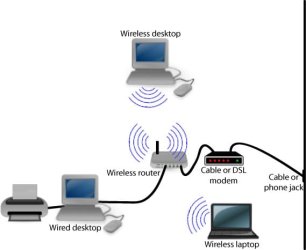
also check this out if some one go about this root will it be more appropriate?
i am gathering more info. then i can put it in to my own words .
 

Attachments

  • network.jpg
    network.jpg
    18.8 KB · Views: 6

My Computer

OS
win7
Back
Top