Network Icon does not display the correct menu

00seven

New member
Local time
7:49 AM
Messages
5
When I click on the Network Icon, the pop-up menu says only 2 things: 1) "Currently connected to xxx" or "Currently not connected" and 2) "Open Network and Sharing Center". It does not display "Dial-up and VPN" nor "Wireless Network Connection" so naturally I do not get presented with a list of available network connection choices.

I am running Windows 7 Professional x64 as a virtual machine using Parallels on a new Macbook Pro. The only way I can see a menu of available networks is to use the Mac OSX utility.

I would prefer to do it all using Windows 7. Is it possible?
 

My Computer

OS
Windows 7 Professional x64
Welcome to the Seven Forums
I may be wrong but if Windows 7 is the guest in the virtual machine you won't get that option only the host machine will have that.
Jerry
 

My Computer

Computer type
Laptop
Computer Manufacturer/Model Number
Sager NP9170
OS
Win 7 Pro x64 / Win 10 Pro
CPU
Intel(R) Core(TM) i7-3630QM CPU @ 2.40GHz
Motherboard
CLEVO P170EM
Memory
12 GB
Graphics Card(s)
(1) Intel(R) HD Graphics 4000 (2) NVIDIA GeForce GTX 675M
Sound Card
(1) Realtek High Definition Audio (2) Intel(R) Display Aud
Monitor(s) Displays
17.3
Screen Resolution
1920x1080
Hard Drives
(1) Samsung 860 EVO 500GB(OS) (1) Samsung 860 EVO 500GB(Data)
Keyboard
Backlite
Antivirus
MSE, Malwarebytes Pro
Browser
Firefox
Other Info
DESKTOP: Custom-built.
OS: Win 10 Pro x64.
CASE: Rosewill R5.
CPU: Intel I5 4670K CPU @ 3.40GHz.
CPU COOLER: Cool Master Hyper 212 EVO.
MOTHERBOARD: Asus Z87-A.
MEMORY: Kingston HyperX 2x4 GB.
GPU: Nvidia Geforce 650 TI.
PSU: Corsair TX750.
DRIVES: (1) Samsung 840 120 GB SSD (2) Western Digital blue 500 GB 7200 RPM.
Thanks

Not the answer I was hoping for, but thank you. I guess that makes sense.
 

My Computer

OS
Windows 7 Professional x64
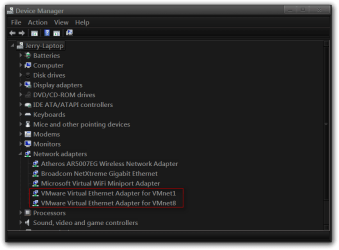
I'm not sure what kind of device manager your Mac has but looking at mine you can see the vmware adapter in place, if you look in your device manager in Windows 7 that is visualized you will probably only see one adapter.
Jerry
Device Manager.png
 

My Computer

Computer type
Laptop
Computer Manufacturer/Model Number
Sager NP9170
OS
Win 7 Pro x64 / Win 10 Pro
CPU
Intel(R) Core(TM) i7-3630QM CPU @ 2.40GHz
Motherboard
CLEVO P170EM
Memory
12 GB
Graphics Card(s)
(1) Intel(R) HD Graphics 4000 (2) NVIDIA GeForce GTX 675M
Sound Card
(1) Realtek High Definition Audio (2) Intel(R) Display Aud
Monitor(s) Displays
17.3
Screen Resolution
1920x1080
Hard Drives
(1) Samsung 860 EVO 500GB(OS) (1) Samsung 860 EVO 500GB(Data)
Keyboard
Backlite
Antivirus
MSE, Malwarebytes Pro
Browser
Firefox
Other Info
DESKTOP: Custom-built.
OS: Win 10 Pro x64.
CASE: Rosewill R5.
CPU: Intel I5 4670K CPU @ 3.40GHz.
CPU COOLER: Cool Master Hyper 212 EVO.
MOTHERBOARD: Asus Z87-A.
MEMORY: Kingston HyperX 2x4 GB.
GPU: Nvidia Geforce 650 TI.
PSU: Corsair TX750.
DRIVES: (1) Samsung 840 120 GB SSD (2) Western Digital blue 500 GB 7200 RPM.
Mine indicates 'Intel Pro 1000 MT Network Connection' (enabled) and 'Shrew Soft Virtual Adapter' (disabled). Should I enable it?
 

My Computer

OS
Windows 7 Professional x64
Are you having connection problems? I am not a virtual machine expert at all I have one virtual machine running so I am going by my own experience.
Jerry
 

My Computer

Computer type
Laptop
Computer Manufacturer/Model Number
Sager NP9170
OS
Win 7 Pro x64 / Win 10 Pro
CPU
Intel(R) Core(TM) i7-3630QM CPU @ 2.40GHz
Motherboard
CLEVO P170EM
Memory
12 GB
Graphics Card(s)
(1) Intel(R) HD Graphics 4000 (2) NVIDIA GeForce GTX 675M
Sound Card
(1) Realtek High Definition Audio (2) Intel(R) Display Aud
Monitor(s) Displays
17.3
Screen Resolution
1920x1080
Hard Drives
(1) Samsung 860 EVO 500GB(OS) (1) Samsung 860 EVO 500GB(Data)
Keyboard
Backlite
Antivirus
MSE, Malwarebytes Pro
Browser
Firefox
Other Info
DESKTOP: Custom-built.
OS: Win 10 Pro x64.
CASE: Rosewill R5.
CPU: Intel I5 4670K CPU @ 3.40GHz.
CPU COOLER: Cool Master Hyper 212 EVO.
MOTHERBOARD: Asus Z87-A.
MEMORY: Kingston HyperX 2x4 GB.
GPU: Nvidia Geforce 650 TI.
PSU: Corsair TX750.
DRIVES: (1) Samsung 840 120 GB SSD (2) Western Digital blue 500 GB 7200 RPM.
i do have connection problems sometimes, typically in hotels. The first thing they ask me is "do you have a Mac?". And so far none of the hotel tech support staff has been able to solve it for me. I can connect and get Internet access through Safari on the Mac but that does nothing for me as i need to access corporate email through Outlook Exchange which is running on Windows 7.
 

My Computer

OS
Windows 7 Professional x64
Do you have Office for Mac?
 

My Computer

Computer Manufacturer/Model Number
Dell XPS 15 L502x
OS
Windows 7 Ultimate x64 SP1
CPU
Core i7-2670QM
Memory
8GB DDR3 PC3-10600
Graphics Card(s)
Intel HD Graphics 3000 + GeForce GT 540M
Screen Resolution
1920x1080
Hard Drives
1TB 5400RPM Seagate
Microsoft Office Professional Plus 2010/Windows 7 Professional x64/Parallels Virtual Platform/Macbook Pro with OSX Lion
 

My Computer

OS
Windows 7 Professional x64
Back
Top