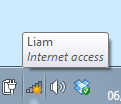
Network icon in status bar showing not connected?

liamwli

New member
Local time
11:17 AM
Messages
12
Hello again, seven forums :)

I have an annoying error :mad:

If you look at the picture below, you will see that my network icon shows that I am not connected, even though I am??

attachment.php


Does anyone know a way to stop this? It has been happening for a couple of days, over loads of reboots :(
 

Attachments

  • icon.PNG
    icon.PNG
    2.1 KB · Views: 1,703

My Computer My Computer

At a glance

Windows 7 Home Premium x64Intel Pentium B9604GBIntel HD
Computer type
Laptop
Computer Manufacturer/Model Number
Asus X401A
OS
Windows 7 Home Premium x64
CPU
Intel Pentium B960
Motherboard
Unknown
Memory
4GB
Graphics Card(s)
Intel HD
Screen Resolution
1366x768
Antivirus
MSE
Browser
Chrome
Did you recently change/update/install anything on the computer around the time this started happening?
 

My Computer My Computer

At a glance

XP / Win7 x64 ProIntel Quad-Core Q9450 @ 3.2GHz2x2GB GSkill DDR2NVIDIA GeForce 8600 GTS (EVGA)
OS
XP / Win7 x64 Pro
CPU
Intel Quad-Core Q9450 @ 3.2GHz
Motherboard
Asus P5-E
Memory
2x2GB GSkill DDR2
Graphics Card(s)
NVIDIA GeForce 8600 GTS (EVGA)
Monitor(s) Displays
Dell 2408WFP
Screen Resolution
1920x1200
Did you recently change/update/install anything on the computer around the time this started happening?

Yes. Virtualbox was uninstalled, along with some other things. I dont know which one it was, but I used to see the same picture I see when connected to a LAN, with a cross in the bottom left.
 

My Computer My Computer

At a glance

Windows 7 Home Premium x64Intel Pentium B9604GBIntel HD
Computer type
Laptop
Computer Manufacturer/Model Number
Asus X401A
OS
Windows 7 Home Premium x64
CPU
Intel Pentium B960
Motherboard
Unknown
Memory
4GB
Graphics Card(s)
Intel HD
Screen Resolution
1366x768
Antivirus
MSE
Browser
Chrome
Without knowing what "some other things" are, it sounds like something got corrupted with that uninstall of Virtual box (which loads virtual networking components that interface with your network hardware). I would try a System Restore to a time previous to this, when it worked, and try uninstalling again (and reboot after uninstallation).

Or it could be an issue with those other things you uninstalled/changed. What were they?
 

My Computer My Computer

At a glance

XP / Win7 x64 ProIntel Quad-Core Q9450 @ 3.2GHz2x2GB GSkill DDR2NVIDIA GeForce 8600 GTS (EVGA)
OS
XP / Win7 x64 Pro
CPU
Intel Quad-Core Q9450 @ 3.2GHz
Motherboard
Asus P5-E
Memory
2x2GB GSkill DDR2
Graphics Card(s)
NVIDIA GeForce 8600 GTS (EVGA)
Monitor(s) Displays
Dell 2408WFP
Screen Resolution
1920x1200

My Computer My Computer

At a glance

Windows 7 Professional SP1 64-bitIntel Core i5-2450M @2.5 GHz6 GB DDR3 1333MHzIntel HD 3000
Computer type
Laptop
Computer Manufacturer/Model Number
Toshiba P775-S7100
OS
Windows 7 Professional SP1 64-bit
CPU
Intel Core i5-2450M @2.5 GHz
Memory
6 GB DDR3 1333MHz
Graphics Card(s)
Intel HD 3000
Monitor(s) Displays
Built-in 17.3" LED; 22" Insignia NS-L22Q-10A
Screen Resolution
1600x900; 1360x768
Hard Drives
750 GB Hitachi
1TB Seagate FreeAgent External
Internet Speed
Verizon DSL Speed(Down/Up): 3360 Kbps / 800 Kbps
Antivirus
MSE and MBAM Pro
Browser
IE10

My Computer My Computer

At a glance

Microsoft Windows 7 Home Premium 64-bit 7600IIx4 amd athelon 635 processor2x2gbati radeon HD 5450
Computer Manufacturer/Model Number
Hewlett packard/p6512uk
OS
Microsoft Windows 7 Home Premium 64-bit 7600
CPU
IIx4 amd athelon 635 processor
Motherboard
FOXCONN 2AA9
Memory
2x2gb
Graphics Card(s)
ati radeon HD 5450
Sound Card
(1) Realtek High Definition Audio (2) AMD High Definition
Monitor(s) Displays
samsung lcd tv 32"
Screen Resolution
1360x 768
Hard Drives
(1) WDC WD10 01FAES-60Z2A0 SATA Disk Device (2) Maxtor OneTouch USB Device (3) ST310003 33AS USB Device (4) WD My Book 1111 USB Device
PSU
?
Cooling
air!
Keyboard
wireless hp
Mouse
wireless Hp,optical
Internet Speed
1.10mb/s
Antivirus
MSE
Browser
Firefox
Back
Top