
Network instability

sherisdoppel

New member
Local time
6:15 PM
Messages
28
Hi,

I installed a genuine Windows 7 Ultimate on my recently bought a new laptop and am facing some problems on network connectivity.

The problem I have is on the wireless instability. When I use internet connection such as playing games or watching Youtube videos but browsing, it constantly loses connection stealthily or even drops.

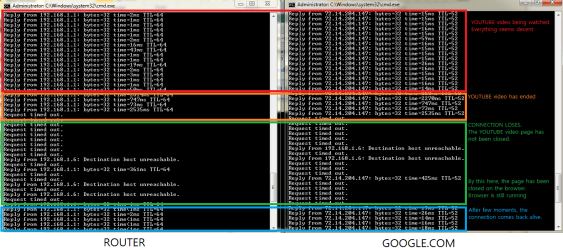
So that any experts can really help me with enough information they can get from me, I did a test myself and I'm sure it will help you to help me.

Here is what is happening:
http://www.sevenforums.com/attachment.php?attachmentid=70532&stc=1&d=1272735240

Closing the page is done by myself, but the video was left there until it reaches the end.
My local IP address is 192.168.1.6 in case anyone wonders from that image.

To ensure this is not affected by any software, I formatted the computer and only installed Firefox and Adobe Flash Player. The problem still arose.

I could have been the driver problem, but I updated with different versions. This is happening in both wireless and wired cable.

What I can best guess is that it is the router.
I have 7 PC's connected to the router, but I tried to turn them all off except for the new laptop. I had no luck. Resetting the router or unplug-plugging the power didn't not do much as well.

I've done a lot of things that I can do myself to solve this issue but I think I reached my limitation. I need people's help.

Here is the new laptop's spec.
Intel i7 M620 (4 CPUs) 2.7GHz
4.00GB RAM
330M GT 512MB / DX 11.0
Windows Ultimate 32-bit

Network adapter
Ethernet: Broadcom NetXtreme Gigabit Ethernet
Wireless: Broadcom 802.11n Network Adapter

ISP speed test:
Verizon
Download speed: 9.90Mb/s
Upload speed: 1.84Mb/s

I'm really frustrated and the technical support from the laptop manufacturer wasn't able to help me.
It would be really great if anyone can help.
Thank you.
 

Attachments
  • unstableconnection.png
    unstableconnection.png
    32.2 KB · Views: 151

My Computer

Computer type
PC/Desktop
Computer Manufacturer/Model Number
Custom Build
OS
Windows 7 Ultimate 64bit
CPU
i7 2600K
Motherboard
Asus P8P67 Pro Rev 3.1
Graphics Card(s)
GTX 560 Ti
Screen Resolution
1920x1080
My first thought is you may have an odd QoS [Quality of Service] setting in your router.

What make/model of router do you have?
 

My Computer

OS
Windows 7 Ultimate 64-bit
CPU
AMD Phenom II X6 1090T 3.2GHZ
Motherboard
MSI 890FXA-GD70
Memory
G.SKILL RipJaw 3x2GB DDR3-1066
Graphics Card(s)
2x HIS Radeon HD 6850 1 GB
Sound Card
VIA 8-channel
Monitor(s) Displays
2x 20 inch Acer LCDs, 1x 32" Sony LCD TV
Screen Resolution
4480x900
Hard Drives
1x Crucial 64GB SSD
3x 1TB HDDs (WD, Seagate, Hitatchi)
1x 500GB Seagate External
PSU
Kingwin 1000W Modular
Case
Coolermaster HAF 932
Cooling
1x 120mm, 3x 200mm, CoolerMaster Hyper 212+
Keyboard
Microsoft Wireless Keyboard 1000
Mouse
Microsoft Wiresless Mouse 5000
Internet Speed
20mbps
Other Info
Samsung BD-ROM/DVD-RW
I'm using the router that was given when I was provided with the internet from Verizon. The WAN is provided through coax cable.
The model name is MI424-WR.
 

My Computer

Computer type
PC/Desktop
Computer Manufacturer/Model Number
Custom Build
OS
Windows 7 Ultimate 64bit
CPU
i7 2600K
Motherboard
Asus P8P67 Pro Rev 3.1
Graphics Card(s)
GTX 560 Ti
Screen Resolution
1920x1080
I suspect a Wifi interface gone bad. This can be the on your PC/notebook or the one on the router. If you can, change the router, see how it goes... or use a friend's Wifi router (make it acts as an Access point) in your network.

zzz2496
 

My Computer

Computer Manufacturer/Model Number
Self Built
OS
Windows7 Ultimate 64bit
CPU
Intel Core 2 Quad Q6600
Motherboard
Abit IN9-32X-MMAX
Memory
DDR2 Adata 4GB
Graphics Card(s)
Nvidia GeForce GTX 285 1024 and Nvidia GeForce 8800GT 512
Sound Card
Asus Xonar HDAV 1.3
Monitor(s) Displays
Dell 2407WFP and BenQ 2400v and Philips 150v3
Screen Resolution
3840x1200 and 1024x768
Hard Drives
2 WDC 1TB
1 WDC 1.5TB
1 WDC 640GB
1 WDC 320GB
1 Seagate 200GB
PSU
Corsair TX 850W
Case
Cooler Master HAF932
Cooling
Arctic Cooling Freezer Extreme and plenty of fans...
Keyboard
MicrosoftNaturalKeyboard 4000/Apple Alu keyboard/Dinovo mini
Mouse
Logitech G5/MarbleMouseTrackball/PerformanceMX/SpacePilotPRO
Internet Speed
1.5Mbps down/384Kbps up
Other Info
APC SURT 1000XL
Logitech Z-560
Wiimote
Mikrotik Router
Linksys (now Cisco) SD2008 8 port Gigabit switch
Linksys WRT54G (acting as AP)
Apple wireless Aluminium keyboard
Apple Magic Mouse
Xbox360 wired controller
Thanks for the suggestion but it also happens on wired connection.
Can anyone help me?
 

My Computer

Computer type
PC/Desktop
Computer Manufacturer/Model Number
Custom Build
OS
Windows 7 Ultimate 64bit
CPU
i7 2600K
Motherboard
Asus P8P67 Pro Rev 3.1
Graphics Card(s)
GTX 560 Ti
Screen Resolution
1920x1080

My Computer

Computer type
PC/Desktop
Computer Manufacturer/Model Number
Home built
OS
Windows 7 Ult, Windows 8.1 Pro,
CPU
Q9650-4.275GHz, E8600 4.5GHz, E6750-3.8GHz
Motherboard
Evga 780i FTW
Memory
G.Skill PC2 9600 1200Mhz 5 5 5 15 2T
Graphics Card(s)
GTX480
Sound Card
Asus Xonar D2
Monitor(s) Displays
HannsG
Screen Resolution
1680X1050
Hard Drives
GSkill Phoenix Pro 120GB SSD
PSU
ThermalTake Toughpower 1000Watt modular
Case
ThermalTake XaserV
Cooling
Xigmatek S1283
Keyboard
Logitech G15
Mouse
Logitech G9
Internet Speed
T1
I just realized this happens to everywhere.
I went to a random wireless in a mall, but still had the same symptom.
Any other cause?
 

My Computer

Computer type
PC/Desktop
Computer Manufacturer/Model Number
Custom Build
OS
Windows 7 Ultimate 64bit
CPU
i7 2600K
Motherboard
Asus P8P67 Pro Rev 3.1
Graphics Card(s)
GTX 560 Ti
Screen Resolution
1920x1080
I just realized this happens to everywhere.
I went to a random wireless in a mall, but still had the same symptom.
Any other cause?

Are you using any firewall software and if so what?
 

My Computer

OS
Windows 7 Ultimate 64-bit
CPU
AMD Phenom II X6 1090T 3.2GHZ
Motherboard
MSI 890FXA-GD70
Memory
G.SKILL RipJaw 3x2GB DDR3-1066
Graphics Card(s)
2x HIS Radeon HD 6850 1 GB
Sound Card
VIA 8-channel
Monitor(s) Displays
2x 20 inch Acer LCDs, 1x 32" Sony LCD TV
Screen Resolution
4480x900
Hard Drives
1x Crucial 64GB SSD
3x 1TB HDDs (WD, Seagate, Hitatchi)
1x 500GB Seagate External
PSU
Kingwin 1000W Modular
Case
Coolermaster HAF 932
Cooling
1x 120mm, 3x 200mm, CoolerMaster Hyper 212+
Keyboard
Microsoft Wireless Keyboard 1000
Mouse
Microsoft Wiresless Mouse 5000
Internet Speed
20mbps
Other Info
Samsung BD-ROM/DVD-RW
I was using Avast! but ever since I reformatted, a work trying to solve this issue, I'm not using any software nor any firewall.
 

My Computer

Computer type
PC/Desktop
Computer Manufacturer/Model Number
Custom Build
OS
Windows 7 Ultimate 64bit
CPU
i7 2600K
Motherboard
Asus P8P67 Pro Rev 3.1
Graphics Card(s)
GTX 560 Ti
Screen Resolution
1920x1080
I was using Avast! but ever since I reformatted, a work trying to solve this issue, I'm not using any software nor any firewall.

I'm really leaning on your wireless card. Do you know the make/model of your wireless card in your machine?

If not, the the specifc make/model of your machine so I can look it up?
 

My Computer

OS
Windows 7 Ultimate 64-bit
CPU
AMD Phenom II X6 1090T 3.2GHZ
Motherboard
MSI 890FXA-GD70
Memory
G.SKILL RipJaw 3x2GB DDR3-1066
Graphics Card(s)
2x HIS Radeon HD 6850 1 GB
Sound Card
VIA 8-channel
Monitor(s) Displays
2x 20 inch Acer LCDs, 1x 32" Sony LCD TV
Screen Resolution
4480x900
Hard Drives
1x Crucial 64GB SSD
3x 1TB HDDs (WD, Seagate, Hitatchi)
1x 500GB Seagate External
PSU
Kingwin 1000W Modular
Case
Coolermaster HAF 932
Cooling
1x 120mm, 3x 200mm, CoolerMaster Hyper 212+
Keyboard
Microsoft Wireless Keyboard 1000
Mouse
Microsoft Wiresless Mouse 5000
Internet Speed
20mbps
Other Info
Samsung BD-ROM/DVD-RW
I have no idea the detail, but all it says on the driver information is the following:
Ethernet: Broadcom NetXtreme Gigabit Ethernet
Wireless: Broadcom 802.11n Network Adapter

It's a laptop, 15" Macbook Pro i7. Driver is provided directly from Apple Bootcamp software. The weird thing is that the wireless works fine on Mac OS X.
I thought it was the Windows disc, so I installed with the same disc on other PC's and Macbook Air. They had no problem.
 

My Computer

Computer type
PC/Desktop
Computer Manufacturer/Model Number
Custom Build
OS
Windows 7 Ultimate 64bit
CPU
i7 2600K
Motherboard
Asus P8P67 Pro Rev 3.1
Graphics Card(s)
GTX 560 Ti
Screen Resolution
1920x1080
I have no idea the detail, but all it says on the driver information is the following:
Ethernet: Broadcom NetXtreme Gigabit Ethernet
Wireless: Broadcom 802.11n Network Adapter

It's a laptop, 15" Macbook Pro i7. Driver is provided directly from Apple Bootcamp software. The weird thing is that the wireless works fine on Mac OS X.
I thought it was the Windows disc, so I installed with the same disc on other PC's and Macbook Air. They had no problem.

If it works fine via OS X then I would take a gander that the driver is a bit sub-par.

I haven't tried this before so it may not work but see if you can't run Piriform's Speccy on your BootCamp'd Windows install

Speccy - System Information - Free Download

and post what you have in the "Network" category. If you can't, tell us what System Profiler says on the OS X side of the fence. I want to see if we can't get you a real driver.
 

My Computer

OS
Windows 7 Ultimate 64-bit
CPU
AMD Phenom II X6 1090T 3.2GHZ
Motherboard
MSI 890FXA-GD70
Memory
G.SKILL RipJaw 3x2GB DDR3-1066
Graphics Card(s)
2x HIS Radeon HD 6850 1 GB
Sound Card
VIA 8-channel
Monitor(s) Displays
2x 20 inch Acer LCDs, 1x 32" Sony LCD TV
Screen Resolution
4480x900
Hard Drives
1x Crucial 64GB SSD
3x 1TB HDDs (WD, Seagate, Hitatchi)
1x 500GB Seagate External
PSU
Kingwin 1000W Modular
Case
Coolermaster HAF 932
Cooling
1x 120mm, 3x 200mm, CoolerMaster Hyper 212+
Keyboard
Microsoft Wireless Keyboard 1000
Mouse
Microsoft Wiresless Mouse 5000
Internet Speed
20mbps
Other Info
Samsung BD-ROM/DVD-RW
My Windows 7 says the same thing I told you so I went to Mac OS X and ran System Profiler and I got this under Ethernet card section on the left panel:

Card: Broadcom 5764
Type: Ethernet Controller
Bus: PCI

There is this card under AirPort section, but i just don't know what it is but I'm posting it hoping that it helps.
Card Type: AirPort Extreme (0x14E4, 0x93)
Firmware Version: Broadcom BCM43xx 1.0

I just want you to know that I really appreciate you trying to help.
 

My Computer

Computer type
PC/Desktop
Computer Manufacturer/Model Number
Custom Build
OS
Windows 7 Ultimate 64bit
CPU
i7 2600K
Motherboard
Asus P8P67 Pro Rev 3.1
Graphics Card(s)
GTX 560 Ti
Screen Resolution
1920x1080
My Windows 7 says the same thing I told you so I went to Mac OS X and ran System Profiler and I got this under Ethernet card section on the left panel:

Card: Broadcom 5764
Type: Ethernet Controller
Bus: PCI

There is this card under AirPort section, but i just don't know what it is but I'm posting it hoping that it helps.
Card Type: AirPort Extreme (0x14E4, 0x93)
Firmware Version: Broadcom BCM43xx 1.0

I just want you to know that I really appreciate you trying to help.

I'm glad I am able to help you, even if we haven't gotten very far, yet.

I was able to track down A driver for your BCM43xx for Windows. I cannot guarantee it'll work, though as it's labelled for Windows Vista. The BCM43 series wasn't used in any Windows-based machines.

Broadcom BCM-943xx/BCM43XX Driver 5.10.91.4 for Vista Driver for Windows Vista / Windows Vista64 Free Download - Softpedia

I'd set a restore point before treading these waters just in case.

Let me know how it turns out for you. :D
 

My Computer

OS
Windows 7 Ultimate 64-bit
CPU
AMD Phenom II X6 1090T 3.2GHZ
Motherboard
MSI 890FXA-GD70
Memory
G.SKILL RipJaw 3x2GB DDR3-1066
Graphics Card(s)
2x HIS Radeon HD 6850 1 GB
Sound Card
VIA 8-channel
Monitor(s) Displays
2x 20 inch Acer LCDs, 1x 32" Sony LCD TV
Screen Resolution
4480x900
Hard Drives
1x Crucial 64GB SSD
3x 1TB HDDs (WD, Seagate, Hitatchi)
1x 500GB Seagate External
PSU
Kingwin 1000W Modular
Case
Coolermaster HAF 932
Cooling
1x 120mm, 3x 200mm, CoolerMaster Hyper 212+
Keyboard
Microsoft Wireless Keyboard 1000
Mouse
Microsoft Wiresless Mouse 5000
Internet Speed
20mbps
Other Info
Samsung BD-ROM/DVD-RW
Oh, it was a driver issue from the beginning... No wonder your network acting very weird... Good luck finding the right driver...

zzz2496
 

My Computer

Computer Manufacturer/Model Number
Self Built
OS
Windows7 Ultimate 64bit
CPU
Intel Core 2 Quad Q6600
Motherboard
Abit IN9-32X-MMAX
Memory
DDR2 Adata 4GB
Graphics Card(s)
Nvidia GeForce GTX 285 1024 and Nvidia GeForce 8800GT 512
Sound Card
Asus Xonar HDAV 1.3
Monitor(s) Displays
Dell 2407WFP and BenQ 2400v and Philips 150v3
Screen Resolution
3840x1200 and 1024x768
Hard Drives
2 WDC 1TB
1 WDC 1.5TB
1 WDC 640GB
1 WDC 320GB
1 Seagate 200GB
PSU
Corsair TX 850W
Case
Cooler Master HAF932
Cooling
Arctic Cooling Freezer Extreme and plenty of fans...
Keyboard
MicrosoftNaturalKeyboard 4000/Apple Alu keyboard/Dinovo mini
Mouse
Logitech G5/MarbleMouseTrackball/PerformanceMX/SpacePilotPRO
Internet Speed
1.5Mbps down/384Kbps up
Other Info
APC SURT 1000XL
Logitech Z-560
Wiimote
Mikrotik Router
Linksys (now Cisco) SD2008 8 port Gigabit switch
Linksys WRT54G (acting as AP)
Apple wireless Aluminium keyboard
Apple Magic Mouse
Xbox360 wired controller
I just noticed the driver you gave me is mores stable, but when I ping a connection, I get 20% loss as to 0% loss on the other laptop beside me.
I believe this is a driver problem but is there any workaround with this?
 

My Computer

Computer type
PC/Desktop
Computer Manufacturer/Model Number
Custom Build
OS
Windows 7 Ultimate 64bit
CPU
i7 2600K
Motherboard
Asus P8P67 Pro Rev 3.1
Graphics Card(s)
GTX 560 Ti
Screen Resolution
1920x1080
I just noticed the driver you gave me is mores stable, but when I ping a connection, I get 20% loss as to 0% loss on the other laptop beside me.
I believe this is a driver problem but is there any workaround with this?

So now the OTHER computer is having packet loss? What is the make/model of this other laptop?
 

My Computer

OS
Windows 7 Ultimate 64-bit
CPU
AMD Phenom II X6 1090T 3.2GHZ
Motherboard
MSI 890FXA-GD70
Memory
G.SKILL RipJaw 3x2GB DDR3-1066
Graphics Card(s)
2x HIS Radeon HD 6850 1 GB
Sound Card
VIA 8-channel
Monitor(s) Displays
2x 20 inch Acer LCDs, 1x 32" Sony LCD TV
Screen Resolution
4480x900
Hard Drives
1x Crucial 64GB SSD
3x 1TB HDDs (WD, Seagate, Hitatchi)
1x 500GB Seagate External
PSU
Kingwin 1000W Modular
Case
Coolermaster HAF 932
Cooling
1x 120mm, 3x 200mm, CoolerMaster Hyper 212+
Keyboard
Microsoft Wireless Keyboard 1000
Mouse
Microsoft Wiresless Mouse 5000
Internet Speed
20mbps
Other Info
Samsung BD-ROM/DVD-RW
Nope. The other laptop is having 0% issue.
 

My Computer

Computer type
PC/Desktop
Computer Manufacturer/Model Number
Custom Build
OS
Windows 7 Ultimate 64bit
CPU
i7 2600K
Motherboard
Asus P8P67 Pro Rev 3.1
Graphics Card(s)
GTX 560 Ti
Screen Resolution
1920x1080
I just noticed the driver you gave me is mores stable, but when I ping a connection, I get 20% loss as to 0% loss on the other laptop beside me.
I believe this is a driver problem but is there any workaround with this?

Ok I misread your statement. With the fact that you're not on Windows-ready hardware, it's going to be hard to really pin down the problem. I fear it really is a driver miscommunication, rather than it just being flat out bad and it may be something you will have to live with.

I'm sure there's someone here who may have two more cents to toss in for you, but at this point, I'm sorry, but I'm out of ideas.
 

My Computer

OS
Windows 7 Ultimate 64-bit
CPU
AMD Phenom II X6 1090T 3.2GHZ
Motherboard
MSI 890FXA-GD70
Memory
G.SKILL RipJaw 3x2GB DDR3-1066
Graphics Card(s)
2x HIS Radeon HD 6850 1 GB
Sound Card
VIA 8-channel
Monitor(s) Displays
2x 20 inch Acer LCDs, 1x 32" Sony LCD TV
Screen Resolution
4480x900
Hard Drives
1x Crucial 64GB SSD
3x 1TB HDDs (WD, Seagate, Hitatchi)
1x 500GB Seagate External
PSU
Kingwin 1000W Modular
Case
Coolermaster HAF 932
Cooling
1x 120mm, 3x 200mm, CoolerMaster Hyper 212+
Keyboard
Microsoft Wireless Keyboard 1000
Mouse
Microsoft Wiresless Mouse 5000
Internet Speed
20mbps
Other Info
Samsung BD-ROM/DVD-RW
It turned out to be the driver. There were bunch of names on the driver so I tried every single one of them.
The first one worked well the most. I contacted Apple for the driver software update and they said they will be giving how it will go in the next few business days.

When I ping my router, I still sometimes get a hitch every 50 packets or so, but still better than not be able to watch Youtube or play some games.
I really appreciate your effort and it was very helpful. Thank you so much!

+REP !!
 

My Computer

Computer type
PC/Desktop
Computer Manufacturer/Model Number
Custom Build
OS
Windows 7 Ultimate 64bit
CPU
i7 2600K
Motherboard
Asus P8P67 Pro Rev 3.1
Graphics Card(s)
GTX 560 Ti
Screen Resolution
1920x1080
Back
Top