Network items getting lost in Explorer/Network menu

WBFAir

New member
Member
Local time
7:42 PM
Messages
79
Hello all

I have a main PC an LT that is running 24/7 as I am using it as a media server to my Roku's. The LT an PC are networked together an sharing their proper folders via my router (which is not a cheap one an fairly new) an both are running Win 7Ult 64.

For the most part everything works OK, but for some reason, I keep loosing the LT in the Network menu if the main PC.

If I reboot the main PC this does not fix this, mostly if I reboot the LT, I can get it back, but most times it can take some time an I wouldn't say it works 100% of the time.


Now to bring up some interesting points.

When I loose the LT, I also loose the few other things that are on the Network too, such as the Network shared printer server.

When this is happening, if I go into the routers http based main programming, the LT as well as everything is there.

If I use the routers Windows based utility on the main PC, (kind of a software ver of the main access) the LT an everything else is there.

When I open the Laptop an go into "its" Network explore menu, the main PC along with everything else in the Network is there.

I have made sure the Network device for the LT is set to stay awake all the time.

I have gone through an setup dedicated IP address's and ones way out side of anything else an as well done the other proper networking setting for the main PC, an the LT. (My IT guy at work helped me with that).

For all times I have never "Not" been able to access the LT with the Roku systems. Which for a lot of this, it tells me (with my limited knowledge) that the LT an router should not be the issue?

As best as I can tell an I have checked for this, nothing else on the network has any conflicting at least IP address.

From as best as I can tell, I haven't shut off any Network scanning services on the Main PC. Although I can't say I really know where or how to check for this, of if something else did this.

Also note that this condition stays this way no matter how many times that main PC is rebooted.

All in all it seems to me (again with my limited knowledge) that for what ever reason, the main PC is either loosing, or not checking for things on the network, not that I can really say what I mean by that because I don't know of a way to check/test for this, just more or less the plain to me way to say it.

So am really hoping someone might have some ideas or things I can check an I greatly appreciate any help I can get.


Thanks for any help.
 
Last edited:

My Computer

Computer Manufacturer/Model Number
Homebuilt
OS
Windows 7 Ultimate 64 bit (Full)
CPU
AMD Phenom II X4 965
Motherboard
Asus M4A78T-E
Memory
8G Corsair DDR3 CMD4GX3M2B1600C8
Graphics Card(s)
EVGA 896-P3-1257-AR GeForce GTX 260 Core 216 Superclocked Ed
Sound Card
Sound Blaster X-Fi XtremeGamer Fatal1ty Pro Series
Monitor(s) Displays
SAMSUNG 943BX Black 19" 5ms LCD
Screen Resolution
1024 x 768, 75Hz
Hard Drives
(4) WD Raptor WD1500ADFD 150GB 10,000 RPM in 2 RAID

(2) WD 1 Tera's
PSU
Enermax Galaxy 1000w
Case
LianLi Full Alum.
Cooling
CPU: Artic-Cooling Freezer 46 Pro, Case: (6) 80mm
Keyboard
Microsoft Natural
Mouse
Microsoft Optical Wheel

My Computer

Computer type
PC/Desktop
Computer Manufacturer/Model Number
Custom Build
OS
Windows 7 Ultimate x64 SP1
CPU
AMD Phenom 2 1090T
Motherboard
Gigabyte GA-890FXA-UD5
Memory
2x8GB Kingston HyperX Fury Black 1600Mhz Unganged
Graphics Card(s)
MSI GTX 970 Gaming 4G
Sound Card
Realtek On-Board HD 7.1 Audio / Logitech G35
Monitor(s) Displays
3xAcer GD245HQ
Screen Resolution
1920x1080
Hard Drives
Samsung 850 Pro 512GB SSD - OS /
WD Caviar Black SATA 3 - 1 TBx2 - Dynamic RAID 0 /
WD Caviar Green SATA 2 - 640GBx2 - Dynamic RAID 0 /
WD Caviar Green SATA 2 - 640GB - Internal Backup /
Seagate Barracude SATA 3 - 3TB - External Backup/ Sync
PSU
HighPower 1000W
Case
Cooler Master HAF 932
Cooling
Noctua NH-D14
Keyboard
Logitech G19
Mouse
Logitech G500
Internet Speed
100/4 Mbit Cable (100GB quota)
Antivirus
ZoneAlarm Extreme Security / MBAM Pro / MBAE Free / SAS Free
Browser
IE 11 - Firefox - Chrome
Other Info
Logitech F710/ G27/ G940/ Z5500 // TrackIR 5 // Nvidia 3D Surround Vision
Thanks for the quick reply GokAy

Don't know if this matters, but I just checked that an while it is started (btw, all network items are showing at the moment) it is set for its startup type to manual.

Should it be set to Automatic?
 

My Computer

Computer Manufacturer/Model Number
Homebuilt
OS
Windows 7 Ultimate 64 bit (Full)
CPU
AMD Phenom II X4 965
Motherboard
Asus M4A78T-E
Memory
8G Corsair DDR3 CMD4GX3M2B1600C8
Graphics Card(s)
EVGA 896-P3-1257-AR GeForce GTX 260 Core 216 Superclocked Ed
Sound Card
Sound Blaster X-Fi XtremeGamer Fatal1ty Pro Series
Monitor(s) Displays
SAMSUNG 943BX Black 19" 5ms LCD
Screen Resolution
1024 x 768, 75Hz
Hard Drives
(4) WD Raptor WD1500ADFD 150GB 10,000 RPM in 2 RAID

(2) WD 1 Tera's
PSU
Enermax Galaxy 1000w
Case
LianLi Full Alum.
Cooling
CPU: Artic-Cooling Freezer 46 Pro, Case: (6) 80mm
Keyboard
Microsoft Natural
Mouse
Microsoft Optical Wheel
Oh also GokAy

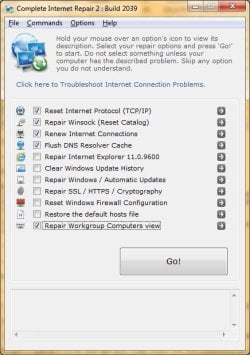
If I run the program you showed above (Complete Internet Repair), should I run it with only the options you showed checked?

Thanks again.
 

My Computer

Computer Manufacturer/Model Number
Homebuilt
OS
Windows 7 Ultimate 64 bit (Full)
CPU
AMD Phenom II X4 965
Motherboard
Asus M4A78T-E
Memory
8G Corsair DDR3 CMD4GX3M2B1600C8
Graphics Card(s)
EVGA 896-P3-1257-AR GeForce GTX 260 Core 216 Superclocked Ed
Sound Card
Sound Blaster X-Fi XtremeGamer Fatal1ty Pro Series
Monitor(s) Displays
SAMSUNG 943BX Black 19" 5ms LCD
Screen Resolution
1024 x 768, 75Hz
Hard Drives
(4) WD Raptor WD1500ADFD 150GB 10,000 RPM in 2 RAID

(2) WD 1 Tera's
PSU
Enermax Galaxy 1000w
Case
LianLi Full Alum.
Cooling
CPU: Artic-Cooling Freezer 46 Pro, Case: (6) 80mm
Keyboard
Microsoft Natural
Mouse
Microsoft Optical Wheel
Mine is set to manual too. Lets see if it will turn to stopped when network stops refreshing.

I doubt you would need others, they are mostly for Web browsing.
 

My Computer

Computer type
PC/Desktop
Computer Manufacturer/Model Number
Custom Build
OS
Windows 7 Ultimate x64 SP1
CPU
AMD Phenom 2 1090T
Motherboard
Gigabyte GA-890FXA-UD5
Memory
2x8GB Kingston HyperX Fury Black 1600Mhz Unganged
Graphics Card(s)
MSI GTX 970 Gaming 4G
Sound Card
Realtek On-Board HD 7.1 Audio / Logitech G35
Monitor(s) Displays
3xAcer GD245HQ
Screen Resolution
1920x1080
Hard Drives
Samsung 850 Pro 512GB SSD - OS /
WD Caviar Black SATA 3 - 1 TBx2 - Dynamic RAID 0 /
WD Caviar Green SATA 2 - 640GBx2 - Dynamic RAID 0 /
WD Caviar Green SATA 2 - 640GB - Internal Backup /
Seagate Barracude SATA 3 - 3TB - External Backup/ Sync
PSU
HighPower 1000W
Case
Cooler Master HAF 932
Cooling
Noctua NH-D14
Keyboard
Logitech G19
Mouse
Logitech G500
Internet Speed
100/4 Mbit Cable (100GB quota)
Antivirus
ZoneAlarm Extreme Security / MBAM Pro / MBAE Free / SAS Free
Browser
IE 11 - Firefox - Chrome
Other Info
Logitech F710/ G27/ G940/ Z5500 // TrackIR 5 // Nvidia 3D Surround Vision
OK will do.

Will hold off on the other stuff too so as to better ID the issue.

Will report back as to how things go, but as its working now, it might be awhile.

Some times I loose it quickly, sometimes is has even gone as long as a week.

Thanks for the help.
 

My Computer

Computer Manufacturer/Model Number
Homebuilt
OS
Windows 7 Ultimate 64 bit (Full)
CPU
AMD Phenom II X4 965
Motherboard
Asus M4A78T-E
Memory
8G Corsair DDR3 CMD4GX3M2B1600C8
Graphics Card(s)
EVGA 896-P3-1257-AR GeForce GTX 260 Core 216 Superclocked Ed
Sound Card
Sound Blaster X-Fi XtremeGamer Fatal1ty Pro Series
Monitor(s) Displays
SAMSUNG 943BX Black 19" 5ms LCD
Screen Resolution
1024 x 768, 75Hz
Hard Drives
(4) WD Raptor WD1500ADFD 150GB 10,000 RPM in 2 RAID

(2) WD 1 Tera's
PSU
Enermax Galaxy 1000w
Case
LianLi Full Alum.
Cooling
CPU: Artic-Cooling Freezer 46 Pro, Case: (6) 80mm
Keyboard
Microsoft Natural
Mouse
Microsoft Optical Wheel
Hello GokAy, don't know if you are still monitoring this thread, but just thought I would post that so far (an its been about 2 weeks now), since doing the few things we discussed, I haven't lost the Network items.

Basically I never ran the program you linked for me, but what I did was switch the "Computer Browser" service to Automatic start, as well then from the thread you linked, I also did the same for DNS Client, Function Discovery Resource Publication, SSDP Discovery, and UPnP Device Host services.

For all of these they were set to manual, which I think is the default, an then also to mention, they were all shown as started.

To add that I did switch things a few times back an fourth with the Computer Browser service.

Over all I just mention that an the others an their points I started with as I wonder if while they were set for this an maybe even reading it, perhaps there was some issue where one or all of them weren't really working fully, an that perhaps switching back an fourth might have fix that.

Anyway, kind hard to do as we spoke which was to check if any were not running when I had a loss as it hasn't happened since.

I very much hope it stays this way an can't really say if its fixed perm, but this has been the longest it has stayed fixed for awhile...so thought I would post to inform you an any others in case it might help, as well to say thank you very much for the help that you gave.
 

My Computer

Computer Manufacturer/Model Number
Homebuilt
OS
Windows 7 Ultimate 64 bit (Full)
CPU
AMD Phenom II X4 965
Motherboard
Asus M4A78T-E
Memory
8G Corsair DDR3 CMD4GX3M2B1600C8
Graphics Card(s)
EVGA 896-P3-1257-AR GeForce GTX 260 Core 216 Superclocked Ed
Sound Card
Sound Blaster X-Fi XtremeGamer Fatal1ty Pro Series
Monitor(s) Displays
SAMSUNG 943BX Black 19" 5ms LCD
Screen Resolution
1024 x 768, 75Hz
Hard Drives
(4) WD Raptor WD1500ADFD 150GB 10,000 RPM in 2 RAID

(2) WD 1 Tera's
PSU
Enermax Galaxy 1000w
Case
LianLi Full Alum.
Cooling
CPU: Artic-Cooling Freezer 46 Pro, Case: (6) 80mm
Keyboard
Microsoft Natural
Mouse
Microsoft Optical Wheel
Hey there, I do get an email when someone posts in the thread even though I don't actively check it. Great to hear everything is going alright. Of course you don't need to run the repair program as long as we have other options. And to be honest I don't know why I suggested it in first post :) I usually resort to it as a final step or the poster already tried all I would think of.

You can mark this as solved (green button at top or bottom) for now and if you have this issue again just mark it unsolved.
Thanks for letting us know!
 

My Computer

Computer type
PC/Desktop
Computer Manufacturer/Model Number
Custom Build
OS
Windows 7 Ultimate x64 SP1
CPU
AMD Phenom 2 1090T
Motherboard
Gigabyte GA-890FXA-UD5
Memory
2x8GB Kingston HyperX Fury Black 1600Mhz Unganged
Graphics Card(s)
MSI GTX 970 Gaming 4G
Sound Card
Realtek On-Board HD 7.1 Audio / Logitech G35
Monitor(s) Displays
3xAcer GD245HQ
Screen Resolution
1920x1080
Hard Drives
Samsung 850 Pro 512GB SSD - OS /
WD Caviar Black SATA 3 - 1 TBx2 - Dynamic RAID 0 /
WD Caviar Green SATA 2 - 640GBx2 - Dynamic RAID 0 /
WD Caviar Green SATA 2 - 640GB - Internal Backup /
Seagate Barracude SATA 3 - 3TB - External Backup/ Sync
PSU
HighPower 1000W
Case
Cooler Master HAF 932
Cooling
Noctua NH-D14
Keyboard
Logitech G19
Mouse
Logitech G500
Internet Speed
100/4 Mbit Cable (100GB quota)
Antivirus
ZoneAlarm Extreme Security / MBAM Pro / MBAE Free / SAS Free
Browser
IE 11 - Firefox - Chrome
Other Info
Logitech F710/ G27/ G940/ Z5500 // TrackIR 5 // Nvidia 3D Surround Vision
Hello GokAy

Hopefully you are still subscribed to this post, as just as one would figure, not long after making the post that this was fixed, it happened again.

I went through some of the stuff we talked about, an for all the services I mentioned, they were all shown as running.

Note currently it has been not working for many days now.

Been spending the day running check disk an SFC /Scannow, an have two errors left, but will get to that later as I don't think are relevant as they seem to be with something with shellstyle.dll an Aero, which I don't use btw. But to say, that hasn't fixed anything.

But one thing to talk about is I was looking at Event Viewer, an have found that the following started happening on the same day I lost things.


Warning Event: ID: 8201: The browser service was unable to retrieve a list of servers from the browser master \\MEDIAPC on the network \Device\NetBT_Tcpip_{39DF96A9-ACA6-40A1-8D5A-084EB01D5FF6}.

Browser master: \\MEDIAPC
Network: \Device\NetBT_Tcpip_{39DF96A9-ACA6-40A1-8D5A-084EB01D5FF6}

This event may be caused by a temporary loss of network connectivity. If this message appears again, verify that the server is still connected to the network. The return code is in the Data text box.

...an

Error Event: ID: 8032: The browser service has failed to retrieve the backup list too many times on transport \Device\NetBT_Tcpip_{39DF96A9-ACA6-40A1-8D5A-084EB01D5FF6}. The backup browser is stopping.

Not that I know what much of that means, but is clearly related to the Browser Service an it not being able to do something. Have seen it happening since the day I lost things, an seems to be focused around the times I started the PC.

So does any of that mean any thing to you?

Thanks for any help
 

My Computer

Computer Manufacturer/Model Number
Homebuilt
OS
Windows 7 Ultimate 64 bit (Full)
CPU
AMD Phenom II X4 965
Motherboard
Asus M4A78T-E
Memory
8G Corsair DDR3 CMD4GX3M2B1600C8
Graphics Card(s)
EVGA 896-P3-1257-AR GeForce GTX 260 Core 216 Superclocked Ed
Sound Card
Sound Blaster X-Fi XtremeGamer Fatal1ty Pro Series
Monitor(s) Displays
SAMSUNG 943BX Black 19" 5ms LCD
Screen Resolution
1024 x 768, 75Hz
Hard Drives
(4) WD Raptor WD1500ADFD 150GB 10,000 RPM in 2 RAID

(2) WD 1 Tera's
PSU
Enermax Galaxy 1000w
Case
LianLi Full Alum.
Cooling
CPU: Artic-Cooling Freezer 46 Pro, Case: (6) 80mm
Keyboard
Microsoft Natural
Mouse
Microsoft Optical Wheel
Do you get these while MEDIAPC running or shutdown? If running, it may be a firewall issue. Try disabling it. Which firewall you are using?
 

My Computer

Computer type
PC/Desktop
Computer Manufacturer/Model Number
Custom Build
OS
Windows 7 Ultimate x64 SP1
CPU
AMD Phenom 2 1090T
Motherboard
Gigabyte GA-890FXA-UD5
Memory
2x8GB Kingston HyperX Fury Black 1600Mhz Unganged
Graphics Card(s)
MSI GTX 970 Gaming 4G
Sound Card
Realtek On-Board HD 7.1 Audio / Logitech G35
Monitor(s) Displays
3xAcer GD245HQ
Screen Resolution
1920x1080
Hard Drives
Samsung 850 Pro 512GB SSD - OS /
WD Caviar Black SATA 3 - 1 TBx2 - Dynamic RAID 0 /
WD Caviar Green SATA 2 - 640GBx2 - Dynamic RAID 0 /
WD Caviar Green SATA 2 - 640GB - Internal Backup /
Seagate Barracude SATA 3 - 3TB - External Backup/ Sync
PSU
HighPower 1000W
Case
Cooler Master HAF 932
Cooling
Noctua NH-D14
Keyboard
Logitech G19
Mouse
Logitech G500
Internet Speed
100/4 Mbit Cable (100GB quota)
Antivirus
ZoneAlarm Extreme Security / MBAM Pro / MBAE Free / SAS Free
Browser
IE 11 - Firefox - Chrome
Other Info
Logitech F710/ G27/ G940/ Z5500 // TrackIR 5 // Nvidia 3D Surround Vision
Thanks for responding. I never shut off the MediaPC, is always running.

The funny part is an just to mention again, I have a utility that is for the Router, that runs on the main PC that is loosing the display in Explorer, an that shows the MediaPC, an states its active.
 

My Computer

Computer Manufacturer/Model Number
Homebuilt
OS
Windows 7 Ultimate 64 bit (Full)
CPU
AMD Phenom II X4 965
Motherboard
Asus M4A78T-E
Memory
8G Corsair DDR3 CMD4GX3M2B1600C8
Graphics Card(s)
EVGA 896-P3-1257-AR GeForce GTX 260 Core 216 Superclocked Ed
Sound Card
Sound Blaster X-Fi XtremeGamer Fatal1ty Pro Series
Monitor(s) Displays
SAMSUNG 943BX Black 19" 5ms LCD
Screen Resolution
1024 x 768, 75Hz
Hard Drives
(4) WD Raptor WD1500ADFD 150GB 10,000 RPM in 2 RAID

(2) WD 1 Tera's
PSU
Enermax Galaxy 1000w
Case
LianLi Full Alum.
Cooling
CPU: Artic-Cooling Freezer 46 Pro, Case: (6) 80mm
Keyboard
Microsoft Natural
Mouse
Microsoft Optical Wheel
You haven't addressed the firewall question :) Which firewall are you using on both machines? Did you try disabling?

(I used to get these error/warnings in Event Viewer on my desktop whenever I started my laptop before I configured firewall to trust the IP of laptop.)

Also, run in cmd "ipconfig -all" on both PCs and paste here please.
 

My Computer

Computer type
PC/Desktop
Computer Manufacturer/Model Number
Custom Build
OS
Windows 7 Ultimate x64 SP1
CPU
AMD Phenom 2 1090T
Motherboard
Gigabyte GA-890FXA-UD5
Memory
2x8GB Kingston HyperX Fury Black 1600Mhz Unganged
Graphics Card(s)
MSI GTX 970 Gaming 4G
Sound Card
Realtek On-Board HD 7.1 Audio / Logitech G35
Monitor(s) Displays
3xAcer GD245HQ
Screen Resolution
1920x1080
Hard Drives
Samsung 850 Pro 512GB SSD - OS /
WD Caviar Black SATA 3 - 1 TBx2 - Dynamic RAID 0 /
WD Caviar Green SATA 2 - 640GBx2 - Dynamic RAID 0 /
WD Caviar Green SATA 2 - 640GB - Internal Backup /
Seagate Barracude SATA 3 - 3TB - External Backup/ Sync
PSU
HighPower 1000W
Case
Cooler Master HAF 932
Cooling
Noctua NH-D14
Keyboard
Logitech G19
Mouse
Logitech G500
Internet Speed
100/4 Mbit Cable (100GB quota)
Antivirus
ZoneAlarm Extreme Security / MBAM Pro / MBAE Free / SAS Free
Browser
IE 11 - Firefox - Chrome
Other Info
Logitech F710/ G27/ G940/ Z5500 // TrackIR 5 // Nvidia 3D Surround Vision
Sorry GokAy, don't mean to come off wrong by not having done that, an just want to mention, I know you are trying to help an I greatly appreciate that.

Just to mention, I am very leery in today's age to shutting down my firewalls an only like to do it when I know for sure it's needed.

I guess I could unplug my internet connection for the time, but will have to setup a time for that. As well I have noticed that unless it's from doing restarts sometimes it takes some time for the network system to re-find a item.

So could be kinda, the firewall is off, an then I wait an wait an wait all without knowing if that is issue an its just taking some time, or its not an its never going to fix things. With all along having to be unplugged from the internet an not able to do my other work needed.

Anyway, I'm not saying I wouldn't do it, but just want to be sure it could be the problem by making sure its nothing else, an like I said, would have to setup a time an last night was not good for that.

Just to mention, I got the MediaPC back at least for now. Basically I did a few things. One I went through all the services on the MediaPC an made sure the same were all set on the MainPC. There were a few things an by reading them, they might have had something to do with things, but I think were low possibilities.

The second thing I did was to run the program you had listed above an per the checks you showed in the pic, an did this for both the MainPC, an the MediaPC.

For both this cleared out all the custom an or proper settings for the IP stuff in the Networking hardware I have, an set everything back to automatic.

Also oddly, for both machines after their reboots, they were not able to go on the Internet. Then after doing the automatic Windows repairs for that in the Network sections, what ever that did, it fixed that.

After that an a reboot of the MediaPC, the connection came back. But that is pretty much normal.

Anyway, at this point as its working, can't really do much.

An I know I'm getting long here, but just to mention or perhaps ask to say, I just wonder why if its a Firewall issue, one, why doesn't this happen right off. Kinda hard to understand if it's not configured to allow a connection, how I can have that for weeks at a time, and then suddenly loose that. To mention, also, I currently am not seeing, nor did I see, any of those issues in the Event Viewer, until the day I lost the connection. So again, if it were the firewall, why didn't it do that for all that time?

To close, I just want to say again, I know you are trying to help an I greatly appreciate it, I really do. An I hope very much I am not coming off wrong in any way by ever questioning things or not doing things.

I guess for now the only thing I can do is wait an see what happens, perhaps the program you linked me fixed things, or perhaps the stuff I did may have an so will just have to wait an see.

Again, thanks for all the help.
 

My Computer

Computer Manufacturer/Model Number
Homebuilt
OS
Windows 7 Ultimate 64 bit (Full)
CPU
AMD Phenom II X4 965
Motherboard
Asus M4A78T-E
Memory
8G Corsair DDR3 CMD4GX3M2B1600C8
Graphics Card(s)
EVGA 896-P3-1257-AR GeForce GTX 260 Core 216 Superclocked Ed
Sound Card
Sound Blaster X-Fi XtremeGamer Fatal1ty Pro Series
Monitor(s) Displays
SAMSUNG 943BX Black 19" 5ms LCD
Screen Resolution
1024 x 768, 75Hz
Hard Drives
(4) WD Raptor WD1500ADFD 150GB 10,000 RPM in 2 RAID

(2) WD 1 Tera's
PSU
Enermax Galaxy 1000w
Case
LianLi Full Alum.
Cooling
CPU: Artic-Cooling Freezer 46 Pro, Case: (6) 80mm
Keyboard
Microsoft Natural
Mouse
Microsoft Optical Wheel
As you say not experiencing the issue right away hardens the diagnosis a lot. Sorry for not mentioning earlier, of course disabling firewall is not a good thing, I should have said, disconnect Internet first and then disable firewall.

Hmm, Internet Repair to set IPs to automatic is expected but no Internet access after reboot (with auto config) I don't expect.

Can't say much about why firewall would act after a certain time, a scheduled task interfering perhaps or just a bug occurring.

Keep us posted, and good luck this time :)
 

My Computer

Computer type
PC/Desktop
Computer Manufacturer/Model Number
Custom Build
OS
Windows 7 Ultimate x64 SP1
CPU
AMD Phenom 2 1090T
Motherboard
Gigabyte GA-890FXA-UD5
Memory
2x8GB Kingston HyperX Fury Black 1600Mhz Unganged
Graphics Card(s)
MSI GTX 970 Gaming 4G
Sound Card
Realtek On-Board HD 7.1 Audio / Logitech G35
Monitor(s) Displays
3xAcer GD245HQ
Screen Resolution
1920x1080
Hard Drives
Samsung 850 Pro 512GB SSD - OS /
WD Caviar Black SATA 3 - 1 TBx2 - Dynamic RAID 0 /
WD Caviar Green SATA 2 - 640GBx2 - Dynamic RAID 0 /
WD Caviar Green SATA 2 - 640GB - Internal Backup /
Seagate Barracude SATA 3 - 3TB - External Backup/ Sync
PSU
HighPower 1000W
Case
Cooler Master HAF 932
Cooling
Noctua NH-D14
Keyboard
Logitech G19
Mouse
Logitech G500
Internet Speed
100/4 Mbit Cable (100GB quota)
Antivirus
ZoneAlarm Extreme Security / MBAM Pro / MBAE Free / SAS Free
Browser
IE 11 - Firefox - Chrome
Other Info
Logitech F710/ G27/ G940/ Z5500 // TrackIR 5 // Nvidia 3D Surround Vision
Hello GokAy

Has been awhile, but I thought I would update this thread as I think I might have come upon the solution to my problem.

Basically after looking at my MainPC for so much with this issue, I finally began to look at the MediaPC/Laptop unit, an after learning more how to use the Event Viewer, I came upon what I think I remember as a issue with the "ID of 2017, The server was unable to allocate from the system nonpaged pool because the server reached the configured limit for nonpaged pool allocations"

I say I think it was this as I did flush the viewer as I do that to make it easier to see if a issue comes back, but at any rate, I know for sure it let me to info such as this:

Intermittent connection to Windows 7 shared folder from Windows XP workstations - Server Fault

Which basically describes exactly what I having happen.

Think one thing to point out here is perhaps I have even been describing my setup wrong as I really don't know what 100% Networking really is, but really for my use, I was looking to have just one folder be accessible on the MediaPC, from my MainPC, all so I could transfer files to it.

So really what I think I did was just setup one shared folder on my MediaPC, an was looking to have that (or really access to a path to that) show up in my Networking areas of Explorer in my MainPC.

So don't know if that really is 100% Networking the machines, but is what I wanted to have so I could do what I wanted to do.

Anyway, to move on. So from that it describes the solution, which is to go into the Lap's registry an make these changes:

[HKEY_LOCAL_MACHINE\SYSTEM\CurrentControlSet\Control\Session Manager\Memory Management]
"LargeSystemCache"=dword:00000001
(in my case from the default of "0" to like the above of "1")

[HKEY_LOCAL_MACHINE\SYSTEM\CurrentControlSet\services\LanmanServer\Parameters]
"Size"=dword:00000003
(in my case from the default of "1" to like the above of "3")

So I did this an low an behold, I have had a nice two weeks of a solid connection. To which also to add that unlike any times this has happened before, it also has done something new in that while before while I did get it restored, it also would typically show other items in the menu such as things on the network I really didn't want to see, such as my file printer sever unit, an a USB drive I never really use that is plugged into my router. But with this fix is has not shown those things, an just keeps it simple, which is exactly what I have always wanted anyway.

So as I known from before...for me I really need to test this for many weeks as I certainly have had my share of "false positives", but I thought I would post as this one seems pretty good.

One, its issue description really seems right up the alley of what I had going on, two, I have not seen any of the Event IDs I have described in this thread on either machine since, an three it really is showing things in the Explore menu like never before.

Anyway, thought I would post on that to let you know, an help the direction of any others that might be having the same issue an will keep this thread in mind an if this stays this way for long enough that I think it is the resolution, I will list the thread as solved.

Thanks again for all your help
 

My Computer

Computer Manufacturer/Model Number
Homebuilt
OS
Windows 7 Ultimate 64 bit (Full)
CPU
AMD Phenom II X4 965
Motherboard
Asus M4A78T-E
Memory
8G Corsair DDR3 CMD4GX3M2B1600C8
Graphics Card(s)
EVGA 896-P3-1257-AR GeForce GTX 260 Core 216 Superclocked Ed
Sound Card
Sound Blaster X-Fi XtremeGamer Fatal1ty Pro Series
Monitor(s) Displays
SAMSUNG 943BX Black 19" 5ms LCD
Screen Resolution
1024 x 768, 75Hz
Hard Drives
(4) WD Raptor WD1500ADFD 150GB 10,000 RPM in 2 RAID

(2) WD 1 Tera's
PSU
Enermax Galaxy 1000w
Case
LianLi Full Alum.
Cooling
CPU: Artic-Cooling Freezer 46 Pro, Case: (6) 80mm
Keyboard
Microsoft Natural
Mouse
Microsoft Optical Wheel
Interesting, thanks for sharing.
 

My Computer

Computer type
PC/Desktop
Computer Manufacturer/Model Number
Custom Build
OS
Windows 7 Ultimate x64 SP1
CPU
AMD Phenom 2 1090T
Motherboard
Gigabyte GA-890FXA-UD5
Memory
2x8GB Kingston HyperX Fury Black 1600Mhz Unganged
Graphics Card(s)
MSI GTX 970 Gaming 4G
Sound Card
Realtek On-Board HD 7.1 Audio / Logitech G35
Monitor(s) Displays
3xAcer GD245HQ
Screen Resolution
1920x1080
Hard Drives
Samsung 850 Pro 512GB SSD - OS /
WD Caviar Black SATA 3 - 1 TBx2 - Dynamic RAID 0 /
WD Caviar Green SATA 2 - 640GBx2 - Dynamic RAID 0 /
WD Caviar Green SATA 2 - 640GB - Internal Backup /
Seagate Barracude SATA 3 - 3TB - External Backup/ Sync
PSU
HighPower 1000W
Case
Cooler Master HAF 932
Cooling
Noctua NH-D14
Keyboard
Logitech G19
Mouse
Logitech G500
Internet Speed
100/4 Mbit Cable (100GB quota)
Antivirus
ZoneAlarm Extreme Security / MBAM Pro / MBAE Free / SAS Free
Browser
IE 11 - Firefox - Chrome
Other Info
Logitech F710/ G27/ G940/ Z5500 // TrackIR 5 // Nvidia 3D Surround Vision
Back
Top